Agents Have Skills Now — Here's How They Work in Copilot Studio
GHCP harness
How Skills work in Copilot Studio agents: instructions and resources loaded on demand for specific scenarios, why you would modularize instructions into Skills, and when to use Skills versus instructions.
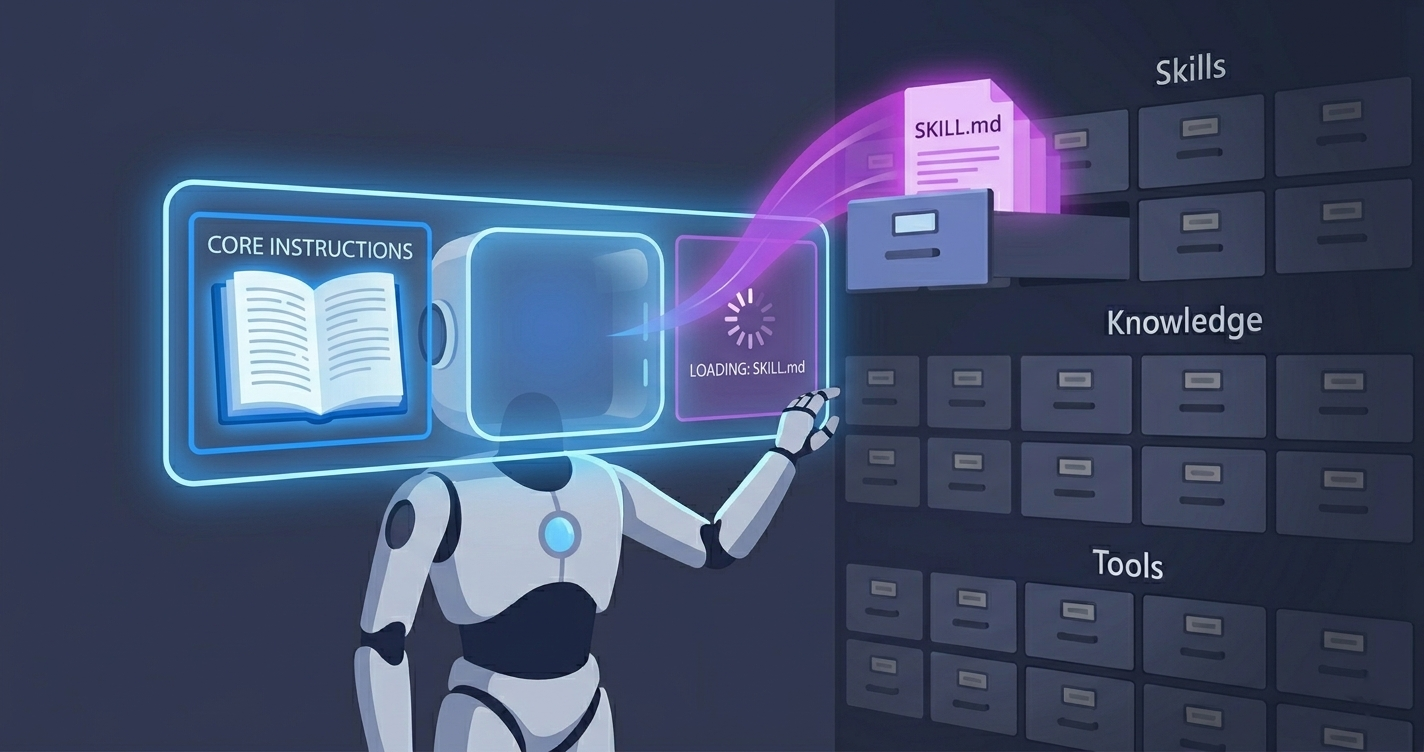
LLMs are good at the common cases, the ones that don’t need any specific knowledge of your organization. Where they might do less well is everything that does: the context, conventions, data, and know-how a model cannot infer on its own. Procedural know-how especially, the step-by-step way your organization does something, is the kind of thing an LLM is not all that good at figuring out on its own, so you end up writing it down. But pile all of it into the agent’s context, all the time, and that is exactly where agents get bloated and unpredictable. Agents have a cleaner place to put the situational part: Skills.
If you have spent time with coding agents recently, you have probably already met them. At its core, a Skill is just instructions (and optionally resources like examples, templates, or scripts) that the agent loads on demand, only when a specific kind of task comes up. A SKILL.md file carries a name, a description, and the instructions themselves. The name and description are what tell the agent when the Skill is relevant.
That same idea has now arrived in Copilot Studio agents powered by the GitHub Copilot harness. This post is about what Skills are, why an agent builder should care, and how they work in Copilot Studio specifically.
Why an agent builder should care
Skills are based on the Agent Skills open format, an open standard originally developed by Anthropic. The shape is deliberately simple. A Skill is just instructions, so the real question is why you would break instructions out into a discrete Skill at all. It comes down to four things:
- Manageability. Instead of one ever-growing instruction blob, each Skill is a focused, self-contained unit you can reason about, review, and version one at a time.
- Context management. Skills load on demand. The agent keeps only the names and descriptions in view by default, and pulls the full instructions into context only when a task matches. Ten Skills cost you ten short descriptions, not ten full sets of instructions, in every turn, so the context window stays lean.
- Accuracy. Use-case dependent, but real. A Skill can carry detailed tool-use guidance: which tool to reach for, which parameters matter, how to shape a query, what to validate before calling, and what to do when a tool returns nothing. With large or overlapping toolsets, bringing that guidance into context only when it is relevant can make the agent call tools more reliably. It is not a guarantee, so evaluate it rather than assume it.
- Speed and cost. A Skill nudges the agent toward the right approach instead of leaving it to work everything out from scratch. Fewer knowledge searches, tool calls, and reasoning loops mean fewer round-trips before the agent answers — which cuts response latency, lifts throughput under load, and lowers the cost of a conversation. Like accuracy, it’s use-case dependent, so validate it rather than assume it.
That is the short version. Manageability and context management are structural and apply almost everywhere. Accuracy and speed depend on your agent.
The same benefits show up in Copilot Studio
The good news is that an agent on the GitHub Copilot harness works the same way: it can reason over a set of available Skills, select the relevant one, and bring its instructions into context only when the conversation calls for it.
flowchart TB
    Task([User prompt]):::prompt --> Match

    subgraph Default["Agent context"]
        direction LR
        Instr["Full<br/>instructions"]:::instr
        K["Knowledge<br/>metadata<br/>A, B, C"]:::ctx
        T["Tools<br/>metadata<br/>A, B, C"]:::ctx
        S["Skills<br/>metadata<br/>A, B, C"]:::ctx
    end

    K --> Match{"Evaluate context:<br/>which Skill matches?"}:::decision
    Match -- Skill B matches --> Load["Load Skill B's full instructions<br/>(optionally examples + resources)"]:::load
    Load --> Act["Agent acts on: general instructions<br/>+ Skill B + needed knowledge/tools"]:::act

    classDef prompt fill:#1f6feb,stroke:#1f6feb,color:#fff;
    classDef instr fill:#30363d,stroke:#8b949e,color:#fff;
    classDef ctx fill:#21262d,stroke:#8b949e,color:#fff;
    classDef decision fill:#9e6a03,stroke:#d29922,color:#fff;
    classDef load fill:#1a7f37,stroke:#2ea043,color:#fff;
    classDef act fill:#8250df,stroke:#a371f7,color:#fff;
This isn’t specific to Skills: knowledge sources, tools, and Skills are all registered the same way — only their metadata sits in context by default, and the full content is pulled in only when the prompt calls for it (the agent’s own instructions are the exception, always loaded in full). Because Copilot Studio loads Skills on demand like this, the benefits from earlier — manageability, context management, accuracy, and speed — carry over directly.
Working with Skills in Copilot Studio
Add a Skill
Skills live in the Skills tab of the agent. There are two entry points today: create a Skill from blank, or upload an existing Skill. An upload can be a standalone SKILL.md file, or a .zip that bundles the SKILL.md together with additional resources, such as Python scripts the Skill can refer to.
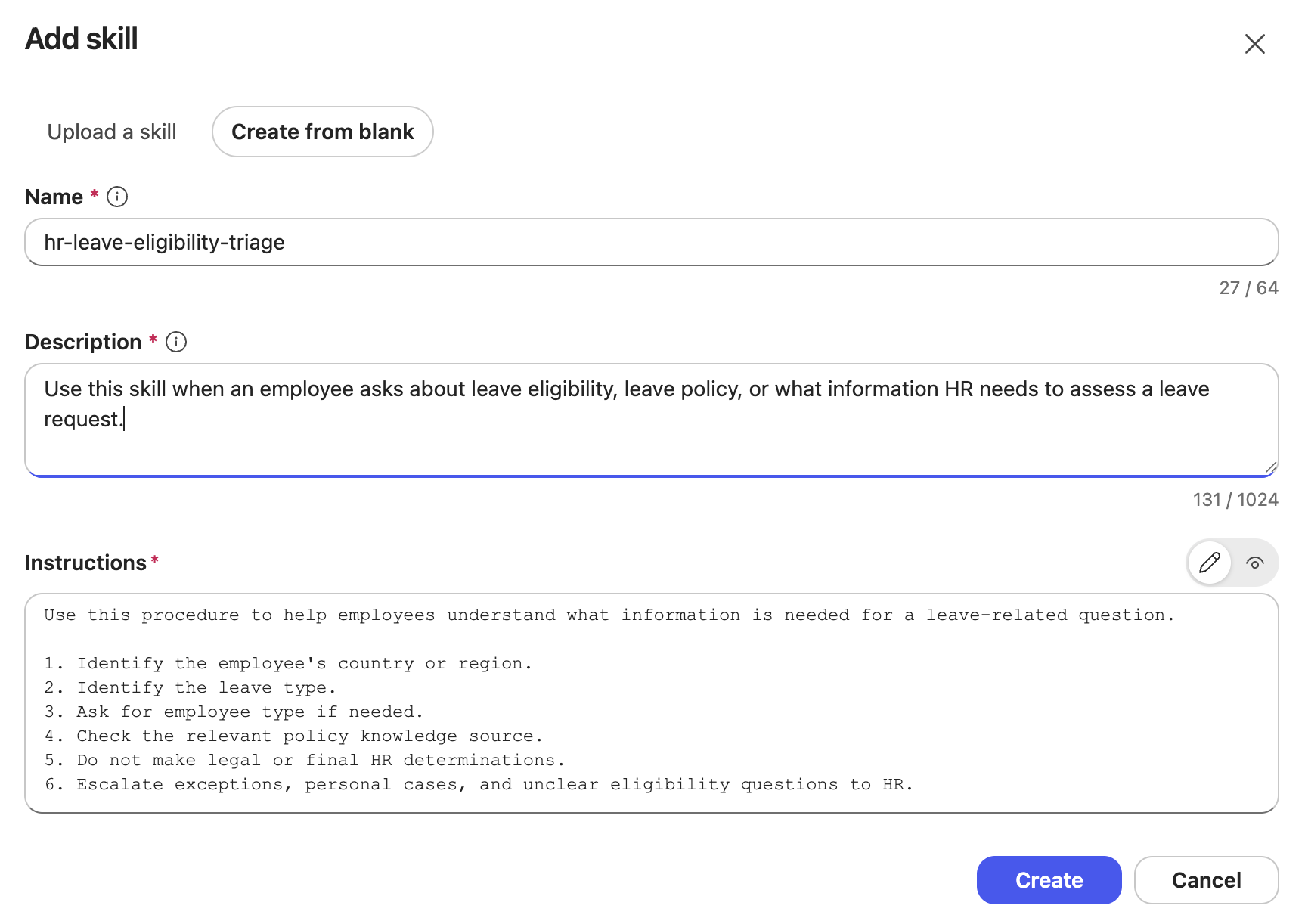 Create from blank asks for the three pieces that matter: name, description, and instructions. An uploaded Skill carries the same fields in the
 SKILL.md front matter and body, plus any files it bundles alongside it.
Once added, the Skill becomes part of the agent. It is scoped to that agent and travels with it: add the agent to a Power Platform solution and the Skill moves with it through your ALM lifecycle.
Invoke a Skill
You do not “call” a Skill directly. The agent selects it, based on the Skill’s name and description, when the conversation matches. You can watch this happen in the agent’s reasoning view.
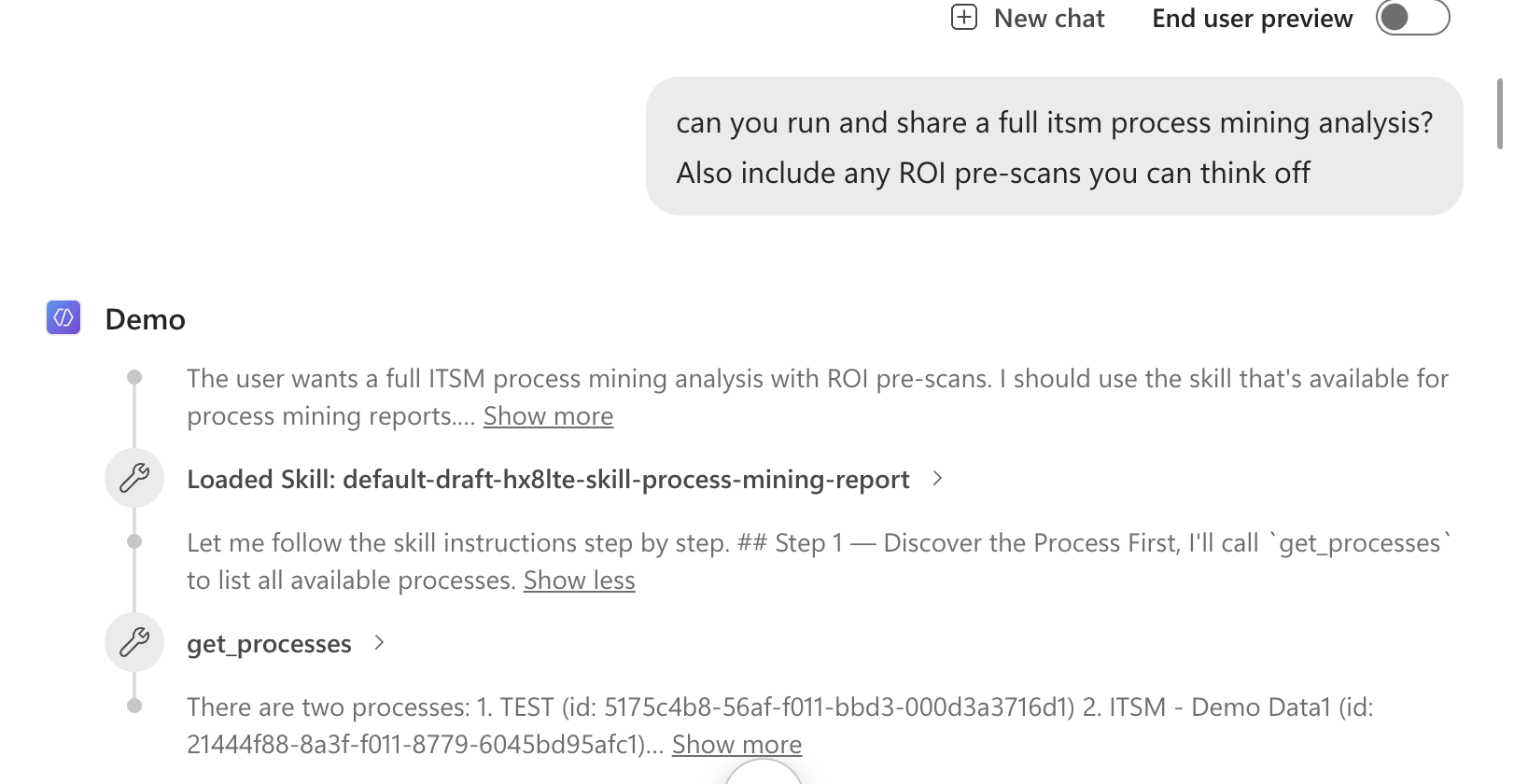 The user asks for a process-mining analysis. The agent loads the matching Skill, then follows its instructions step by step, including calling the right tool (
get_processes) at the right moment.
That reasoning view is also your main debugging surface: if a Skill fires too often, the description is probably too broad; if it never fires, the description is too narrow or does not match the words your users actually use.
Write the description like routing metadata
This is worth dwelling on, because it is the part makers most often get wrong. The name and description are not documentation for humans; they are the routing signal the agent uses to decide when the Skill applies. Treat them that way:
- Name specifically:
HR Leave Eligibility Triage, notHR Help. - Say when to use it and when not to: “Use for leave eligibility and required documentation. Do not use for payroll or benefits enrollment.”
A precise description gives the agent a clear routing target. A vague one (“Helps with HR questions”) invites the wrong Skill to fire, or none at all. If two reasonable makers would disagree on when a Skill applies, the description is not specific enough yet.
Copilot Studio Skills and the open format
If you come from coding agents, the good news is that Copilot Studio Skills follow the same Agent Skills open format. A Skill folder can bundle more than instructions:
1
2
3
4
5

my-skill/
├── SKILL.md          # metadata + instructions
├── scripts/          # optional executable code
├── references/       # optional documentation
└── assets/           # optional templates, resources
Copilot Studio supports this full shape today. A Skill carries its SKILL.md instructions and can bundle resources (reference files, examples, templates) and executable scripts, all loaded on demand when the Skill is selected. Putting those resources and scripts to work deserves its own walkthrough, and that is coming in a follow-up post. For now, two things about how Copilot Studio handles the bundle are worth calling out:
- Distribution is per-agent, for now. Coding-agent ecosystems let you distribute Skills as plugins across products and tenants. As of June 2026, a Skill in Copilot Studio is scoped to its agent and travels with that agent through solutions and ALM, rather than through a shared, cross-product catalog. That’s the current state, not the end state: a more catalog-like way to share Skills in the product is being worked on. Outside the product, the community-driven CAT Agent Skills gallery already collects ready-made Skills you can browse and upload into your agent.
- Skills can soft-point at the agent’s tools, not just bundled scripts. A Skill can run its own bundled script, but it can also soft-point at the agent’s existing capabilities: actions, flows, connectors, and MCP servers. It’s a soft pointer because the Skill only references the capability, it doesn’t bind to it or grant it. The Skill can say “use the order-lookup action here,” but there’s no guarantee: if the agent doesn’t already have that tool, the instruction can’t be fulfilled, and even when it does, the agent still decides whether to follow the pointer.
How to think about a Skill
A Skill can take whatever shape the job in front of the agent needs. Think of a Skill as any of these:
| Think of a Skill as a… | Useful when the job is… | For example |
|---|---|---|
| Reference manual the agent consults | Understanding a proprietary data model, schema, or domain the LLM does not know | Documenting your data model and how to query it so a data tool returns the right thing |
| Specialist you call in | A narrow area of expertise the agent only occasionally needs | Region-specific tax rules, applied only when that region comes up |
| Playbook | There is a known set of plays for a recurring situation | Triaging a support request: classify it, then route by category |
| Standard operating procedure | A task must be done the same, compliant way every time | Handling a refund within policy windows and approval limits |
| Briefing pack | The agent needs background and context before it can act well | Onboarding context the agent reads before answering HR questions |
| Checklist | Certain steps or validations must not be skipped | Pre-submission validation before a record is created |
| Protocol | There are firm rules for handling a sensitive case | What to do when a user reports a suspected security incident |
| Runbook | An operational task has defined steps and known failure handling | Running a pipeline: discover processes, analyze, add a ROI pre-scan, format the result |
| Template | The output must follow a fixed structure or house style | Generating a report or standardized record to a fixed format |
The common thread: each one is context-specific guidance the LLM cannot infer on its own, packaged once and pulled in only when it is relevant. Knowledge gives the agent facts, tools give it reach, and a Skill gives it the situational know-how to use both well. And crucially, a Skill guides the agent, it does not straitjacket it. The model still reads the situation and decides whether to follow the Skill to the letter or adapt. That judgment is the whole point of using an LLM; the Skill just makes sure the right expertise is in the room when the task shows up.
Instructions, or a Skill?
By the time you are weighing instructions against a Skill, one thing is already settled: there is something here the agent cannot infer on its own. (Give it a well-described tool or knowledge source and it can usually work out how to use it from the description alone, so the obvious does not need writing down at all.) What is left, your organization’s context, conventions, data, and rules, is the part you genuinely have to put into words. The only question is where it goes, and that choice is simple:
- Is it true in every conversation, for every scenario? Put it in the agent’s instructions. Tone, the agent’s role, always-on guardrails: these are valid 100% of the time, so they should always be in context.
- Does it only apply to specific scenarios? Make it a Skill. If a piece of guidance is not relevant to every turn, keeping it out of the default context and loading it only when its scenario comes up is exactly what Skills are for.
flowchart TB
    Need([Something you want the agent to know or do]):::prompt --> Q1{Can the agent infer it from<br/>tool and knowledge descriptions?}:::decision
    Q1 -- Yes --> Common[Leave it to the agent]:::neutral
    Q1 -- No --> Q2{Is it valid for every<br/>scenario and conversation?}:::decision
    Q2 -- Yes, always true --> Instr[Put it in instructions]:::instr
    Q2 -- No, only specific scenarios --> Skill[Put it in a Skill]:::act

    classDef prompt fill:#1f6feb,stroke:#1f6feb,color:#fff;
    classDef decision fill:#9e6a03,stroke:#d29922,color:#fff;
    classDef neutral fill:#21262d,stroke:#8b949e,color:#fff;
    classDef instr fill:#30363d,stroke:#8b949e,color:#fff;
    classDef act fill:#8250df,stroke:#a371f7,color:#fff;
Two questions decide it: can the agent infer it, and if not, is it always true or only situational?
That is the whole distinction. Instructions are the always-on baseline; Skills are everything situational, named and described so the agent can reach for the right one at the right moment. And splitting things this way is where the benefits from earlier pay off:
- Context management. Situational guidance stays out of the default context, so the context window is less likely to saturate.
- Manageability. Each Skill is a self-contained unit, so you have an easier time managing the agent and making changes.
- Accuracy. When the right guidance lands at the right moment instead of the agent wading through everything at once, it can make better calls. Per-case, so validate it rather than assume it.
- Speed and credits. Fewer searches, tool calls, and reasoning loops can shorten responses and reduce credit spend — also per-case.
A Skill, or a new agent?
Before Skills arrived in Copilot Studio, the instinct for every distinct task was to build another specialized agent: one for password resets, one for software-request approvals, one for incident triage. But often those are not three agents, they are one IT support agent with three Skills. If the same agent serves the same audience and shares the same knowledge boundary, a Skill is the better unit of modularity: you are not building another agent to maintain, you are teaching the existing one another way of working.
Two things still point to a separate agent:
- It would stand on its own. An HR assistant and an IT support agent are not one agent with two Skills. They serve different audiences, sit behind different security boundaries, and each makes sense as a standalone agent someone would use on its own. When a capability is standalone like that, build the agent. (Standalone is not the same as reusable; sharing a Skill across agents is a separate question, and the kind of thing a Skill catalog in the product would address down the line.)
- One agent has taken on too many tools. There is some data suggesting that accuracy can degrade as more is loaded into an agent’s context, and a growing toolset is part of that load. Past some point, adding more Skills will not save it. As always, evaluate this for your own agent rather than assume it. When you hit that wall, the move can be to split the work out into a separate agent and delegate to it, rather than pile everything onto one.
A word on trust
Because a Skill shapes how the agent behaves, and can now bundle scripts, it is a trust surface. Treat any Skill you did not write, one from a community source, generated by AI, or reused from another environment, the way you would treat untrusted code: review it before adding it. Check for prompt injection, instructions to misuse tools, and anything that does not match what the Skill claims to do.
What to take away
If you want to go deeper, Influencing Agent Planning with Contextual Instructions covers how always-on instructions steer the agent, Open the Hood: What Your Copilot Studio Agent Is Really Doing shows how to inspect the reasoning that decides when a Skill fires, and Closing the Loop covers how to evaluate that the right Skill fires at the right moment.
Skills are early in Copilot Studio, and intentionally focused. But the core idea is already worth internalizing: keep instructions for what is true in every conversation, and move everything situational into Skills the agent can pull in on demand, whether that is a reference manual, a checklist, a runbook, or a playbook.
Skills are new to Copilot Studio, and I would love to hear how everyone is putting them to use. What is the first thing you would pull out of your instructions and turn into a Skill?