Pick the right SDK for your Teams agent
Microsoft offers two supported, actively-developed SDKs that can build a bot or agent for Microsoft Teams:
- Microsoft Teams SDK: the SDK these docs cover, a Teams-first application framework
- Microsoft 365 Agents SDK: a multi-channel agent runtime that reaches Teams, M365 Copilot, Microsoft Copilot Studio, WebChat, and other surfaces
Both ship for C#, TypeScript, and Python. Both speak the Activity Protocol (the JSON wire format for bot/agent activities such as messages and events), both interoperate with Microsoft Entra, both support agentic identity via Agent365 (shipped in the M365 Agents SDK; coming soon to Teams SDK), and both reach Microsoft 365 Copilot. Microsoft positions both as first-class. You are not locked into one path; see Bot Framework migration below for what switching between them entails.
This doc helps you pick the SDK whose defaults match the bot or agent you're building. The criteria are about fit, not gates: the two SDKs are converging on most capabilities, so we focus on durable differences.
Which SDK for your Teams scenario
How Teams-deep does your bot need to go? Two paths:
- Cross-channel essentials are breadth-focused: Activity Protocol primitives that work uniformly across Teams, M365 Copilot, Copilot Studio, WebChat, and other channels. Best fit: the M365 Agents SDK.
- Teams-native collaboration is depth-focused: the surfaces a bot needs to participate in group conversations the way Teams users expect (mentions, reactions, quoted replies, threaded replies, channel events, meetings experiences, citations, …). Best fit: the Microsoft Teams SDK.
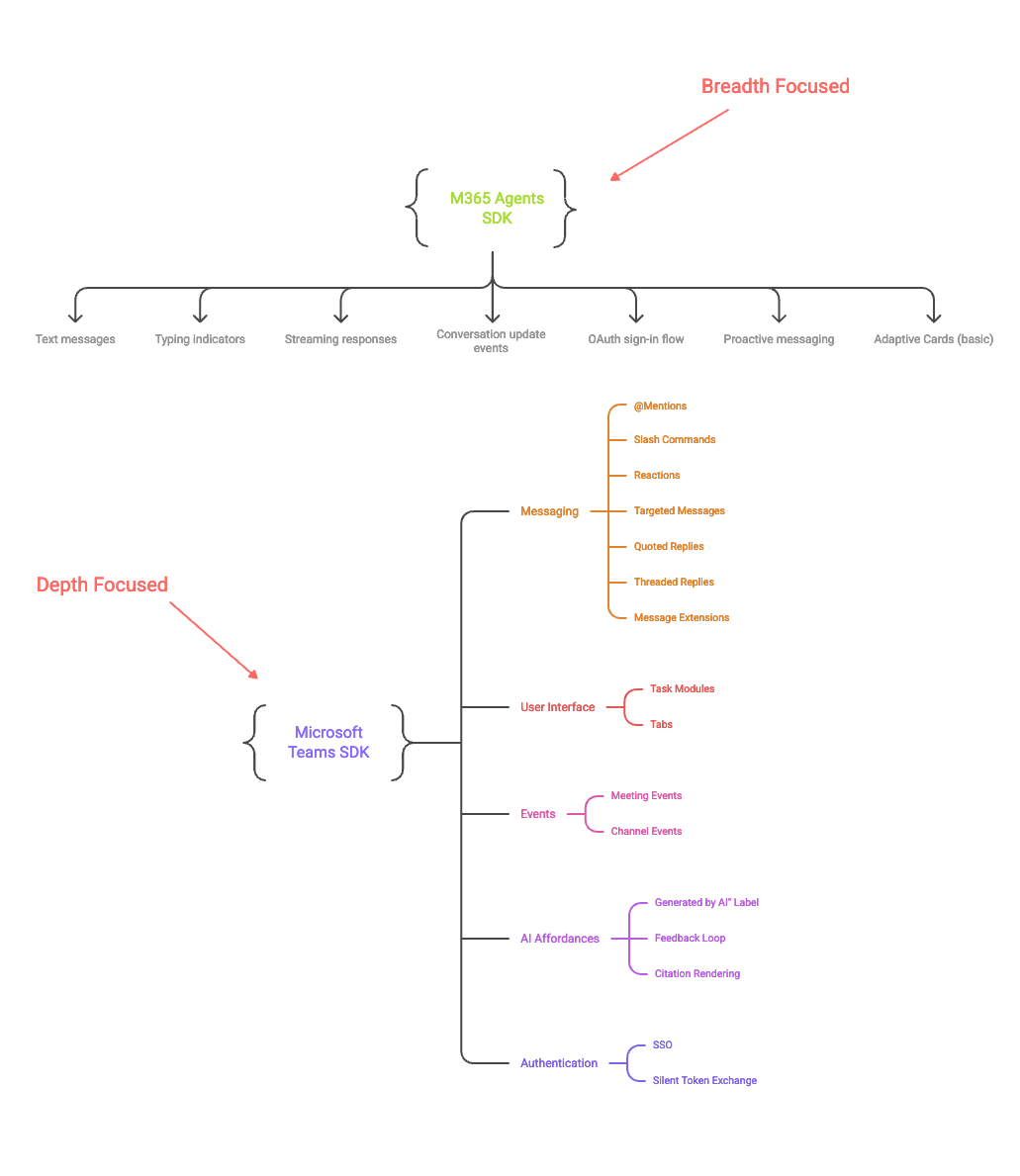
Cross-channel essentials: what you get with the M365 Agents SDK on Teams
Activity Protocol primitives that work uniformly across channels.
| Feature | Description |
|---|---|
| Text messages | Receive and reply |
| Typing indicators | Acknowledge a message is being processed |
| Streaming responses | Chunked output, useful for long or AI-generated messages |
| Conversation update events | Members added / removed |
| OAuth sign-in flow | Standard user authentication |
| Proactive messaging | Send unsolicited messages to a saved conversation |
| Adaptive Cards (basic) | Send cards and handle simple action callbacks |
Teams-native collaboration: what you get with the Microsoft Teams SDK on Teams
Everything in the cross-channel essentials above, plus the Teams-native surface for collaboration in group conversations: the affordances your bot needs to participate in channels, chats, and meetings the way Teams users expect.
| Feature | Description |
|---|---|
| @Mentions | Mention a specific user in a message; receive a mention activity when the bot is mentioned |
| Reactions | Add / remove emoji reactions on messages |
| Targeted (ephemeral) messages | Deliver a message to a specific user in a shared conversation; other participants don't see it |
| Quoted replies | Parse incoming quoted-reply context; send replies that auto-quote the user's message or quote a specific message by ID |
| Threaded replies | Reply to a specific message in a channel; channel reply chains |
| Channel events | Channel created / renamed / deleted; team member changes |
| Meetings experiences | Meeting start / end and participant join / leave events |
| Citations | Render source citations on AI-generated messages |
| "Generated by AI" label | Show a visual indicator that a message came from an AI |
| Feedback loop | Capture user feedback (👍 / 👎) on AI messages |
| SSO / silent token exchange | Sign-in token exchange invokes |
| Slash commands | Manifest-registered command lists invoked from the Teams compose box |
| Task modules | Show a form in a pop-up; dialog.open / dialog.submit (task/fetch, task/submit) invokes |
| File consent, read receipts, suggested actions, O365 connector card actions | Additional Teams-specific invokes |
| Message extensions | Search commands, link unfurling, action commands |
Rule of thumb: if your bot uses most of the Teams-native set above, the Teams SDK is the right home. If it uses few or none, the M365 Agents SDK is sufficient.
How they relate
The two SDKs target different backends, but speak the same Activity Protocol to reach them.
- Teams Bot Service (Microsoft Teams SDK): the Teams-native runtime that handles bot traffic for Microsoft Teams and the M365 Copilot client surface directly.
- Azure Bot Service (M365 Agents SDK): the broader Bot Framework infrastructure that routes to Teams plus other channels (WebChat, DirectLine, etc.).
Messages flow in both directions along the lines shown: a user's turn rises from the channel up through the backend and SDK to your code, and your reply travels back down the same path.
The channels then split into two groups:
- Microsoft Teams and Microsoft 365 Copilot (solid borders in the diagram) are reachable from both SDKs. Cross-channel essentials are at parity; for Teams-native collaboration, use the Teams SDK.
- Microsoft Copilot Studio, WebChat / DirectLine, and other Bot Framework Connector channels (dashed borders in the diagram) are reachable from either SDK in principle, but the M365 Agents SDK is the recommended, optimized path.
Bot Framework migration
If you're migrating from the Bot Framework SDK (the Microsoft.Bot.* packages), both SDKs offer a path. Pick based on whether you want to modernize end-to-end or host legacy code unchanged.
| Migrate to M365 Agents SDK | Host legacy in Teams SDK | |
|---|---|---|
| What changes | Package + namespace rename, Program.cs modernization, drop deprecated services | Add the compat package, register the adapter; existing handler unchanged |
| Effort | Medium (modernization scope, not a one-line swap) | Minimal (install + a few lines of registration) |
| When to pick | You want primitives preserved across a clean SDK switch; you may need cross-channel reach later | You want existing BotBuilder code running unchanged while you rewrite handlers piece by piece (or not at all) |
Next steps
- Sticking with Teams SDK? Continue to Get started or the TypeScript / C# / Python guides.
- Need cross-channel reach? Head to the Microsoft 365 Agents SDK docs.
- Already using Bot Framework or TeamsFx? See Bot Framework migration above; both SDKs offer migration paths.
Both SDKs reach Microsoft 365 Copilot through the same Teams client surface. Once your bot works in Teams, enable it in M365 Copilot with a single CLI command, then republish or reload the app. No code change required.