Publishing Datasets#
Goal: share and archive a finished damage assessment. Once a model result is processed, you can publish it — either as an immutable copy in the app’s own storage (for download), or to a Planetary Computer STAC catalog where others can discover, reference, and visualize it.
Publishing is available from either workflow — Rapid Building Assessment or Damage Mapping — wherever you have a processed result.
The workflow at a glance
Open a processed model’s Results menu → Publish dataset… → pick a target and fill in the details → track and manage it under Published Datasets.
Is publishing available?
Publishing is an operator-enabled feature. If you don’t see Publish dataset… in the Results menu or a Published Datasets section, an administrator hasn’t enabled it for your deployment — see Enabling and configuring publishing.
Contents#
Before you start#
You need a processed model result to publish:
a Rapid Building Assessment (per-building damaged/intact), or
a Damage Mapping model whose training and inference have finished.
Publishing captures the outputs that already exist for that result — the predicted-damage geopackage, building footprints, the valid-area mask, and (for local publishing) the processed image. You don’t prepare anything special beforehand.
Choose a target#
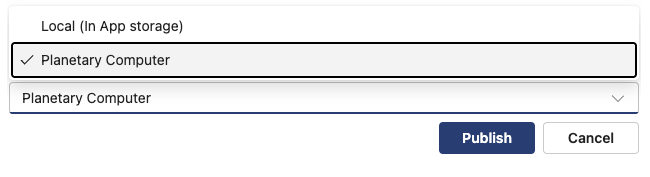
When you publish, you pick where the dataset goes. Which targets appear depends on what your administrator has configured.
Local (in-app storage) |
Planetary Computer |
|
|---|---|---|
What it is |
An immutable copy kept in the app’s storage. |
A STAC collection + item in an external Microsoft Planetary Computer Pro GeoCatalog. |
Who can see it |
Anyone with access to your HASTE deployment. |
Anyone with access to the GeoCatalog — discoverable via its STAC API and map Explorer. |
Best for |
Keeping a durable, downloadable snapshot of a result. |
Sharing results in an interoperable catalog and visualizing them on a map. |
Outputs |
Downloadable assets (geopackage, footprints, processed image, valid-area mask). |
STAC item with the same vector assets, plus a rendered damage layer in the Explorer. |
You pick the target in the Publish dataset dialog; a target your administrator hasn’t configured is shown with the reason it’s unavailable.
Publish a dataset#
Open the model’s Results menu and choose Publish dataset….

Why is it disabled?
Publish dataset… is enabled only once inference is Processed and a predicted-damage geopackage exists.
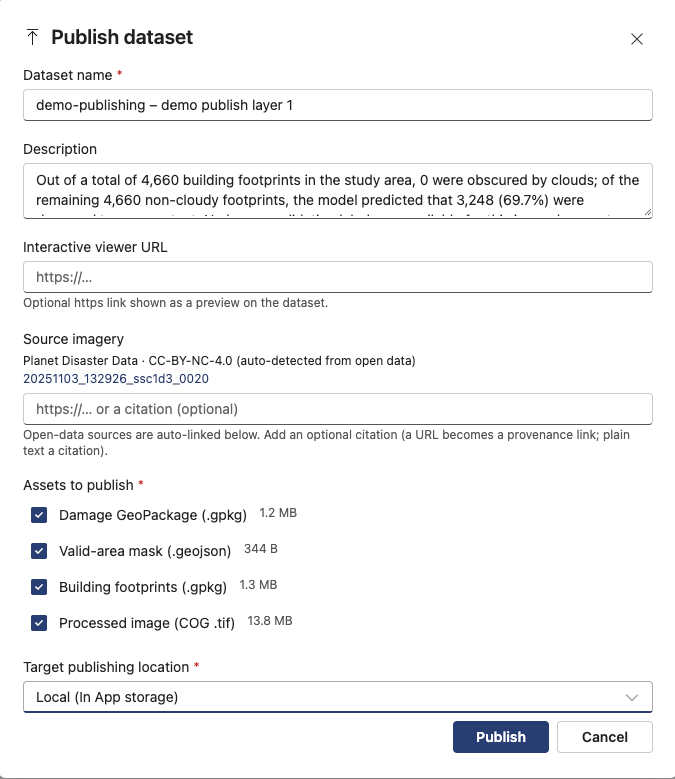
In the Publish dataset dialog, complete the details:
Dataset name — prefilled as
<project> – <layer>; edit as you like.Description — prefilled from the assessment summary.
Interactive viewer URL (optional) — an
httpslink to an external interactive view of the result. On Planetary Computer it becomes the item’s preview link.Source imagery citation (optional) — free text, or a URL that becomes a provenance link. If your image layer was built from the Open Data Catalog, the source scenes are listed and linked automatically just above this field — you don’t enter them by hand. See Source-imagery attribution.
Under Assets to publish, select which outputs to include — the predicted-damage geopackage, building footprints, valid-area mask, and (for Local) the processed image.
Planetary Computer needs the valid-area mask
For the Planetary Computer target the valid-area mask must stay selected — it bounds the published extent, and a publish without it is rejected. Local publishing has no such requirement.
Choose the Target publishing location, then select Publish.
Publishing runs in the background. The confirmation dialog offers View to jump straight to Published Datasets, where the new entry appears and updates as it progresses.
Manage published datasets#
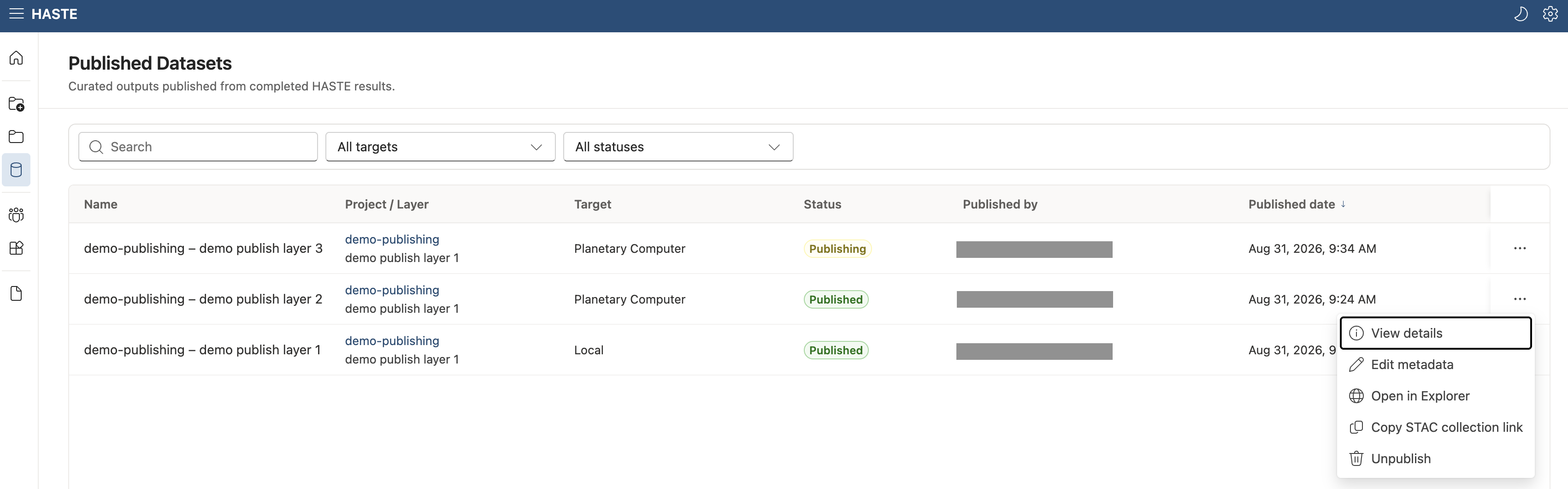
The Published Datasets section lists all datasets published in your HASTE deployment — not just your own — each with its publisher, target, status, and a per-row menu. Use the search box and the target/status filters to narrow the list. Anyone with access can browse and inspect these datasets; only a dataset’s owner or an administrator can manage it (see Actions).
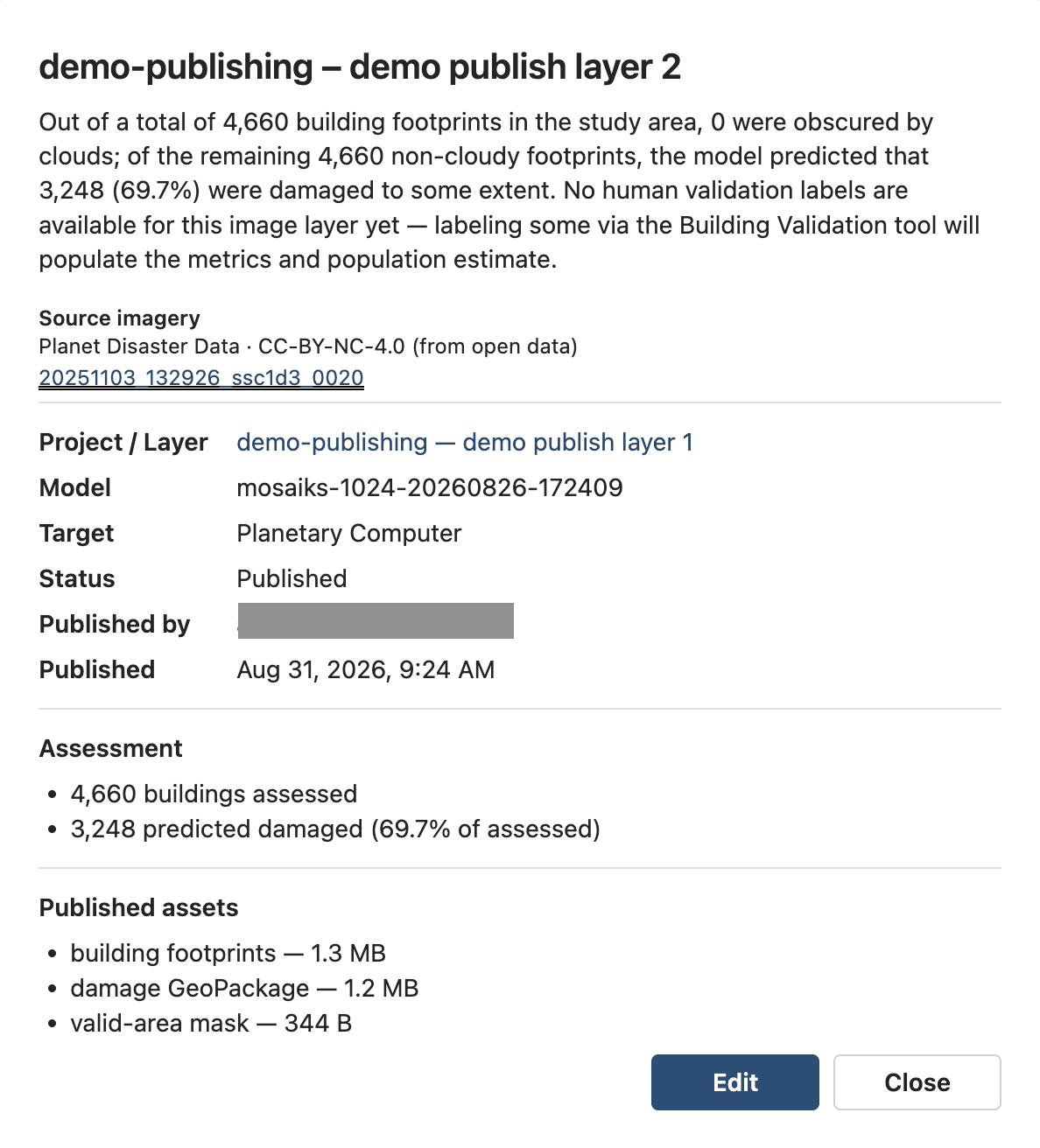
Select a row to open its detail view — the assessment summary, source imagery, project/layer, model, publish time, assessment counts, and the published assets with their sizes and links.
Statuses#
Status |
Meaning |
|---|---|
Pending / In progress |
The publish (or unpublish) operation is running. In-progress rows can’t be edited. |
Published |
Live. For Planetary Computer, the STAC item and collection are available in the GeoCatalog. |
Failed |
The publish didn’t complete. Use Retry, or Force remove if it can’t recover. |
Unpublishing |
A removal is in progress. |
Unpublish failed |
Removal didn’t complete — Retry it, or Force remove. |
Actions#
Anyone with access to HASTE can View details for any dataset in the list — the full metadata, assets, and links.
A dataset’s owner (its publisher) and administrators can additionally:
Edit metadata — change the name, description, interactive viewer URL, and source-imagery citation. Editing is allowed only in a settled state (Published, Failed, or Unpublish failed); for a published Planetary Computer dataset the edit is pushed to the live STAC item.
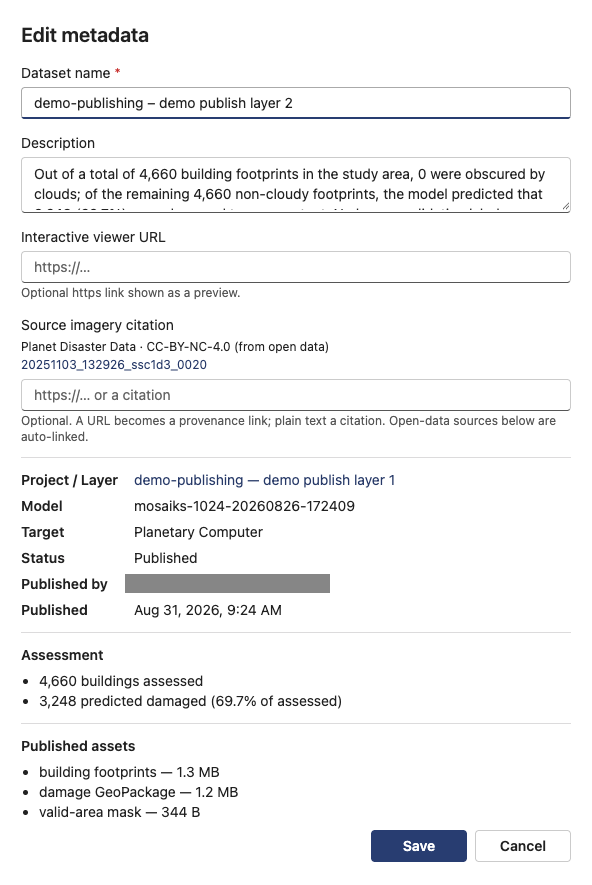
Retry — re-run a Failed or Unpublish failed operation.
Unpublish — remove the published copies. For Planetary Computer this deletes the STAC item (and the collection once its last dataset is removed).
Force remove — a last-resort escape hatch for a row stuck in Failed / Unpublish failed: it makes a best-effort cleanup and then drops the tracking record so the row leaves the list.
Force remove can leave orphaned resources
If cleanup can’t complete, force remove still removes the row — so resources already created in Planetary Computer may remain and must be deleted manually in the catalog. Use it only when Retry can’t recover the dataset.
Source-imagery attribution#
If an image layer was assembled from the Open Data Catalog, HASTE records where the imagery came from and carries that provenance onto every dataset published from it — so published results credit the imagery correctly and link back to the exact source scenes.
On a Planetary Computer dataset this becomes standard STAC attribution and provenance:
Providers — the imagery vendor is recorded as the
licensor; the organization operating your deployment (seeHASTE_PUBLISHING_ORGANIZATION_NAME) as theproducerandprocessor.derived_fromlinks — each source scene the output was derived from.Citation — your optional free-text/URL citation is shown on the dataset and item.
Only registered open-data imagery is attributed
Attribution is applied only for imagery from registered open-data programs. This is a licensing safeguard for the Planetary Computer target: publishing there never redistributes the source imagery to the external catalog — only your derived damage-assessment outputs are sent. (Local publishing can include the processed image, but it stays inside your own HASTE storage and isn’t shared to an external catalog.)
Viewing in the Planetary Computer Explorer#
For Planetary Computer datasets, HASTE also produces a damage-classification layer you can view on the map in the GeoCatalog Explorer — damaged buildings in red over undamaged buildings in grey.
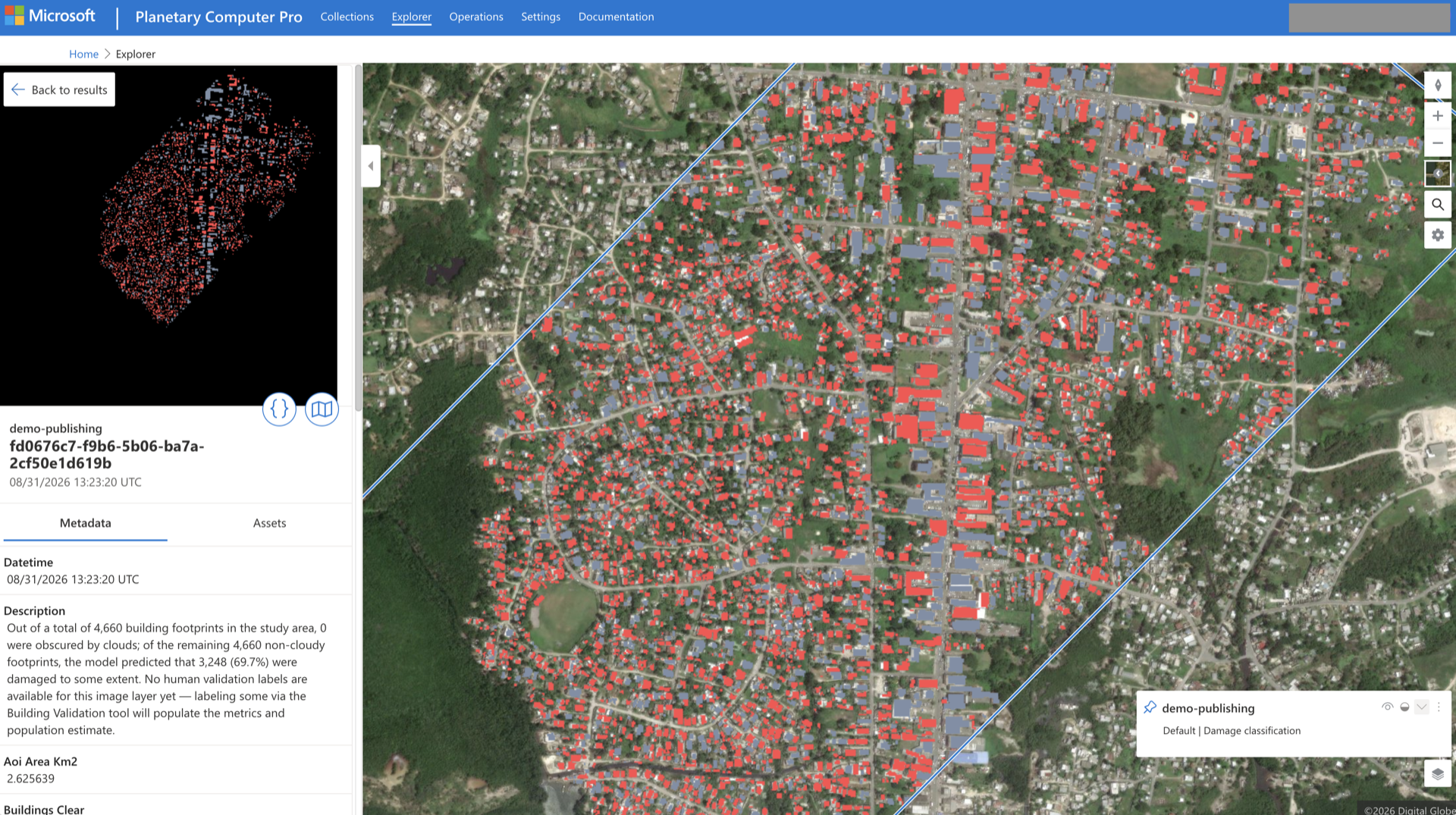
This layer is HASTE’s own derived output (a classification raster), not the source imagery, so it carries the same license and attribution as the vector outputs and never exposes licensed imagery. Along with it, HASTE registers the render, mosaic, and tile configuration the Explorer needs, so the collection becomes selectable there.
To view it: open the collection in the GeoCatalog and choose Launch in Explorer (or pick the collection from the Explorer’s dataset list). See the Planetary Computer Explorer guide.
Requires a render configuration
The Explorer can only display a collection that has a render configuration. HASTE creates one
automatically when HASTE_PUBLISH_EXPLORER_RENDER_ENABLED is on (the default). The vector
assets (geopackage / GeoJSON) remain downloadable but are not drawn on the map — the Explorer
renders raster layers.
Enabling and configuring publishing#
Publishing has two parts to set up: in-app configuration (environment settings on your HASTE deployment) and, for the Planetary Computer target, out-of-app resources you provision in Azure.
In-app configuration#
Publishing is controlled by HASTE_* environment settings applied at deploy time. The Local
target is on by default; the Planetary Computer target is off until you configure it. The full
matrix — feature flags, the GeoCatalog URLs, the publish storage target, and organization
attribution — is documented in the
Configuration guide → Data publishing.
Out-of-app: Planetary Computer#
The GeoCatalog is external to the HASTE template — you provision and own it. At a high level:
Provision a Planetary Computer Pro GeoCatalog and note its API and Explorer URLs. See Deploy a GeoCatalog resource.
Grant the HASTE Function App identity a GeoCatalog data-plane RBAC role on the GeoCatalog resource, so it can call the STAC and ingestion APIs. This is the grant that authorizes publishing itself — without it, HASTE can reach storage but cannot create catalog resources. Verify the exact role against your GeoCatalog.
Give HASTE a publish storage container the GeoCatalog can ingest from, and grant the GeoCatalog’s managed identity read access to it (Storage Blob Data Reader). HASTE copies published assets into this container and points STAC hrefs at it. See Manage ingestion sources.
Grant the HASTE Function App identity write access (Storage Blob Data Contributor) to the publish storage account so it can stage assets.
For a private container, create an ingestion source in the GeoCatalog and set
HASTE_PC_INGESTION_SOURCE. Public containers need none.
Once configured, HASTE handles the rest per publish: it creates the STAC collection and item, uploads assets, and — when Explorer rendering is enabled — registers the render configuration.
Managed identity and RBAC
Publishing to Planetary Computer relies on Azure managed identities and role assignments rather than keys. If a publish fails with an authorization error, check that the three role grants above are in place — the GeoCatalog data-plane role on the HASTE identity, plus the two storage roles. See Secure configuration.