Best Practices
When sending messages using AI, Teams recommends a number of best practices to help with both user and developer experience.
AI-Generated Indicator
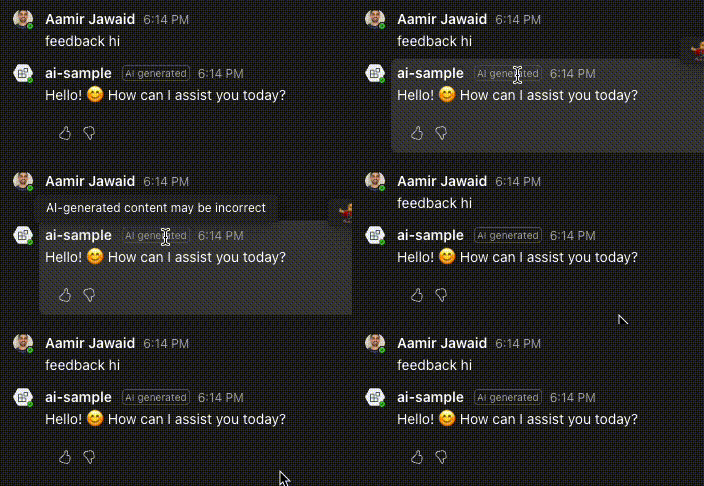
When sending messages using AI, Teams recommends including an indicator that the message was generated by AI. This can be done by calling the .add_ai_generated() method on outgoing messages. This will help users understand that the message was generated by AI, and not by a human and can help with trust and transparency.
message = MessageActivityInput(text="Hello!").add_ai_generated()
Gather feedback to improve prompts
AI Generated messages are not always perfect. Prompts can have gaps, and can sometimes lead to unexpected results. To help improve the prompts, Teams recommends gathering feedback from users on the AI-generated messages. See Feedback for more information on how to gather feedback.
This does involve thinking through a pipeline for gathering feedback and then automatically, or manually, updating prompts based on the feedback. The feedback system is an point of entry to your eval pipeline.
Citations
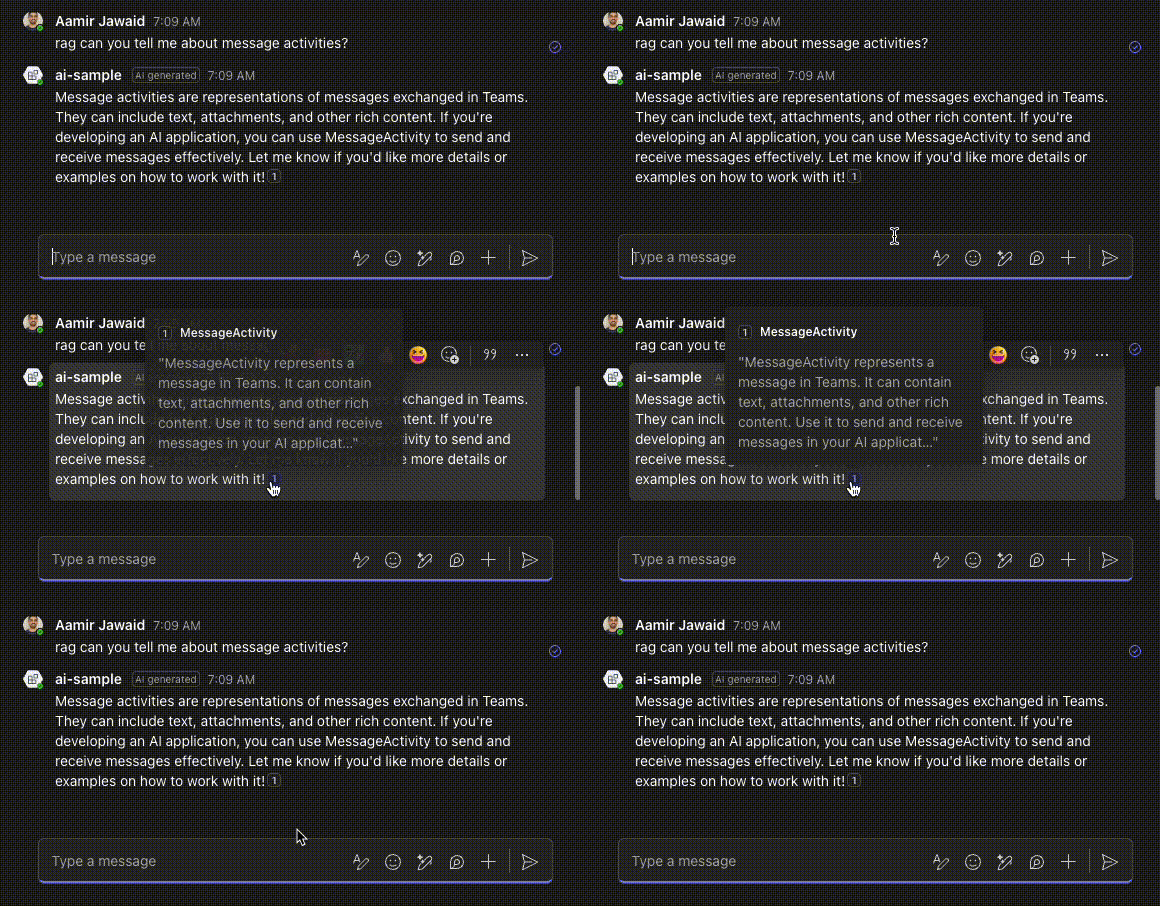
AI generated messages can hallucinate even if messages are grounded in real data. To help with this, Teams recommends including citations in the AI Generated messages. This is easy to do by using the add_citation method on the message.
Citations are added with a position property. This property value needs to also be included in the message text as [<position>]. If there is a citation that's added without the associated value in the message text, Teams will not render the citation
from microsoft_teams.api import MessageActivityInput
from microsoft_teams.api.models.entity import CitationAppearance

message = MessageActivityInput(text=result.content).add_ai_generated()

for i, doc in enumerate(cited_docs):
    position = i + 1
    message.text += f"[{position}]"
    message.add_citation(
        position,
        CitationAppearance(name=doc.title, abstract=doc.content),
    )
Suggested actions
Suggested actions help users with ideas of what to ask next, based on the previous response or conversation. Teams recommends including suggested actions in your messages. You can do that by using the with_suggested_actions method on the message.
from microsoft_teams.api import MessageActivityInput
from microsoft_teams.api.models.card.card_action import CardAction
from microsoft_teams.api.models.card.card_action_type import CardActionType
from microsoft_teams.api.models.suggested_actions import SuggestedActions

message = MessageActivityInput(text=result.content).with_suggested_actions(
    SuggestedActions(
        to=[ctx.activity.from_.id],
        actions=[
            CardAction(
                type=CardActionType.IM_BACK,
                title="Thank you!",
                value="Thank you very much!",
            ),
        ],
    )
).add_ai_generated()
await ctx.send(message)
Sending an Action.Submit suggested action
Use the CardActionType.SUBMIT suggested action type when you want the click to deliver a structured payload to your bot without posting a visible message on the user's behalf.
CardActionType.SUBMIT, SuggestedActionSubmitInvokeActivity, and on_suggested_action_submit are marked @experimental("ExperimentalTeamsSuggestedAction"). The platform feature will be generally available by end of summer 2026.
from microsoft_teams.api import MessageActivityInput
from microsoft_teams.api.models.card.card_action import CardAction
from microsoft_teams.api.models.card.card_action_type import CardActionType
from microsoft_teams.api.models.suggested_actions import SuggestedActions

reply = MessageActivityInput(text="Approve or reject the request:").with_suggested_actions(
    SuggestedActions(
        to=[],
        actions=[
            CardAction(type=CardActionType.SUBMIT, title="Approve", value={"vote": "approve"}),
            CardAction(type=CardActionType.SUBMIT, title="Reject", value={"vote": "reject"}),
        ],
    )
)
await ctx.send(reply)
Handling an Action.Submit suggested action
The click arrives as a typed suggestedActions/submit invoke. Register a handler with the @app.on_suggested_action_submit decorator and read the payload from ctx.activity.value.
import json
from microsoft_teams.api.activities.invoke.suggested_action_submit import SuggestedActionSubmitInvokeActivity
from microsoft_teams.apps import ActivityContext

@app.on_suggested_action_submit
async def handle_suggested_action_submit(ctx: ActivityContext[SuggestedActionSubmitInvokeActivity]) -> None:
    payload = json.dumps(ctx.activity.value)
    await ctx.send(f"Got vote: {payload}")
See Suggested actions for more information on suggested actions.