Foundry IQ Live Knowledge Sources
Wrap and prove an existing Azure AI Search index with the stable API, compose it with preview MCP Server retrieval, then extend the same guarded lifecycle to governed Fabric Ontology sources.
Start the stable live path Inspect the no-cloud replay
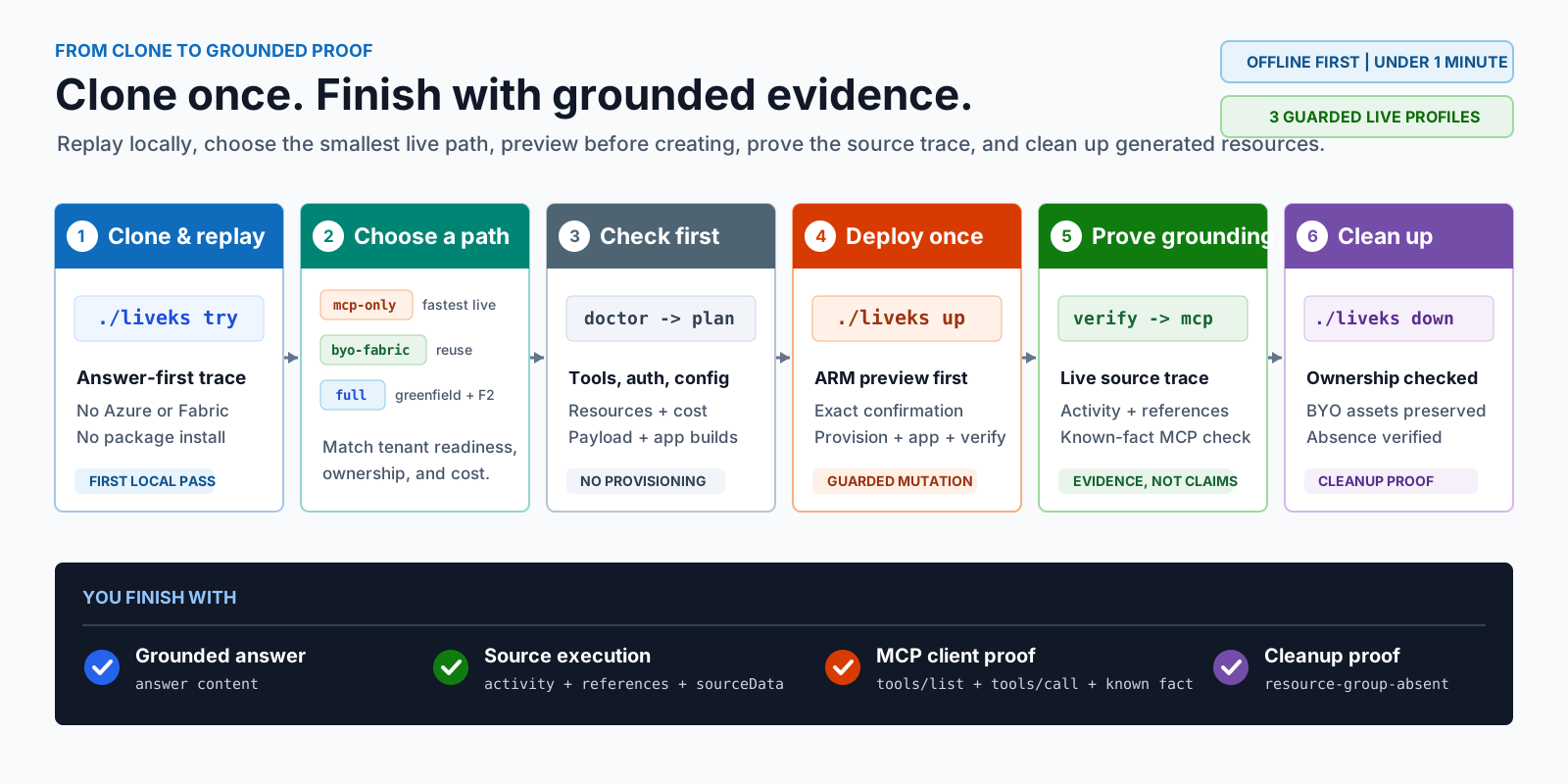
Choose Your Outcome
| Role | Finish line | Start here |
|---|---|---|
| Evaluator | Inspect the packaged answer and trace contract with no cloud access. | ./liveks try |
| Search implementer | Prove an existing agentic-ready index through the GA data plane. | Stable Search Index KS |
| Knowledge composer | Combine that existing index with Microsoft Learn MCP without provisioning a new service. | MCP + Search Index KB |
| Three-source composer | Add an existing native Fabric ontology to the reused Search and MCP path. | Preview Three-Source KB |
| Azure implementer | Prove Microsoft Learn MCP runs live through the preview Foundry IQ path. | Codespaces First Live |
| Fabric implementer | Add governed entities and relationships after the Azure path works. | Fabric Live BYO Validation |
The accelerator is not a production reference architecture. It keeps the human path narrow while AGENTS.md defines the separate execution contract for coding agents.
30-Second Replay
Require Contract: PASS (4/4 assertions). Python 3.11 or newer is the only dependency, no package is installed, and no cloud resource is created.
Replay is not live
The replay proves a checked-in response and evidence contract. A realistic answer, mcpServer activity, or fabricOntology activity in this fixture does not prove that Azure called either source.
The ignored evidence capsule retains scenario/pack versions, revision, manifest and fixture digests, source types/counts, assertion status, ownership, and cleanup expectation. It excludes query, expected terms, answer, raw response, source identities, sourceData, endpoints, tenant values, and credentials. Pull-request validation executes the same entry point.
Lowest-Risk Live: Existing Search Index
./liveks init --profile search-index --env liveks-index
# Fill the existing endpoint, index, semantic configuration, and optional fields.
az login --use-device-code --tenant <tenant-guid>
./liveks doctor --env liveks-index
./liveks plan --env liveks-index
./liveks up --env liveks-index
./liveks verify --env liveks-index --query "<question>" --expect-term "<known term>"
This generally available 2026-04-01 lane creates only a Search Index KS and minimal extractive Knowledge Base. The Search service and index remain reused assets, and cleanup must finish with search-index-preserved=pass.
Follow the stable execution contract
Compose Existing Search With MCP
./liveks init --profile mcp-search-index --env liveks-combined
# Fill existing Search index and Azure OpenAI deployment values.
./liveks doctor --env liveks-combined
./liveks plan --env liveks-combined
./liveks up --env liveks-combined --query "<index question>" --expect-term "<known term>"
The Search Index KS remains on GA 2026-04-01. MCP Server KS, the combined KB, and the three ordered retrieve calls use 2026-05-01-preview. Independent searchIndex and mcpServer evidence must pass before combined routing evidence is reported. The Search service, index, and Azure OpenAI deployment remain reused assets.
Follow the two-source execution contract
When existing native Fabric assets are also ready, continue to the three-source execution contract.
First Preview Live: MCP-Only
The checked-in Codespaces environment supplies Python 3.11, Node.js 22, Azure CLI, Bicep, and Azure Developer CLI. Container creation runs only safe local checks.
./liveks init --profile mcp-only --env liveks-mcp
az login --use-device-code --tenant <tenant-guid>
azd auth login --use-device-code
./liveks doctor --env liveks-mcp
./liveks plan --env liveks-mcp
./liveks up --env liveks-mcp
doctor and plan must pass before creation. up runs an ARM preview and waits for create liveks-mcp before provisioning. The result is a hosted app, MCP Server KS, and MCP-only Knowledge Base without any Fabric dependency.
Typical duration is 10-20 minutes. The exact subscription, region, model availability, and ARM preview determine the actual result and cost.
Prove Source Execution
./liveks verify --env liveks-mcp --format json
./liveks mcp \
  --env liveks-mcp \
  --query "What must be configured for an Azure AI Search MCP Server knowledge source?" \
  --expect-term "Azure AI Search"
A pass requires:
- a live app status,
mcpServeractivity or references,microsoft-learn-mcp-ksandmicrosoft_docs_searchidentity,- native MCP tool discovery, call, and expected-term checks.
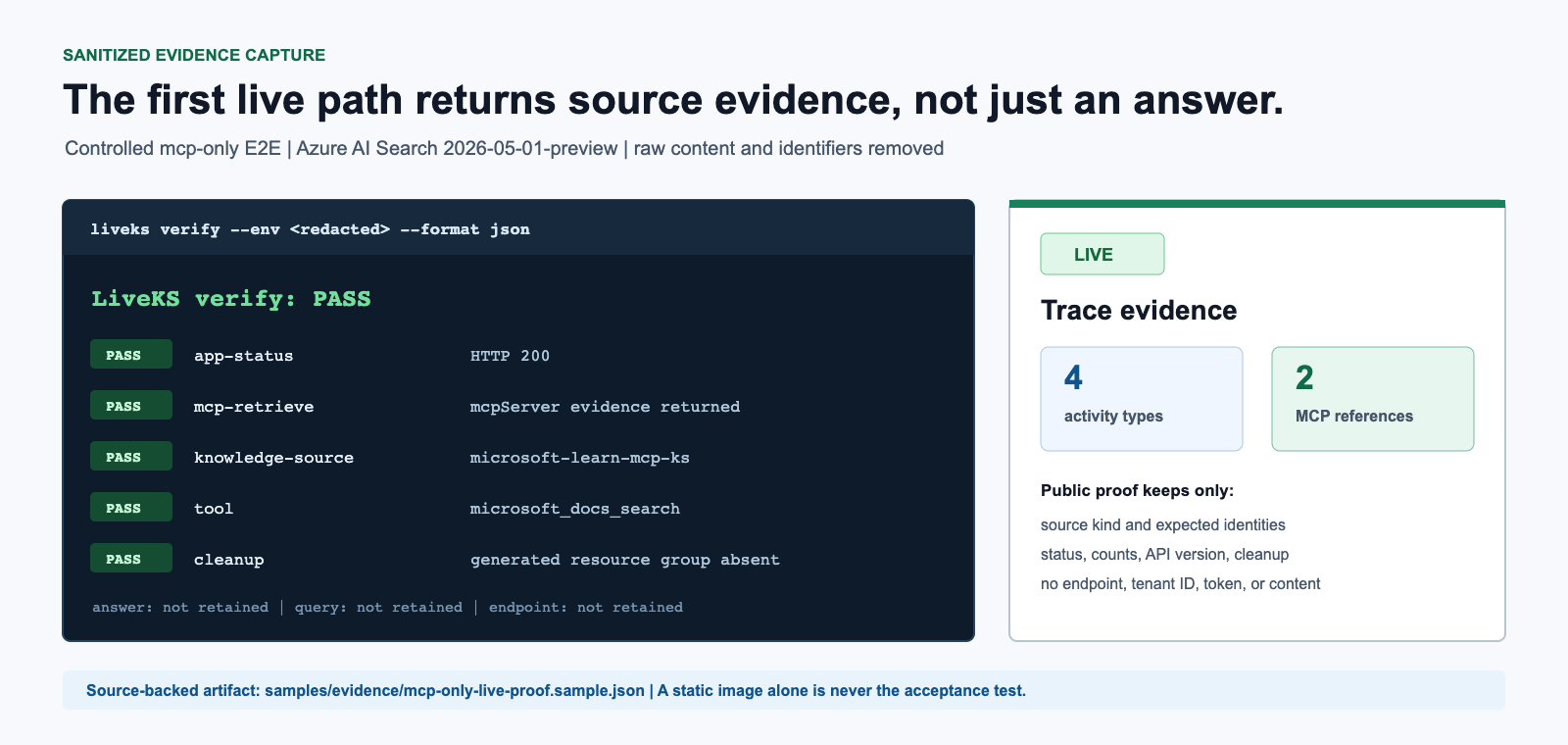
The source-backed public record is samples/evidence/mcp-only-live-proof.sample.json in the repository. It is derived from a controlled live E2E run and excludes endpoint, tenant, query, answer, raw response, and credentials. The image explains the evidence shape; it does not replace verify.
Follow every Codespaces step Use the local execution runbook
Expand To Fabric
| Profile | Add it when | Required proof |
|---|---|---|
byo-fabric |
Existing workspace and ontology IDs are ready. | Separate MCP and Fabric retrieve checks, then combined routing. |
full |
Greenfield creation and billable F2 capacity are explicitly approved. | Generated Fabric readiness, both source checks, and complete teardown. |
BYO cleanup preserves the existing Fabric assets. Full cleanup deletes only assets proven to be generated by the same environment. Start with Choose a Pattern, then use Fabric Prerequisites or Fabric Live BYO Validation.
What Gets Demonstrated
| Component | Role | Acceptance evidence |
|---|---|---|
| Search Index KS | Wraps an existing index for stable extractive retrieval. | searchIndex evidence, expected content, and preserved-index cleanup proof. |
| MCP Server KS | Calls an explicitly allowed remote HTTPS MCP tool. | mcpServer activity or references and tool identity. |
| Fabric Ontology KS | Resolves governed business entities and relationships. | fabricOntology activity or references plus source data. |
| Foundry IQ Knowledge Base | Selects sources and returns grounded output. | Answer, activity, references, and sourceData. |
| Native Knowledge Base MCP | Publishes knowledge_base_retrieve to MCP clients. |
tools/list, tools/call, and a known-fact match. |
| LiveKS | Plans, deploys, verifies, and cleans up. | Nonzero failures, sanitized reports, and absence checks. |
Two MCP directions are distinct:
Northbound: MCP client -> Knowledge Base MCP endpoint -> Foundry IQ -> Knowledge Source
Southbound: Foundry IQ -> MCP Server KS -> remote HTTPS MCP tool
Fabric Ontology is a native Knowledge Source and is not routed through the external MCP Server KS.
Configuration And API Boundary
The ignored .liveks/<environment>.yaml file is the authoring ledger. azd env is generated state. Secrets are environment references, never raw YAML values.
search-index is pinned to generally available 2026-04-01, intents, and minimal extractive retrieval. mcp-search-index and three-source pin Search Index KS separately to 2026-04-01 and MCP/Fabric/KB/retrieve operations to 2026-05-01-preview. Other live compositions remain preview-only. Cross-lane API overrides fail closed.
Compare stable and preview support
Finish With Cleanup
For search-index, mcp-search-index, and three-source, require search-index-preserved=pass; three-source also requires fabric-assets-preserved=pass. For provisioned preview profiles, require resource-group-absent=pass.
Manual Map
| Need | Manual |
|---|---|
| Shortest complete sequence | Execution Runbook |
| Stable existing-index path | Stable Search Index KS |
| Existing-index plus MCP composition | MCP + Search Index KB |
| Existing Search plus MCP plus native Fabric | Preview Three-Source KB |
| Every first-live Codespaces step | Codespaces First Live |
| MCP payload and source contract | MCP Server Knowledge Source |
| Fabric source contract | Fabric Ontology Knowledge Source |
| Post-deployment clicks and queries | Guided Live Demo |
| Trace-level acceptance | Post-Deployment Tests |
| Stable vs preview API | API Compatibility |
| Configuration authority | Configuration |
| Security and safe claims | Security and Governance |
| Failure recovery | Troubleshooting |