Guided Live Demo Walkthrough
This is the click-by-click presenter guide for the deployed demo app. It explains what to open, what to select, what question the app sends, what should appear, and what the result proves.
Use Post-Deployment Tests And Expected Traces when you need the complete acceptance criteria or additional test questions.
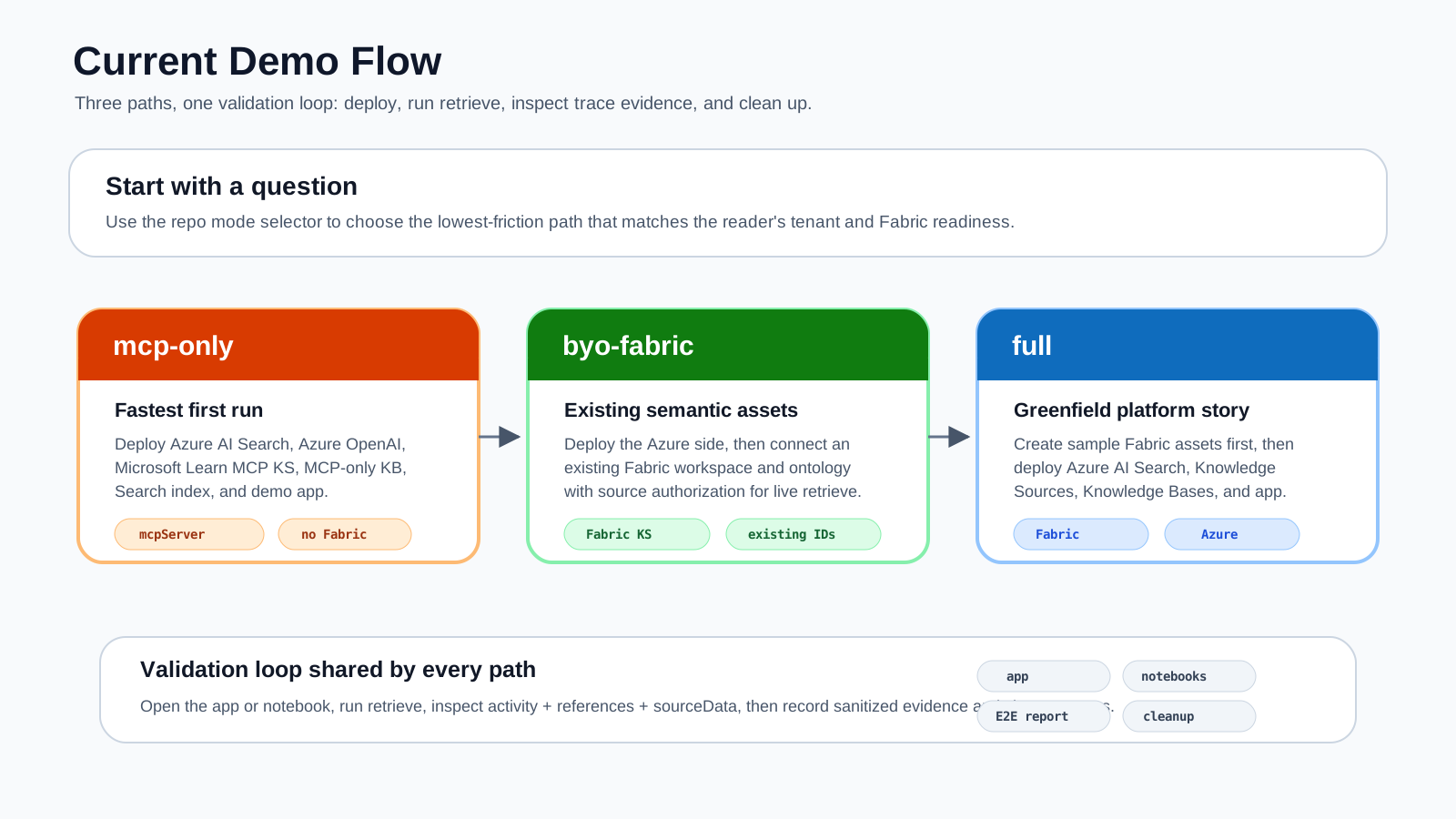
Choose The Demo You Can Prove
| Available environment | Recommended demo | Time | Valid claim |
|---|---|---|---|
| No Azure or Fabric access | GitHub Pages replay | 2 minutes | The packaged response and trace inspection experience. |
mcp-only deployed |
Status plus MCP Live | 3 minutes | A live Microsoft Learn MCP tool call through Knowledge Base retrieve. |
byo-fabric deployed |
MCP, Fabric, then Combined | 7 minutes | Both source paths work independently and the combined planner can route between them. |
full deployed |
Deployment, MCP, Fabric, Combined, cleanup | 10 minutes | Greenfield Fabric assets and the complete Azure/Fabric lifecycle work together. |
Match the claim to the badge
A realistic answer with an offline or offline-replay badge is replay evidence. Only a live answer with matching activity or references proves a live source call.
Presenter Preparation
1. Deploy And Verify
Use the profile that matches the demo:
./liveks init --profile mcp-only --env liveks-mcp
./liveks plan --env liveks-mcp
./liveks up --env liveks-mcp
./liveks verify --env liveks-mcp
For existing Fabric assets:
./liveks init --profile byo-fabric --env liveks-byo
# Add the existing Fabric IDs to .liveks/liveks-byo.yaml.
./liveks plan --env liveks-byo
./liveks up --env liveks-byo
./liveks verify --env liveks-byo
For greenfield Fabric assets:
./liveks init --profile full --env liveks-full
./liveks plan --env liveks-full
./liveks up --env liveks-full --accept-fabric-capacity
./liveks verify --env liveks-full
Do not begin a live presentation with a failed verify result.
2. Find The Correct App
Open the generated, ignored summary for the environment you just verified:
Copy the App URL into a private browser window. Do not present the Search endpoint, tenant IDs, resource names, or the summary itself.
The public interactive trace demo is GitHub Pages replay. Use it when you want to explain the UI without a live environment, and call it replay explicitly.
3. Prepare Fabric Authorization
Skip this step for mcp-only. For byo-fabric or full, acquire a fresh raw token just before the demo:
az account get-access-token \
  --resource https://search.azure.com \
  --query accessToken \
  --output tsv
Keep the value off the shared screen. Do not prepend Bearer. The browser sends the token for the request but does not persist it; refreshing or closing the page clears the entered value.
The app uses a fixed Airline Ops question for a repeatable demo. full creates the matching sample. Before a byo-fabric presentation, confirm that the connected ontology maps the Airline Ops contract; otherwise plan to validate the live Fabric trace in the app and use the Fabric notebook or REST sample for a business question that matches the existing ontology.
4. Rehearse The Exact Path
Run the same tabs once before the audience joins. Confirm:
- the top status pill shows the expected deployment mode and
live, - MCP returns a
liveanswer, - Fabric and Combined return
liveafter the delegated token is entered, - expected source badges and trace entries appear,
- no private endpoint or token is visible in the browser viewport.
Know What Each Control Does
| Control | Behavior |
|---|---|
| Overview, MCP Live, Fabric, Combined Trace, Deployment tabs | Change the visible section but do not run a query. |
| Run MCP, Check Fabric, or View trace on an Overview mode card | Opens the matching tab and immediately runs its packaged query. |
| Top-right Inspect MCP replay or Run MCP live | Opens the MCP view and runs the fixture or live query that matches the current runtime boundary. |
| Run retrieve inside a source tab | Runs that tab's packaged query when you choose. |
| Re-check in Deployment | Refreshes Search reachability and runtime status. |
| Answer mode badge | Distinguishes live from offline or offline-replay. |
| Source badges | Summarize source types found in response activity. |
| Activity, References, Source Data | Provide the detailed routing and grounding evidence. |
For a controlled presentation, use the top navigation tabs and then select Run retrieve. The Overview shortcuts start the request immediately and are better for a quick self-guided demo.
Step 1: Establish Runtime Status
- Open the deployed App URL.
- Stay on Overview.
- Point to the top-right status pill.
- Require
<deployment-mode> live, such asmcp-only liveorbyo-fabric live. - In Deployment Readiness, confirm the current mode, Search endpoint readiness, Search key readiness, and MCP KS name.
- Select Deployment in the top navigation.
- Select Re-check.
- Wait for the button to change from Checking... back to Re-check.
- In Runtime Status, confirm:
"reachabilityStatus": "live"
"reachable": true
"deploymentMode": "<the profile you deployed>"
"hostingMode": "staticwebapp"
- Return to Overview.
What this proves: the managed API is running and can reach the configured Azure AI Search service.
What this does not prove: a Knowledge Source has answered a retrieve request. Continue to the source tabs.
Step 2: Demonstrate MCP Live
This path is available in every live profile and is the best first live query.
Click Sequence
- Select MCP Live in the top navigation.
- Point out that this tab calls the public Microsoft Learn MCP server through Azure AI Search.
- Select Run retrieve.
- Wait while the button reads Running....
- When the result appears, start with the Answer panel.
- Require the
livebadge at the top-right of the Answer panel. - Require the MCP Server KS badge below the answer.
- Scroll to Source Trace.
- Point out the activity count, reference count, and
liveresponse mode. - Scroll to Query and show the exact question sent by the app.
- In Activity, find
type: "mcpServer". - In the same activity entry, find
toolName: "microsoft_docs_search". - In References and Source Data, show that Microsoft Learn evidence accompanied the answer.
Packaged Query
Expected Result
- The answer gives relevant MCP Server KS setup guidance.
- The Answer badge is
live. - MCP Server KS appears as a source badge.
- Activity identifies
mcpServerandmicrosoft_docs_search. - References or source data contain Microsoft Learn grounding.
Presenter Talk Track
This is not an indexed copy of Microsoft Learn. The Knowledge Base selected the MCP Server Knowledge Source at retrieve time, called the allowed microsoft_docs_search tool, and returned the answer together with inspectable activity and references.
Do Not Claim A Pass When
- the badge says
offlineoroffline-replay, - the notice says a canonical sample response was used,
- no MCP activity or reference is present,
- only the answer text looks correct.
Step 3: Demonstrate Fabric Ontology
Use this path only for byo-fabric or full.
Click Sequence
- Select Fabric in the top navigation.
- In Fabric Source Authorization, paste the raw token prepared earlier.
- Confirm visually that the field is populated, but do not reveal the token.
- Select Run retrieve under Fabric Ontology.
- Wait while the button reads Running....
- In Answer, require the
livebadge. - Require the Fabric Ontology KS source badge.
- For
fullor an Airline Ops BYO ontology, confirm the answer identifies Alpine Air as the highest customer-care exposure airline. For another BYO ontology, validate the result against its own known facts. - Scroll to Source Trace and require
liveresponse mode. - In Query, show the business question sent by the app.
- In Activity, find
type: "fabricOntology"and the Fabric ontology search argument. - In References or Source Data, find
fabricAnswerandfabricRawData.
Packaged Query
Expected Result
- The Answer badge is
live. - Fabric Ontology KS appears as a source badge.
- Alpine Air ranks first when the deployed ontology uses the checked-in Airline Ops sample.
- Activity identifies
fabricOntology. - Source data contains both a Fabric answer and raw grounding data.
Presenter Talk Track
The question is expressed in business language. Fabric Ontology resolves the governed entities and relationships behind customer-care exposure, and the retrieve response returns both a synthesized answer and source-specific grounding data.
Important Failure Distinction
An offline replay also names Alpine Air. That is intentional, so the airline name alone is not proof. If the badge is offline, explain the replay or refresh the delegated token; do not present it as live Fabric retrieval.
In mcp-only, the Fabric tab returns replay with a reason that Fabric Ontology KS was not created. This is expected profile behavior, not a Fabric pass.
Step 4: Demonstrate Combined Routing
Run this step after the separate MCP and Fabric tests. The token entered on the Fabric tab remains available while the page stays open.
For a non-Airline Ops BYO ontology, the packaged combined answer is not a domain acceptance test. Use it only to inspect routing, or replace the business question through the REST sample or notebook before the presentation.
Click Sequence
- Select Combined Trace in the top navigation.
- Select Run retrieve.
- Wait while the button reads Running....
- In Answer, require the
livebadge. - Read the answer and separate its business conclusion from its implementation guidance.
- Inspect the source badges. They show which source types appear in this response.
- Scroll to Source Trace and state the activity and reference counts that actually appear.
- In Activity, identify whether the planner selected Fabric, MCP, or both.
- In References, match the business claim to Fabric evidence and any implementation claim to MCP evidence.
- In Source Data, show the source-specific evidence returned for the selected path or paths.
Packaged Query
Using the Airline Ops ontology, identify the airline with the highest customer-care exposure this month. Also cite Microsoft Learn guidance for how I should validate activity, references, and sourceData in the Knowledge Base retrieve response.
Expected Interpretation
- Fabric can supply the Airline Ops ranking and exposure grounding.
- MCP can supply Azure AI Search implementation guidance.
- The planner can select one or both sources for a retrieve call.
- The two preceding single-source tests prove that both paths work independently.
- Only a live combined trace containing both source types proves that this particular call used both.
Presenter Talk Track
One Knowledge Base can compose multiple live Knowledge Sources. The planner decides which source to call for this question, and the response exposes that decision through activity, references, and sourceData instead of asking us to infer routing from the prose answer.
Do not say that every combined query always calls both sources. Describe the trace that is visible in the current response.
Step 5: Close With Automated Evidence
Return to the terminal after the visual walkthrough and run:
Explain that the visual demo answers "what can a user do?" while verify provides a repeatable check of the app, MCP path, and applicable Fabric paths. Sanitized reports are written under the ignored deployments/<environment>/ directory.
For a complete create, retrieve, verify, and delete rehearsal:
Use --accept-fabric-capacity for full.
Ready-Made Demo Sequences
Three-Minute MCP Demo
- Overview: show
mcp-only liveand the Question -> Knowledge Base -> Live Sources -> Trace pipeline. - Deployment: select Re-check and show Search reachability.
- MCP Live: select Run retrieve.
- Answer: show the
liveand MCP Server KS badges. - Activity: show
microsoft_docs_search. - Close with
./liveks verify --env liveks-mcp.
Seven-Minute Fabric Demo
- Overview: show
byo-fabric liveorfull live. - MCP Live: run and prove MCP independently.
- Fabric: enter the delegated token, run, and show
fabricOntologyplus Fabric source data. - Combined Trace: run and describe the source selection actually shown.
- Deployment: show current mode and resource names without exposing private IDs.
- Close with the automated verify result.
Two-Minute Offline Explanation
- Open the public interactive trace demo.
- Select Combined Trace, then Run retrieve.
- Point out the
offline-replaybadge before discussing the answer. - Show the two source badges, activity, references, and source data as the expected contract shape.
- State clearly that no live tenant or source call is being demonstrated.
Troubleshooting During A Demo
| What you see | Meaning | Presenter action |
|---|---|---|
Top pill says REPLAY - no Azure call |
The managed API is unavailable, or this is GitHub Pages. | Use replay only and label it as replay. |
Top pill says <mode> unreachable |
App settings exist but Search did not answer the status check. | Open Deployment, select Re-check, then use the last verified replay if necessary. |
| MCP answer is offline | Search configuration or the live MCP retrieve failed. | Show the error/notice, then use replay and the last verify result. |
| Fabric answer is offline and asks for authorization | The delegated token is missing or expired. | Acquire a fresh raw Search token, paste it in Fabric, and rerun. |
| Combined shows only one live source | Planner selected one source for this question. | Describe the observed routing; use the single-source tests to prove each path. |
| Button stays on Running... | The retrieve call is still within its runtime window or the source is slow. | Wait for completion; do not click repeatedly. |
| App is unavailable | Hosting or deployment is incomplete. | Use notebooks, REST samples, or public replay without making a live claim. |
Demo Safety Checklist
Before showing the demo outside the working team:
- [ ] Local validation and
liveks verifypass. - [ ] The App URL comes from the current environment's deployment summary.
- [ ] The response mode matches every live claim.
- [ ] Fabric authorization is entered off-screen and no token is visible.
- [ ] Source selection claims match visible activity and references.
- [ ] Offline replay is explicitly labeled as replay.
- [ ] Screenshots contain no tenant IDs, keys, tokens, private endpoints, or customer data.
- [ ]
fulldemo ownership and cleanup responsibilities are understood. - [ ] Preview caveats match Public Preview Limitations.
What Not To Claim
Avoid these statements:
- offline replay proves live Fabric retrieval,
- a useful answer alone proves source selection,
- source badges from an offline fixture prove a live call,
- every combined query always calls both sources,
azd upalone proves retrieve behavior,- full mode works in every tenant and region,
- local stdio MCP servers can be attached directly to Azure AI Search.
Use Post-Deployment Tests And Expected Traces for additional questions and exact pass/fail evidence.