Extend Microsoft 365 Copilot
Copilot Developer Camp is a self-paced learning resource, designed to help you extend Microsoft 365 Copilot. It provides practical guidance and real-world examples to support your development journey.
In this dev camp, you have multiple options to extend Microsoft 365 Copilot, depending on your needs.
Building an agent:
- Declarative Agents: You build your agents on the Microsoft 365 Copilot stack. You rely on the foundational model, orchestrator, and user experience of Copilot.
- Custom Engine Agents: You build your agents on any AI stack of your choice. You choose the foundational model, the orchestrator, and the user experience.
Extending Copilot Cowork:
- Skills and plugins for Copilot Cowork: You build skills and plugins to extend the capabilities of Copilot Cowork.
Adding work intelligence layer:
- Work IQ: Optionally, you build agents with Work IQ, which can provide access to the organizations' intelligence (email, meetings, files, people context, search, memory, reasoning signals) to every agent.
No matter what technology you use to create agents or to extend Microsoft 365 Copilot, you can always rely on Microsoft Agent 365 to observe, govern, and secure every agent across your organization.
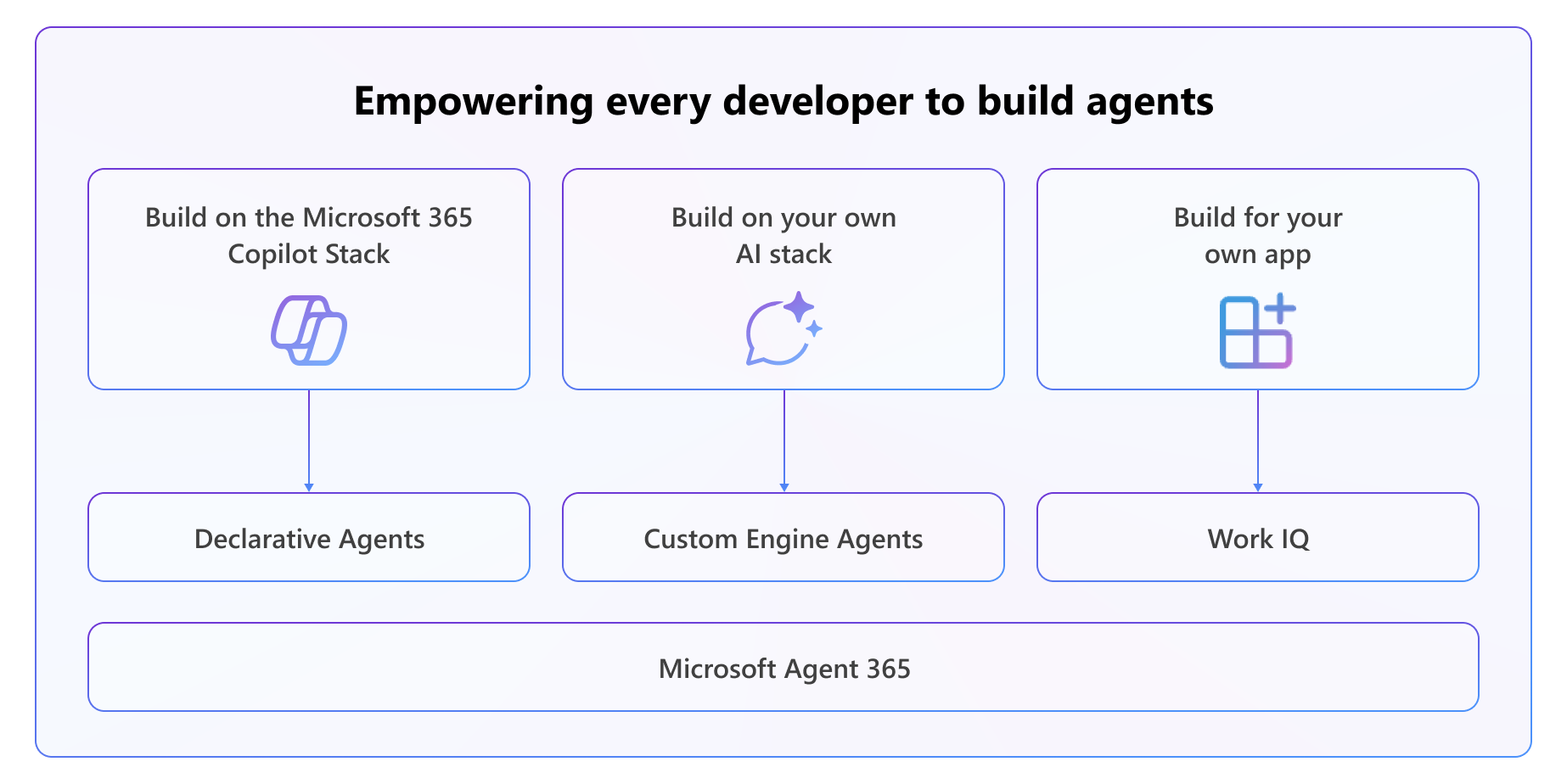
Your learning options to extend Microsoft 365 Copilot
🧪 Where should I start to build agents?
There are plenty of options for you to start from. To create Declarative Agents, you can dig into technologies like Agent Builder, Custom SharePoint Agents, or pro-code Declarative Agents with the Microsoft 365 Agents Toolkit.
To create Custom Engine Agents, you can explore technologies like Microsoft Copilot Studio, Microsoft Foundry, or pro-code Custom Engine Agents with the Microsoft 365 Agents Toolkit. To create your own apps built on top of Microsoft 365 and Microsoft 365 Copilot you should explore the Work IQ area.
No matter what kind of AI solution you are working on, you should always learn about Microsoft Agent 365 to manage agents via the agents registry, have access control and security, handle visualization and observability, and implement interoperability.
Use the following flowchart to find the learning path that best matches what you want to build.
%%{init: {'flowchart': {'htmlLabels': true, 'curve': 'linear'}}}%%
flowchart TD
Solution{"What kind of AI solution<br/>are you working on?"}
Solution -->|Build on the Microsoft 365 Copilot stack| DA["Declarative Agents"]
Solution -->|Build on your own AI stack| CEA["Custom Engine Agents"]
Solution -->|Build for your own app| WIQLabel["Work IQ"]
Solution -->|Extend Microsoft Copilot Cowork| CoworkLabel["Microsoft Copilot Cowork"]
DA --> DAUser{"What type of<br/>user are you?"}
DAUser -->|I am an end user| Content{"Where is your content?"}
DAUser -->|I am a developer| DALab["<span style='color:#0f766e'><b>Declarative Agent</b></span><br/><b>Go to Lab "E"</b>"]
Content -->|Microsoft 365 content| MAB["<span style='color:#0f766e'><b>Agent Builder</b></span><br/><b>Go to Lab "MAB"</b>"]
Content -->|SharePoint Online content only| MSA["<span style='color:#0f766e'><b>SharePoint Agent</b></span><br/><b>Go to Lab "MSA"</b>"]
CEA --> CEAUser{"What type of<br/>user are you?"}
CEAUser -->|I am a power user| MCS["<span style='color:#6d28d9'><b>Copilot Studio</b></span><br/><b>Go to Agent Academy + Lab "MCS"</b>"]
CEAUser -->|I am a developer| ProCode["<span style='color:#6d28d9'><b>Custom Engine Agent</b></span><br/>w/ Microsoft Foundry +<br/>Agent Framework + Microsoft<br/>365 Agents SDK<br/><b>Go to Lab "BMA" and "BAF"</b>"]
WIQLabel --> WIQ["<b>Go to Lab "WIQ"</b>"]
CoworkLabel --> Cowork["<b>Go to Labs "CWRK"</b>"]
AllSol["No matter what kind of<br/>solution you are working on"] -->|Applies to every solution| A365["<span style='color:#b45309'><b>Agent 365</b></span><br/><b>Go to Lab "AG"</b>"]
click DALab "pages/extend-m365-copilot/" "Open Declarative Agent labs"
click MAB "pages/make/agent-builder/" "Open Agent Builder labs"
click MSA "pages/sharepoint/sharepoint-agents/" "Open SharePoint Agent labs"
click MCS "pages/make/copilot-studio/" "Open Copilot Studio labs"
click ProCode "pages/custom-engine/" "Open Custom Engine Agent labs"
click WIQ "pages/work-iq/" "Open Work IQ labs"
click Cowork "pages/copilot-cowork/00-cowork-setup/" "Open Copilot Cowork labs"
click A365 "pages/agent-365/" "Open Agent 365 labs"
classDef decision fill:#f8fafc,stroke:#64748b,stroke-width:2.5px,color:#1e293b,font-weight:bold;
classDef pillTeal fill:transparent,stroke:#0d9488,stroke-width:2px,color:#0d9488,font-weight:bold;
classDef pillViolet fill:transparent,stroke:#7c3aed,stroke-width:2px,color:#ffffff,font-weight:bold;
classDef labelAmber fill:transparent,stroke:none,color:#b45309,font-weight:bold;
classDef labelBlue fill:transparent,stroke:none,color:#0369a1,font-weight:bold;
classDef labBoxTeal fill:#ffffff,stroke:#5eead4,stroke-width:2px,color:#1e293b;
classDef labBoxViolet fill:#ffffff,stroke:#c4b5fd,stroke-width:2px,color:#1e293b;
classDef labBoxAmber fill:#ffffff,stroke:#f59e0b,stroke-width:2px,color:#1e293b;
classDef labBoxBlue fill:#ffffff,stroke:#38bdf8,stroke-width:2px,color:#1e293b;
classDef amberNote fill:#fffbeb,stroke:#f59e0b,stroke-width:2px,color:#78350f,font-weight:bold;
class Solution,DAUser,Content,CEAUser decision;
class DA pillTeal;
class CEA pillViolet;
class WIQLabel labelAmber;
class CoworkLabel labelBlue;
class DALab,MAB,MSA labBoxTeal;
class MCS,ProCode labBoxViolet;
class WIQ,A365 labBoxAmber;
class Cowork labBoxBlue;
class AllSol amberNote;
linkStyle default stroke:#94a3b8,stroke-width:1.6px;🆕 What's New?
Updated in September 2026
We’ve added a new standalone lab to the Declarative Agent pathway for building an agent with a reusable skill in Agent Builder.
- Build an agent with a custom skill in Agent Builder:
Create and package a reusable
SKILL.mdfile, add it to a Declarative Agent without writing application code, and test that the skill is invoked only for matching requests. 🔗 Start Lab E12
Updated in August 2026
We’ve added a new Copilot Cowork security lab and reorganized the Declarative Agent learning experience.
-
Add Entra SSO authentication to a Cowork plugin: Connect an Entra-secured MCP server to a Copilot Cowork plugin, configure single sign-on, and let users authenticate with their existing Microsoft 365 credentials without an extra sign-in prompt. 🔗 Start the Copilot Cowork SSO lab
-
Choose a clearer Declarative Agent pathway: Start with the E1A and E1B fundamentals, follow a guided bundle for an end-to-end scenario, or choose an independent standalone lab for a focused skill. Bundle-specific prerequisites now appear directly on each bundle page. 🔗 Explore the Declarative Agent pathways
🧑💻 More
Connect with us
Join the conversation on GitHub Discussion!
For makers
Learn to build agents with Microsoft Copilot Studio at Agent Academy!
🚑 Issues
We really appreciate your feedback! Please use the issues list to share your comments and issues, or if you're in Microsoft let us know in the "Copilot Developer Camp Early Testers" chat in Microsoft Teams. Thanks!
📜 Code of Conduct
This project has adopted the Microsoft Open Source Code of Conduct.
Resources:
- Microsoft Open Source Code of Conduct
- Microsoft Code of Conduct FAQ
- Contact opencode@microsoft.com with questions or concerns