Cluster Configuration for Azure Cosmos DB Garnet Cache
Available Tiers
Azure Cosmos DB Garnet Cache lets you choose the underlying Azure Virtual Machine that your cache nodes will be provisioned on. The specs offered by cache nodes mirror the Azure virtual machine itself. Garnet doesn't limit the number of client connections that can be made on any node for any SKU. When choosing the right tier and SKU for your workload, consider that roughly 30% of memory on each node will be reserved for metadata and processing requests. Smaller SKUs in each tier are classified as dev/test while larger SKUs are designed for production workloads.
When data persistence is enabled, every node has a Premium SSD Managed Disk provisioned. The disk size is not configurable and is provisioned to scale with each SKU so that persistence keeps pace with the node's write throughput. The Managed Disk SKU provisioned for each option is in the table below.
The pricing model for cache nodes is instance-based and there are no licensing fees. For information about pricing, see the Azure Cosmos DB Garnet Cache pricing page.
General Purpose
Balanced performance tier suitable for most caching workloads with a good balance of compute, memory, and network resources.
- Use Cases: Balanced workloads, general caching, development and testing
| SKU | vCPUs | Memory (GB) | Network bandwidth (MB/s) | Premium SSD Managed Disk | Cluster Type |
|---|---|---|---|---|---|
| Standard_B2ls_v2 | 2 | 4 | 6250 | P4 | Dev/ Test |
| Standard_B2als_v2 | 2 | 4 | 6250 | P4 | Dev/ Test |
| Standard_D2s_v6 | 2 | 8 | 12500 | P6 | Dev/ Test |
| Standard_D4s_v6 | 4 | 16 | 12500 | P10 | Dev/ Test |
| Standard_D8s_v6 | 8 | 32 | 12500 | P15 | Production |
| Standard_D16s_v6 | 16 | 64 | 12500 | P20 | Production |
| Standard_D32s_v6 | 32 | 128 | 16000 | P30 | Production |
| Standard_D48s_v6 | 48 | 192 | 24000 | P40 | Production |
| Standard_D64s_v6 | 64 | 256 | 30000 | P40 | Production |
| Standard_D96s_v6 | 96 | 384 | 41000 | P50 | Production |
| Standard_D128s_v6 | 128 | 512 | 54000 | P50 | Production |
| Standard_D192s_v6 | 192 | 768 | 82000 | P60 | Production |
| Standard_D2s_v5 | 2 | 8 | 12500 | P6 | Dev/ Test |
| Standard_D4s_v5 | 4 | 16 | 12500 | P10 | Dev/ Test |
| Standard_D8s_v5 | 8 | 32 | 12500 | P15 | Production |
| Standard_D16s_v5 | 16 | 64 | 12500 | P20 | Production |
| Standard_D32s_v5 | 32 | 128 | 16000 | P30 | Production |
| Standard_D48s_v5 | 48 | 192 | 24000 | P40 | Production |
| Standard_D64s_v5 | 64 | 256 | 30000 | P40 | Production |
| Standard_D96s_v5 | 96 | 384 | 35000 | P50 | Production |
| Standard_D2as_v5 | 2 | 8 | 12500 | P6 | Dev/ Test |
| Standard_D4as_v5 | 4 | 16 | 12500 | P10 | Dev/ Test |
| Standard_D8as_v5 | 8 | 32 | 12500 | P15 | Production |
| Standard_D16as_v5 | 16 | 64 | 12500 | P20 | Production |
| Standard_D32as_v5 | 32 | 128 | 16000 | P30 | Production |
| Standard_D48as_v5 | 48 | 192 | 24000 | P40 | Production |
| Standard_D64as_v5 | 64 | 256 | 32000 | P40 | Production |
| Standard_D96as_v5 | 96 | 384 | 40000 | P50 | Production |
| Standard_D2s_v4 | 2 | 8 | 5000 | P6 | Dev/ Test |
| Standard_D4s_v4 | 4 | 16 | 10000 | P10 | Dev/ Test |
| Standard_D8s_v4 | 8 | 32 | 12500 | P15 | Production |
| Standard_D16s_v4 | 16 | 64 | 12500 | P20 | Production |
| Standard_D32s_v4 | 32 | 128 | 16000 | P30 | Production |
| Standard_D48s_v4 | 48 | 192 | 24000 | P40 | Production |
| Standard_D64s_v4 | 64 | 256 | 30000 | P40 | Production |
Memory Optimized
High-memory tier designed for workloads requiring large in-memory datasets with optimized memory-to-CPU ratios.
- Use Cases: Large datasets, gaming leaderboards, vector search workloads
| SKU | vCPUs | Memory (GB) | Network bandwidth (MB/s) | Premium SSD Managed Disk | Cluster Type |
|---|---|---|---|---|---|
| Standard_E2s_v6 | 2 | 16 | 12500 | P10 | Dev/ Test |
| Standard_E4s_v6 | 4 | 32 | 12500 | P15 | Dev/ Test |
| Standard_E8s_v6 | 8 | 64 | 12500 | P20 | Production |
| Standard_E16s_v6 | 16 | 128 | 12500 | P30 | Production |
| Standard_E20s_v6 | 20 | 160 | 12500 | P40 | Production |
| Standard_E32s_v6 | 32 | 256 | 16000 | P40 | Production |
| Standard_E48s_v6 | 48 | 384 | 24000 | P50 | Production |
| Standard_E64s_v6 | 64 | 512 | 30000 | P50 | Production |
| Standard_E96s_v6 | 96 | 768 | 41000 | P60 | Production |
| Standard_E128s_v6 | 128 | 1024 | 54000 | P60 | Production |
| Standard_E2s_v5 | 2 | 16 | 12500 | P10 | Dev/ Test |
| Standard_E4s_v5 | 4 | 32 | 12500 | P15 | Dev/ Test |
| Standard_E8s_v5 | 8 | 64 | 12500 | P20 | Production |
| Standard_E16s_v5 | 16 | 128 | 12500 | P30 | Production |
| Standard_E20s_v5 | 20 | 160 | 12500 | P40 | Production |
| Standard_E32s_v5 | 32 | 256 | 16000 | P40 | Production |
| Standard_E48s_v5 | 48 | 384 | 24000 | P50 | Production |
| Standard_E64s_v5 | 64 | 512 | 30000 | P50 | Production |
| Standard_E96s_v5 | 96 | 672 | 35000 | P60 | Production |
| Standard_E2as_v5 | 2 | 16 | 12500 | P10 | Dev/ Test |
| Standard_E4as_v5 | 4 | 32 | 12500 | P15 | Dev/ Test |
| Standard_E8as_v5 | 8 | 64 | 12500 | P20 | Production |
| Standard_E16as_v5 | 16 | 128 | 12500 | P30 | Production |
| Standard_E20as_v5 | 20 | 160 | 12500 | P40 | Production |
| Standard_E32as_v5 | 32 | 256 | 16000 | P40 | Production |
| Standard_E48as_v5 | 48 | 384 | 24000 | P50 | Production |
| Standard_E64as_v5 | 64 | 512 | 32000 | P50 | Production |
| Standard_E96as_v5 | 96 | 672 | 40000 | P60 | Production |
| Standard_E2s_v4 | 2 | 16 | 5000 | P10 | Dev/ Test |
| Standard_E4s_v4 | 4 | 32 | 10000 | P15 | Dev/ Test |
| Standard_E8s_v4 | 8 | 64 | 12500 | P20 | Production |
| Standard_E16s_v4 | 16 | 128 | 12500 | P30 | Production |
| Standard_E20s_v4 | 20 | 160 | 10000 | P40 | Production |
| Standard_E32s_v4 | 32 | 256 | 16000 | P40 | Production |
| Standard_E48s_v4 | 48 | 384 | 24000 | P50 | Production |
| Standard_E64s_v4 | 64 | 504 | 30000 | P50 | Production |
Compute Optimized
High CPU-to-memory ratio tier with dedicated physical cores designed for CPU-intensive caching workloads.
- Use Cases: CPU-bound workloads, high request throughput
| SKU | vCPUs | Memory (GB) | Network bandwidth (MB/s) | Premium SSD Managed Disk | Cluster Type |
|---|---|---|---|---|---|
| Standard_F2as_v6 | 2 | 8 | 12500 | P6 | Dev/ Test |
| Standard_F4as_v6 | 4 | 16 | 12500 | P10 | Dev/ Test |
| Standard_F8as_v6 | 8 | 32 | 12500 | P15 | Production |
| Standard_F16as_v6 | 16 | 64 | 16000 | P20 | Production |
| Standard_F32as_v6 | 32 | 128 | 20000 | P30 | Production |
| Standard_F48as_v6 | 48 | 192 | 28000 | P40 | Production |
| Standard_F64as_v6 | 64 | 256 | 36000 | P40 | Production |
Cluster Types
There are two cluster types to choose from which determine the SKUs available and the performance guarantees offered.
Dev/ Test
Development and testing SKUs are designed for non-production workloads with cost optimization and flexibility in mind. They are a good fit for feature testing and integration validation and are offered without SLAs. You may see lower throughput and higher latencies when using these SKUs. All features, including scaling out across shards, are available on Dev/ Test SKUs.
Production
Production SKUs are configured for high availability, performance, and reliability. They are a good fit for mission critical applications that need high throughput and consistent low latency.
Scaling Options
Azure Cosmos DB Garnet Cache provides flexible scaling options to meet your application's changing demands. Understanding when and how to scale your cache cluster is essential for maintaining optimal performance while controlling costs.
Choosing Your Scaling Strategy
The decision between vertical and horizontal scaling depends on your specific workload characteristics and performance requirements. Vertical scaling offers simplicity and is ideal when you need more resources per node, while horizontal scaling provides better distribution and resilience for high-throughput scenarios.
Vertical Scaling (Scale Up/Down)
Vertical scaling changes the SKU of your cache nodes to increase or decrease their individual capacity while keeping the same cluster topology (shard and replica count). Vertical scaling can't be performed in place: to change the SKU you deprovision the existing cluster and reprovision it at the new SKU. Plan for this when scheduling a scale-up or scale-down operation.
When to Scale Up: Vertical scaling is most effective when your workload benefits from having more resources concentrated on fewer nodes. Concentrating memory and CPU on a single larger node keeps related data together, avoids cross-shard coordination for multi-key operations, and reduces the network overhead and operational complexity of a larger topology. In many cases scaling up is preferable to scaling out: a single large SKU can deliver very high throughput on a large dataset with simpler data management and lower tail latency for multi-key and range operations, and it avoids having to partition a workload that is hard to shard. Consider scaling up when you need increased memory capacity for larger datasets or higher CPU performance for complex operations.
Vector search workloads are particularly well-suited for vertical scaling because they benefit significantly from having the entire dataset available on a single node. Vector similarity searches require access to large portions of the dataset to compute accurate results, and distributing vectors across multiple nodes can introduce latency and complexity. By scaling up to larger SKUs, vector search applications can maintain all vectors in memory on a single node, enabling faster index traversal and more efficient similarity computations.
Benefits of Vertical Scaling: The primary advantages of vertical scaling are operational simplicity and data locality. It maintains your existing cluster topology while concentrating more resources on each node, keeping your entire dataset (or each shard) on a single node for predictable, high-throughput access. The tradeoff is that changing the SKU requires deprovisioning and reprovisioning the cluster rather than an in-place update.
Horizontal Scaling (Scale Out/In)
Horizontal scaling involves adding or removing shards to distribute load across more instances. You can scale out by adding more shards to increase memory footprint and write throughput. Read throughput and availability are determined by the replication factor, which is chosen at provisioning and can't be changed afterward.
When to Scale Out: Horizontal scaling becomes essential when your workload exceeds the capacity limits of individual nodes or when you need to distribute load for better performance. This approach is particularly effective for applications with high concurrent user loads or when you need to improve read performance through additional replicas.
Scaling with Shards vs Replicas: Adding shards increases your total memory capacity and write throughput by distributing data across multiple primary nodes. Each shard handles a portion of your keyspace, allowing for parallel processing of operations. A higher replication factor primarily improves read throughput and provides better availability, as read operations can be distributed across multiple copies of your data. The replication factor is chosen at provisioning and directly impacts both performance and resiliency characteristics of your cluster.
Benefits of Horizontal Scaling: Horizontal scaling provides superior fault tolerance since the failure of individual nodes has less impact on overall system availability. This approach also offers better resource utilization efficiency and can handle virtually unlimited growth by continuously adding nodes.
How to Scale
The Settings > Cluster Explorer page of the Azure portal allows you to scale your cluster horizontally without downtime.
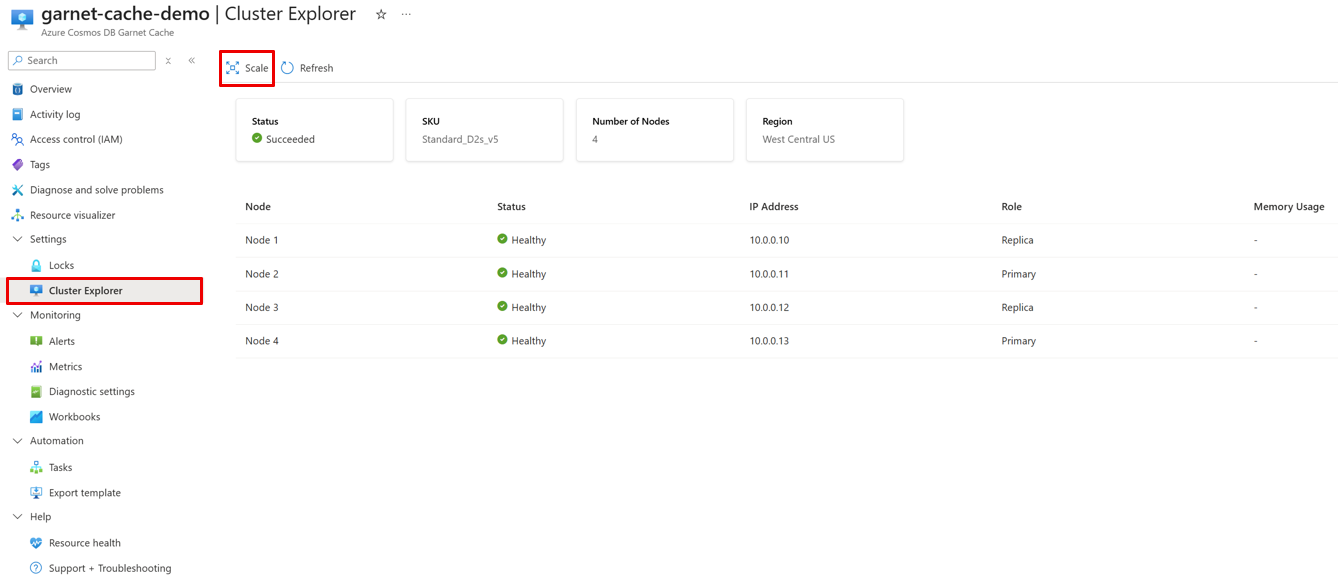
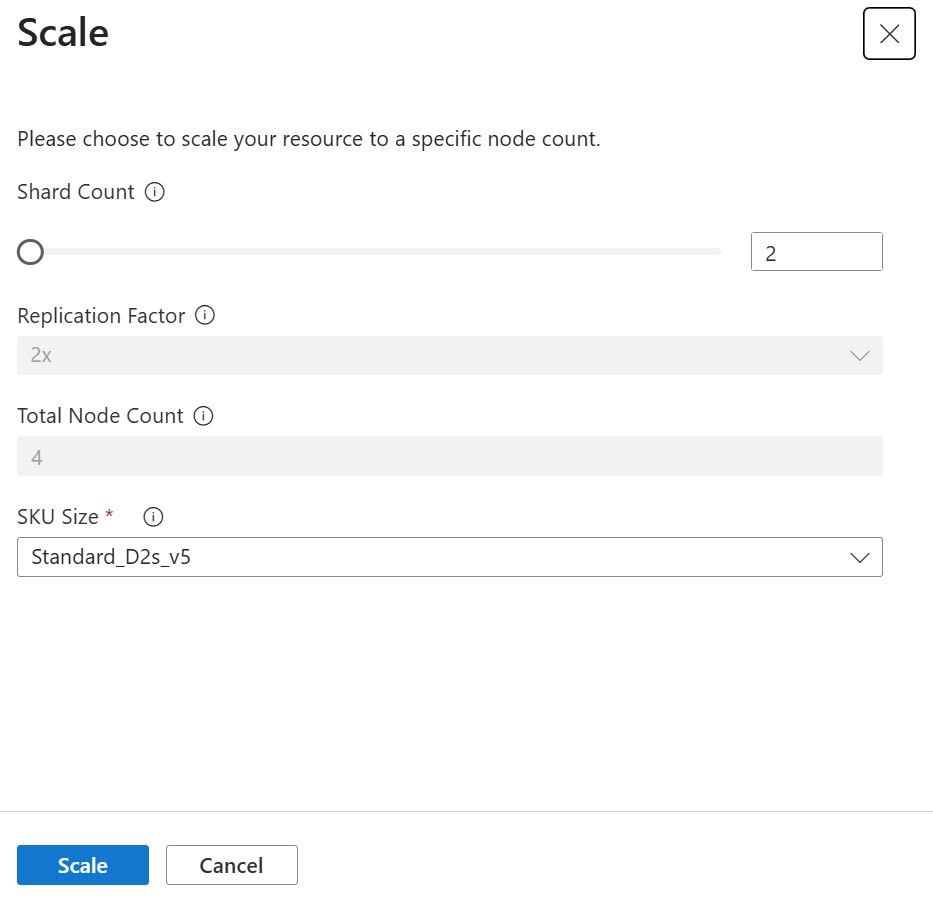
Increase or decrease the shard count to scale out or in on a running cluster. Vertical scaling (changing the SKU to scale up or down) can't be done in place and requires deprovisioning the existing cluster and reprovisioning it at the target SKU. Replication factor can only be configured during cluster provisioning and cannot be updated in place on existing clusters.
Scaling a cluster requires the same permissions as creating one, including Microsoft.Network/virtualNetworks/subnets/join/action on the cluster's subnet. See permissions to create and manage a cluster.
Right-Sizing Your Deployment
You can optimize the size of your Azure Cosmos DB Garnet Cache by monitoring and adjusting based on actual usage patterns. Starting with conservative estimates and scaling based on observed metrics typically provides the most cost-effective approach while ensuring performance requirements are met.
We recommend beginning your deployment with a smaller tier that meets your initial requirements, then monitor key metrics such as memory utilization, CPU usage, and command processing rates. Regular review of these metrics allows you to make informed decisions about when and how to scale your deployment. Watch for sustained high memory utilization that might indicate a need for additional capacity, increased latency that could benefit from more processing power, or uneven load distribution that might be addressed through horizontal scaling. The key is to identify trends before they impact user experience, allowing for proactive scaling rather than reactive responses to performance issues.
Regional availability
Each Azure Cosmos DB Garnet Cache can be provisioned in a single region. It is available in multiple Azure regions worldwide, with ongoing expansion to additional regions. The availability of each SKU in a given region depends on the Azure Virtual Machine regional availability. You can verify which SKUs are available in each region here.
Additionally, you can configure availability zones during provisioning in supported Azure regions where there is capacity for your chosen SKU. See the list of Azure regions with availability zone support.
| Geography | Region | Region Name |
|---|---|---|
| Americas | canadacentral | Canada Central |
| canadaeast | Canada East | |
| centralus | Central US | |
| eastus | East US | |
| eastus2 | East US 2 | |
| northcentralus | North Central US | |
| southcentralus | South Central US | |
| westcentralus | West Central US | |
| westus | West US | |
| westus2 | West US 2 | |
| westus3 | West US 3 | |
| brazilsouth | Brazil South | |
| brazilsoutheast | Brazil Southeast | |
| Europe | northeurope | North Europe |
| westeurope | West Europe | |
| francecentral | France Central | |
| germanynorth | Germany North | |
| germanywestcentral | Germany West Central | |
| italynorth | Italy North | |
| norwayeast | Norway East | |
| norwaywest | Norway West | |
| swedencentral | Sweden Central | |
| swedensouth | Sweden South | |
| switzerlandnorth | Switzerland North | |
| switzerlandwest | Switzerland West | |
| uksouth | UK South | |
| ukwest | UK West | |
| Africa | southafricanorth | South Africa North |
| southafricawest | South Africa West | |
| Middle East | uaecentral | UAE Central |
| uaenorth | UAE North | |
| Asia Pacific | australiaeast | Australia East |
| australiasoutheast | Australia Southeast | |
| centralindia | Central India | |
| southindia | South India | |
| westindia | West India | |
| eastasia | East Asia | |
| southeastasia | Southeast Asia | |
| japaneast | Japan East | |
| japanwest | Japan West | |
| koreacentral | Korea Central | |
| koreasouth | Korea South |