Review Before Release: Using Agent Review Tool for Copilot Studio Agents
GHCP harness
Use Agent Review Tool to investigate findings, assess skill quality, and understand configuration relationships before releasing a Copilot Studio agent.
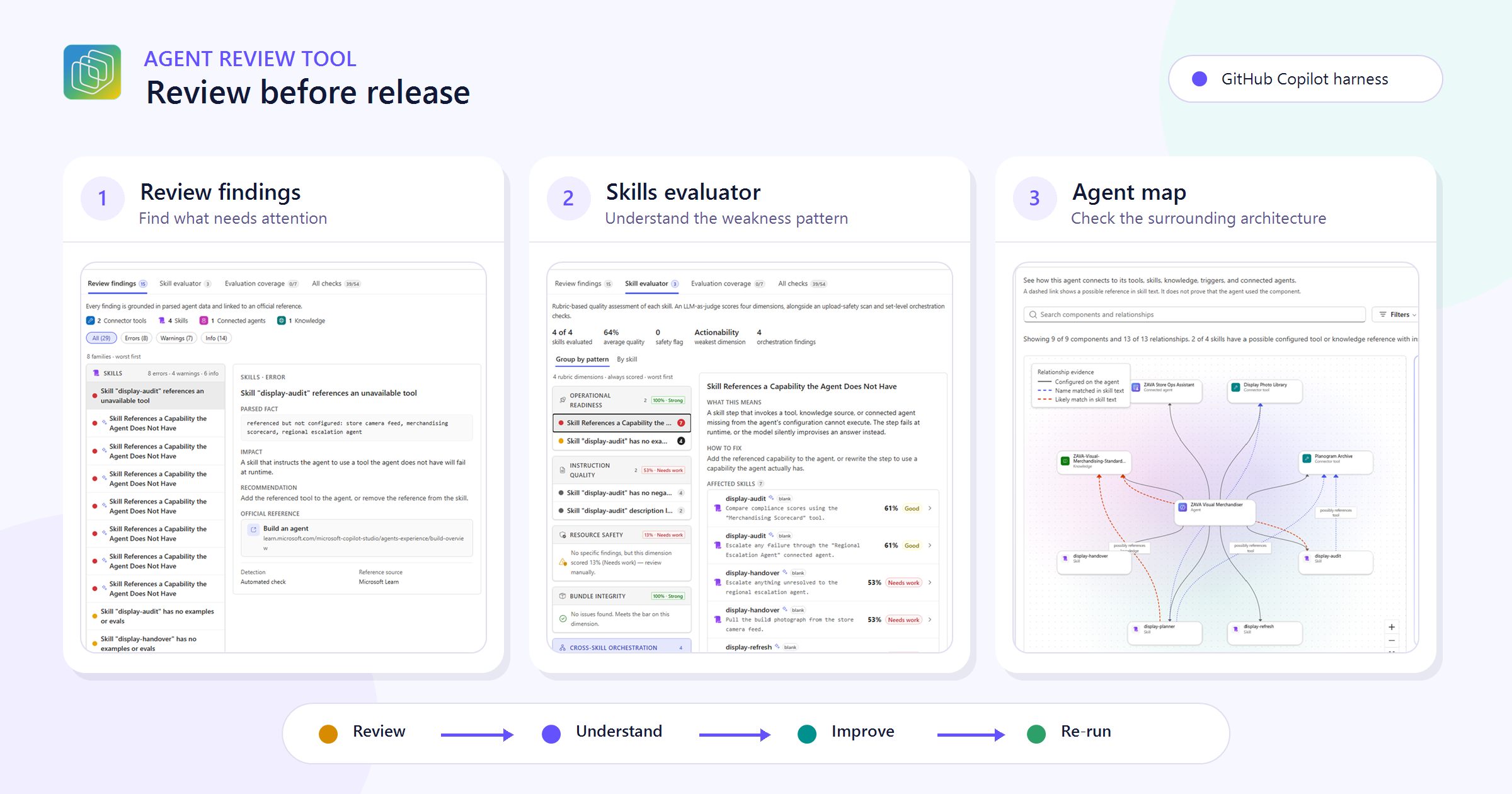
Your agent behaves as expected in the Preview tab. It answers the questions you expected, calls the right tools, and appears ready for its next environment.
But before you release it, how do you systematically review its instructions, skills, tools, knowledge sources, evaluation coverage, and connected-agent architecture?
Everything is easy to inspect when an agent has one instruction and one skill. Agents rarely have the courtesy to stay that small.
As an agent grows, its configuration is distributed across several surfaces. A skill can be perfectly reasonable on its own but overlap with another skill. A tool can be configured correctly but referenced ambiguously. A knowledge source can exist without the skills giving the agent enough direction to use it. Preview may not expose these issues until the right combination of inputs appears.
Agent Review Tool, part of Copilot Agent Kit, provides a repeatable way to inspect those risks. In this post, I will use a Copilot Studio agent powered by the GitHub Copilot harness: ZAVA Visual Merchandiser, a fictional retail visual-merchandising agent. We will use it to show a practical pre-release workflow focused on three capabilities:
- Review findings, which organizes grounded checks by severity and rule family.
- Skill evaluator, which assesses individual skill quality and cross-skill orchestration.
- Agent map, which helps us inspect how the reviewed skills relate to tools, knowledge sources, and other configured components.
This is not a tour of every button in Agent Review Tool. The goal is to answer one question well: what should a maker inspect and improve after an agent works, but before it is released?
As of August 18, 2026, Agent Review Tool is presented as a preview experience. Its evaluators and presentation may evolve.
Why the Preview tab is not the whole review
Testing conversations is essential, but a conversation only exercises the path selected for that input. It does not automatically tell you whether:
- two skills have overlapping responsibilities;
- a skill description helps the agent decide when to use it;
- instructions define boundaries and escalation behavior;
- configured capabilities have representative evaluation coverage;
- a skill references a tool or knowledge source clearly enough to be maintainable; or
- an architectural relationship is configured, inferred from authored text, or actually observed at runtime.
Agent Review Tool complements runtime testing by examining the saved configuration and producing findings that a maker can investigate.
The distinction matters:
| Review method | Question it helps answer |
|---|---|
| Preview and evaluations | Did the agent behave as expected for these conversations? |
| Agent Review | Does the saved configuration contain quality, clarity, coverage, or maintainability risks? |
Neither method certifies that an agent is production-ready. Used together, they provide a more useful picture than either one alone.
If you are new to the broader toolkit, the overview linked above explains how its maker and administrator experiences fit together.
Establish a baseline review
ZAVA Visual Merchandiser is a fictional agent used for this walkthrough, not a downloadable sample. Its screenshots use fictional names and omit tenant-specific details. We selected the August 18, 2026 review because its findings were specific enough to understand, change, and review again.
From Agent Review Tool, locate the agent and start a review. The review combines deterministic checks with AI-supported analysis against the available configuration. Findings remain grounded in the evidence collected for that review.
The completed review opens a workspace with three main sections:
- Review, containing findings, Skill evaluator, evaluation coverage, and the complete check inventory.
- Agent map, containing graphical and list-based views of the reviewed architecture.
- Cost & efficiency, containing bounded observed-activity signals, improvement guidance, validation guidance, and planning ranges.
This post stays within the first two sections. Cost and efficiency deserves its own discussion because planning ranges and observed activity have different evidence boundaries from configuration review.
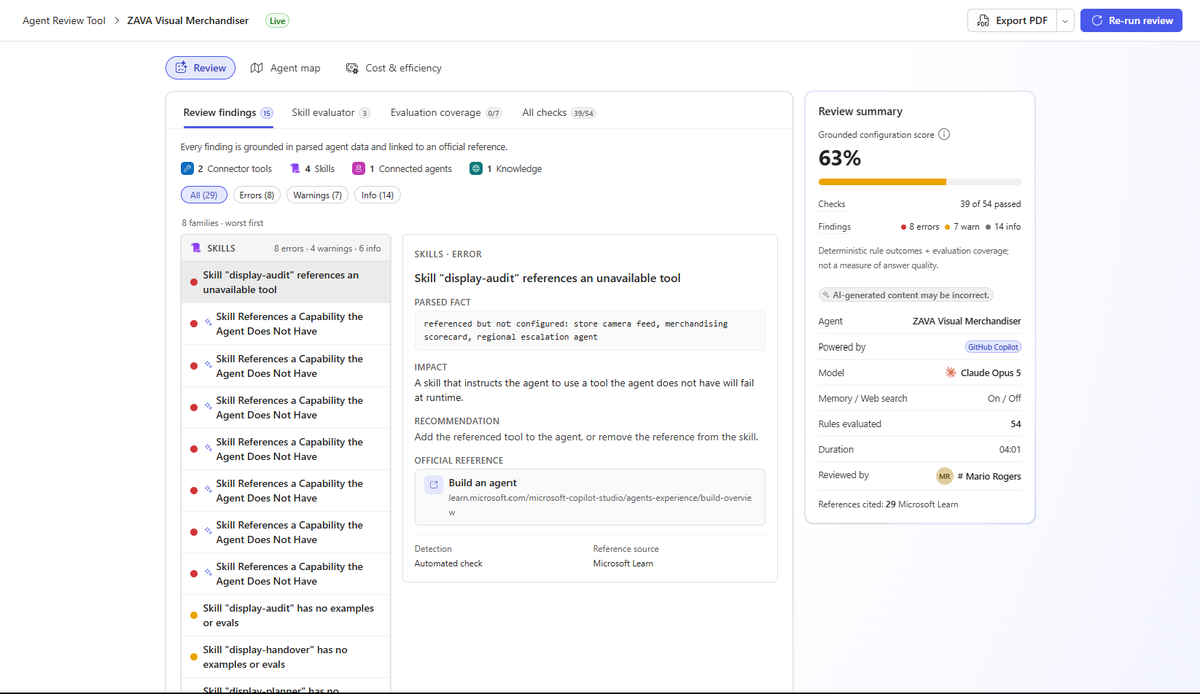 In this walkthrough snapshot, the baseline review scored 63%, with 39 of 54 checks passing.
Start with findings, but do not stop at the score
The review summary gives us a score and a breakdown of errors, warnings, and informational findings. The score provides a useful summary, but the individual findings and evidence tell us what to investigate and improve.
For agents powered by the GitHub Copilot harness, the grounded score uses deterministic, rule-based pillars for evaluation readiness and instructions, with additional pillars when the agent includes skills, tools, knowledge sources, or connected agents. AI-assisted findings are surfaced as supporting review evidence, but they do not change the deterministic pillar scores.
A high score does not prove runtime quality, and a lower score does not prove that the agent will fail. Use the findings to decide what to investigate and which evaluations to run next.
Before changing anything, record the baseline:
- overall score;
- errors and warnings;
- number of skills evaluated;
- weakest skill dimension;
- cross-skill orchestration findings; and
- evaluation coverage for configured capabilities.
This gives us something more useful than “it looks better” when we run the review again.
Use the Review findings view for triage
Open Review findings first. The capability inventory summarizes what was captured, while severity filters narrow the results. Findings are grouped by rule family, and selecting one opens its evidence, rationale, recommendation, possible fix steps, and supporting references.
This is the fastest place to answer three initial questions:
- Which findings require attention before this release?
- Which capability or configuration area produced them?
- Is the evidence specific enough to verify in the agent?
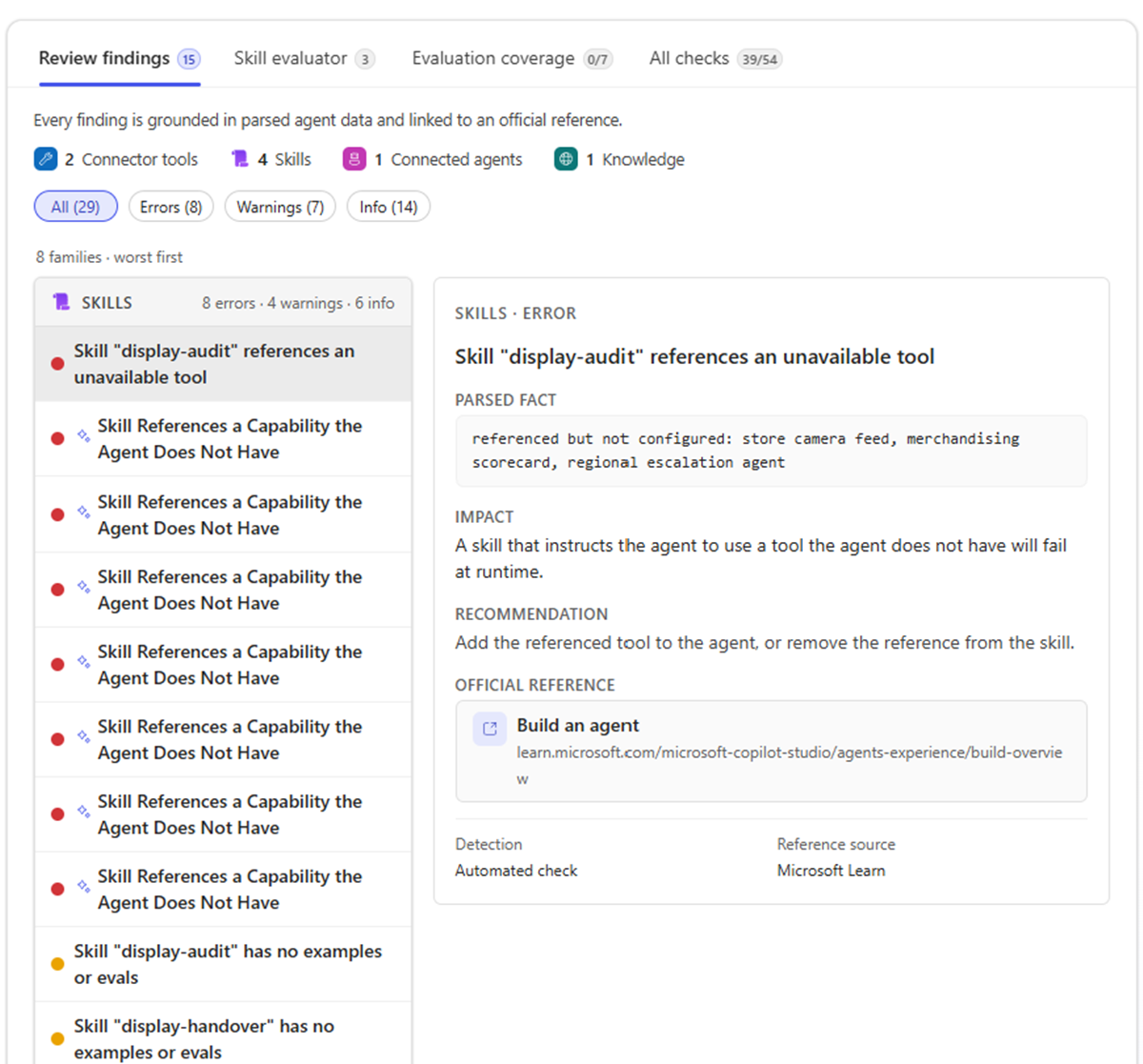 Review findings provide the initial triage view, with severity, evidence, recommendation, and references in one workspace.
The Review findings view tells us what deserves investigation. The Skill evaluator view helps us determine whether the issue is isolated or repeated across the skill set, while Agent map supplies the surrounding configuration context.
Inspect skill quality by pattern
Open Skill evaluator. The default Group by pattern view organizes results across every evaluated skill and summarizes average quality, safety flags, the weakest rubric dimension, and cross-skill orchestration findings.
Instruction quality is assessed across four rubric dimensions:
| Dimension | What to look for |
|---|---|
| Clarity | Does the description state when the skill should be selected, using concrete and unambiguous language? |
| Actionability | Are the steps executable, ordered, and clear about required inputs, outputs, edge cases, and validation? |
| Scope discipline | Does the skill perform one coherent job, with clear boundaries and no unrelated responsibilities? |
| Composability | Can the skill work alongside parent instructions and sibling skills without overlap, contradiction, or hidden dependencies? |
The same skill view also reports Bundle integrity, Resource safety, and Operational readiness. These results are separate from the four instruction-quality dimensions.
These dimensions are especially useful for agents powered by the GitHub Copilot harness because skill quality is not only about the content inside one SKILL.md. The agent must also be able to distinguish that skill from every alternative available to it.
For a deeper introduction to skills for agents powered by the GitHub Copilot harness, see Agents Have Skills Now.
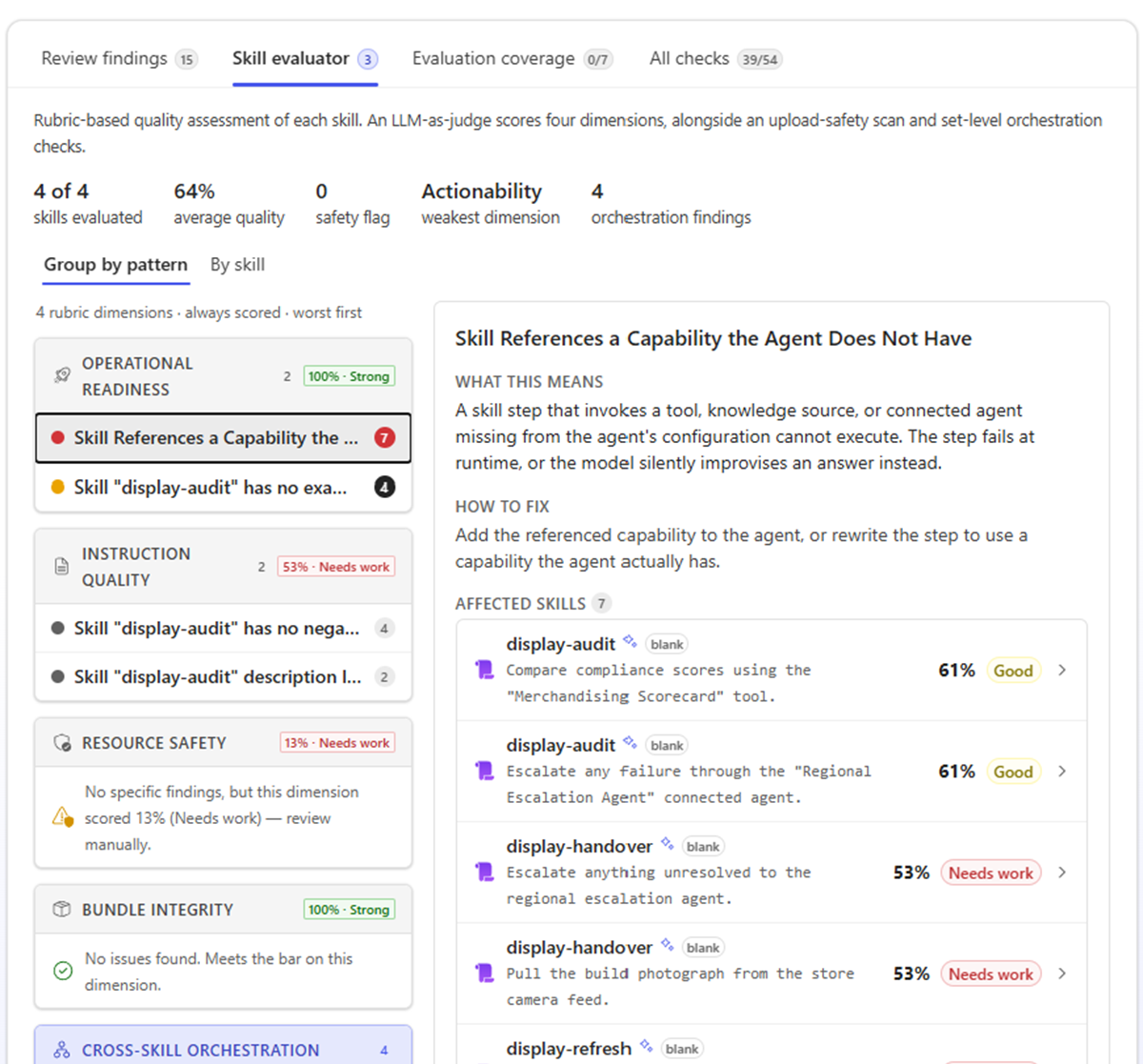 Grouping skill results by pattern makes repeated weaknesses visible across the agent.
Use “By skill” to find the actual change
The grouped view tells us whether a weakness is repeated. By skill tells us where to make the change.
For ZAVA, it pointed to display-audit. Two of its five steps named Merchandising Scorecard and Regional Escalation Agent, but neither capability was configured on the agent. Agent Review marked this as an error under Skill References a Capability the Agent Does Not Have. The skill also scored 4/10 for Actionability and 61% for instruction quality.
This gave us a concrete problem to solve: the agent could not complete the compliance-scoring or escalation steps as written.
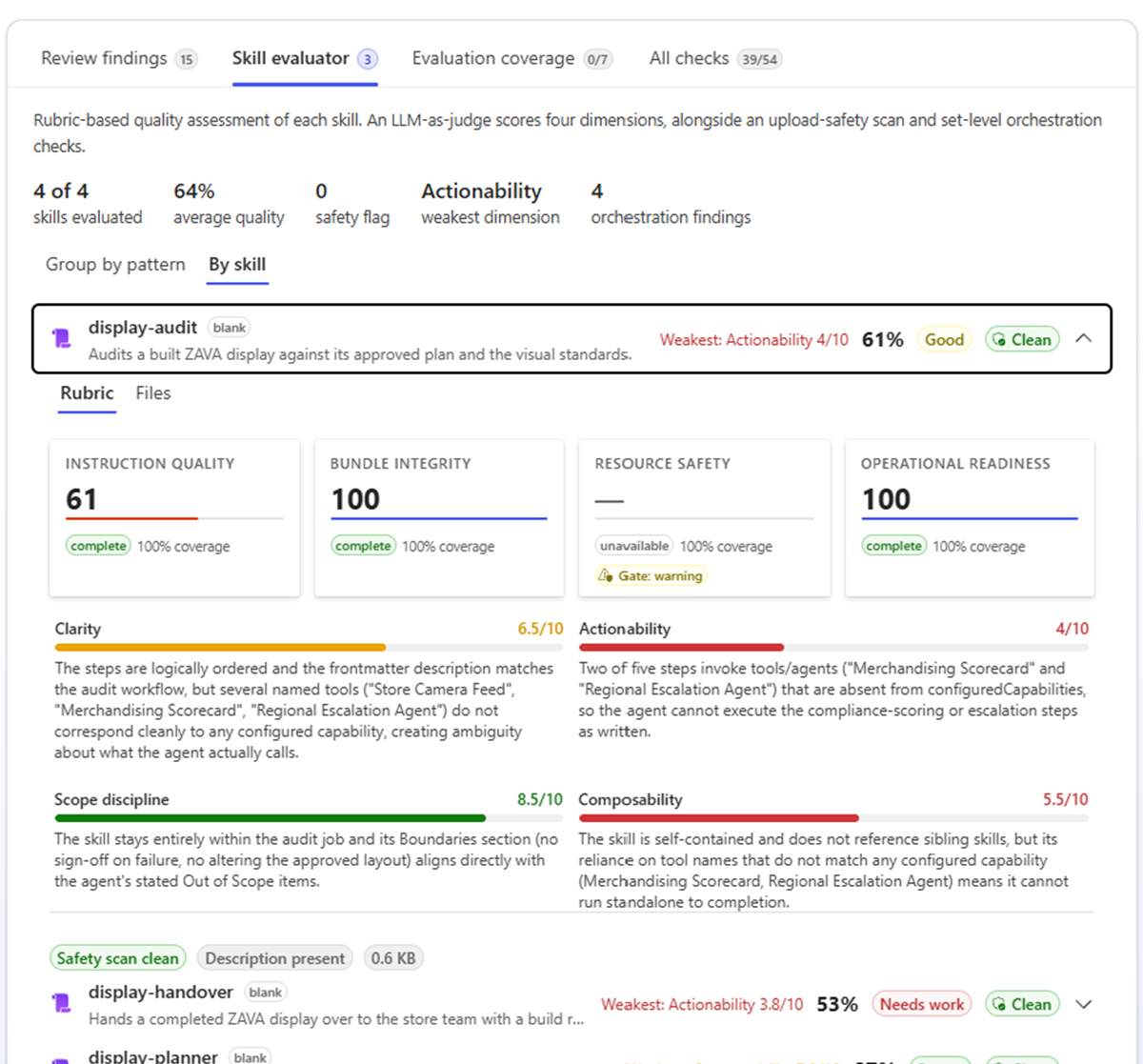 The selected finding ties the skill-quality judgment to bounded configuration evidence.
A useful finding points to the instruction or skill text that caused the concern, making it easier for a maker to verify and fix. If an AI-assisted evaluation is unavailable, Agent Review shows that status instead of treating the check as passed.
Use Agent map to check the surrounding architecture
A skill finding can make more sense when viewed in its architectural context. Open Agent map to inspect the components captured in the saved review.
The map includes supported components captured in the review. Search and filters narrow the graph, while Map and List provide visual and semantic views of the same filtered information.
For our ZAVA finding, filter the map to the affected skill and its related tools or knowledge sources. Then ask:
- Is the referenced capability actually configured on the agent?
- Does the skill use the capability’s configured name clearly and consistently?
- Would another maker understand when and why the skill uses that capability?
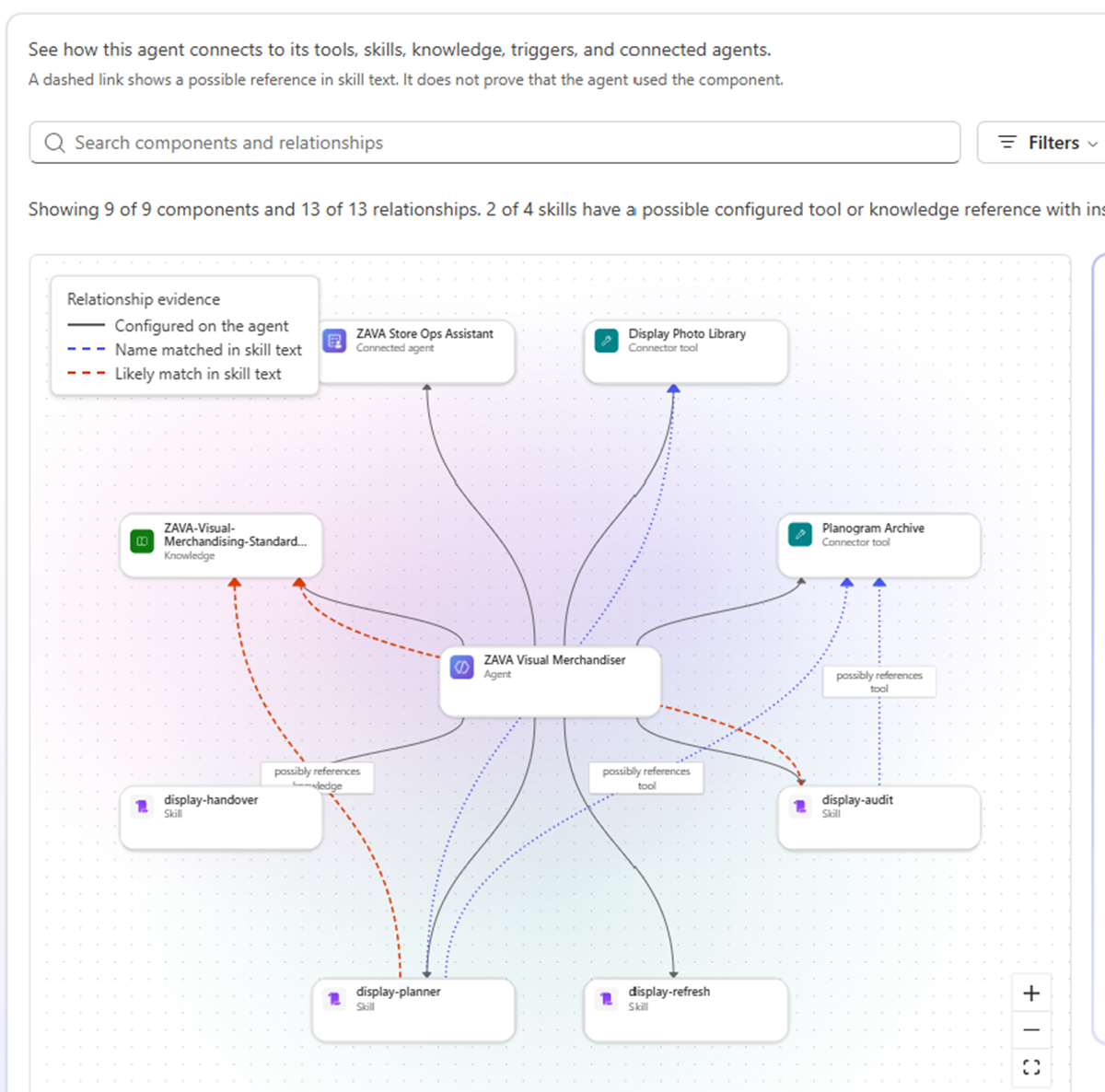 Agent map provides configuration context for the four skills and their authored references without claiming runtime execution.
Agent map describes reviewed configuration and bounded authored references. It does not reconstruct the agent’s runtime plan or prove that a tool, knowledge source, skill, or connected agent was invoked.
Make one focused improvement
Change only the instructions or configuration implicated by the evidence. Before modifying ZAVA, document the intended correction and confirm that it does not alter unrelated behavior.
For display-audit, we chose to rewrite the skill rather than add new capabilities:
The exact step text was not retained, so this table is a conceptual summary of the verified change rather than a before-and-after transcription. It illustrates the remediation pattern but is not copy-ready skill guidance.
| Baseline issue | Implemented correction |
|---|---|
| The skill referenced Merchandising Scorecard and Regional Escalation Agent, neither of which was configured on ZAVA. | The affected steps use configured capabilities: Planogram Archive, Display Photo Library, the ZAVA visual-merchandising standards knowledge source, and ZAVA Store Ops Assistant. |
This change directly addresses the evidence because every referenced capability now exists on the agent. It also preserves the skill’s original purpose: inspect a display, evaluate it against available merchandising standards, and route follow-up through a configured assistant.
After the update:
- Run the conversations and evaluations most likely to exercise the changed skill.
- Confirm that routing and outputs still behave as intended, then run Agent Review again.
- Compare the skill dimension, orchestration findings, and supporting evidence with the baseline.
- Reopen Agent map and verify that its configuration view still reflects the intended architecture.
| Metric | Baseline review | Second review |
|---|---|---|
| Grounded configuration score | 63% | 67% |
| Checks passed | 39 of 54 | 51 of 54 |
| Errors | 8 | 0 |
| Warnings | 7 | 2 |
| Average skill quality | 64% | 90% |
| Evaluation coverage | 0 of 7 | 0 of 7 |
The targeted unavailable-capability finding no longer appeared. Because Evaluation retains a fixed 30% share of the pillar-weighted grounded score, the missing test coverage continued to limit the result despite 51 of 54 checks passing.
The final display-audit instruction-quality result was not captured in the retained evidence, so the comparison does not claim a precise skill-specific change. No runtime evaluation result was retained for this walkthrough; the evidence demonstrates that the configuration finding was resolved, not that runtime behavior improved.
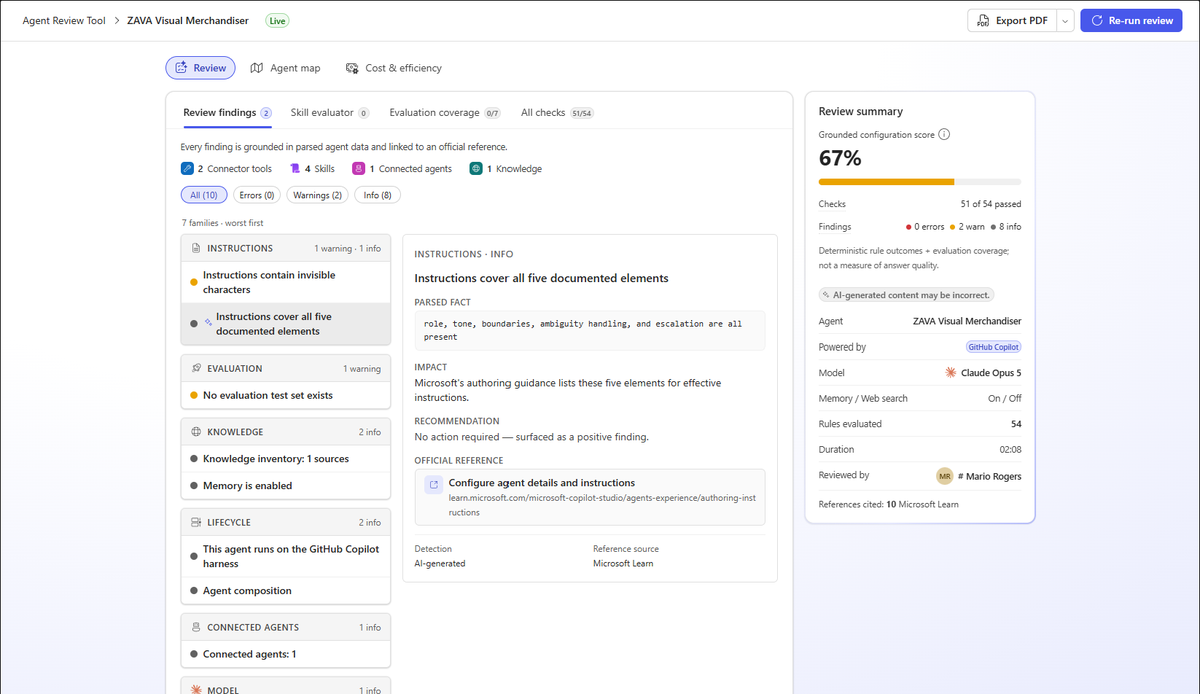 The second review reached 67%, with 51 of 54 checks passing, no errors, two warnings, and evaluation coverage still at 0 of 7.
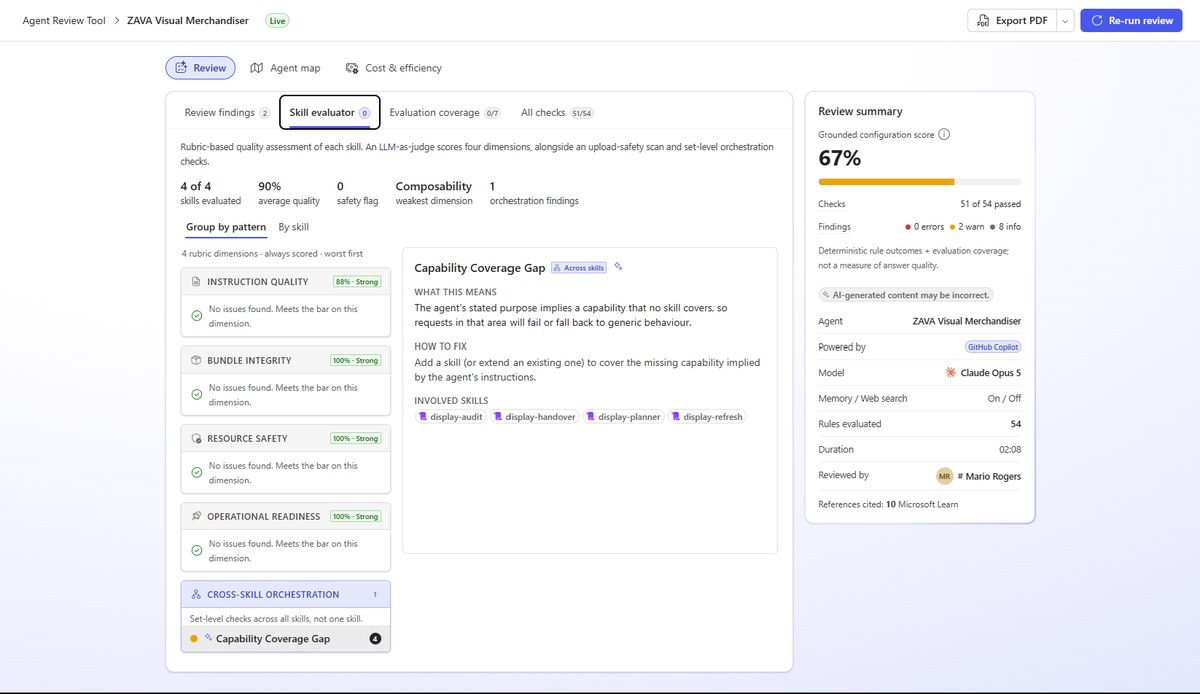 The second Skill evaluator result shows 90% average quality, no safety flags, and one cross-skill orchestration finding.
Resolving the unavailable-capability error exposed the next review priorities rather than producing an empty findings list. The two remaining warnings concerned the missing evaluation test set and instruction-character hygiene. Skill evaluator also surfaced one Capability Coverage Gap across the four skills. These items were outside the focused change in this walkthrough.
If the finding disappears but runtime evaluations regress, we improved the review result, not the agent. The goal is not to win points, but to leave the agent clearer, more reliable, and easier for the next maker to understand.
This is also why a single model-generated rating is not enough. The better LLM scoring pattern explains why smaller evidence-backed checks and deterministic combination rules are more defensible than asking a model for one mystery number.
What the Agent Review Tool does not claim
Agent Review Tool guides investigation. It does not certify an agent as production-ready, modify the source agent, replace representative test cases or human review, or prove that a configured capability ran. Its cost-planning and observed-activity views also do not report actual billed spend or guarantee savings.
Conclusion
An agent working as expected in the Preview tab is ready for deeper review, not necessarily release. Agent Review Tool brings findings, supporting evidence, skill quality, evaluation gaps, and configuration relationships into one workflow so makers can move from “it seems fine” to a focused, traceable improvement.
Agent Review Tool is available through Copilot Agent Kit on Microsoft Marketplace. Installation and access requirements are covered in the Agent Review Tool reference guide, allowing this workflow to stay focused on reviewing the agent rather than setting up the toolkit.
Use it alongside representative evaluations: establish a baseline, inspect the evidence, make a focused change, and review again. The outcome matters more than the score. The configuration should be clearer, and runtime behavior must be verified separately.
Which part of pre-release review is hardest for your agents today: skill boundaries, evaluation coverage, or understanding the configured architecture?