Why Your E3 Users Can Suddenly Build Agents in Copilot Studio — and How to Turn It Off
Both harnesses
A recent redirect change surfaced classic agent creation in the Copilot Studio web app for basic-licensed users. Here's the single service plan admins can disable to govern it.

If your help desk has started fielding questions about agents that users built themselves — or you’ve spotted a create an agent for Teams experience showing up in the Copilot Studio web app for people who only hold a basic Microsoft 365 license such as E3 — you’re not imagining it, and no, you didn’t accidentally buy anything.
This post will explain why it happened, what changed recently to make it so visible, and the single license service plan you can disable to remove access to building agents.
So what changed?
The ability for basic-licensed users to build classic agents ships as part of the Copilot Studio for Microsoft Teams plan that’s bundled into select Microsoft 365 subscriptions including E3 and E5.
What has changed is where that capability now shows up:
As of the end of June 2026, the standalone Copilot Studio for Teams app can no longer be used to create classic chatbots. The app now redirects users to the Copilot Studio web app instead.
This is the source of concern for most admins. Users who previously created agents in a tucked-away Teams app are now landed directly in the Copilot Studio web app — which makes the capability far more discoverable.
Why basic-licensed users can do this at all
Microsoft 365 enterprise licenses include the Copilot Studio for Microsoft Teams plan, which grants a subset of Copilot Studio: the ability to build agents that use classic orchestration and publish them to Teams.
Here’s why it may have been tricky to spot. That entitlement is delivered through a license called Power Virtual Agents for Office 365. When a user creates one of these agents, Copilot Studio automatically provisions a Dataverse for Teams environment for the team they select.
Before we panic and turn everything off, it’s important to remember the following:
This entitlement covers classic agents only which is limited to Dataverse for Teams environments and publishing to Teams. It does not grant generative orchestration, premium connectors, or arbitrary publishing channels which those still require a standalone Copilot Studio subscription.
It’s also worth noting these Teams-plan agents don’t consume Copilot Credits when used in Teams. So this should be treated more as a governance and environment-sprawl concern, rather than a billing one. It’s a good reminder that a basic Microsoft 365 license already entitles users to more Copilot capability than many admins realize, much like how you don’t actually need a Copilot license to deploy agents to Microsoft 365 Copilot.
The control: disable the Power Virtual Agents for Office 365 service plan
To stop affected users from creating and editing classic agents in both the Copilot Studio web app and the Teams app, disable the Power Virtual Agents for Office 365 service plan on their license. You can do this per user or — better — at scale.
Option 1 — Per User.
- Go to the Microsoft 365 admin center → Users → Active users.
- Select the user → Licenses and apps.
- Expand their Microsoft 365 license (e.g., E3).
- Uncheck Power Virtual Agents for Office 365.
- Save changes.
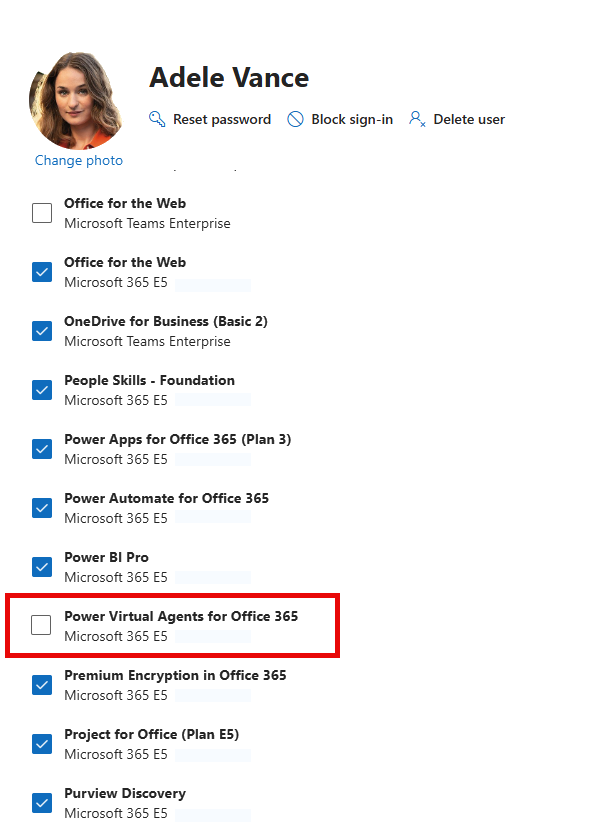 Disable the Power Virtual Agents for Office 365 service plan on the user license.
Option 2 — Group-based licensing.
For anything beyond a handful of users, govern this through group-based licensing in Microsoft Entra ID:
- In Entra ID, open the group you use for license assignment.
- Edit the assigned Microsoft 365 license.
- Turn off the Power Virtual Agents for Office 365 service plan for the group.
- Let the assignment process roll out to members.
Group-based licensing keeps the policy consistent as people join or leave the group. Set it and forget it.
Here is what we will end up with:
- Blocks creating and editing classic agents in the Copilot Studio web app and Teams app for affected users.
- It does not retroactively delete agents users already built, or clean up Dataverse for Teams environments that were already provisioned.
- It does not affect users who hold a standalone Copilot Studio or Microsoft 365 Copilot license — those entitlements are separate.
What are our next steps?
The service-plan toggle is your quick fix. A durable environment-level governance plan is required next:
- Audit existing Dataverse for Teams environments to understand current sprawl before clamping down. We need to ensure we aren’t turning anything off that is providing value to users.
- Use Managed Environments in the Power Platform admin center to govern who can create, and where. Leverage developer environments where possible.
- Layer in DLP policies so even permitted makers operate within guardrails.
In Summary
E3 and E5 quietly include the right to build classic Teams agents, and the end-of-June-2026 redirect simply surfaced that capability to more users in the web app. If that’s not what you want, the control is a single service plan — Power Virtual Agents for Office 365 — that you can disable per user or even better, through group-based licensing. Combine it with Power Platform governance and you can quickly and easily get a handle on things without anyone ever knowing there was a problem to begin with!