Introducing Dashboard Lab: from evaluation scores to evidence
A result file can tell you that an evaluation failed. Finding the useful part takes more work: which task changed, which grader objected, what the agent actually did, and whether the comparison is meaningful.
Dashboard Lab, introduced in Waza v0.39.0, puts that investigation into a single workspace. It is an experimental, opt-in viewer for saved evaluation results, available through waza serve --lab. The classic dashboard stays available, and the evaluation engine does not change.
Open your existing results
Section titled “Open your existing results”Point Waza at the directory containing your saved result files:
waza serve --lab --results-dir ./results --no-browserOpen http://localhost:3000/#/lab. Omit --no-browser to let Waza open it for you. You can return to the classic dashboard at http://localhost:3000/#/, or use Original dashboard in the sidebar.
The flag selects the Lab URL; it does not convert the server into a hosted service or enable remote authentication. Serving saved results does not start an evaluation or make model calls. --lab and --tcp cannot be combined.
Find the runs that deserve attention
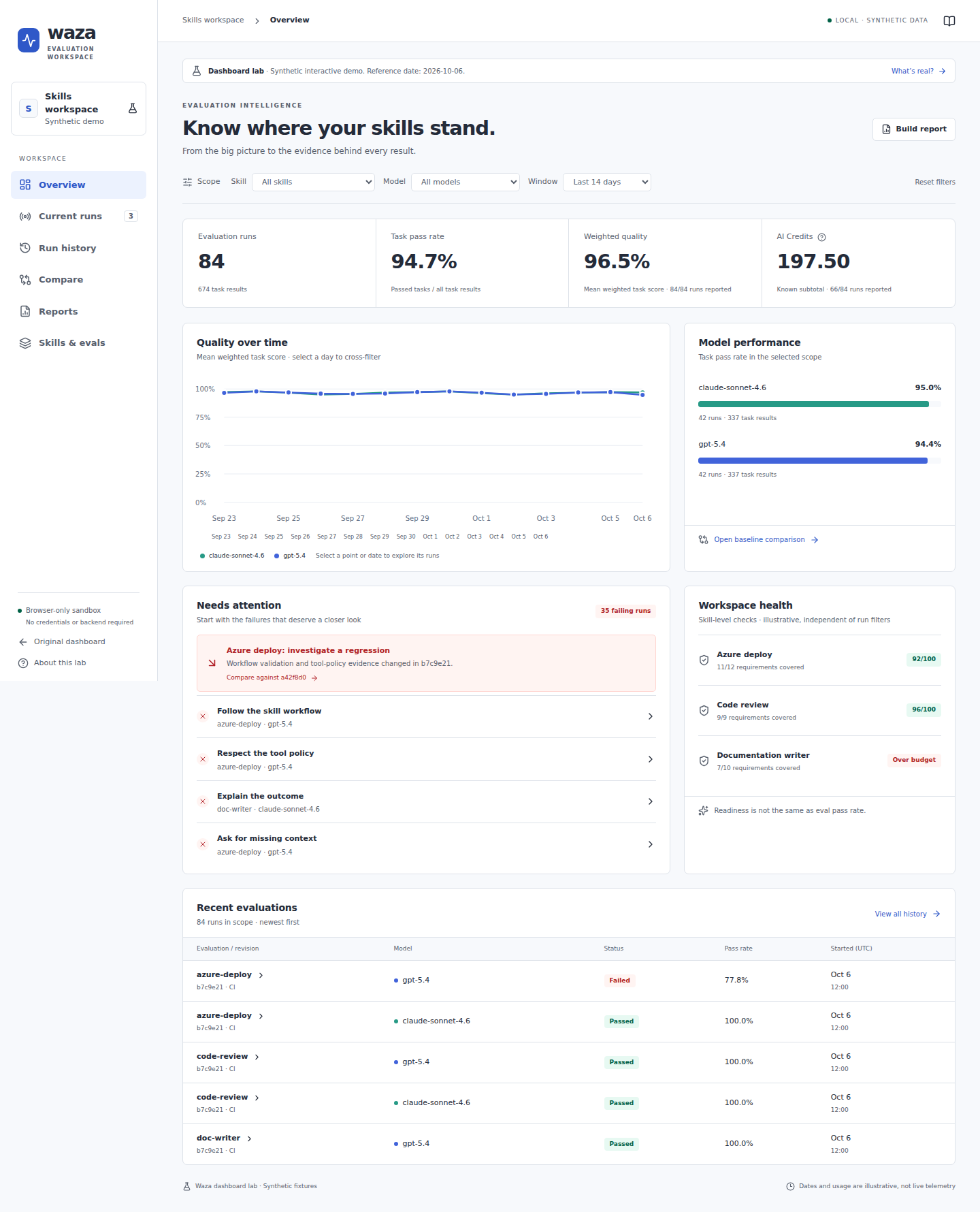
Section titled “Find the runs that deserve attention”The overview brings evaluation counts, task pass rates, weighted quality, model performance, and known AI Credits into one view. Filters let you narrow saved results by eval, skill, model, and time window.
Select a chart date or a model to narrow the investigation rather than scanning an unrelated list of runs. Skill and eval are independent filters: one skill can have several suites, and a scenario without a skill still has its own eval identity.
 🔍 Click to enlarge
Synthetic demo screenshot. The illustrated readiness cards and numbers are not production telemetry or capabilities inferred from your result files.
The default Lab reads your saved results. Local archives refresh every 15 seconds; remote archives refresh on demand through Refresh results. Loading, stale data, and refresh failures remain visible. A failed refresh does not silently replace your results with demo data.
Follow a failure down to its evidence
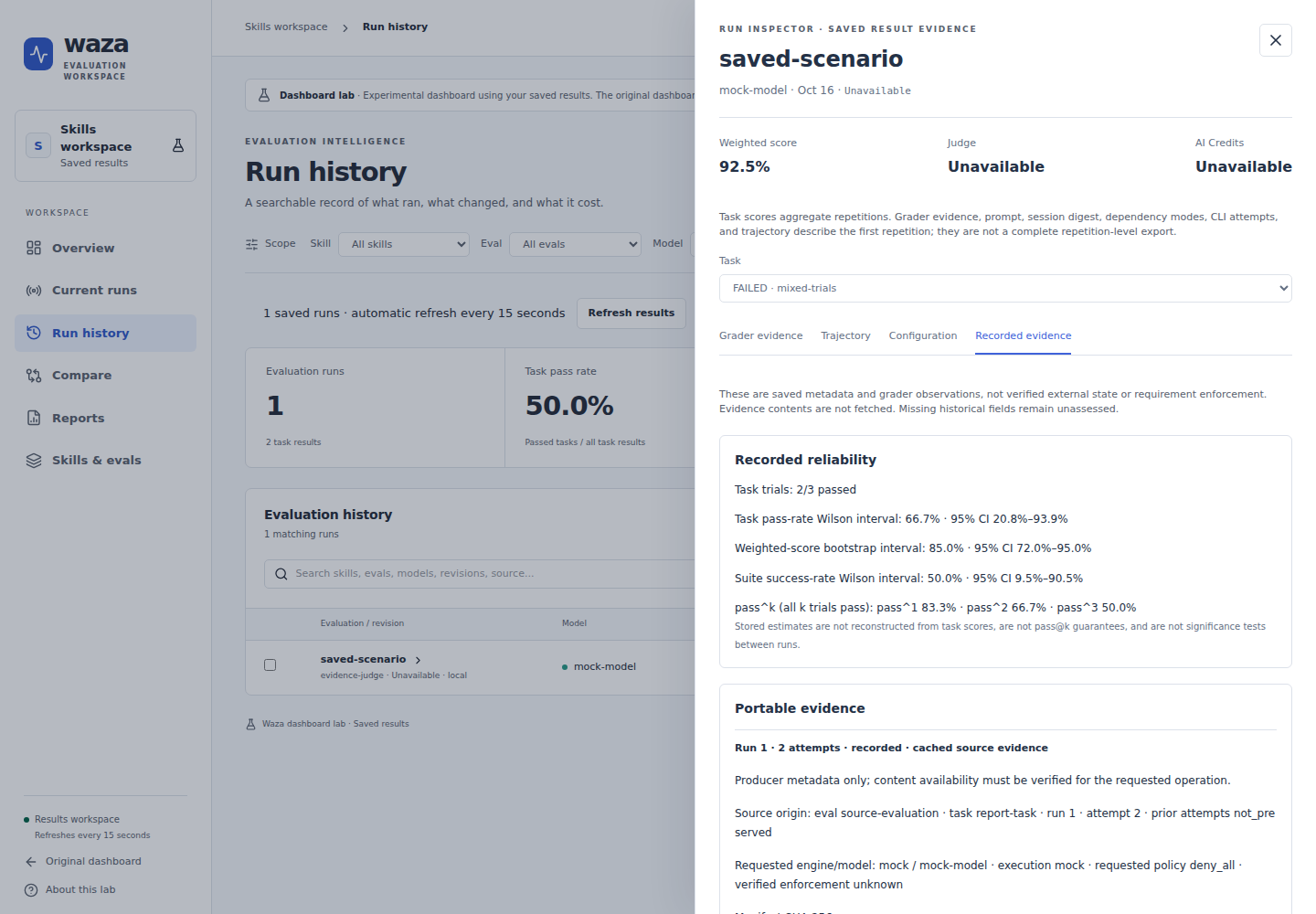
Section titled “Follow a failure down to its evidence”Open a run from history and select a task to inspect its grader feedback, recorded configuration, trajectory, and evidence metadata. Detail loads on demand, so browsing the overview does not require downloading every transcript.
The Recorded evidence tab puts available trial counts, confidence intervals, suite reliability, provenance, scoped requirement observations, and prompt-judging metadata next to the task being investigated.
 🔍 Click to enlarge
Fixture-backed saved-result view with cached mock provenance. This screenshot does not represent a fresh independent judgment or verified external state.
That connection is the benefit: you can move from a score to the recorded material that explains it. It also has boundaries. Task scores aggregate repetitions, while grader details and trajectories describe the first repetition, not a complete trial-by-trial history. Missing historical metadata stays Not assessed, and an artifact digest does not prove that a remote operation succeeded.
Compare changes without hiding coverage gaps
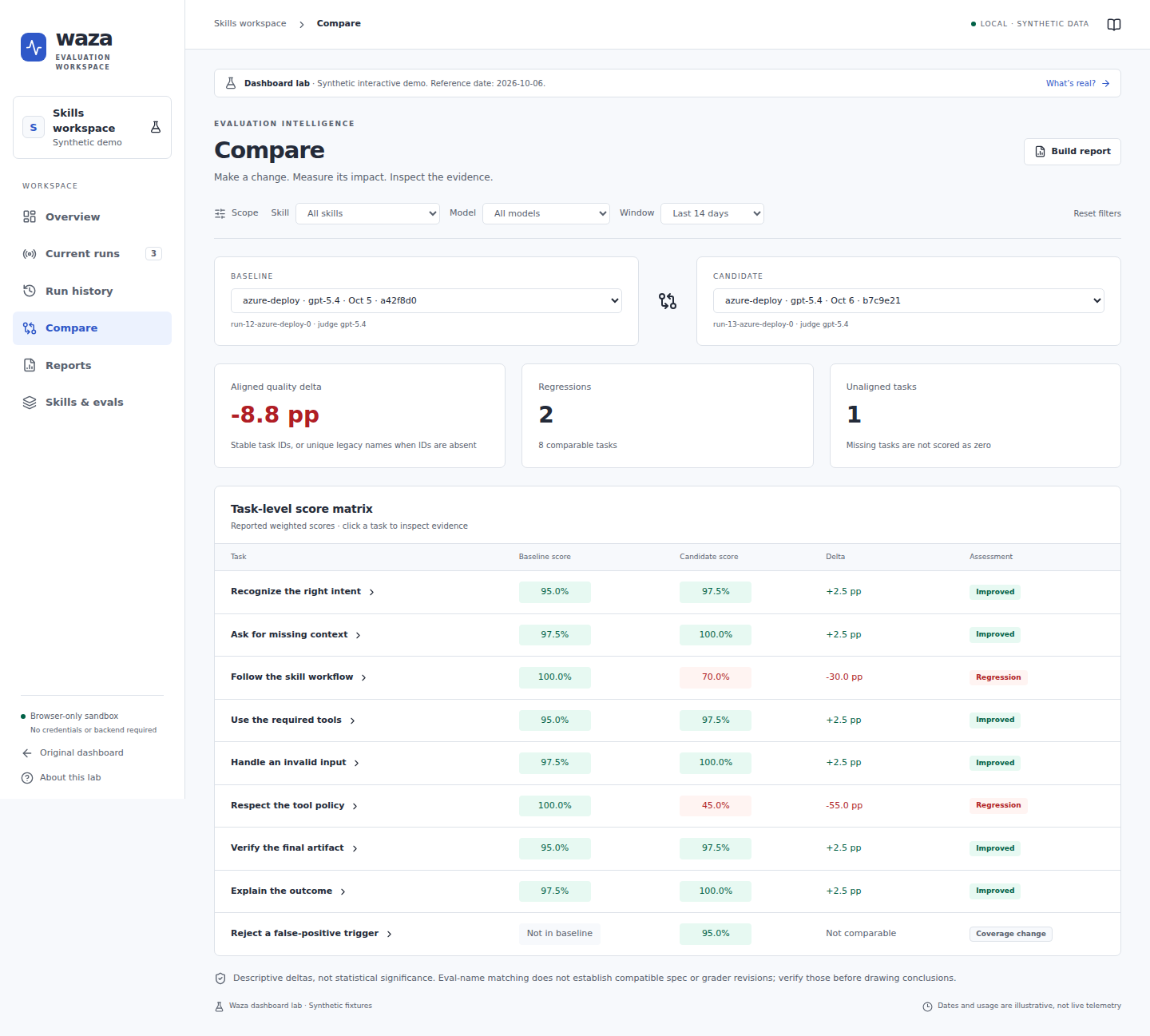
Section titled “Compare changes without hiding coverage gaps”Choose a baseline and candidate from the same eval to see aligned weighted task scores, improvements, regressions, and added or missing tasks.
 🔍 Click to enlarge
Synthetic comparison fixture, not a measured claim about the displayed models.
Stable task IDs drive alignment, with unique legacy names used when both artifacts lack IDs. Added or missing tasks remain not comparable instead of becoming artificial zero-score regressions.
Use this to decide where to inspect next, not as an automatic release approval. These are descriptive comparisons, not statistical-significance tests; matching eval names also does not prove that the grader or spec revisions match.
Share the investigation
Section titled “Share the investigation”Reports carry the selected scope into JSON, CSV, or browser print/save-PDF. JSON includes selected recorded API details; CSV is a run-level summary rather than a complete task-evidence export. The report JSON is its own format, not a replacement Waza results artifact.
Unknown billing stays unavailable. Aggregate AI Credits are labeled as known subtotals with reporting coverage, rather than estimates invented from token counts. That makes a report easier to review without confusing missing observations with zero usage.
Know what is still experimental
Section titled “Know what is still experimental”Current runs replays activity reconstructed from saved results. It is not an active-worker monitor, and it cannot start, cancel, or retry evaluations.
Controlled release-policy decisions and standalone grader-assurance inspection remain in the classic dashboard. Use Original dashboard → Release policies or Assurance for those workflows; Lab’s Compare view does not assess their artifacts.
You can explore the separately labeled synthetic demo at /#/lab/demo. It makes no API requests or evaluation calls, exports explicitly synthetic reports, and is never an automatic fallback for real-data errors.
For a first pass, try Overview → Run history → failing task → Recorded evidence → Trajectory → Reports. The goal is less time searching through files and more time understanding the behavior worth changing.
Read the Dashboard Lab guide for the complete capability and data-boundary reference, or the v0.39.0 release article for the rest of this release.