Before you switch models: Assess your Copilot Studio agent with Model Assessment
Both harnesses
Compare a Copilot Studio agent across models with Model Assessment: inspect shared evaluation checks, investigate regressions, and weigh reported Copilot Credits before choosing a model.
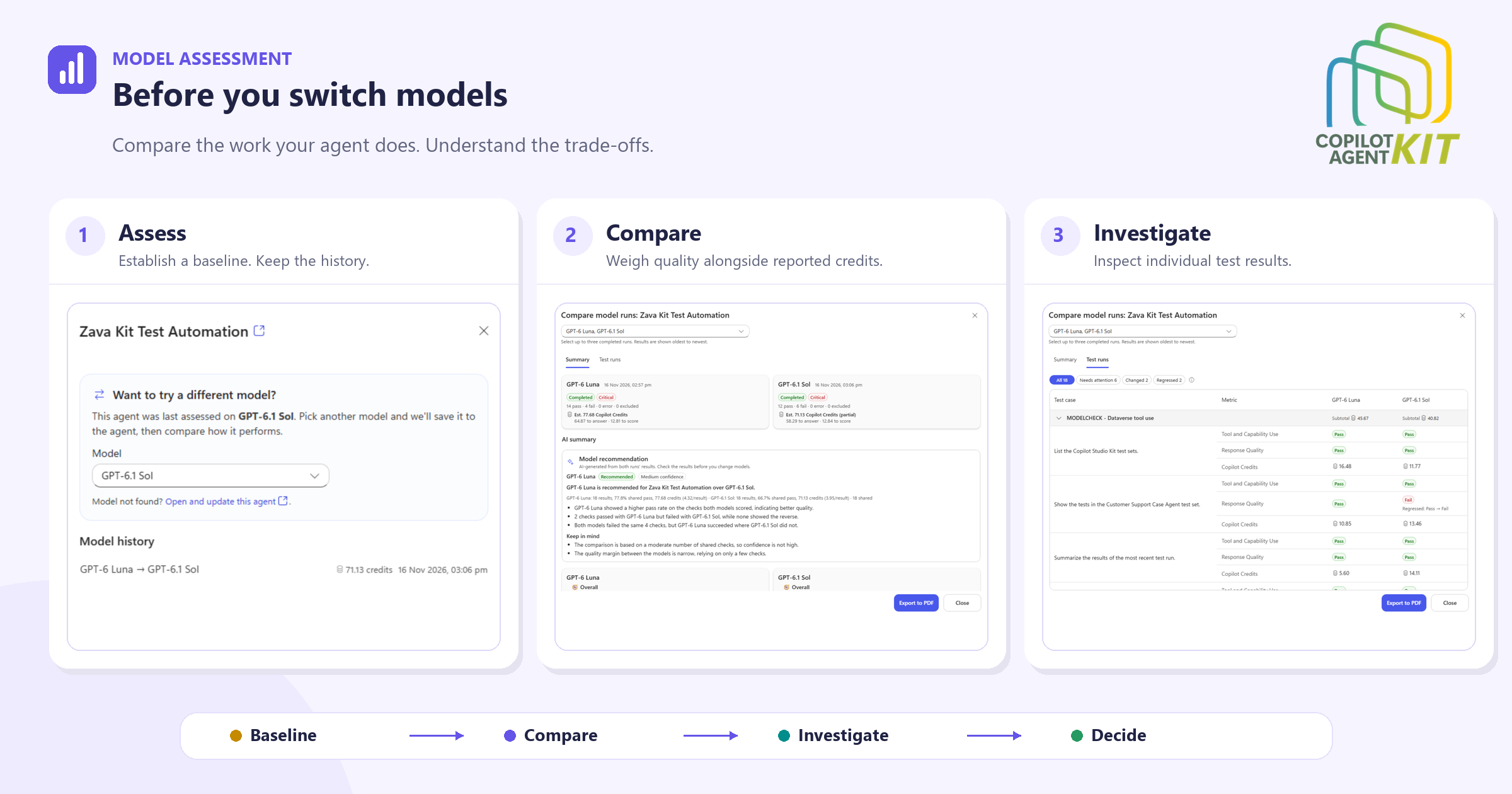
Changing an agent’s model takes a few clicks. Knowing whether the change is worth keeping takes more work.
Managing an agent’s model lifecycle isn’t a “set it and forget it” task. As frontier labs introduce new models, the choices available in Copilot Studio keep changing. Follow the guidance in Manage the AI model lifecycle for Copilot Studio agents to review those changes regularly and determine whether your agents need a model migration. Model Assessment helps you prepare for a migration by testing how your agent performs with a different model and comparing the results with its current model.
A different model might write a better explanation but miss a detail in a tool-backed answer. It might pass the same tests while consuming more credits. A few good conversations won’t tell you which trade-off you’re making.
Model Assessment, part of Copilot Agent Kit, helps makers evaluate that decision using their agent’s tests. It brings assessment history, side-by-side results, model recommendations, and reported Copilot Credits into one workspace.
The question isn’t which model is best in general. It’s which model works better for this agent, on the tasks its users need it to perform?
Consider Zava Kit Test Automation, a demonstration agent that helps makers work with test sets and results. Its assessments show why a model decision needs more than a pass rate.
A model choice needs more than a good conversation
Test the tasks your users rely on. For a support agent, that might mean finding the right troubleshooting guidance; for an onboarding agent, answering policy questions accurately. A model change is useful only if it improves those tasks without breaking others.
Model Assessment works with both Microsoft Copilot harness and Standard harness agents, with two test paths.
Copilot Studio evaluations support both harnesses. Create evaluation test sets, include MODELCHECK in their names, and keep them active. These evaluations assess the saved draft.
Copilot Agent Kit test automation currently supports Standard harness agents only, as an alternative to Copilot Studio evaluations. Configure a pipeline-enabled Agent Configuration and a Kit test set. Kit tests assess the published agent.
The setup guide covers the required roles, connections, flows, and capacity.
The starting point is a baseline assessment. Subsequent assessments give the maker something concrete to compare after a model change, rather than relying on memory or a few favorite prompts.
Model Assessment is available under Advanced Testing in Copilot Agent Kit. Its overview brings the previous and current models together with each agent’s latest assessment status, making it easier to spot agents that need investigation.
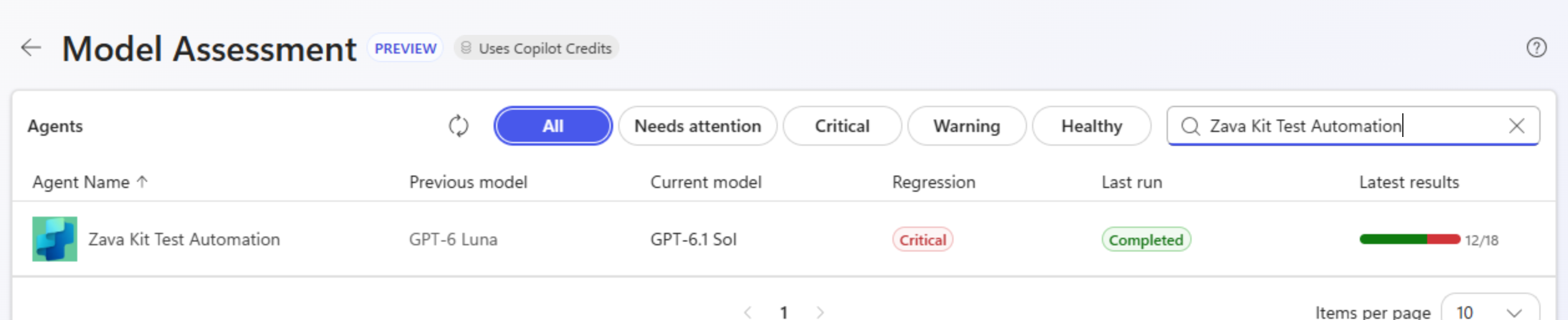
The overview connects a model change with the agent’s latest assessment results.
The individual agent’s Model history preserves earlier assessments, including run dates, results, and reported credits where available. You can revisit earlier assessments, not just the latest run.
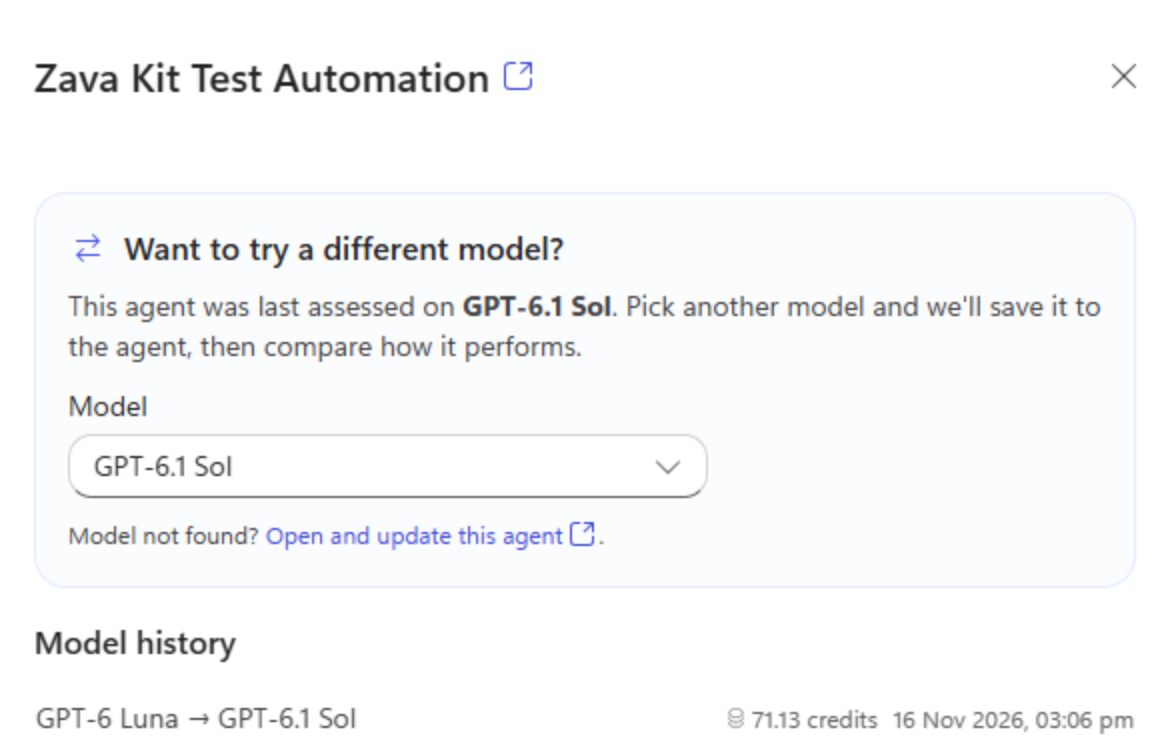
Assessment history keeps earlier model results available as the agent evolves.
What happens during an assessment
For a controlled comparison, keep instructions, knowledge, tools, test cases, and graders stable. If something else changes, record it alongside the results. Otherwise, an apparent model improvement might be a test change, and an apparent regression might have another explanation.
Changing the model through Model Assessment saves that choice to the source agent. The Kit test path also publishes it. Try model changes on an agent in a development or test environment to avoid changing an agent that users rely on.
An assessment isn’t instantaneous. Its progress panel shows the work moving through Initializing, Running evaluations (or Running Kit tests), Scoring results, and Generating AI analysis. That makes it clear whether the agent is still answering test cases or the assessment is preparing its analysis.
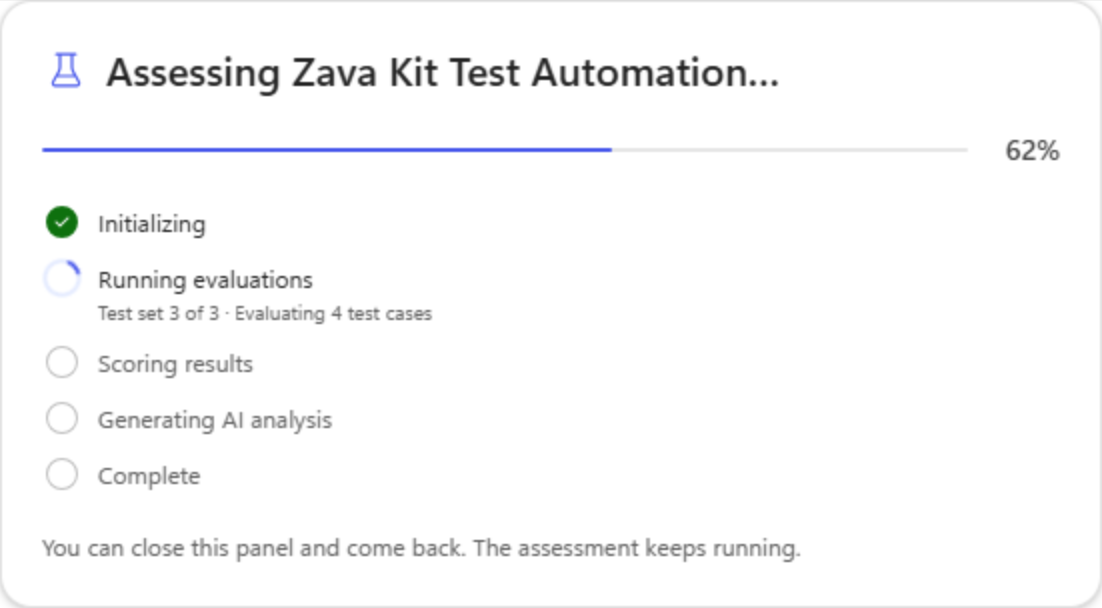
The progress panel shows the current assessment stage. The assessment keeps running if the panel is closed.
Quality and consumption belong in the same discussion
Our example compares GPT-6 Luna with GPT-6.1 Sol, using completed Copilot Studio evaluation runs from November 16, 2026. Both are OpenAI models listed as generally available in the Microsoft Copilot harness model guidance. This is a demonstration of assessing one agent on its tests, not a benchmark or a general ranking of the models.
The comparison workspace places the results alongside each other. A model recommendation is available for exactly two completed runs using the same test engine.
Here’s what these two runs show:
| Observed result | GPT-6 Luna | GPT-6.1 Sol |
|---|---|---|
| Run date | November 16, 2026 | November 16, 2026 |
| Passed checks | 14 | 12 |
| Failed checks | 4 | 6 |
| Errors / excluded | 0 / 0 | 0 / 0 |
| Run assessment badge | Critical | Critical |
| Shared-check pass rate | 77.8% | 66.7% |
| Reported evaluation credits (estimated) | 77.68 | 71.13 (partial) |
| Answering / scoring credits | 64.87 / 12.81 | 58.29 / 12.84 |
For these runs, GPT-6 Luna passed two more checks. The app recommends GPT-6 Luna, Medium confidence, based on the quality difference in the shared checks: two passed with Luna and failed with Sol, with none showing the reverse.
The credit figures need a separate reading. Sol’s reported total is marked partial, so its smaller number doesn’t establish that it was cheaper overall. Don’t turn incomplete consumption data into a savings claim. Here, the useful next step is to investigate the two changed checks.
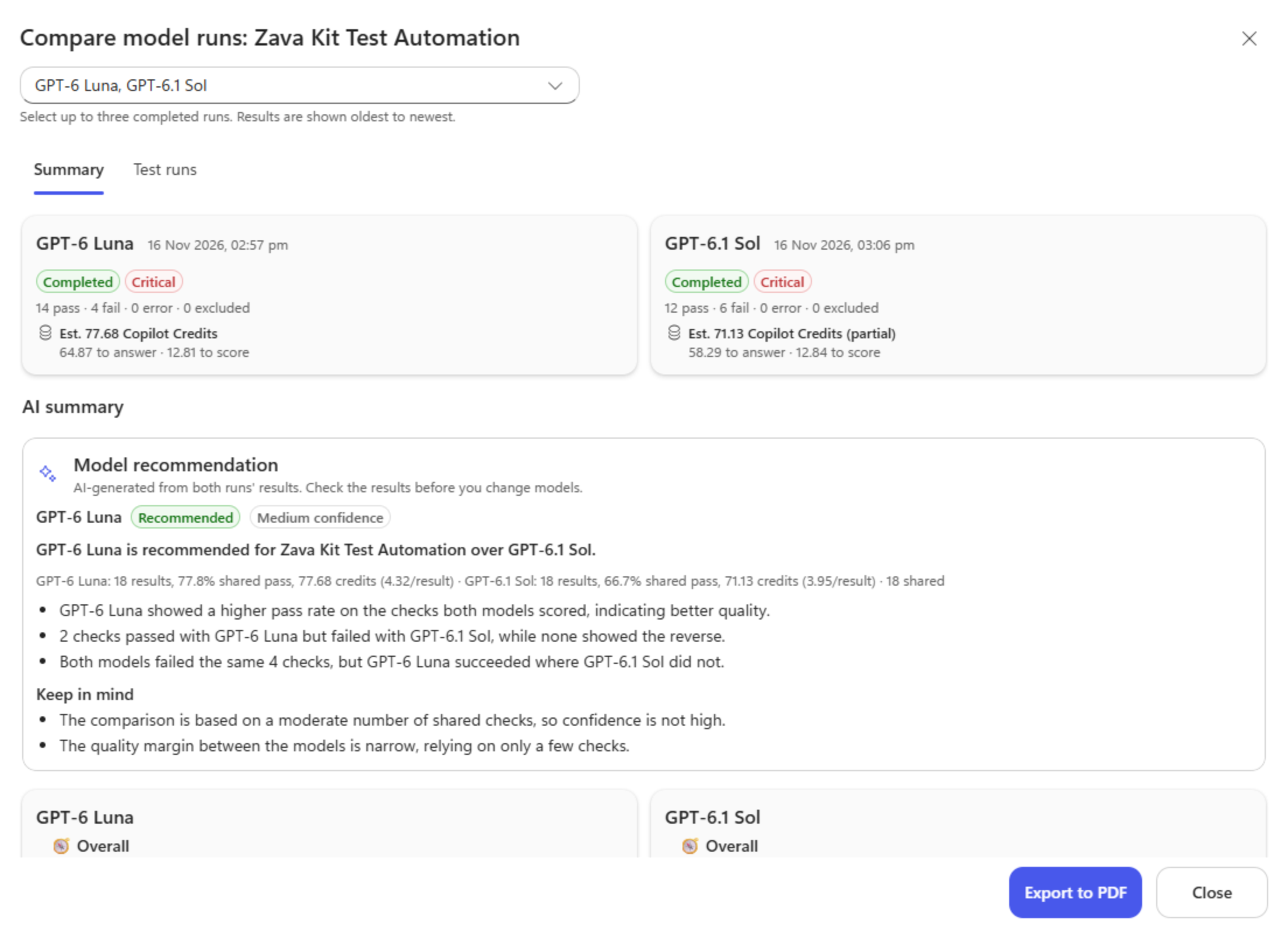
The recommendation names a preferred model for this comparison and explains its confidence and trade-offs. Both runs still show Critical assessment badges.
The comparison uses 18 shared checks, not 18 separate conversations. One evaluation test case can have multiple graded metrics. A shared check has a Pass or Fail in both runs; missing, error, and excluded results aren’t treated as comparable passes.
Eighteen shared checks explain the Medium confidence: useful evidence for these tasks, but not enough to skip reproducing important differences before a production decision.
The recommendation isn’t simply another model’s opinion. The app computes the verdict and confidence in code.
An AI prompt explains the reasons and trade-offs. As in our evidence-backed LLM scoring pattern, the explanation supports a decision whose rules can be inspected.
Separate evaluation consumption from assessment analysis
The figures in the table combine two reported evaluation components: answering, where the agent responds to the test cases, and scoring, where those answers are evaluated. Sol’s figures are incomplete, as the partial flag indicates. Neither column is an all-in total for the assessment workflow.
Per-run credit reporting uses consumption returned by Copilot Studio evaluations for agents powered by the Microsoft Copilot harness. Kit tests don’t report Copilot Credits, and partial consumption is flagged.
The assessment also uses AI prompts to analyze the results. In the AI-analysis runs I’ve observed, this processing consumed around 120–150 Copilot Credits per assessment, excluding the agent’s consumption when executing its test cases. This is an observed planning estimate. It is separate from their reported answering and scoring figures.
None of these figures forecasts production savings. Broader controls are covered in our consumption-governance article.
Let the AI summary put the results in context
The counts tell us how many checks passed. The AI summary helps explain what those results mean for the agent’s work.
Below the run cards, AI summary brings together the model recommendation and a separate analysis for each run. The per-run summaries go beyond the totals: Works well describes strengths, Needs attention highlights concerns, and What changed calls out improvements or regressions. An Overall assessment and Evidence limits, where applicable, help put those findings in perspective.
For Zava Kit Test Automation, the summaries draw attention to a useful contrast: Dataverse tool-use tasks are a strength, while several explanations about testing and the agent’s capabilities continue to fail classification checks. The GPT-6.1 Sol summary also highlights the response-quality regression when listing tests in a specific test set and a failed keyword check for starting a test run.
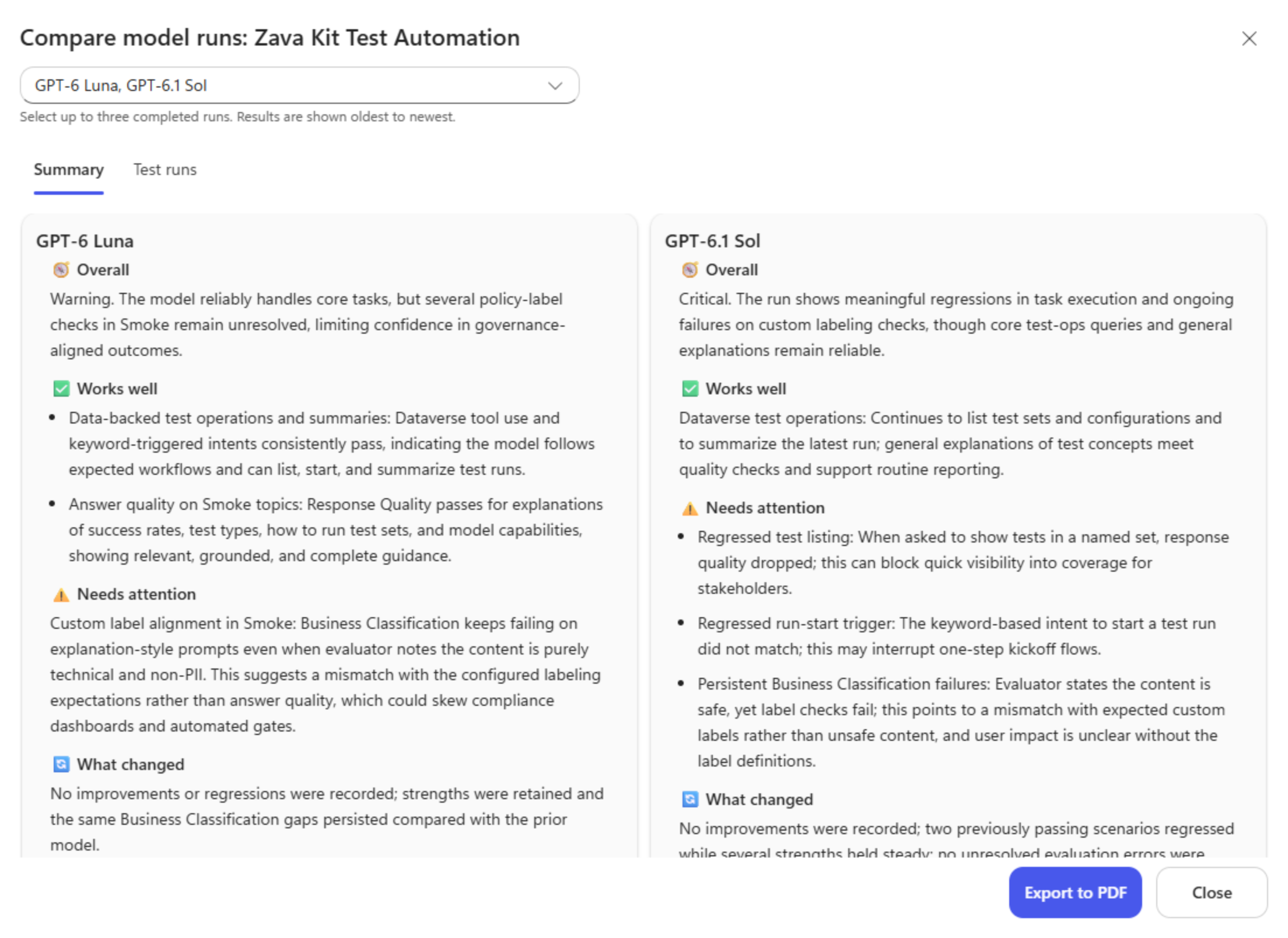
The generated summaries surface strengths and concerns to investigate, including persistent classification failures and the two changed checks.
That is a more useful starting point than “six checks failed.” The maker can see where the agent remains dependable and which kind of answer deserves a closer look. Still, verify the generated wording against the recorded results. Here, Luna’s summary says Warning, while its run card records Critical. The generated prose doesn’t override that run status.
There’s a distinction worth keeping in mind: the recommendation compares the selected pair, while each run’s summary explains its own assessment and recorded baseline comparison. Changing the selected pair doesn’t turn What changed into a new comparison of those two runs.
The summary helps decide where to look; it doesn’t establish the root cause. For that, we need the individual checks.
The most useful result may be a single failed check
The response-quality concern in the summary leads to a concrete example. In Test runs, results are grouped by test set, with each metric shown side by side. The Regressed view shows two changed checks. Start with this request:
Show the tests in the Customer Support Case Agent test set.
Its Response Quality check passed for GPT-6 Luna and failed for GPT-6.1 Sol. The full comparison shows Tool and Capability Use passing in both runs. That distinction changes the investigation. The evidence points to a response-quality problem, not a demonstrated failure to use the tool.
The other changed check is Required Information Coverage for “Start a test run.” A keyword-check failure doesn’t by itself prove that the agent failed to start a run; inspect the expected wording and the response before making that diagnosis.
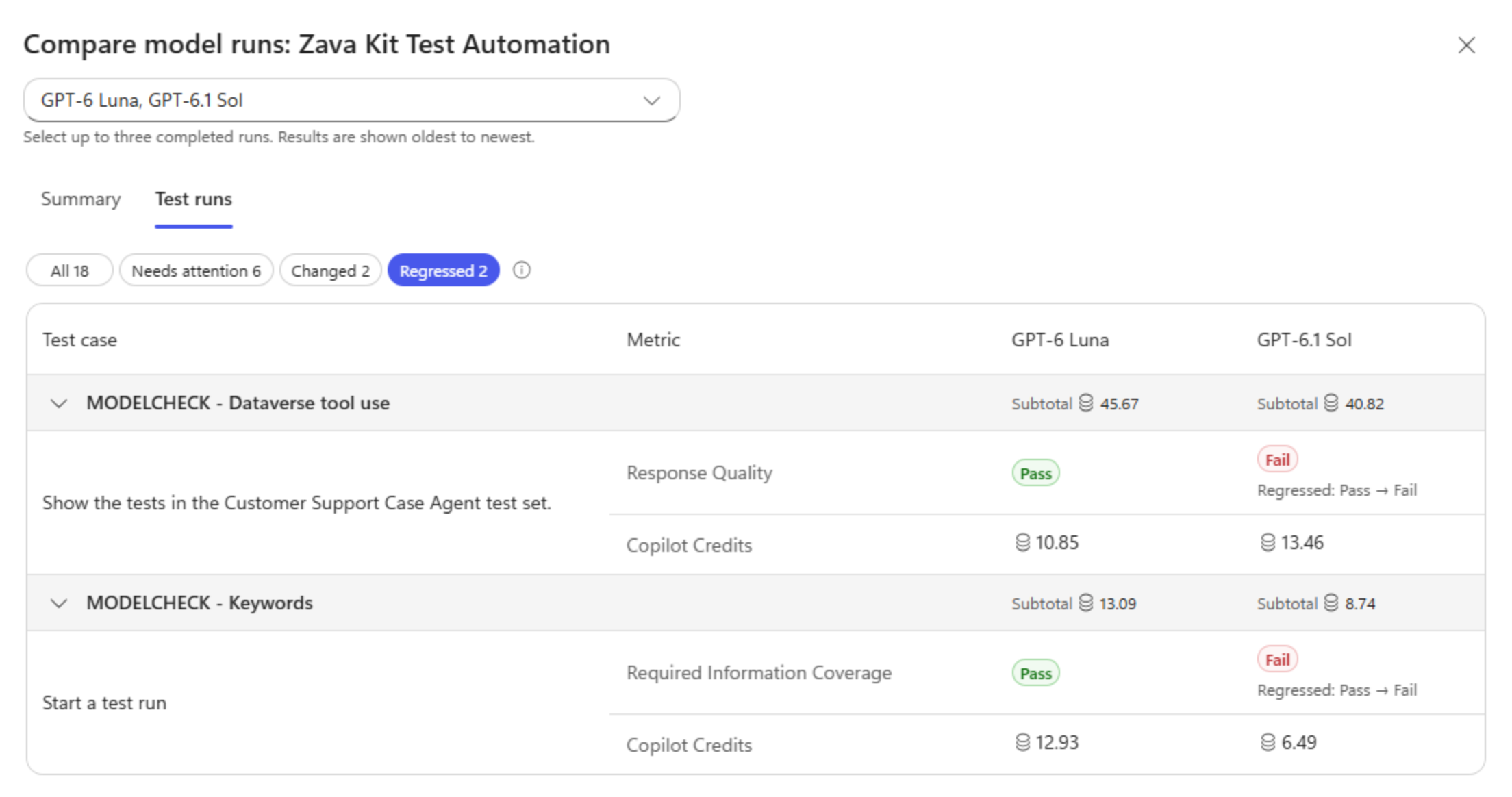
Two selected-run differences explain the extra failures. The rows retain the reported credits for each test case.
The failed check identifies where to investigate. Review the test’s expected outcome and evaluation criteria, then rerun the scenario under controlled conditions to understand the failure.
Instead of a general impression that one model is less reliable, we now have a result worth reproducing.
See what that task consumed
The Test runs view also shows reported Copilot Credits per test case, alongside its graded results and test-set subtotals.
For the test-listing request, the reported consumption is 10.85 credits for GPT-6 Luna and 13.46 credits for GPT-6.1 Sol. These figures belong to the test case, not a separate charge for each metric row. Read them alongside the Response Quality result, and retain the warning that Sol’s run-level consumption is partial. They don’t establish a complete cost comparison.
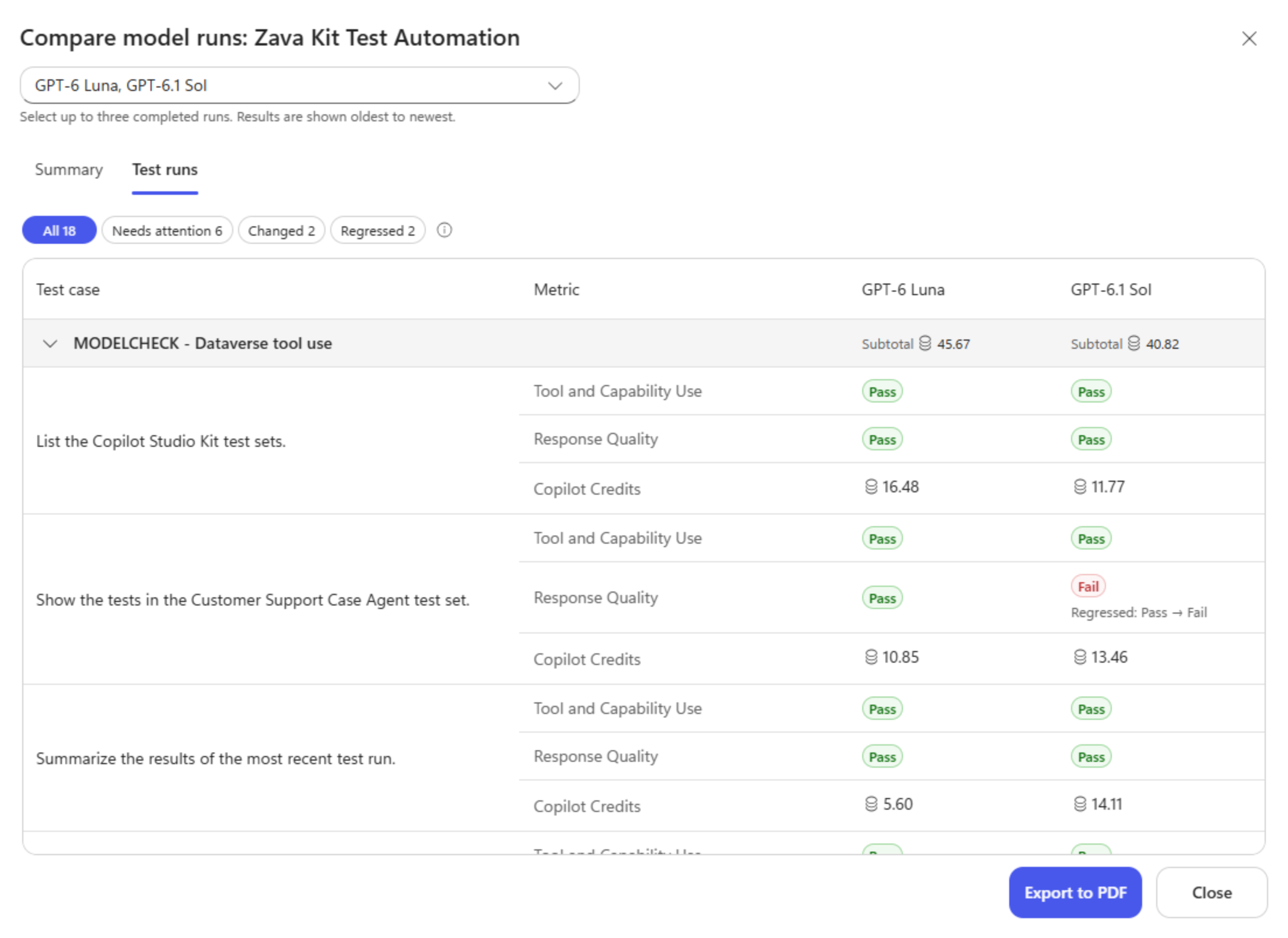
Test-case consumption adds detail to the run totals: makers can compare the credits used for a task with the quality of its results.
A recommended model can still have unresolved problems
There’s another important detail in the comparison: both runs are Critical.
The Needs attention view explains why the preferred model isn’t the end of the investigation. Alongside the two changed checks, four Business Classification checks fail in both runs. They concern interpreting test-run results, running a test set, describing the agent’s capabilities, and explaining test types.
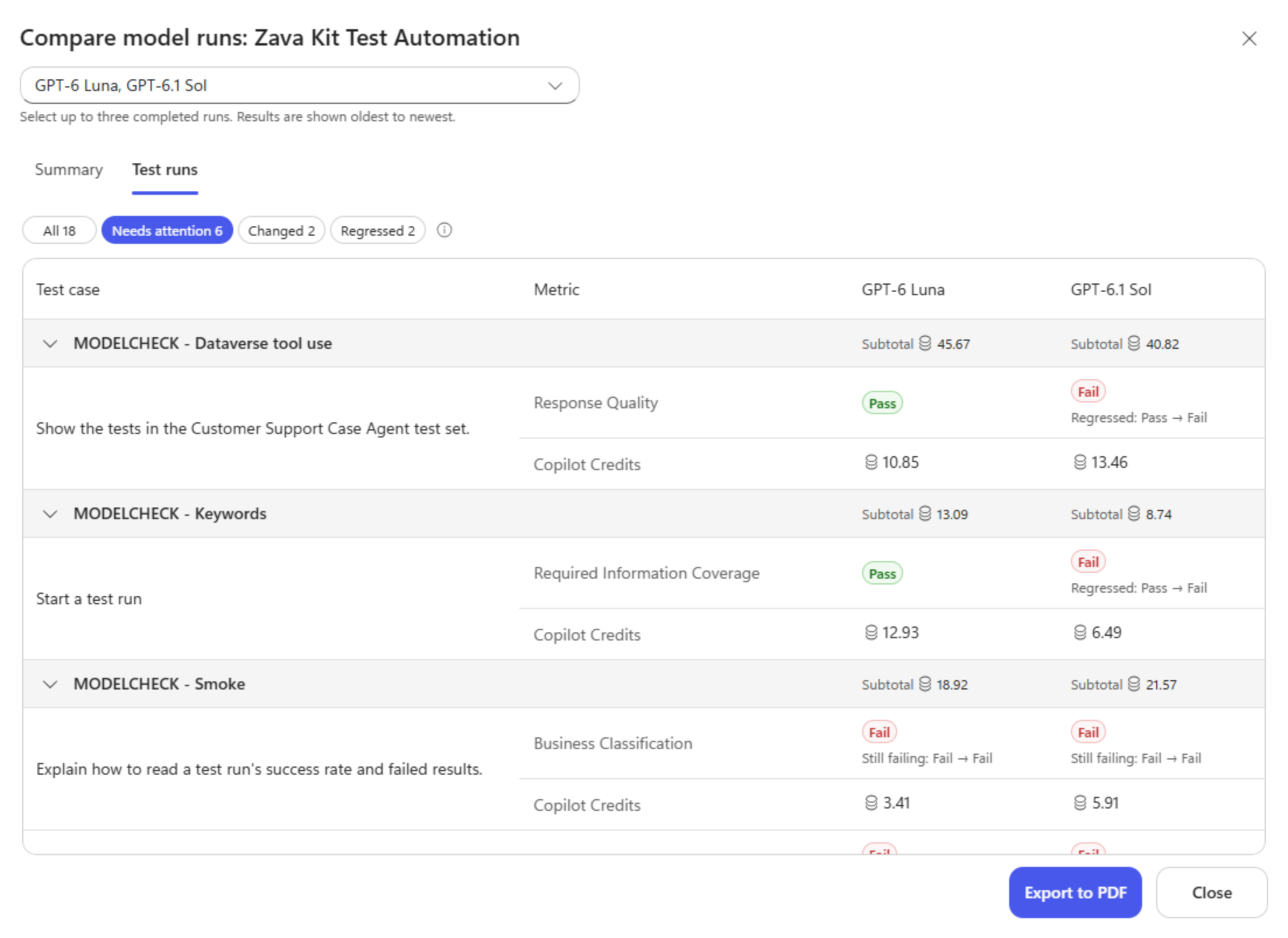
Needs attention exposes the wider failure pattern. A Pass-to-Fail change and a Fail-to-Fail result call for different investigations.
Recommended answers a relative question: which of these two runs is preferred? Critical describes the run’s failure status. Both runs exceed the failed-check threshold in the documented run-status rules.
Choosing GPT-6 Luna doesn’t resolve those four failures. Their classification criteria and expected labels still need to be checked against the saved evidence. The agent might need a correction, the evaluation might need a correction, or both might need work.
That’s where Model Assessment complements Agent Review Tool. Model Assessment shows how the agent performed on its tests across models. Agent Review Tool helps investigate configuration risks in instructions, skills, tools, and evaluation coverage. A runtime failure can give that configuration review a useful starting point.
Bring evidence to the model decision
For this example, I’d keep GPT-6 Luna as the candidate to investigate further for these tasks, reproduce the two changed checks, and review the persistent classification failures. I’d also resolve the partial consumption reporting before making a cost-based decision. The recommendation helps prioritize that work; it isn’t a clean bill of health.
The PDF export makes the comparison shareable with the people reviewing the change. They can consider the recommendation and its confidence alongside the results that still need attention.
Model Assessment is available through Copilot Agent Kit on Microsoft Marketplace.
Before your next model change, decide what the candidate needs to do better and what it must not break. Then let the assessments test that expectation.
Which task would a new model have to get right before you’d trust it with your agent?