

Installing and Deploying the Application Code
Manual setup reference for installing and deploying the application code.
Installing and Deploying the Application Code
Deploy the application code from your local repository to the Azure App Service.
Deploying via VS Code (Recommended for Simplicity)
-
Ensure Azure Extensions are Installed: You need the Azure Tools Extension Pack and the Azure App Service extension in VS Code.
-
Sign In to Azure: Use the Azure extension to sign in to your Azure account.
-
Deploy:
-
In the VS Code Activity Bar, click the Azure icon.
-
Expand App Service, find your subscription and the App Service instance you created.
-
Right-click on the App Service name.
-
Select Deploy to Web App….
-
Browse and select the
application/single_appfolder from the repository. -
VS Code will prompt to confirm the deployment, potentially warning about overwriting existing content. Click Deploy.
-
Make sure your requirements.txt file is up-to-date before deploying. The deployment process (SCM_DO_BUILD_DURING_DEPLOYMENT=true) will use this file to install dependencies on the App Service.
-
Monitor the deployment progress in the VS Code Output window.
-
Deploying via Azure CLI (Zip Deploy)
This method involves creating a zip file of the application code and uploading it using the Azure CLI. Refer to the official documentation for detailed steps: Quickstart: Deploy a Python web app to Azure App Service.
Key Steps:
-
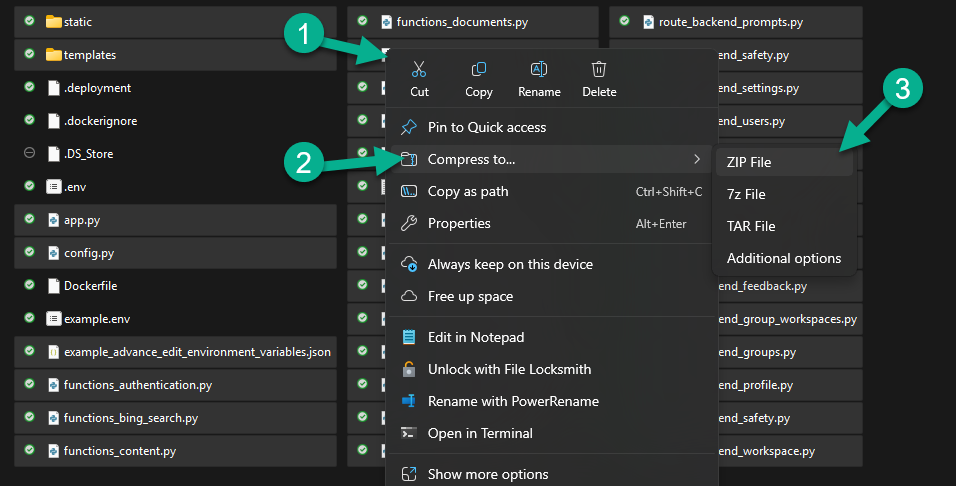
Create the ZIP file:
-
Navigate into
application/single_appin your terminal. -
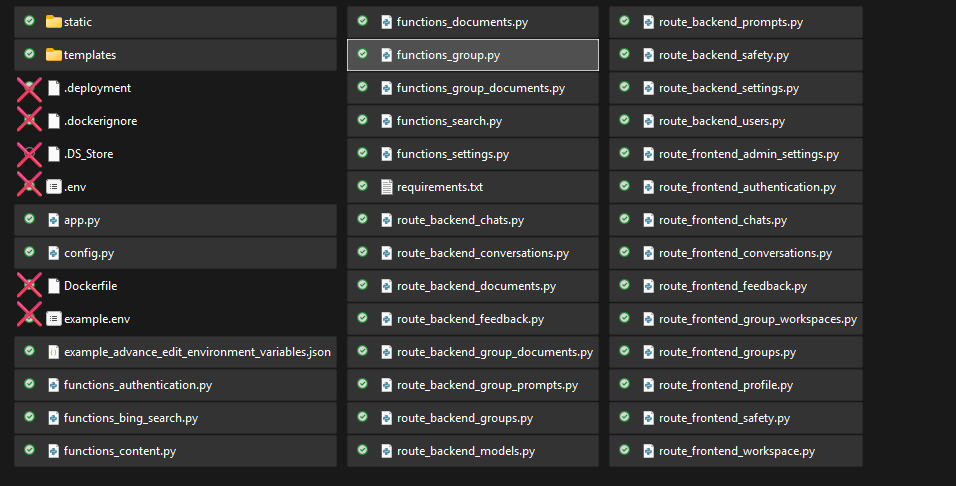
Create a zip file containing only the necessary application files and folders. Crucially, zip the contents, not the parent folder itself.
-
Include:
-
static/ folder
-
templates/ folder
-
requirements.txt file
-
All Python files (*.py) at the root level (e.g., app.py, utils.py, etc.).
-
Any other necessary support files or directories at the root level.
-
-
Exclude:
-
.git/ folder and .gitignore
-
.vscode/ folder
-
pycache/ directories
-
.env, example.env (environment variables are set in App Settings)
-
.deployment, Dockerfile, .dockerignore (unless specifically using Docker deployment)
-
README.md, LICENSE, .DS_Store, etc.
-
Any local virtual environment folders (e.g., .venv, env).
-
Ensure SCM_DO_BUILD_DURING_DEPLOYMENT is Set: Verify this application setting is true in your App Service configuration to ensure dependencies are installed from requirements.txt during deployment.
-
-
Deploy using Azure CLI:
az login # Sign in if you haven't already

az account set --subscription "<Your-Subscription-ID>"


az webapp deploy --resource-group <Your-Resource-Group-Name> --name <Your-App-Service-Name> --src-path ../deployment.zip --type zip