Feedback
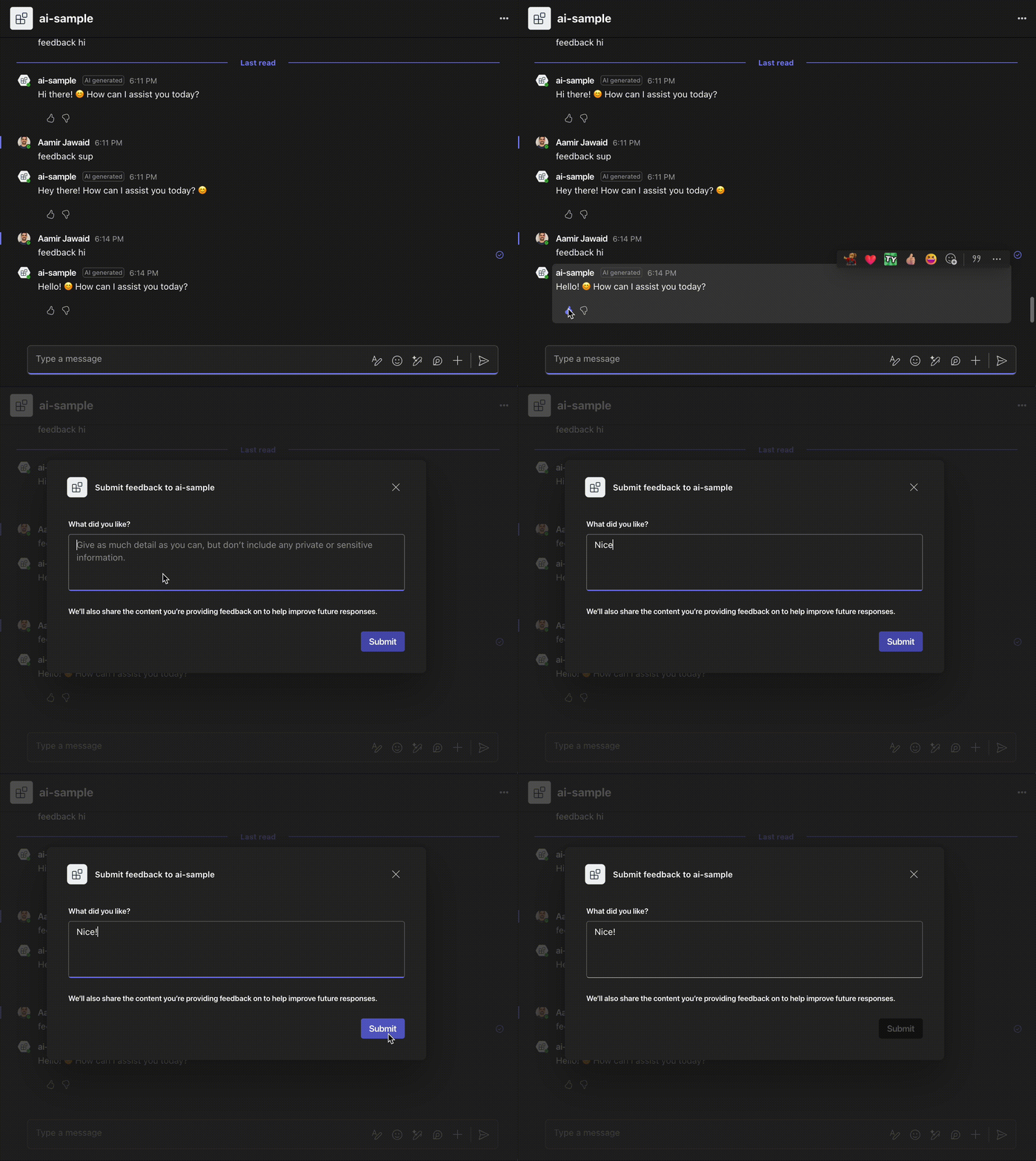
User feedback is essential for the improvement of any application. Teams provides specialized UI components to help facilitate the gathering of feedback from users.
Storage
Once you receive a feedback event, you can choose to store it in some persistent storage. In the example below, we are storing it in an in-memory store.
// This store would ideally be persisted in a database
public static class FeedbackStore
{
    public static readonly Dictionary<string, FeedbackData> StoredFeedbackByMessageId = new();

    public class FeedbackData
    {
        public string IncomingMessage { get; set; } = string.Empty;
        public string OutgoingMessage { get; set; } = string.Empty;
        public int Likes { get; set; }
        public int Dislikes { get; set; }
        public List<string> Feedbacks { get; set; } = new();
    }
}
Including Feedback Buttons
When sending a message that you want feedback in, simply add feedback functionality to the message you are sending.
- SDK 2.0 (Legacy)
- SDK 2.1 (current)
using Microsoft.Teams.Api.Activities;
using Microsoft.Teams.Apps.Annotations;

MessageActivity activity;
if (result.Content != null)
{
    activity = new MessageActivity(result.Content)
        .AddAiGenerated()
        /** Add feedback buttons via this method */
        .AddFeedback();
}
else
{
    activity = new MessageActivity("I did not generate a response.");
}

var sentActivity = await context.Client.Send(activity);

FeedbackStore.StoredFeedbackByMessageId[sentActivity.Id] = new FeedbackStore.FeedbackData
{
    IncomingMessage = context.Activity.Text,
    OutgoingMessage = result.Content ?? string.Empty,
    Likes = 0,
    Dislikes = 0,
    Feedbacks = new List<string>()
};
using Microsoft.Teams.Apps;

SendActivityResponse? sentResponse;

if (result.Content != null)
{
    MessageActivityInput activity = new MessageActivityInput()
        .WithText(result.Content)
        .AddAIGenerated()
        /** Add feedback buttons via this method */
        .AddFeedback();
    sentResponse = await context.SendAsync(activity, cancellationToken);
}
else
{
    sentResponse = await context.SendAsync("I did not generate a response.", cancellationToken);
}

if (sentResponse?.Id != null)
{
    FeedbackStore.StoredFeedbackByMessageId[sentResponse.Id] = new FeedbackStore.FeedbackData
    {
        IncomingMessage = context.Activity.Text,
        OutgoingMessage = result.Content ?? string.Empty,
        Likes = 0,
        Dislikes = 0,
        Feedbacks = new List<string>()
    };
}
Handling the feedback
Once the user decides to like/dislike the message, you can handle the feedback in a received event. Once received, you can choose to include it in your persistent store.
- SDK 2.0 (Legacy)
- SDK 2.1 (current)
using Microsoft.Teams.Apps.Annotations;

[TeamsController]
public class FeedbackController
{
    [Microsoft.Teams.Apps.Activities.Invokes.Message.Feedback]
    public Task OnFeedbackReceived([Context] Microsoft.Teams.Api.Activities.Invokes.Messages.SubmitActionActivity activity)
    {
        var reaction = activity.Value?.ActionValue?.GetType().GetProperty("reaction")?.GetValue(activity.Value?.ActionValue)?.ToString();
        var feedbackJson = activity.Value?.ActionValue?.GetType().GetProperty("feedback")?.GetValue(activity.Value?.ActionValue)?.ToString();

        if (activity.ReplyToId == null)
            return Task.CompletedTask;

        var existingFeedback = FeedbackStore.StoredFeedbackByMessageId.GetValueOrDefault(activity.ReplyToId);

        if (existingFeedback != null)
        {
            FeedbackStore.StoredFeedbackByMessageId[activity.ReplyToId] = new FeedbackStore.FeedbackData
            {
                IncomingMessage = existingFeedback.IncomingMessage,
                OutgoingMessage = existingFeedback.OutgoingMessage,
                Likes = existingFeedback.Likes + (reaction == "like" ? 1 : 0),
                Dislikes = existingFeedback.Dislikes + (reaction == "dislike" ? 1 : 0),
                Feedbacks = existingFeedback.Feedbacks.Concat(new[] { feedbackJson ?? string.Empty }).ToList()
            };
        }

        return Task.CompletedTask;
    }
}
using Microsoft.Teams.Apps;

bot.OnMessageSubmitFeedback((context, cancellationToken) =>
{
    MessageSubmitFeedbackValue? feedback = context.Activity.Value;
    var reaction = feedback?.Reaction;
    var feedbackText = feedback?.Feedback;

    if (context.Activity.ReplyToId == null)
        return Task.FromResult(InvokeResponse.Ok());

    var existingFeedback = FeedbackStore.StoredFeedbackByMessageId.GetValueOrDefault(context.Activity.ReplyToId);

    if (existingFeedback != null)
    {
        FeedbackStore.StoredFeedbackByMessageId[context.Activity.ReplyToId] = new FeedbackStore.FeedbackData
        {
            IncomingMessage = existingFeedback.IncomingMessage,
            OutgoingMessage = existingFeedback.OutgoingMessage,
            Likes = existingFeedback.Likes + (reaction == "like" ? 1 : 0),
            Dislikes = existingFeedback.Dislikes + (reaction == "dislike" ? 1 : 0),
            Feedbacks = existingFeedback.Feedbacks.Concat(new[] { feedbackText ?? string.Empty }).ToList()
        };
    }

    return Task.FromResult(InvokeResponse.Ok());
});