Build an agent in Teams
This guide walks through building a Teams agent with Microsoft Agent Framework (MAF) — Microsoft's open-source SDK for AI agents. MAF gives you typed primitives — Agent, tool, AgentSession, FunctionMiddleware — that wrap the underlying model API, the tool-dispatch loop, and conversation history into composable pieces, so you don't hand-roll chat completions or thread tool calls yourself. It works against multiple model backends (OpenAI, Azure OpenAI, and others) and scales from a single chat agent up to coordinated multi-agent workflows.
In a Teams app, MAF runs the agent loop (model calls, tool invocations, and per-conversation memory) while the Teams SDK handles activity routing, streaming, and Teams-native affordances like Adaptive Cards and feedback controls.
Full source: examples/ai-mcp.
Defining the agent
An agent is composed of three core elements: a client (model backend), instructions (system prompt), and tools (capabilities beyond text generation). A minimal setup starts with just a chat-enabled agent:
from agent_framework import Agent
from agent_framework.openai import OpenAIChatClient

client = OpenAIChatClient(
    model=getenv("AZURE_OPENAI_MODEL"),
    azure_endpoint=getenv("AZURE_OPENAI_ENDPOINT"),
    api_key=getenv("AZURE_OPENAI_API_KEY"),
)

agent = Agent(
    client=client,
    instructions="You are a helpful Teams assistant.",
)
Adding a local tool
Tools extend the agent with executable capabilities. They are regular functions the model can decide to invoke. Anything that runs in your process — database lookups, business logic, or Teams-specific actions like attaching an Adaptive Card to the reply — belongs here.
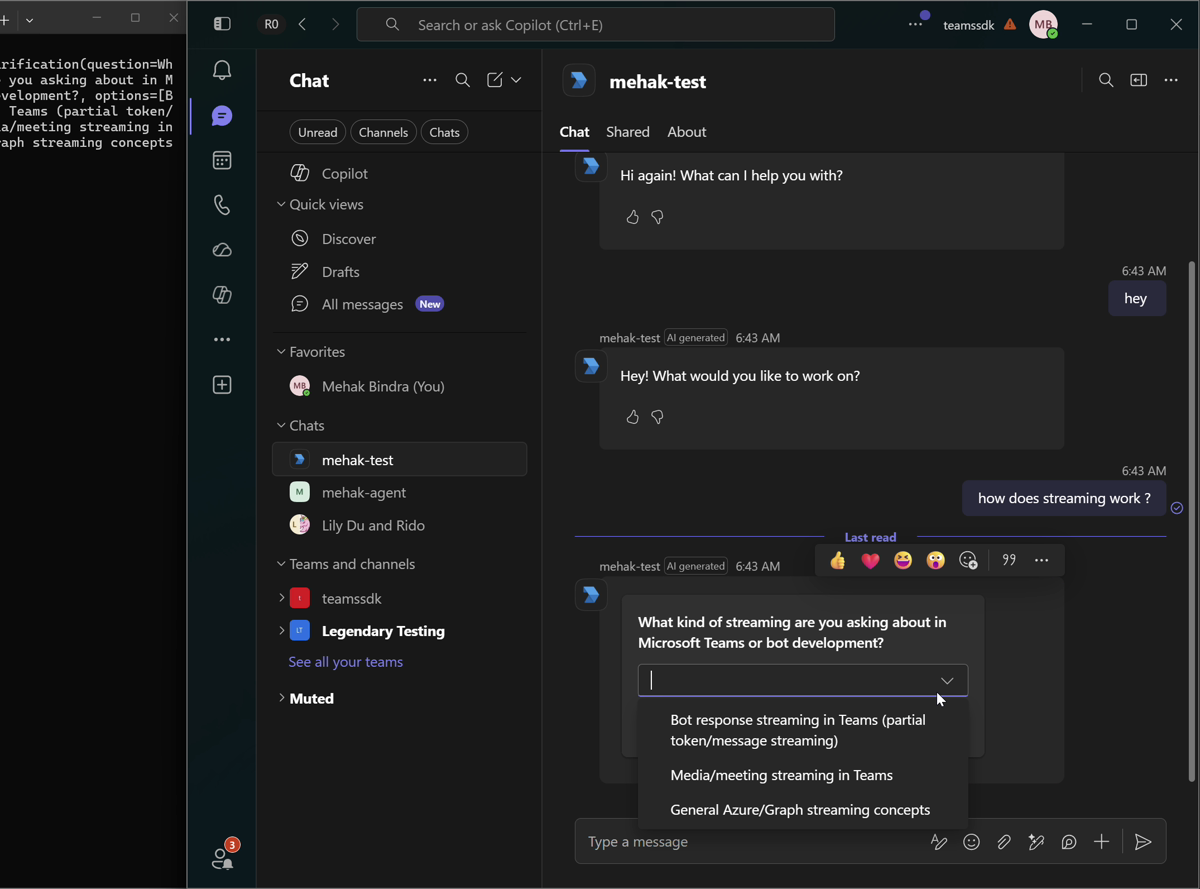
A good example is clarification: when a request is ambiguous, the agent asks the user to pick between interpretations instead of guessing. The tool builds an Adaptive Card and stashes it in a per-turn bucket the handler inspects after the run completes; the user's choice comes back as the next turn.
Tools are declared with the @tool decorator from Agent Framework. The function name, docstring, and type annotations tell the model when and how to call the tool.
from typing import Annotated

from agent_framework import tool
from microsoft_teams.cards import AdaptiveCard, Choice, ChoiceSetInput, ExecuteAction, SubmitData, TextBlock
from pydantic import Field

CLARIFICATION_VERB = "clarification"
CLARIFICATION_INPUT_ID = "clarificationChoice"

@tool
async def request_clarification(
    question: Annotated[str, Field(description="The clarification question to ask the user.")],
    options: Annotated[list[str], Field(description="2-4 candidate interpretations the user can pick between.")],
) -> str:
    """Show an Adaptive Card asking the user to clarify their ambiguous request."""
    cards = pending_cards.get()
    if cards is None:
        return "No active turn context; card could not be attached."
    card = AdaptiveCard(version="1.6").with_body([
        TextBlock(text=question, weight="Bolder", size="Medium", wrap=True),
        ChoiceSetInput(
            id=CLARIFICATION_INPUT_ID,
            choices=[Choice(title=o, value=o) for o in options],
            is_required=True,
        ),
    ]).with_actions([
        ExecuteAction(title="Submit")
        .with_data(SubmitData(CLARIFICATION_VERB, {CLARIFICATION_INPUT_ID: ""}))
        .with_associated_inputs("auto"),
    ])
    cards.append(card)
    return "Clarification card attached."
See clarification cards for how the user's choice flows back in.
Adding remote MCP tools
Remote tools are exposed via MCP servers and live behind a network boundary. The agent discovers their schemas at runtime and invokes them over HTTP. From the model's perspective, they behave like any other tool.
Remote tools are declared using MCP tool wrappers from Agent Framework and passed to the agent just like local tools:
from agent_framework import MCPStreamableHTTPTool

mcp_tools = [
    MCPStreamableHTTPTool(name="MSLearn", url="https://learn.microsoft.com/api/mcp"),
]

agent = Agent(
    client=client,
    instructions="You are a helpful Teams assistant with access to local tools and remote MCP servers.",
    tools=[request_clarification, *mcp_tools],
)
Running the agent in Teams
Integrate with Teams by forwarding incoming messages to the agent and streaming the response back to the chat interface chunk by chunk.
@app.on_message
async def handle_message(ctx: ActivityContext[MessageActivity]):
    async for chunk in agent.run(ctx.activity.text or "", stream=True):
        if chunk.text:
            ctx.stream.emit(chunk.text)
Per-conversation memory
By default, each run starts with no history — the model only sees the current message. This works for one-shot interactions, but is insufficient for multi-turn conversations where users refer back to earlier context. Keep a per-conversation buffer and reuse it across turns:
A session provides a conversation buffer that maintains state across turns. Create one per Teams conversation and reuse it for subsequent messages:
from agent_framework import AgentSession

_sessions: dict[str, AgentSession] = {}

@app.on_message
async def handle_message(ctx: ActivityContext[MessageActivity]):
    conversation_id = ctx.activity.conversation.id
    session = _sessions.setdefault(conversation_id, agent.create_session())

    async for chunk in agent.run(ctx.activity.text or "", session=session, stream=True):
        if chunk.text:
            ctx.stream.emit(chunk.text)
In production, push conversation history into Redis, Cosmos DB, or whatever you already use for state.
Grounding responses with citations
When a tool returns search results, you usually want the model to cite its sources. The pattern: intercept each tool result, assign every source a stable 1-based index, and hand that index back to the model so it can reference it inline as [1], [2], and so on. The collected citations are attached to the final reply in Enhancing the Teams Experience.
In Agent Framework this is a FunctionMiddleware — it sits between tool execution and the model response, letting you inspect and transform results without coupling that logic to the agent. Override process, run the wrapped tool with call_next(), then post-process its result.
import json
from typing import Any

from agent_framework import FunctionInvocationContext, FunctionMiddleware

class CitationMiddleware(FunctionMiddleware):
    citations: dict[str, Any]

    async def process(self, context: FunctionInvocationContext, call_next) -> None:
        # Run the wrapped tool first, then post-process its result.
        await call_next()

        parsed = json.loads(context.result)
        for item in parsed.get("results", []):
            url = item.get("contentUrl") or item.get("link")
            if not url:
                continue
            # setdefault dedupes by URL — the same source returned by multiple
            # tool calls keeps a single, stable position.
            entry = self.citations.setdefault(url, {
                "position": len(self.citations) + 1,
                "url": url,
                "title": item.get("title") or "",
                "snippet": (item.get("content") or item.get("description") or "")[:160],
            })
            # Hand the marker back to the model so it can cite this source inline.
            item["citation"] = f"[{entry['position']}]"
        context.result = json.dumps(parsed)


tool_logger = CitationMiddleware()
agent = Agent(
    client=client,
    instructions=(
        "You are a helpful Teams assistant with access to local tools and remote MCP servers. "
        'When you use information from a search tool, cite your sources inline using the "citation" value.'
    ),
    tools=[request_clarification, *mcp_tools],
    middleware=[tool_logger],
)
For Teams-specific enhancements — continue to Enhancing the Teams Experience.