Enhance the Teams Experience
The Teams SDK has deprecated its own AI libraries — the @microsoft/teams.ai packages (ChatPrompt, Model, and the older @microsoft/teams.mcp / @microsoft/teams.a2a plugins) — in favor of dedicated AI frameworks. Use the pattern shown in these guides instead: bring the OpenAI SDK (or any framework you like), and wire MCP and A2A directly into your Teams app.
You can enrich the agent output into a more Teams-native experience — adding structure, interactivity, and metadata on top of the generated text. This guide builds on the agent from Build an agent in Teams.
Streaming
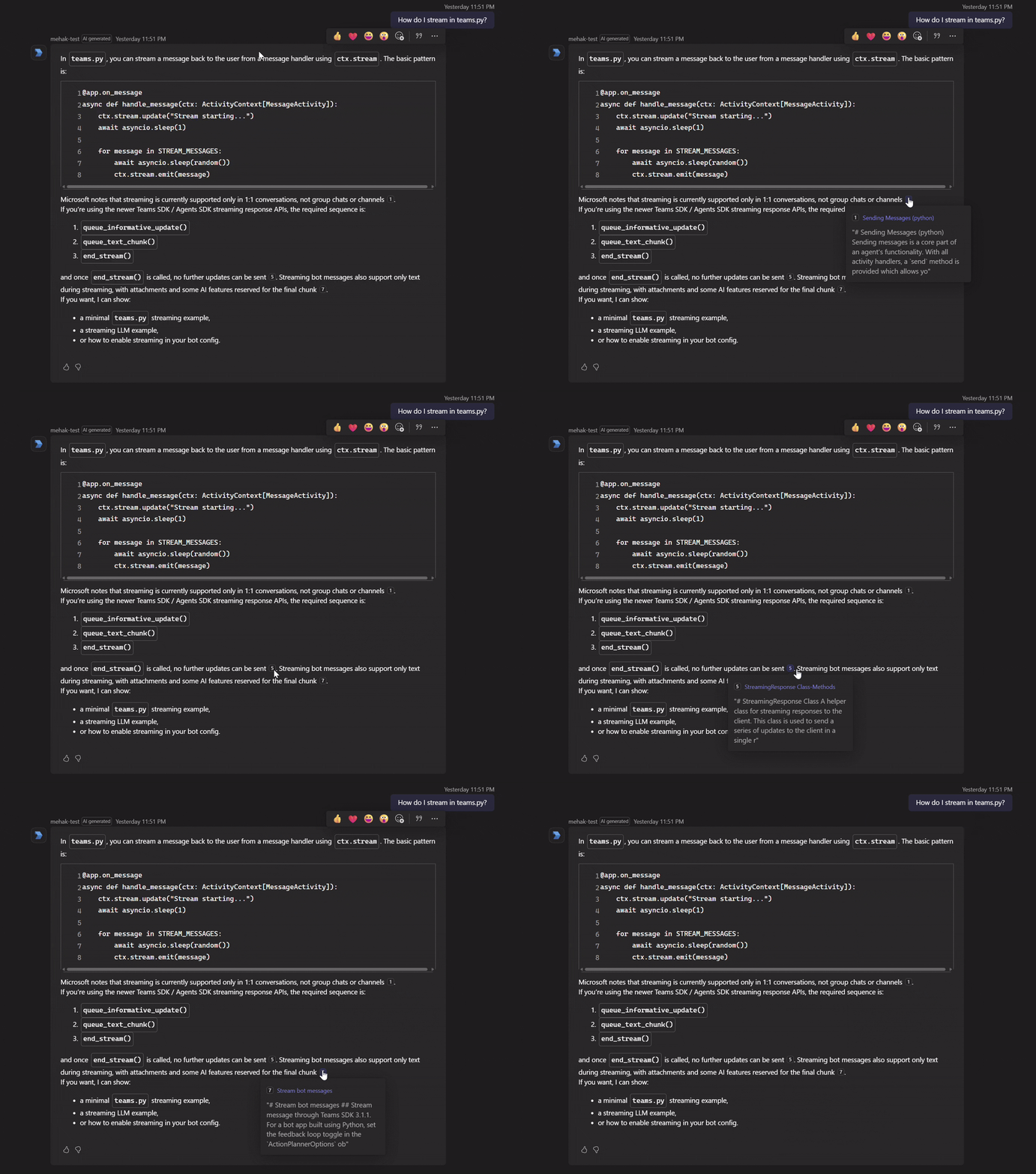
Streaming delivers responses to Teams incrementally as they're generated, rather than waiting for the full reply to complete. Each chunk of text is appended to the stream as it arrives.
const runner = client.chat.completions.runTools({ model, messages: history, tools, stream: true });
runner.on('content', (delta: string) => stream.emit(delta));
await runner.done();
See Streaming for the full story on how Teams renders chunks and the constraints on stream lifecycle.
AI-generated label
Mark the message as system-generated so Teams clearly labels it as AI output.
addAiGenerated() marks the message as system-generated.
const reply = new MessageActivityInput().addAiGenerated();
stream.emit(reply);
Feedback
Enable built-in thumbs up/down controls on the reply and surface a custom feedback form when users respond.
addFeedback('custom') enables the thumbs up/down controls and lets you surface a custom feedback form when users respond.
const reply = new MessageActivityInput().addAiGenerated().addFeedback('custom');
stream.emit(reply);
See Feedback for the full form-handling story — capturing the submission, persisting it, and following up with the user.
Clarification cards
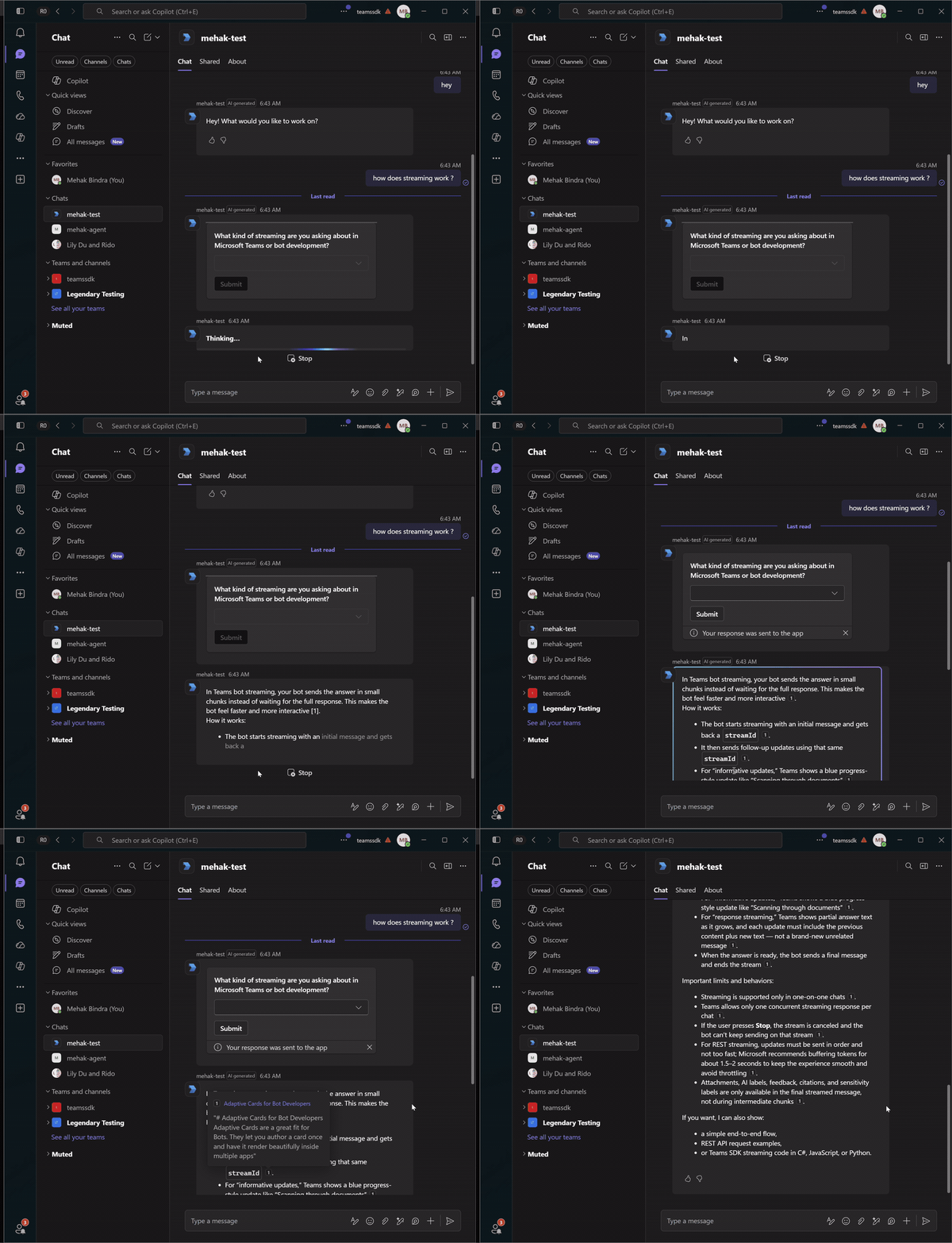
When the agent calls the request_clarification tool (from Build an agent), the reply is a card, not text. The model still produces a short wrap-up after the tool returns, so discard the streamed text and send only the card. Clearing the stream's accumulated text before emitting the card-only activity keeps the turn to a single clean reply.
function shipResult(result: AgentRunResult, stream: IStreamer, recipientId: string): void {
  if (result.pendingCard) {
    // Clarification card — discard any streamed text, then emit card-only.
    stream.clearText();
    stream.emit(new MessageActivityInput().addCard('adaptive', result.pendingCard).addAiGenerated());
    return;
  }
  // normal reply: attach follow-ups, citations, feedback (below).
}
The user's choice is captured by a card-action handler and fed straight back into the agent as the next turn:
app.on('card.action.clarification', async ({ activity, stream }) => {
  const data = (activity.value.action.data ?? {}) as Record<string, unknown>;
  const choice = typeof data[CLARIFICATION_INPUT_ID] === 'string' ? (data[CLARIFICATION_INPUT_ID] as string) : '';
  if (choice) {
    const result = await agent.run(activity.conversation.id, choice, stream);
    shipResult(result, stream, activity.from.id);
  }
  return { statusCode: 200, type: 'application/vnd.microsoft.activity.message', value: 'OK' };
});
The user's selection arrives as a fresh turn through the card-action route — the same code path as a normal message — so the agent picks up with full context.
Suggested prompts
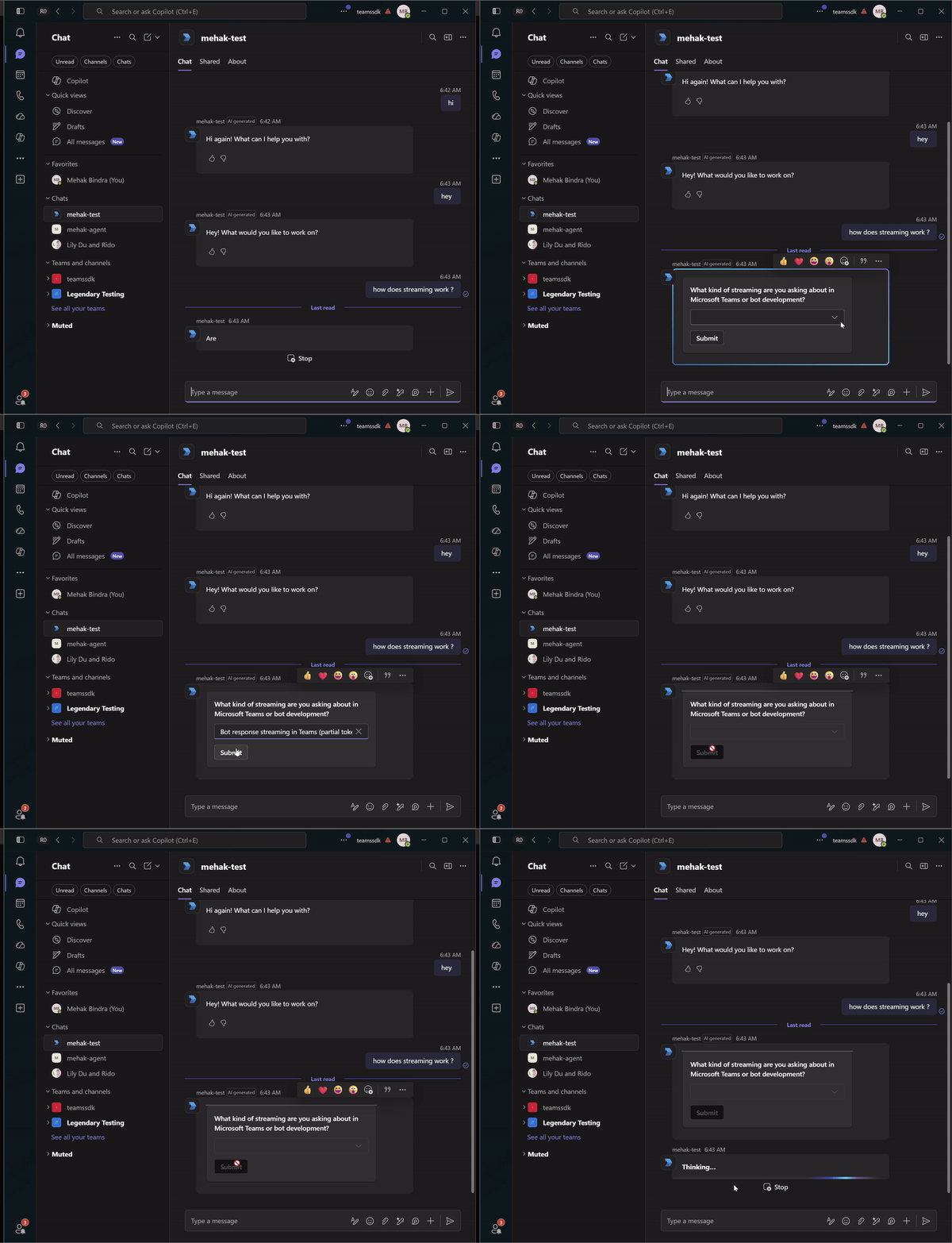
Suggested prompts give the user one-click follow-up questions after a reply. In Teams they render as chips under the message; tapping one sends the value back as a normal user message, so the same message handler picks it up — no extra routing required.
Rather than hard-coding them, generate two contextual follow-ups with a separate lightweight model call constrained to a strict JSON schema, then attach them as suggested actions.
const FOLLOW_UPS_PROMPT =
  'Produce 2 specific prompts the user might want to ask next, based on the conversation so far. ' +
  'Each must be phrased in the first person and stay under 8 words.';

const FOLLOW_UPS_SCHEMA = {
  type: 'object',
  properties: { prompt1: { type: 'string' }, prompt2: { type: 'string' } },
  required: ['prompt1', 'prompt2'],
  additionalProperties: false,
} as const;

async function generateFollowUps(history: ChatCompletionMessageParam[]): Promise<string[]> {
  try {
    const completion = await client.chat.completions.create({
      model: deployment,
      messages: [...history, { role: 'system', content: FOLLOW_UPS_PROMPT }],
      response_format: {
        type: 'json_schema',
        json_schema: { name: 'follow_ups', strict: true, schema: FOLLOW_UPS_SCHEMA },
      },
    });
    const parsed = JSON.parse(completion.choices[0]?.message?.content ?? '{}');
    return [parsed.prompt1, parsed.prompt2].filter((s): s is string => typeof s === 'string' && s.length > 0);
  } catch {
    return []; // degrade silently — the main reply still ships
  }
}
Attach the generated prompts to the reply with withSuggestedActions:
finalMarker.withSuggestedActions({
  to: [recipientId],
  actions: followUps.map((prompt) => ({ type: 'imBack', title: prompt, value: prompt })),
});
Citations
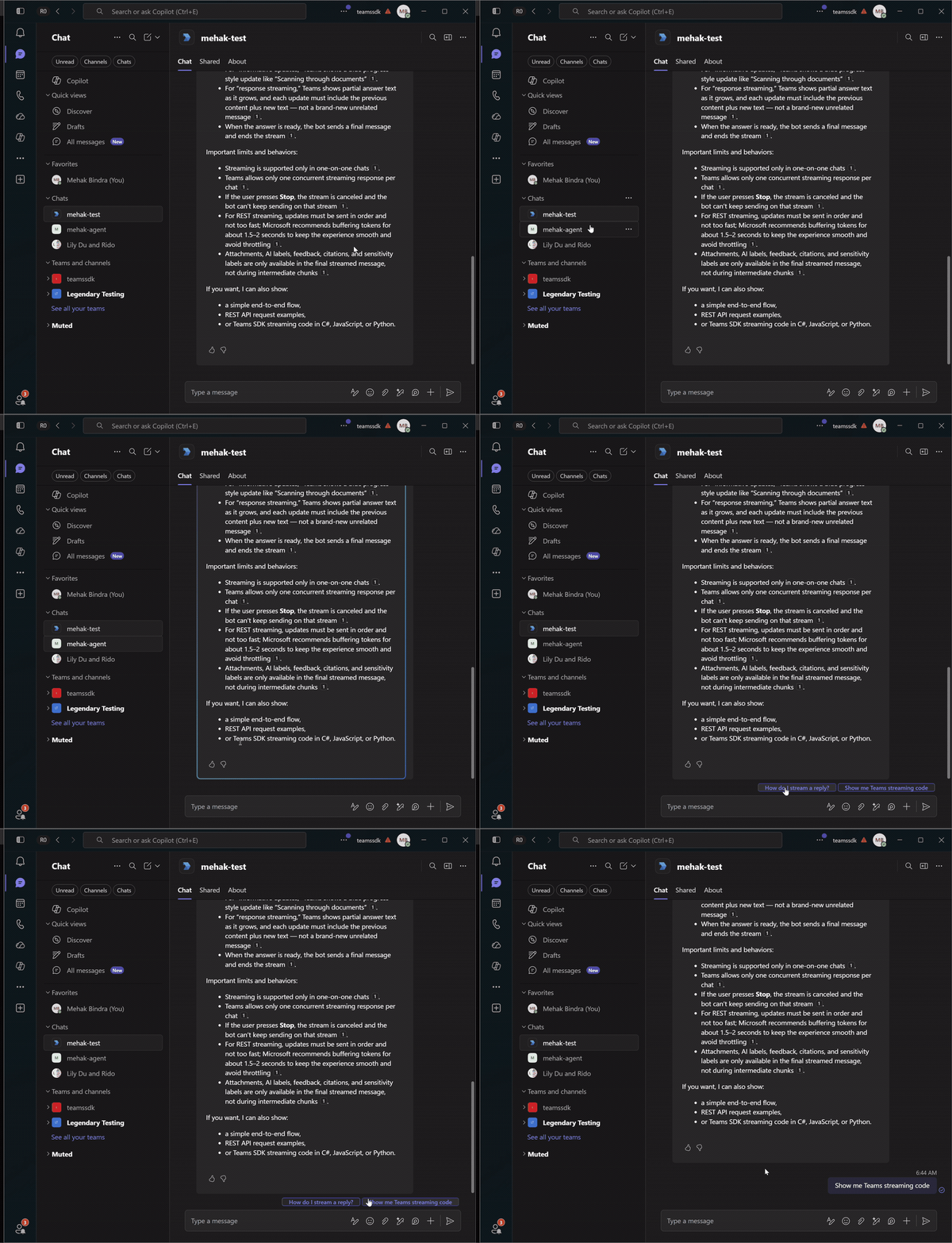
Citations render as footnote-style references inline with the reply — [1], [2], etc. — surfacing the source title, abstract, and URL on hover. They originate from tool outputs, where the collector from Grounding responses with citations assigned each result a stable position.
When building the final reply, attach only the citations whose position actually appears in the streamed text.
Use the CitationCollector from Build an agent. attachCitations reads the [N] markers out of the streamed text and writes a citation entity onto the final activity for each one it has data for.
attachCitations(activity: MessageActivityInput, fullText: string): number {
  const used = new Set<number>();
  for (const match of fullText.matchAll(/\[(\d+)\]/g)) used.add(Number(match[1]));

  let attached = 0;
  for (const entry of this.entries.values()) {
    if (!used.has(entry.position)) continue;
    activity.addCitation(entry.position, {
      name: entry.title || `Source ${entry.position}`,
      abstract: entry.snippet || 'No description available.',
      url: entry.url,
    });
    attached++;
  }
  return attached;
}
Assemble the final marker activity with everything at once — the AI label, custom feedback, citations, and follow-up chips — then emit it so the streamer folds them into the final message:
const finalMarker = new MessageActivityInput().addAiGenerated().addFeedback('custom');
result.citations.attachCitations(finalMarker, result.fullText);
if (result.followUps.length > 0) {
  finalMarker.withSuggestedActions({
    to: [recipientId],
    actions: result.followUps.map((p) => ({ type: 'imBack', title: p, value: p })),
  });
}
stream.emit(finalMarker);