Action commands
Action commands allow you to present your users with a modal pop-up called a dialog in Teams. The dialog collects or displays information, processes the interaction, and sends the information back to Teams compose box.
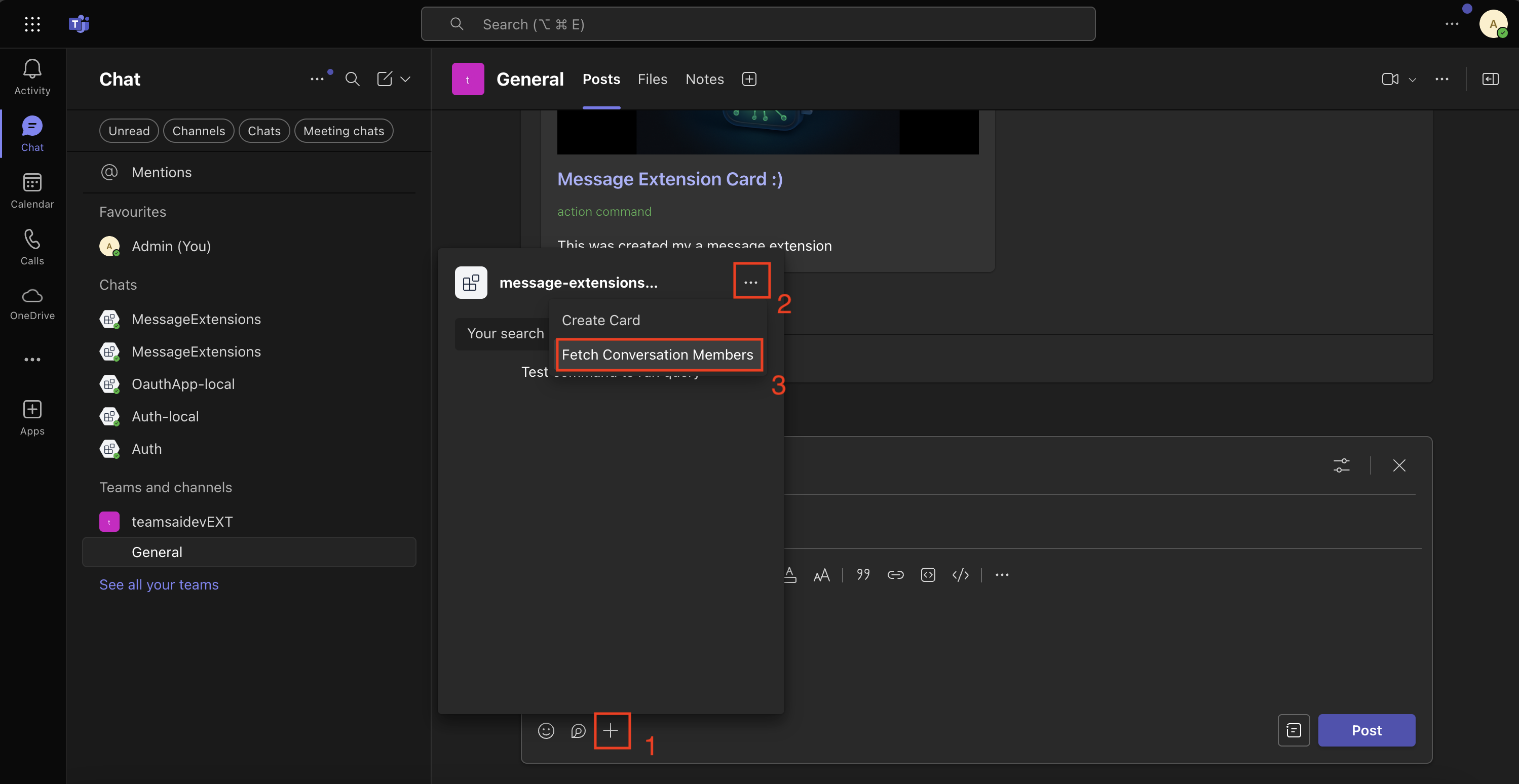
Action command invocation locations
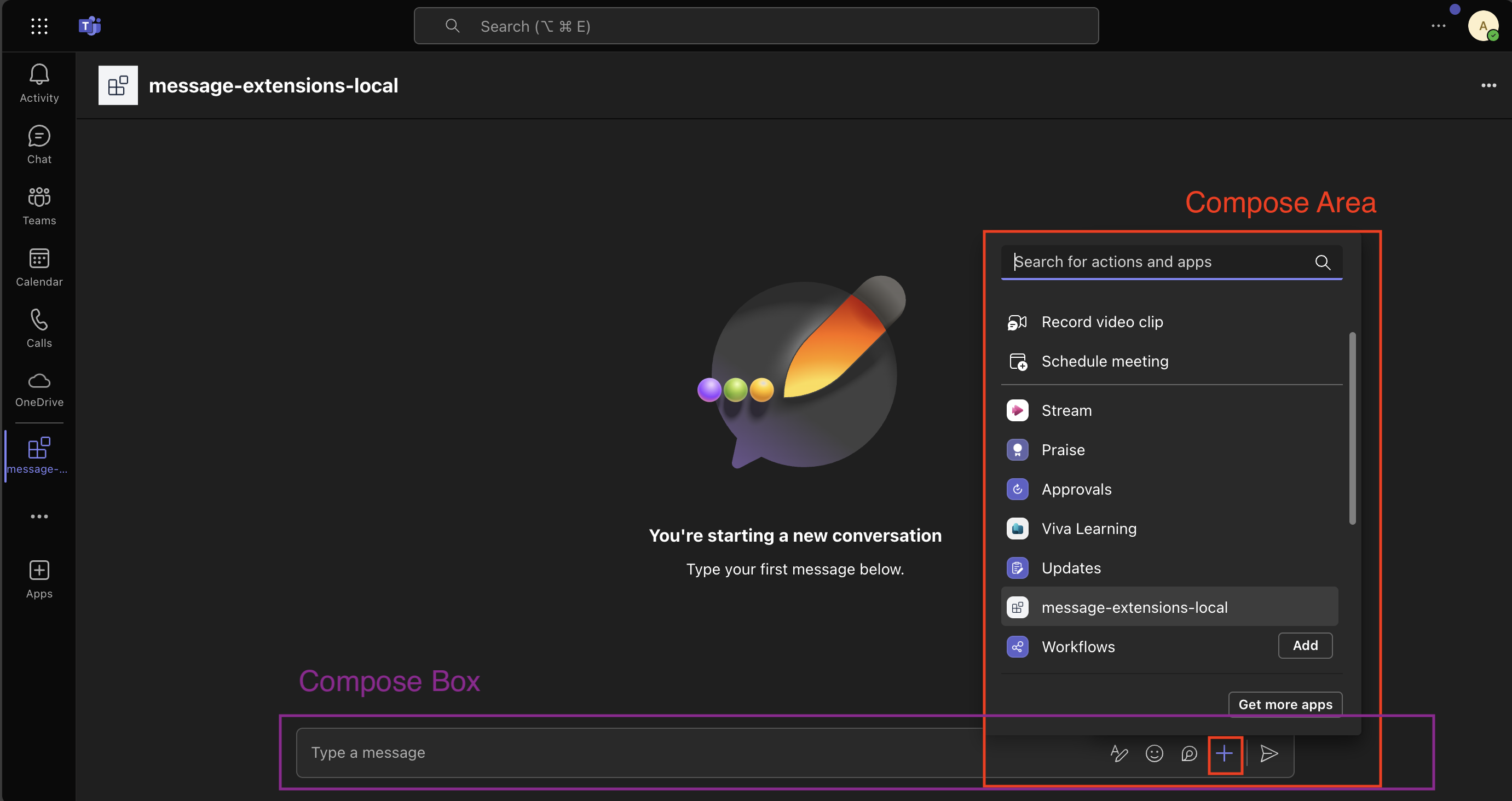
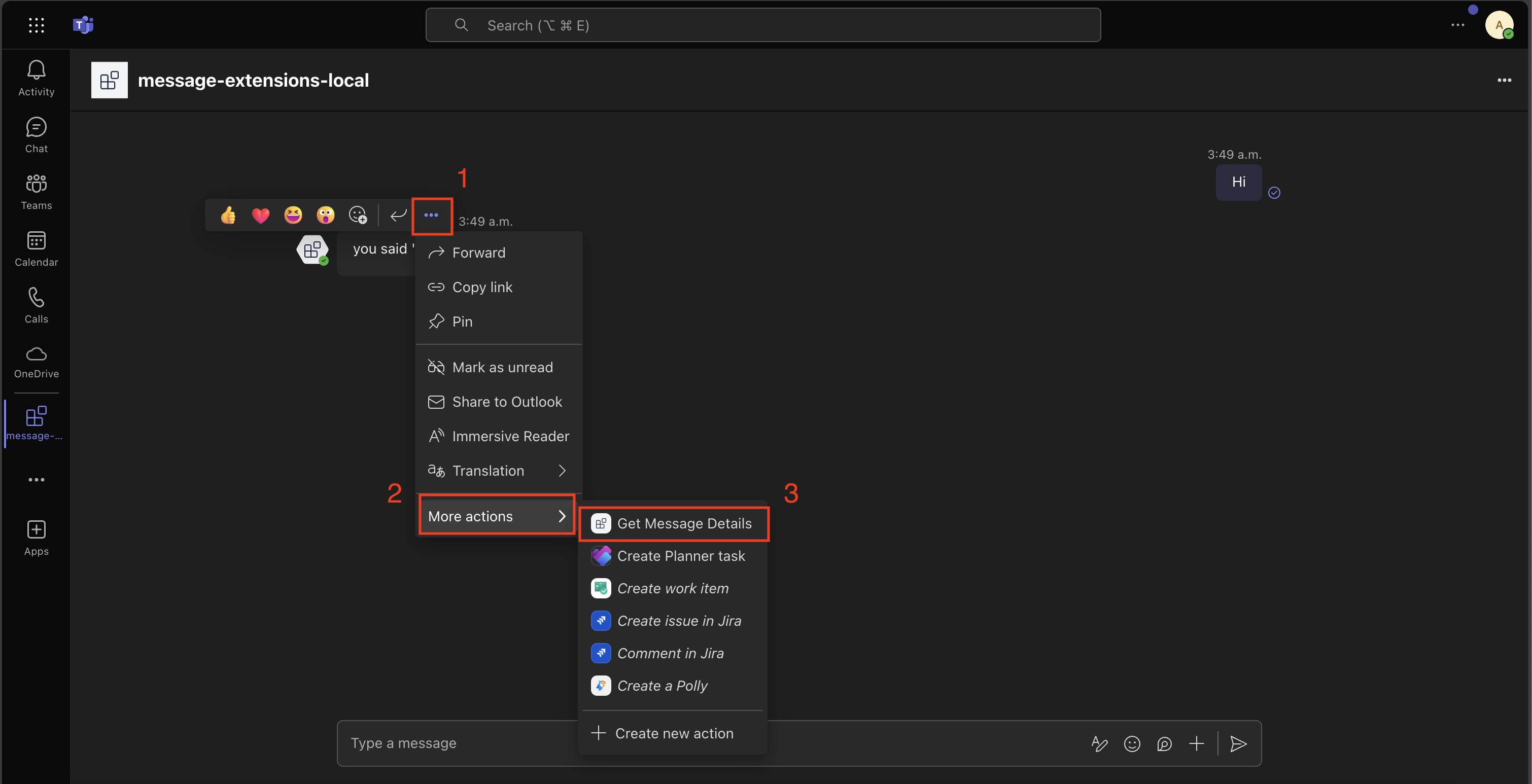
There are three different areas action commands can be invoked from:
- Compose Area
- Compose Box
- Message
Compose Area and Box
Message action command
See the Invoke Locations guide to learn more about the different entry points for action commands.
Setting up your Teams app manifest
To use action commands you have define them in the Teams app manifest. Here is an example:
"composeExtensions": [
    {
        "botId": "${{BOT_ID}}",
        "commands": [
            {
            "id": "createCard",
            "type": "action",
            "context": [
                "compose",
                "commandBox"
            ],
            "description": "Command to run action to create a card from the compose box.",
            "title": "Create Card",
            "parameters": [
                {
                    "name": "title",
                    "title": "Card title",
                    "description": "Title for the card",
                    "inputType": "text"
                },
                {
                    "name": "subTitle",
                    "title": "Subtitle",
                    "description": "Subtitle for the card",
                    "inputType": "text"
                },
                {
                    "name": "text",
                    "title": "Text",
                    "description": "Text for the card",
                    "inputType": "textarea"
                }
            ]
            },
            {
                "id": "getMessageDetails",
                "type": "action",
                "context": [
                    "message"
                ],
                "description": "Command to run action on message context.",
                "title": "Get Message Details"
            },
            {
                "id": "fetchConversationMembers",
                "description": "Fetch the conversation members",
                "title": "Fetch Conversation Members",
                "type": "action",
                "fetchTask": true,
                "context": [
                    "compose"
                ]
            },
        ]
    }
]
Here we have defining three different commands:
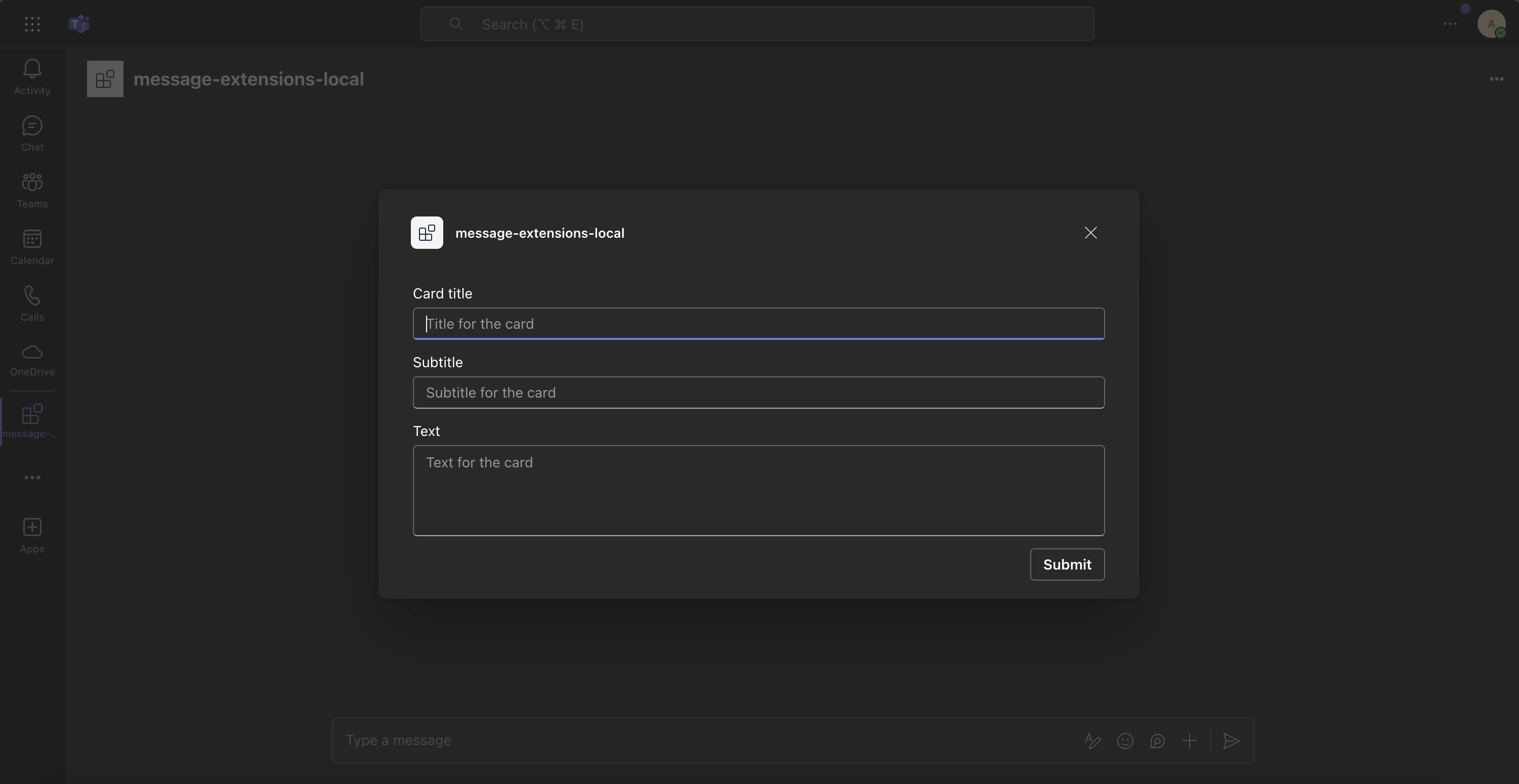
createCard- that can be invoked from either thecomposeorcommandBoxareas. Upon invocation a dialog will popup asking the user to fill thetitle,subTitle, andtext.
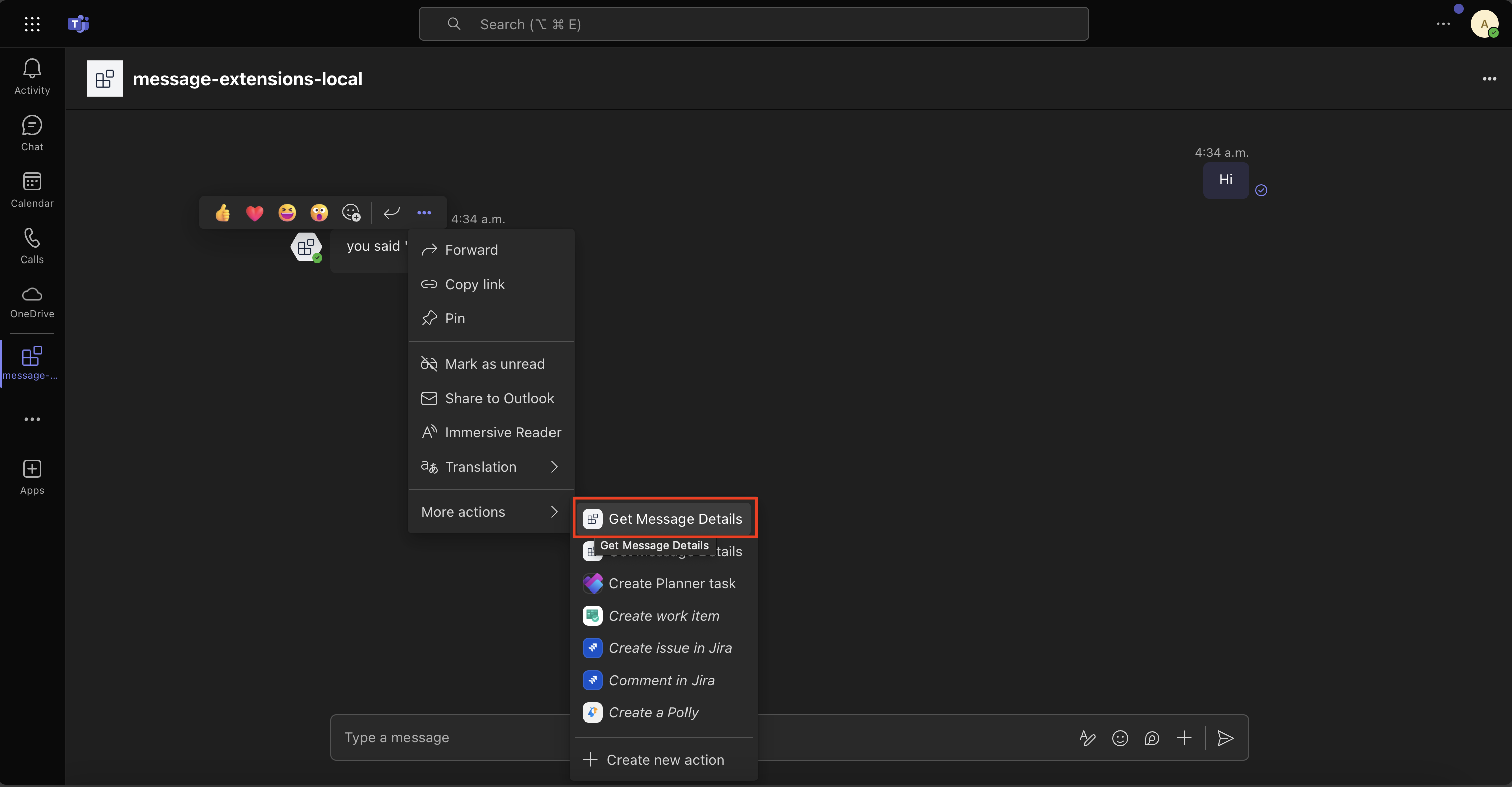
getMessageDetails- It is invoked from themessageoverflow menu. Upon invocation the message payload will be sent to the app which will then return the details likecreatedDate, etc.
fetchConversationMembers- It is invoked from thecomposearea. Upon invocation the app will return an adaptive card in the form of a dialog with the conversation roster.
Handle submission
Handle submission when the createCard or getMessageDetails action commands are invoked.
import { cardAttachment } from '@microsoft/teams.api';
import { App } from '@microsoft/teams.apps';
import { IAdaptiveCard } from '@microsoft/teams.cards';
// ...

app.on('message.ext.submit', async ({ activity }) => {
  const { commandId } = activity.value;
  let card: IAdaptiveCard;

  if (commandId === 'createCard') {
    // The activity.value.commandContext == "compose" here because it was from
    // the compose box
    card = createCard(activity.value.data);
  } else if (commandId === 'getMessageDetails' && activity.value.messagePayload) {
    // The activity.value.commandContext == "message" here because it was from
    // the message context
    card = createMessageDetailsCard(activity.value.messagePayload);
  } else {
    throw new Error(`Unknown commandId: ${commandId}`);
  }

  return {
    composeExtension: {
      type: 'result',
      attachmentLayout: 'list',
      attachments: [cardAttachment('adaptive', card)],
    },
  };
});
Create card
createCard() function
import { AdaptiveCard, TextBlock, Image } from '@microsoft/teams.cards';
// ...

interface IFormData {
  title: string;
  subtitle: string;
  text: string;
}

export function createCard(data: IFormData) {
  return new AdaptiveCard(
    new Image(IMAGE_URL),
    new TextBlock(data.title, {
      size: 'Large',
      weight: 'Bolder',
      color: 'Accent',
      style: 'heading',
    }),
    new TextBlock(data.subtitle, {
      size: 'Small',
      weight: 'Lighter',
      color: 'Good',
    }),
    new TextBlock(data.text, {
      wrap: true,
      spacing: 'Medium',
    })
  );
}
Create message details card
createMessageDetailsCard() function
import { Message } from '@microsoft/teams.api';
import {
  AdaptiveCard,
  CardElement,
  TextBlock,
  ActionSet,
  OpenUrlAction,
} from '@microsoft/teams.cards';
// ...

export function createMessageDetailsCard(messagePayload: Message) {
  const cardElements: CardElement[] = [
    new TextBlock('Message Details', {
      size: 'Large',
      weight: 'Bolder',
      color: 'Accent',
      style: 'heading',
    }),
  ];

  if (messagePayload?.body?.content) {
    cardElements.push(
      new TextBlock('Content', {
        size: 'Medium',
        weight: 'Bolder',
        spacing: 'Medium',
      }),
      new TextBlock(messagePayload.body.content)
    );
  }

  if (messagePayload?.attachments?.length) {
    cardElements.push(
      new TextBlock('Attachments', {
        size: 'Medium',
        weight: 'Bolder',
        spacing: 'Medium',
      }),
      new TextBlock(`Number of attachments: ${messagePayload.attachments.length}`, {
        wrap: true,
        spacing: 'Small',
      })
    );
  }

  if (messagePayload?.createdDateTime) {
    cardElements.push(
      new TextBlock('Created Date', {
        size: 'Medium',
        weight: 'Bolder',
        spacing: 'Medium',
      }),
      new TextBlock(messagePayload.createdDateTime, {
        wrap: true,
        spacing: 'Small',
      })
    );
  }

  if (messagePayload?.linkToMessage) {
    cardElements.push(
      new TextBlock('Message Link', {
        size: 'Medium',
        weight: 'Bolder',
        spacing: 'Medium',
      }),
      new ActionSet(
        new OpenUrlAction(messagePayload.linkToMessage, {
          title: 'Go to message',
        })
      )
    );
  }

  return new AdaptiveCard(...cardElements);
}
Handle opening adaptive card dialog
Handle opening adaptive card dialog when the fetchConversationMembers command is invoked.
import { cardAttachment } from '@microsoft/teams.api';
import { App } from '@microsoft/teams.apps';
// ...

app.on('message.ext.open', async ({ activity, api }) => {
  const conversationId = activity.conversation.id;
  const members = await api.conversations.getMembers(conversationId);
  const card = createConversationMembersCard(members);

  return {
    task: {
      type: 'continue',
      value: {
        title: 'Conversation members',
        height: 'small',
        width: 'small',
        card: cardAttachment('adaptive', card),
      },
    },
  };
});
Create conversation members card
createConversationMembersCard() function
import { Account } from '@microsoft/teams.api';
import { AdaptiveCard, TextBlock } from '@microsoft/teams.cards';
// ...

export function createConversationMembersCard(members: Account[]) {
  const membersList = members.map((member) => member.name).join(', ');

  return new AdaptiveCard(
    new TextBlock('Conversation members', {
      size: 'Medium',
      weight: 'Bolder',
      color: 'Accent',
      style: 'heading',
    }),
    new TextBlock(membersList, {
      wrap: true,
      spacing: 'Small',
    })
  );
}