Copilot analytics
Copilot Consumption and Ways of Working
Reproduce the synthetic Consumption dashboard and follow the supported, narrower route for real M365 credit exports.
All dashboards · Open the synthetic demo
What this dashboard shows
Explore recorded M365 Copilot and GitHub credit consumption alongside collaboration patterns. The synthetic reference includes product usage mix, group comparisons, credit concentration and sustained or intermittent heavy-user patterns.
Two different outputs are available: reproduce renders the complete synthetic reference. Real-data build creates a much smaller M365 credits-only aggregate table. It does not recreate the reference’s collaboration story.

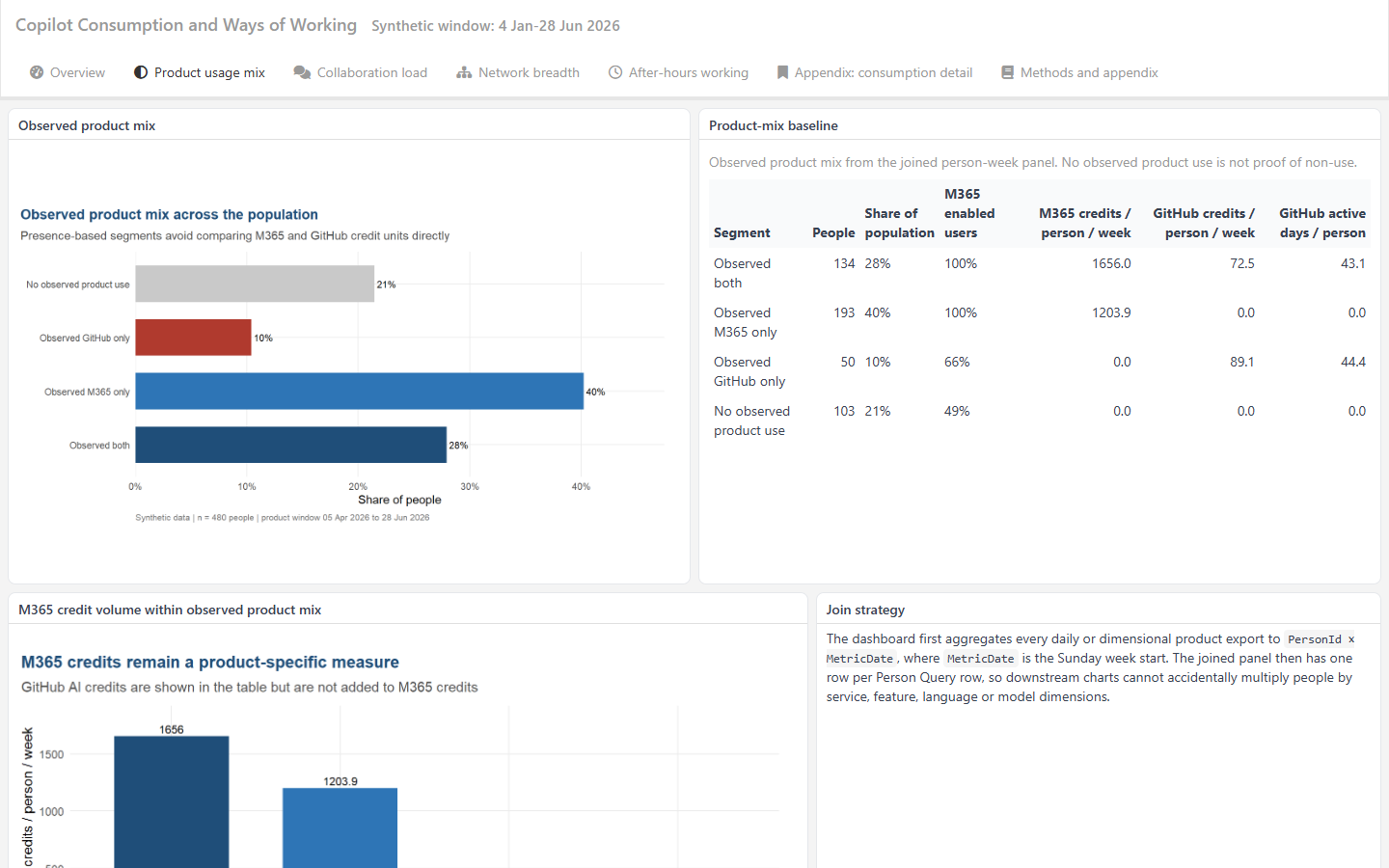
Credit concentration ranks people within each product’s observed credits. Heavy-user patterns describe consistency within the 13-week product window. They are neither forecasts nor measures of value.
You will need
For the demo: the full repository and software below. No customer data or tenant access is required.
The cards describe the five synthetic exports used by the full reference:

Person query
Weekly collaboration metrics and organisational attributes for the reference dashboard.
Exports: PersonQuery.csv in the demo. Real Person Query filenames vary by user, date and locale.
Query setup and schema
Consumption query
M365 and GitHub credit records, plus historical licensing metadata.
Exports: PersonM365CreditsMetrics.csv, PersonGitHubCreditsMetrics.csv and PeopleMetaData.csv.
Query setup and schema
GitHub query
Activity observations, including explicit zero rows, needed to distinguish observed inactivity from missing coverage.
Exports: PersonGitHubActivityMetrics.csv. The four feature, language and model breakdown files are not used.
Query setup and schemaFor the supported real build: only PersonM365CreditsMetrics.csv and its matching PeopleMetaData.csv are required. No Person Query, GitHub credit file, GitHub activity file or spending-policy metadata file is consumed. Export through Create analysis > Customized query > Consumption query, or the Consumption dashboard’s Export data button.
Use the join guide for query setup and current schemas. Its combined person-week panel is not a drop-in runner input.
Software prerequisites
Install R, Git and Pandoc, or use Pandoc bundled with RStudio. Ensure Rscript and git are available in PowerShell.
Clone the whole repository. It supplies the Rmd, helpers, fixtures, JSON configurations and runner, which a single downloaded report cannot replace.
git clone https://github.com/microsoft/viva-insights-sample-code.git
Set-Location .\viva-insights-sample-code
Run all remaining commands from the repository root. Install reproduction dependencies:
Rscript -e "install.packages(c('jsonlite', 'rmarkdown', 'flexdashboard', 'dplyr', 'tidyr', 'ggplot2', 'scales', 'knitr', 'stringr', 'htmltools', 'vivainsights', 'ggrepel'), repos='https://cloud.r-project.org')"
Rscript -e "stopifnot(rmarkdown::pandoc_available())"
If Pandoc is not discovered, set $env:RSTUDIO_PANDOC to the installed folder containing pandoc. If needed, replace Rscript with & 'C:\Program Files\R\R-4.6.1\bin\Rscript.exe', matching your installation. Real inspection and build need only base R, jsonlite and Git, not Pandoc.
Run the demo
-
Check the synthetic reference inputs:
Rscript .\frontier-analytics\starter-kits\copilot-query-dashboard\dashboard.R inspect .\frontier-analytics\starter-kits\copilot-query-dashboard\configs\demo-consumption.json -
Reproduce the full dashboard in isolation:
Rscript .\frontier-analytics\starter-kits\copilot-query-dashboard\dashboard.R reproduce .\frontier-analytics\starter-kits\copilot-query-dashboard\configs\demo-consumption.json -
Open the resulting HTML:
Start-Process ..\copilot-dashboard-work\consumption-demo\reproduce\dashboard.html
Expected outputs
Location beneath ..\copilot-dashboard-work\consumption-demo |
Contents |
|---|---|
inspect\readiness.json |
Readiness assessment and provenance. Inspection alone does not render HTML. |
reproduce\dashboard.html |
Complete synthetic reference dashboard. |
reproduce\provenance.json |
Synthetic mode, repository revision, configuration, file checksums, package versions and execution details. |
reproduce\work |
Isolated copies and intermediate rendering files. |
The runner accepts only tracked, unmodified reference inputs. It does not rewrite source reports or committed CSVs. Demo mode fixes the privacy minimum at 10 and accepts no real-data mapping approvals or custom filters.
Each action directory must not already exist. Inspection and reproduction can share an output root, but reruns need a fresh output_dir. If you move a configuration, update its paths because paths resolve relative to the JSON file, not PowerShell.
Use your own data
The supported adapter reports Total Copilot Credits used by source period label and ServiceId, with optional grouping from metadata. It does not report sessions, limits, tokens, task types, GitHub use, licensed denominators or Person Query associations.
- Place authorised UTF-8 CSVs in a private folder outside the checkout.
-
Make a private configuration from the supplied example:
New-Item -ItemType Directory -Force ..\copilot-dashboard-private Copy-Item .\frontier-analytics\starter-kits\copilot-query-dashboard\configs\real-consumption.example.json ..\copilot-dashboard-private\consumption.json notepad ..\copilot-dashboard-private\consumption.json - Set
repo_root,output_dirand both input paths to your actual absolute paths. In JSON, write Windows backslashes as\\. Outputs must stay outside the repository and cannot contain inputs. - Review the exact column mappings, exported
granularityand date window. Keepgroup: falsewhen metadata has no HR attributes. Do not infer grouping from Person Query. -
Leave approval false and inspect:
Rscript .\frontier-analytics\starter-kits\copilot-query-dashboard\dashboard.R inspect ..\copilot-dashboard-private\consumption.json - Read
inspect\readiness.jsonunder your configured output directory. Resolve structural, coverage and privacy blockers. A successful process exit means inspection completed, not that publication is approved. - Review the export contract and credit unit. If several spending-policy rows have positive credits for one person, service and date, obtain confirmation that they are disjoint. Only then record
policy_additivityconfirmation and its evidence. -
After the responsible analyst approves the mapping, record
mapping_approval.approved: trueand a non-sensitive evidence reference. Build:Rscript .\frontier-analytics\starter-kits\copilot-query-dashboard\dashboard.R build ..\copilot-dashboard-private\consumption.json
Expected real outputs are build\dashboard.html, build\aggregates.csv and build\provenance.json beneath output_dir. The HTML is a self-contained accessible aggregate table, not the illustrated multi-page dashboard.
The adapter joins activity to metadata on PeopleHistoricalId, not PersonId. It validates declared grain, dates, numeric credits, keys and metadata matches across the entire input before date filtering. It never silently deduplicates or substitutes demo data.
Consult the runner configuration contract for precise mappings, policy handling and blockers.
Optional agent-assisted route
The optional dashboard Skill supports Consumption and Developer Experience, not Business Leaders. Install both Skills from this checkout:
gh skill install . viva-insights-analysis --from-local --agent github-copilot --scope user
gh skill install . viva-insights-copilot-dashboards --from-local --agent github-copilot --scope user
Keep the checkout. In Copilot CLI, run /skills reload then /skills info viva-insights-copilot-dashboards. Ask the agent to reproduce the Consumption demo and provide your checkout’s full path. The Skill does not remove software prerequisites or expand real-data support.
Privacy and limitations
- Real releases require at least
privacy_mindistinct PersonIds in every displayed cell, with a minimum setting of 10. - If any cell is too small, the entire real release table is withheld. Empty or suppressed builds still write explanatory HTML, a header-only CSV and provenance.
- This is not differential privacy. Review overlapping releases and external information before sharing.
- Keep exports, configurations, inspection records and outputs private until approved. Provenance is not automatic distribution approval.
- Missing periods are not filled with zero. Weekly or monthly periods are not split by a date filter.
- M365 and GitHub credits are different units, not currency. Neither collaboration comparisons nor consumption patterns establish productivity, causal effects or return on investment.