📞 Scenario: Call Center Triage — NovaTel Communications
Background
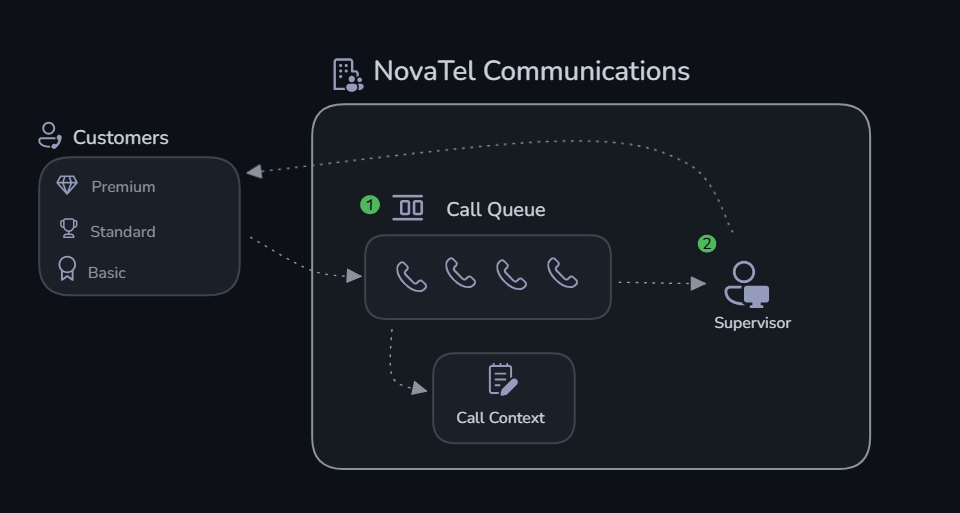
NovaTel Communications is a telecom provider handling hundreds of customer calls daily across their support center. Today's queue has 7 active calls spanning different issue types:
- CALL-001 — Maria Gonzalez (Premium, 3 years) — Unexpected charge dispute
- CALL-002 — James Liu (Basic, 4 months) — Internet dropping repeatedly
- CALL-003 — Priya Sharma (Premium, 18 months) — Wants to cancel (moving)
- CALL-004 — Robert Chen (Business, 2 years) — Adding 7 phone lines
- CALL-005 — Sarah Mitchell (Basic, 5 years) — Can't navigate new app
- CALL-006 — David Park (Premium, 1 year) — Charged for returned device
- CALL-007 — Emma Wilson (Basic, 8 months) — Suspected account hack
Your Mission
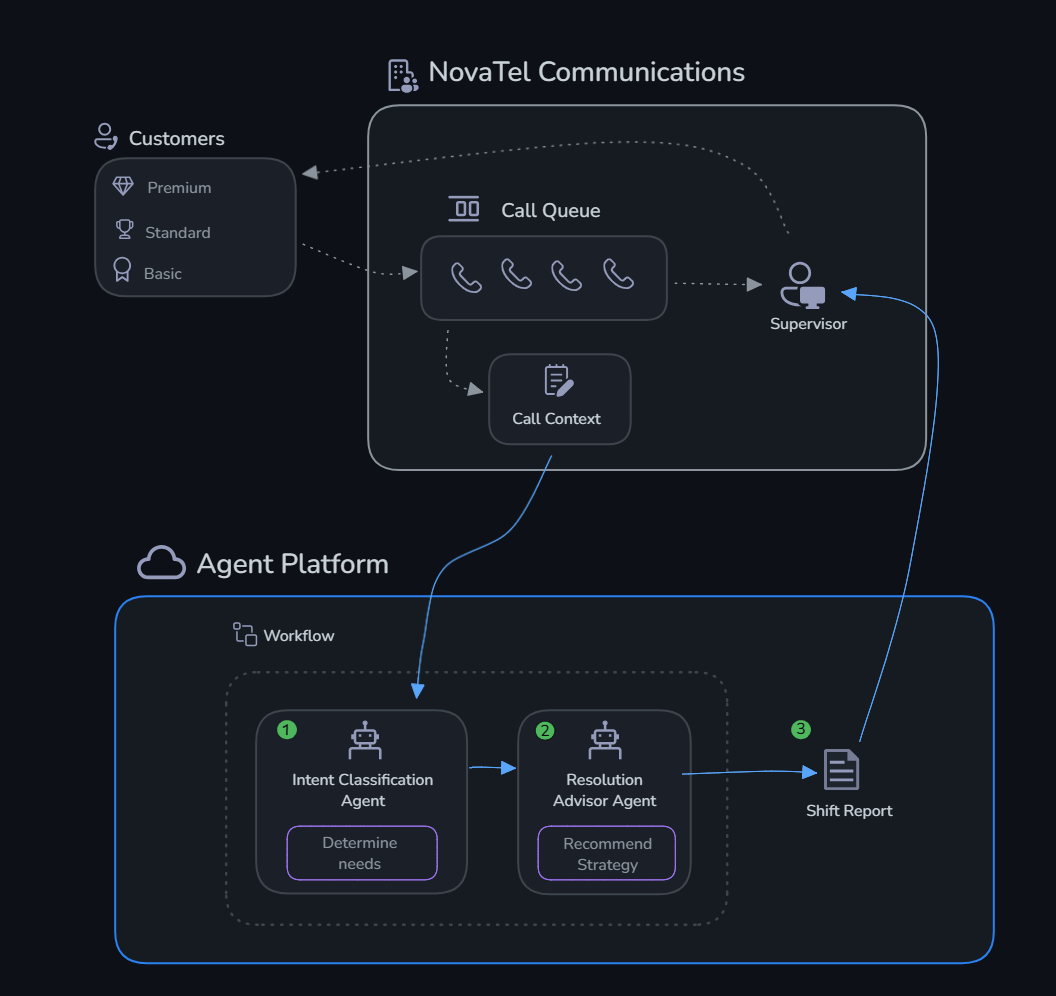
Build an AI agent system that:
- Classifies intent — Determines what each customer needs (billing, tech, cancellation, upsell, support, security)
- Advises resolution — Recommends the best handling strategy based on customer context
- Produces a shift report — Consolidated triage with prioritized action items
Challenges
| # | Challenge | What You'll Do | Time |
|---|---|---|---|
| 0 | Setup | Deploy Microsoft Foundry infrastructure | 20 min |
| 1 | Build Agents | Create Intent Classification + Resolution Advisor agents | 30 min |
| 2 | Monitor | Enable GenAI tracing with Application Insights | 20 min |
| 3 | Evaluate | Run systematic quality evaluations | 30 min |
| 4 | Production Workflow | Multi-agent orchestration + portal workflow | 20 min |
Why the Challenges Are in This Order
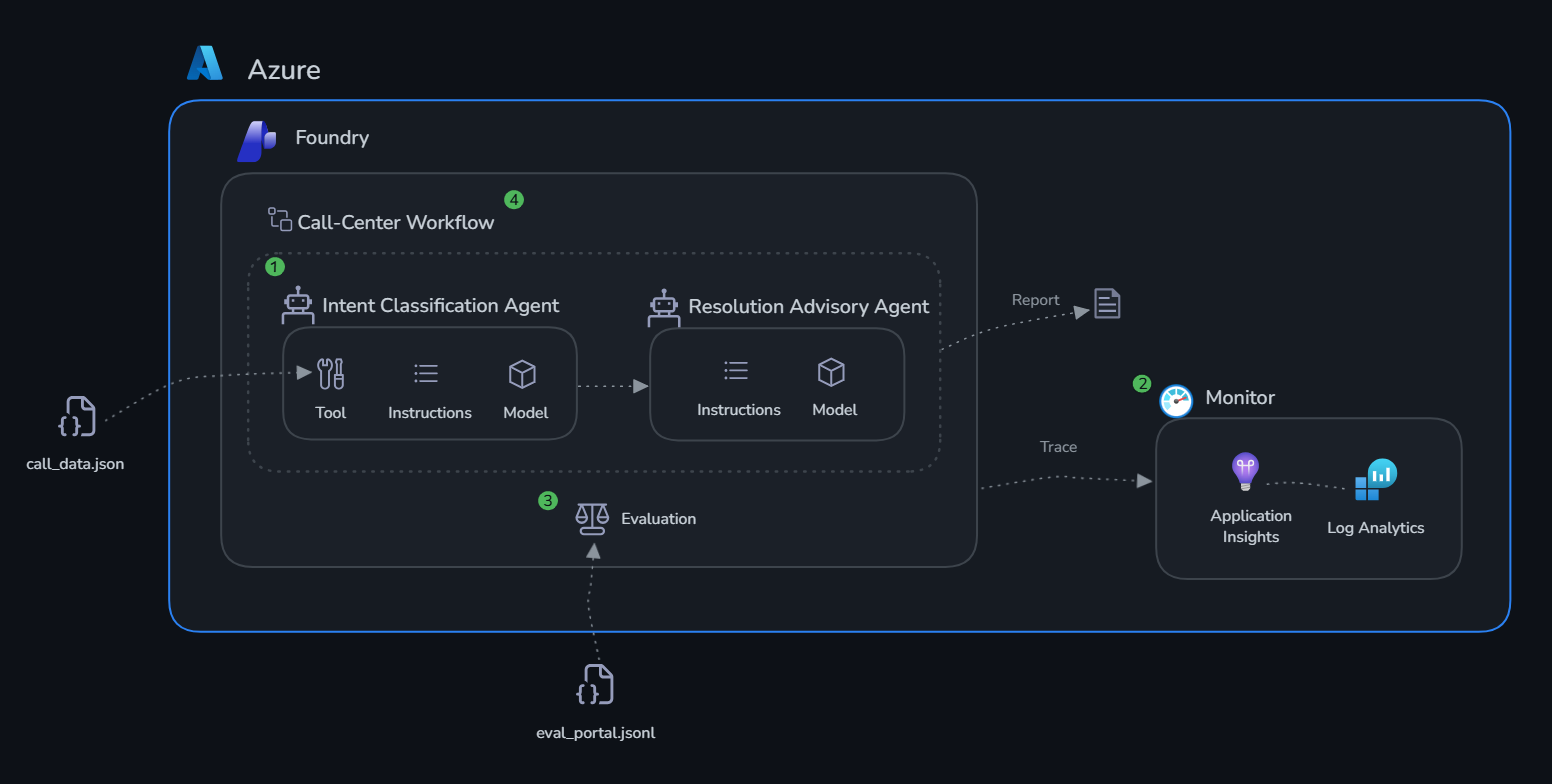
Build first. Intent classification only works if the agent has sharp instructions and real account context. An agent that can't tell a cancellation risk from a billing dispute will route calls wrong — sending retention offers to customers who just have a billing question, and putting high-value accounts in the wrong queue. The lookup_customer tool gives the Intent Agent actual account data: tier, tenure, open cases. Without it, the agent is guessing.
Then monitor. A call triage system runs all day across hundreds of calls. Application Insights traces let you see what the agent actually did for each one — whether it called lookup_customer, how long it took, and exactly what it recommended. When a supervisor says "the system gave wrong advice on CALL-007," traces are how you find out why.
Then evaluate. The test dataset has known right answers. Running the agents against it — before and after every change — gives you a score that tells you whether classification is improving or quietly degrading. A prompt tweak that looks fine on five spot-checked responses can still break precision on edge cases you didn't happen to check.
Then deploy. The portal workflow produces the shift report supervisors can actually act on: prioritized queue, recommended actions, customer context, full trace history. That's the gap between a Python script you run manually and something the operations team trusts at the start of every shift.
Architecture
Next Steps
Completing these challenges gives you a working multi-agent system with observability and evaluation in place. Here are the directions you can take it further:
Deploy as a hosted agent endpoint Microsoft Foundry can host your agents as persistent, scalable API endpoints — no infrastructure to manage. Once hosted, your telephony platform (Twilio, Genesys, Azure Communication Services) can push live call transcripts directly to the Intent Classification Agent and receive triage decisions in real time, replacing manual queue review.
Add more tools to your agents
The lookup_customer function in this lab uses local mock data. In production you’d replace it with tools that call real systems:
- A fetch_crm_history tool querying Salesforce or Dynamics 365 for the customer’s full interaction history
- A check_active_offers tool pulling current retention promotions and eligibility rules from a pricing API
- A create_case tool that automatically opens a CRM ticket and assigns it to the right queue based on the Resolution Advisor’s recommendation
Build a knowledge base Upload NovaTel’s customer service policy manual, resolution scripts, and product documentation to a Microsoft Foundry knowledge base. Attach it to the Resolution Advisor Agent as a File Search tool so its scripts are grounded in the actual approved playbook — not a hallucinated version of it.
Integrate evaluations into CI/CD Run your evaluation dataset automatically on every pull request or deployment. If the coherence or relevance score drops below a threshold (e.g. 3.5 out of 5), block the release. This prevents a system prompt edit or model update from silently degrading classification accuracy during peak call hours.
Explore advanced agent patterns - Parallelise intent classification across all 7 calls simultaneously instead of sequentially - Add confidence thresholds — if the Intent Agent is uncertain between cancellation and billing, flag the call for human review rather than auto-assigning - Human-in-the-loop — for CALL-007 (security incidents), always escalate to a human supervisor regardless of the agent’s confidence level
Fine-tune for your domain Use your evaluation results to identify systematic errors — intent types the agent consistently confuses or customer segments it handles poorly. Use those cases to refine system prompts, add targeted few-shot examples, or fine-tune the underlying model on NovaTel call transcripts.