🏭 Scenario: Predictive Maintenance — TireForge Industries
Background
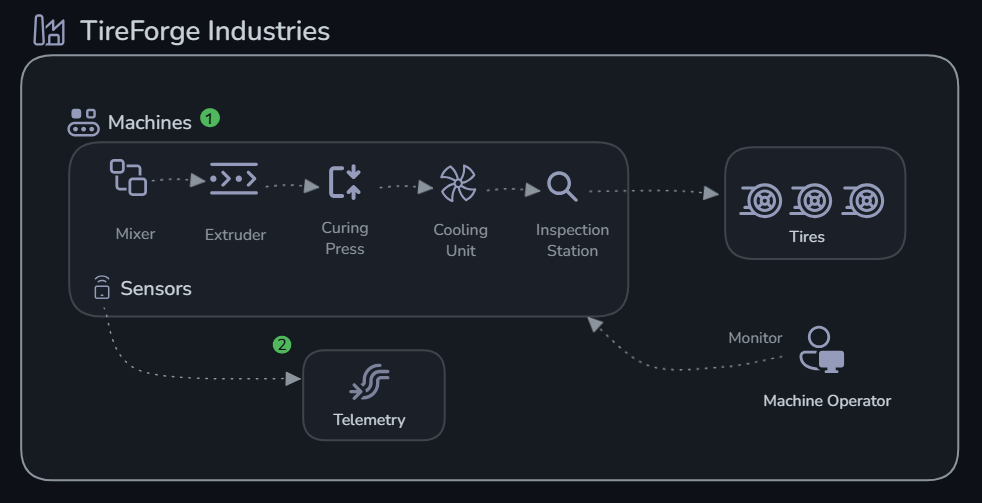
TireForge Industries operates a tire manufacturing plant with 5 critical machines:
- MX-001 (Mixer) — Blends raw rubber compounds
- EX-002 (Extruder) — Shapes rubber into tire tread profiles
- CP-003 (Curing Press) — Vulcanizes tires under heat and pressure
- CU-004 (Cooling Unit) — Gradually cools cured tires
- IS-005 (Inspection Station) — Quality assurance via vibration analysis
Each machine emits real-time sensor data: temperature, pressure, vibration, and RPM.
Your Mission
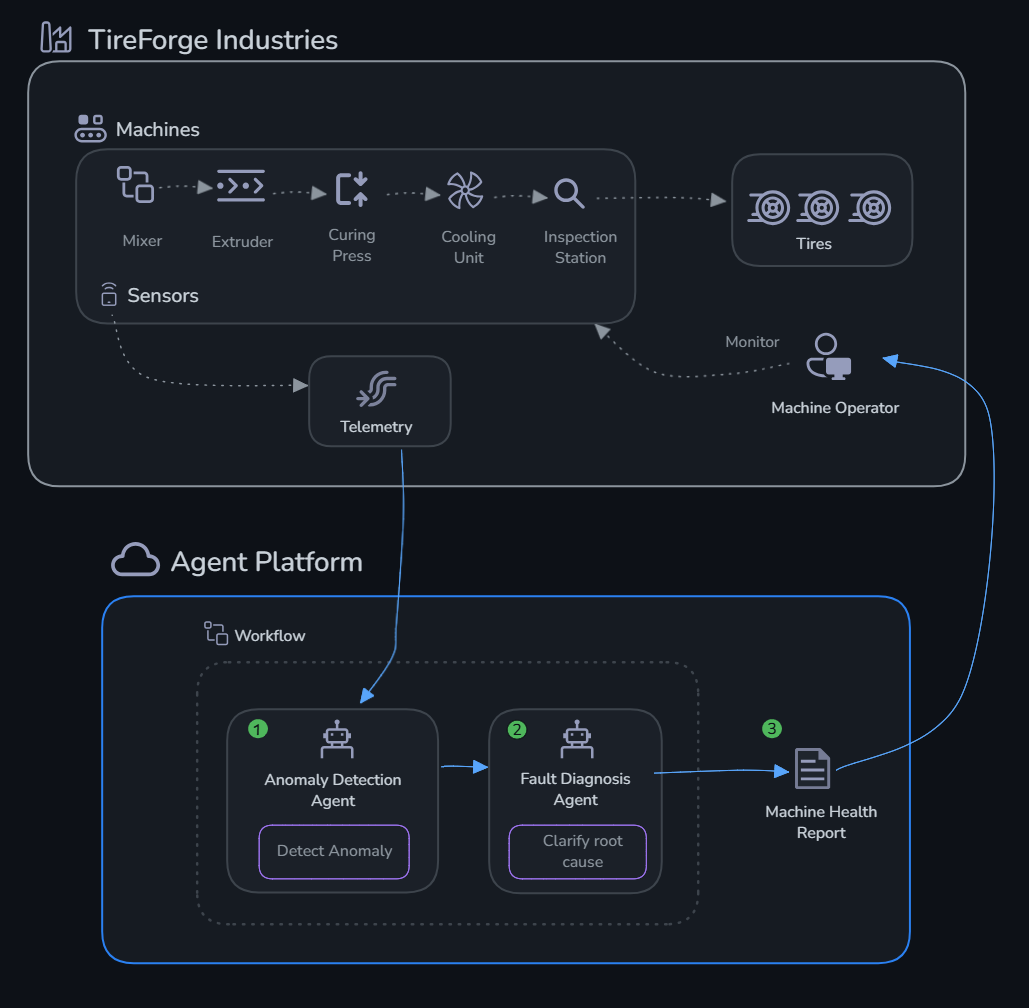
Build an AI agent system that:
- Detects anomalies — Compares sensor readings against thresholds
- Diagnoses faults — Reasons about root causes from anomaly patterns
- Reports health — Produces a consolidated factory health report
Challenges
| # | Challenge | What You'll Do | Time |
|---|---|---|---|
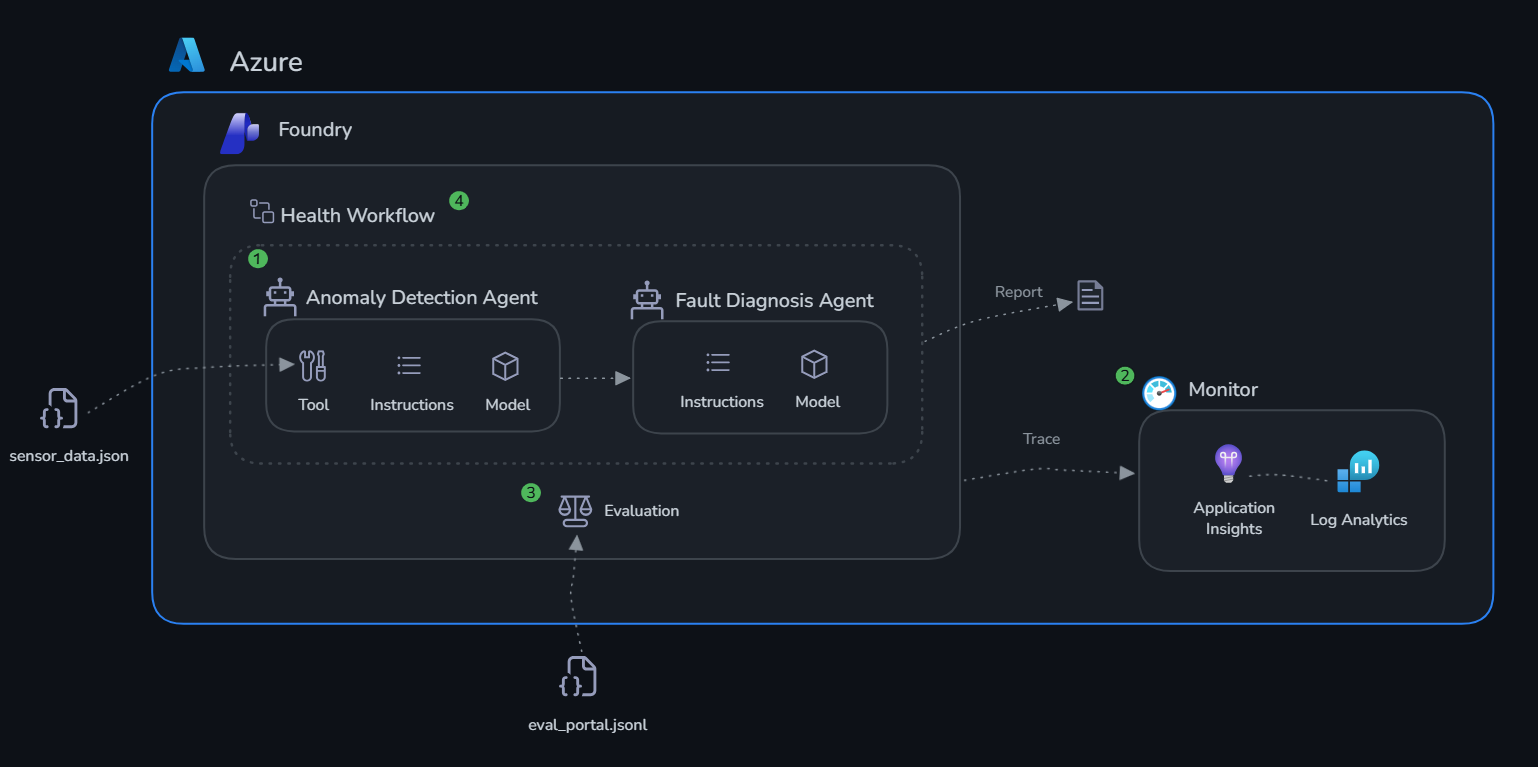
| 0 | Setup | Deploy Microsoft Foundry infrastructure | 20 min |
| 1 | Build Agents | Create Anomaly Detection + Fault Diagnosis agents | 30 min |
| 2 | Monitor | Enable GenAI tracing with Application Insights | 20 min |
| 3 | Evaluate | Run systematic quality evaluations | 30 min |
| 4 | Production Workflow | Multi-agent orchestration + portal workflow | 20 min |
Why the Challenges Are in This Order
Build first. An agent with a vague system prompt or missing tools will hallucinate plausible-sounding diagnoses. For a tire manufacturing plant, that's not an academic problem — it means maintenance crews chasing phantom faults, or missing real ones until a machine fails mid-shift. The check_thresholds tool grounds the Anomaly Agent in actual machine specs, not general LLM knowledge about what "normal" vibration looks like for an extruder.
Then monitor. When the Fault Diagnosis Agent recommends pulling CP-003 offline, did it actually examine the sensor readings you fed it? Did check_thresholds get called, or did the agent reason from context alone? Application Insights traces answer that. Without them, the only signal you have is a machine failure that should have been caught earlier.
Then evaluate. Tracing tells you the agent ran. Evaluation tells you it ran correctly. The curated test dataset gives you a repeatable score to compare before and after any prompt change or model swap — so you catch regressions before they reach the production floor.
Then deploy. The portal workflow turns what you built in scripts into something the maintenance team can actually hand off: a stable endpoint, a per-shift factory health report, and a trace history for every diagnosis. That's the gap between a demo and a tool someone will actually trust before scheduling an unplanned maintenance window.
Architecture
Next Steps
Completing these challenges gives you a working multi-agent system with observability and evaluation in place. Here are the directions you can take it further:
Deploy as a hosted agent endpoint Microsoft Foundry can host your agents as persistent, scalable API endpoints — no infrastructure to manage. Once hosted, any system (a SCADA dashboard, a mobile maintenance app, a Slack bot) can send a machine ID and receive a diagnosis in real time, rather than running a Python script manually.
Add more tools to your agents
The check_thresholds function in this lab uses local mock data. In production you’d replace it with tools that call real systems:
- A fetch_maintenance_history tool querying your CMMS (e.g. SAP PM, IBM Maximo) for past failures on that machine
- A lookup_spare_parts tool checking inventory availability before recommending a replacement
- A create_work_order tool that automatically opens a ServiceNow ticket when the Fault Diagnosis Agent flags a critical issue
Build a knowledge base Upload TireForge’s machine manuals, supplier spec sheets, and historical incident reports to a Microsoft Foundry knowledge base. Attach it to the Fault Diagnosis Agent as a File Search tool so its recommendations are grounded in documented procedures rather than general LLM knowledge.
Integrate evaluations into CI/CD Run your evaluation dataset automatically on every pull request or deployment. If the coherence or relevance score drops below a threshold (e.g. 3.5 out of 5), block the release. This prevents a system prompt edit or model update from silently degrading diagnosis quality in production.
Explore advanced agent patterns - Parallelise the anomaly checks across all 5 machines simultaneously instead of sequentially - Add confidence thresholds — if the Anomaly Detection Agent is uncertain, escalate to a human operator rather than passing to Fault Diagnosis automatically - Human-in-the-loop — for critical faults, require a maintenance engineer to approve the recommended action before it triggers a work order
Fine-tune for your domain Use your evaluation results to identify systematic errors — machines the agent consistently misclassifies or fault types it handles poorly. Use those cases to refine system prompts, add targeted few-shot examples, or fine-tune the underlying model on TireForge-specific sensor patterns.