Challenge 1: Build Agents
Time: ~30 minutes
Objectives
By the end of this challenge, you will have:
- ✅ An Anomaly Detection Agent that monitors sensor data and flags abnormal readings
- ✅ A Fault Diagnosis Agent that analyzes flagged anomalies and recommends maintenance actions
- ✅ Both agents tested against real sensor data from the factory floor
Context
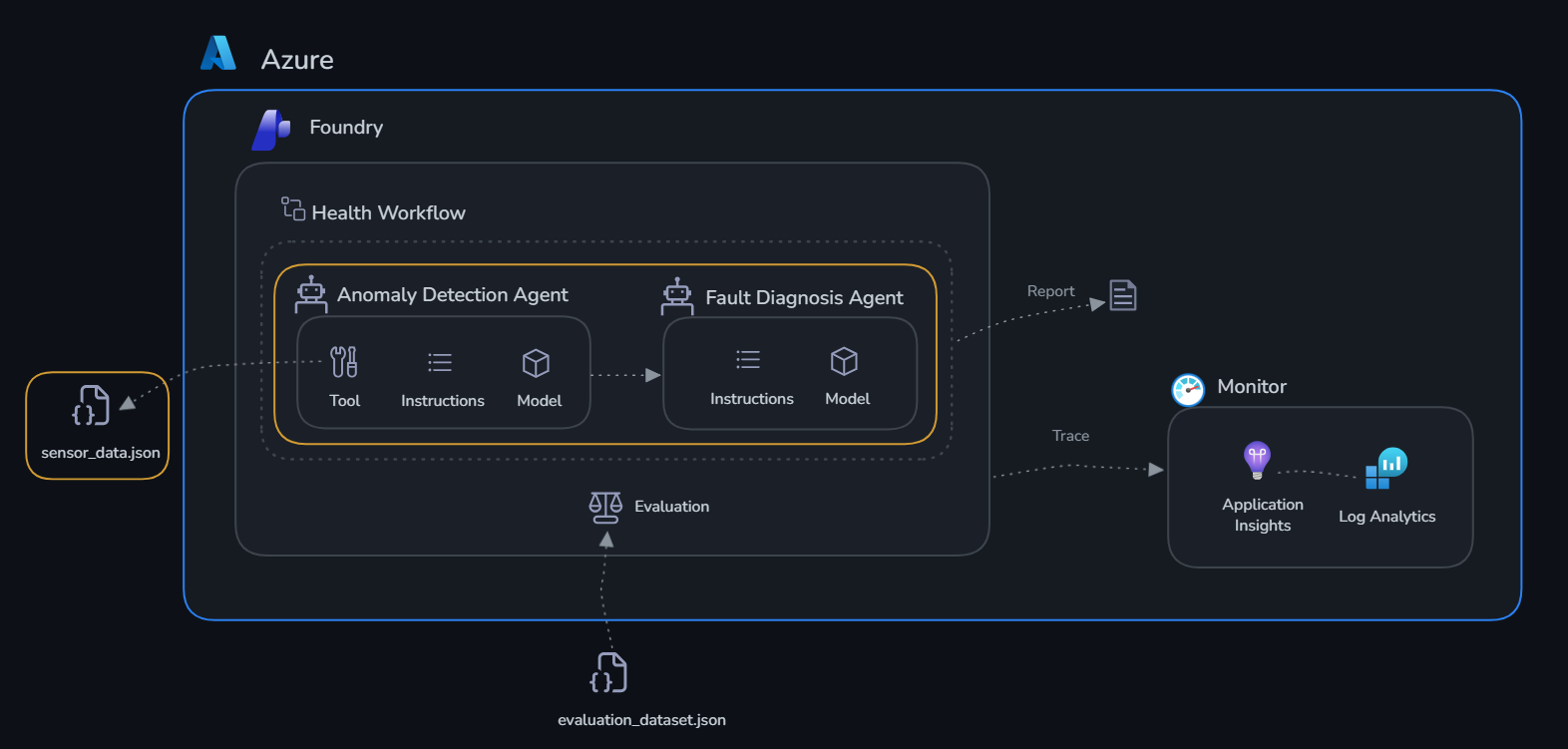
TireForge Industries has 5 machines on the production floor. Each machine emits sensor data including temperature, pressure, vibration, and RPM. Your agents need to:
- Anomaly Detection: Compare current readings against known thresholds and flag machines that are out of spec
- Fault Diagnosis: Given an anomaly, reason about what might be wrong and recommend an action
Check out sensor_data.json to see the current state of all machines.
Portal or SDK?
Microsoft Foundry gives you two ways to build agents. The Foundry portal (ai.azure.com/nextgen) provides a visual, no-code interface where you can create agents, attach tools, and test them interactively in a playground — great for exploration and rapid prototyping. The Azure AI Agents SDK gives you full programmatic control: you define agent behavior, tools, and orchestration logic in Python, which makes it easy to version, test, and integrate into automated pipelines.
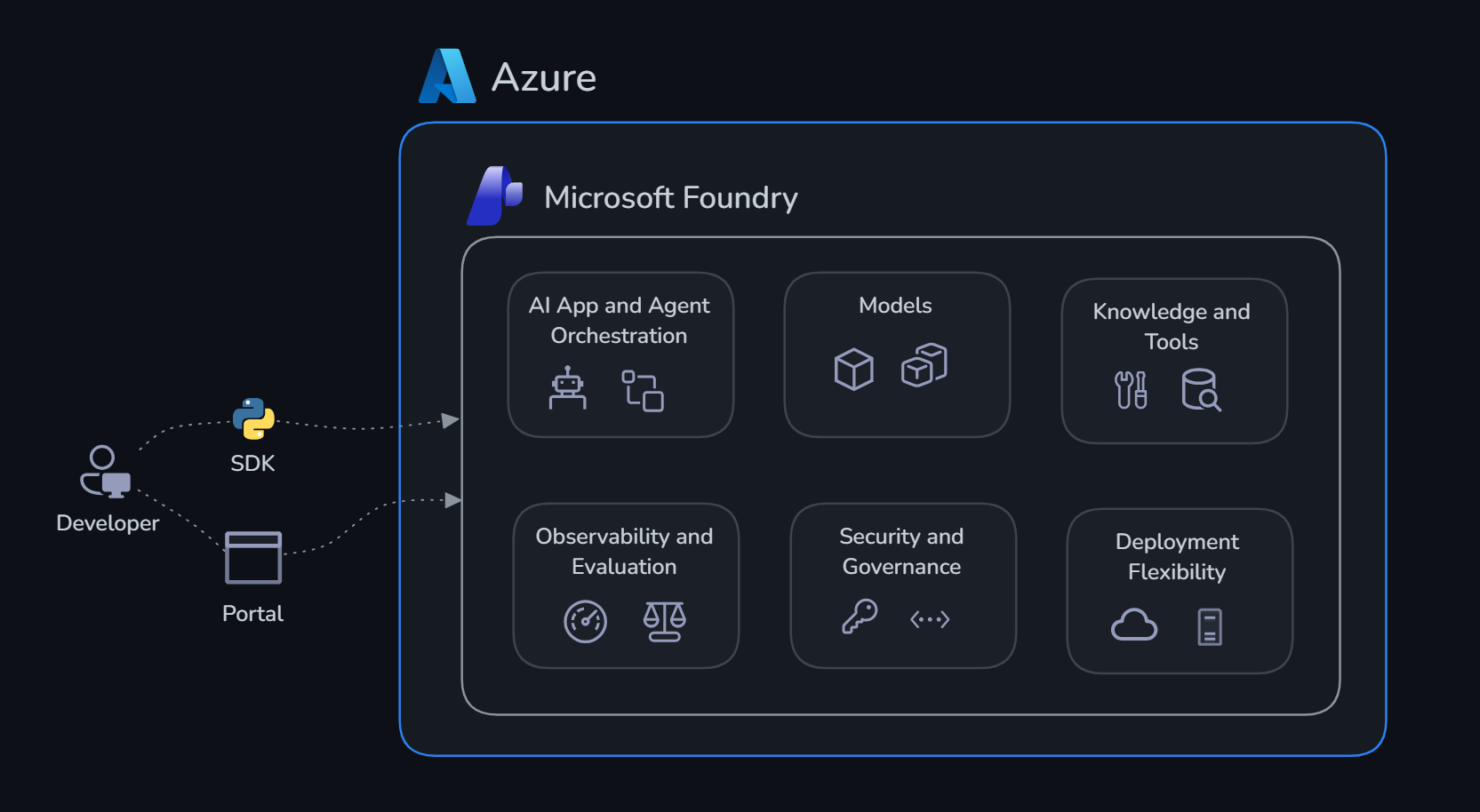
In this challenge we use the SDK. The code in agents.py creates both agents, registers their tools, and runs them against every machine in sensor_data.json — all from the terminal. After the script runs, both agents will also be visible in the portal under Agents, so you can inspect them, tweak their instructions, and test them interactively without touching any code.
Agents and Tools
What is an agent?
An agent in Microsoft Foundry is a persistent, stateful AI assistant backed by a large language model. Unlike a plain API call — where you send a prompt and get a single response — an agent maintains a conversation thread, can invoke tools autonomously, and retains context across multiple turns. You configure it with:
- A name and model (e.g.
gpt-5.4) - A system prompt — instructions that define its role, personality, and constraints
- One or more tools it can call when it needs information or actions beyond its training data
Agents are managed resources in your Foundry project. They persist between runs, appear in the portal under Agents, and can be versioned, shared, and reused.
What are tools?
Tools extend an agent's capabilities beyond pure language generation. When the model decides it needs information it doesn't have in its context window, it emits a tool call — a structured JSON request specifying the tool name and arguments. The SDK intercepts this, runs the corresponding Python function, and feeds the result back to the model. This reasoning loop continues until the agent produces a final response.
From the model's perspective, tools are described by a JSON schema (name, description, parameters). The model reads these descriptions and decides autonomously when and how to call them — you never hard-code the decision logic.
What tools can you add?
| Tool type | What it does | Best for |
|---|---|---|
| Function | Calls a local Python function you define | Any custom logic: database lookups, APIs, calculations |
| Code Interpreter | Lets the agent write and execute Python in a sandbox | Data analysis, chart generation, file processing |
| File Search | Semantic search over a Microsoft Foundry knowledge base | Policy docs, manuals, historical records |
| Bing Search | Live web search | Real-time information, news |
| Azure AI Search | Queries an Azure Search index | Grounded retrieval over your own data at scale |
Vector databases and Microsoft Foundry knowledge bases
When your agent needs to answer questions grounded in a large body of documents — policy manuals, product specs, historical records — you need a vector database. Unlike keyword search, a vector database converts text into numerical embeddings and finds semantically similar passages at query time. This lets the agent ask a natural-language question and retrieve the right content even when the exact words don’t appear in the query.
Microsoft Foundry includes a built-in knowledge base backed by a vector store. You upload documents (PDFs, Word files, plain text) and the service automatically chunks, embeds, and indexes them. When you attach this knowledge base to an agent as a File Search tool, the agent queries it at inference time — pulling relevant passages into its context before generating a response, so its answers are grounded in your actual documents rather than model training data alone.
For TireForge Industries, useful knowledge bases would include:
- Machine maintenance manuals — repair procedures, lubrication schedules, torque specs, and replacement part numbers for each machine
- Historical incident reports — past failures, their root causes, and the corrective actions that resolved them
- Supplier specification sheets — acceptable operating tolerances, warranty conditions, and recommended sensor thresholds per machine model
With this in place, the Fault Diagnosis Agent could query “what are the known failure modes of the CP-003 curing press when vibration exceeds 9.0 mm/s?” and retrieve relevant maintenance history — grounding its recommendation in documented precedent rather than general LLM knowledge.
In this challenge the agents use function tools. The Anomaly Detection Agent uses check_thresholds to look up the acceptable operating ranges for each machine and compare them against live sensor readings. Without this tool, the agent would have to reason from memory alone — with it, every threshold check is grounded in actual machine spec data.
Get Started
Open agents.py and review the implementation of both agents.
As the script runs, watch the terminal closely — you'll see each agent being created, then each machine from sensor_data.json being sent through the Anomaly Detection Agent first, and its output handed off to the Fault Diagnosis Agent. You'll see the raw agent responses printed for every machine, giving you a live view of how the two agents collaborate. Once it completes, head to the Microsoft Foundry portal, open your project, and navigate to Agents in the left sidebar — hit Refresh if the agents don't appear immediately, as it can take a few seconds for newly created agents to show up in the portal.
Success Criteria
- [ ] Anomaly Detection Agent correctly identifies the 2 warning + 1 critical machine
- [ ] Fault Diagnosis Agent provides reasonable maintenance recommendations
- [ ] Both agents respond coherently when given a machine's sensor readings