📋 Scenario: AI Agents for Insurance Claims Processing
Scenario
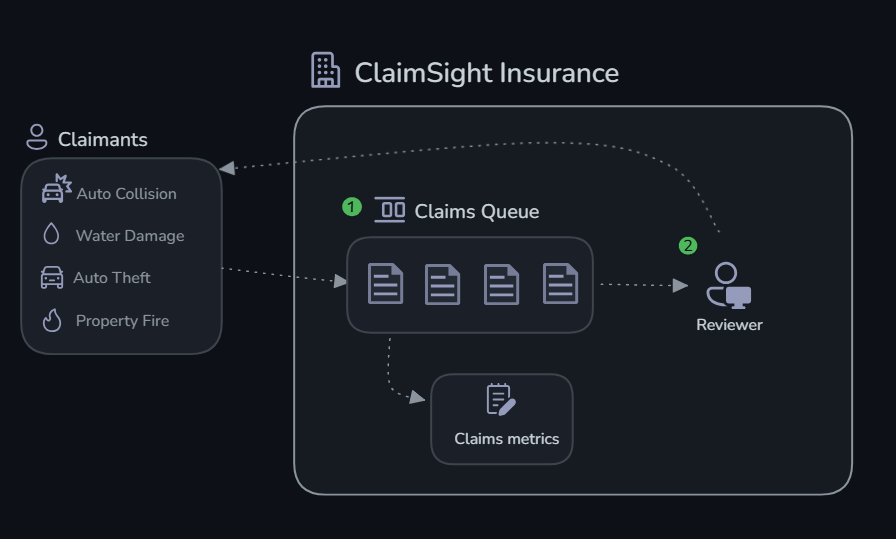
You work at ClaimSight Insurance, a property and auto insurance company that processes hundreds of claims daily. Each claim has associated metrics: document completeness, damage-vs-estimate consistency, fraud risk scoring, and policy coverage matching. Lately, fraudulent claims and processing delays have been costing the company millions.
Your mission: Build AI agents using Microsoft Foundry that can triage incoming claims and make intelligent processing decisions — flagging suspicious claims for investigation while fast-tracking legitimate ones.
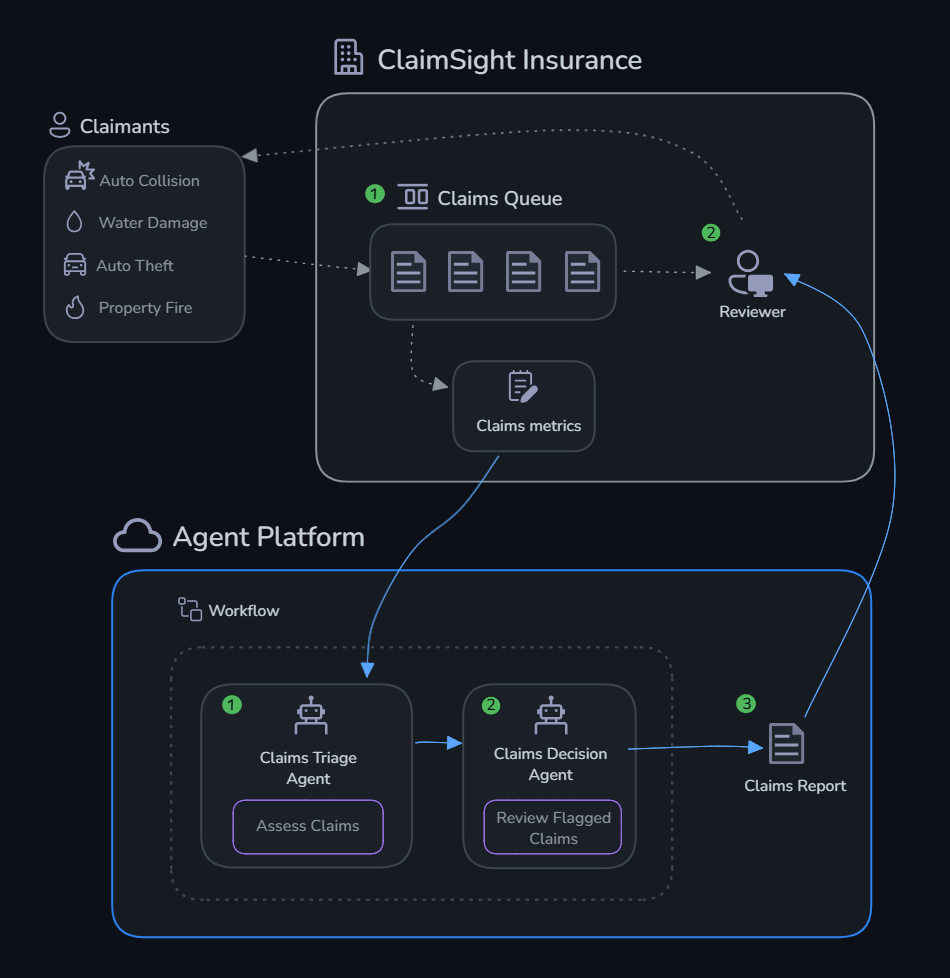
You'll build two agents:
- Claims Triage Agent — Assesses claim metrics against acceptable thresholds and flags anomalies
- Claims Decision Agent — Takes flagged claims and recommends actions (approve, investigate, request documents, deny)
The Claims
| Claim | Type | Claimant | Status |
|---|---|---|---|
| CLM-001 | Auto Collision | Maria Torres | 🔴 Critical |
| CLM-002 | Property Water Damage | James Chen | ✅ Normal |
| CLM-003 | Auto Theft | Robert Kim | ⚠️ Warning |
| CLM-004 | Property Fire | Sarah Williams | ✅ Normal |
| CLM-005 | Auto Collision | David Okafor | ⚠️ Warning |
Prerequisites
- Azure subscription with Contributor access
- Python 3.10+ installed locally
- Azure CLI (
az) installed and logged in (az login) - A terminal (bash, PowerShell, or WSL)
- ~20 minutes for infrastructure provisioning (run
challenge-0-setup/deploy.shfrom the repo root first!)
Structure
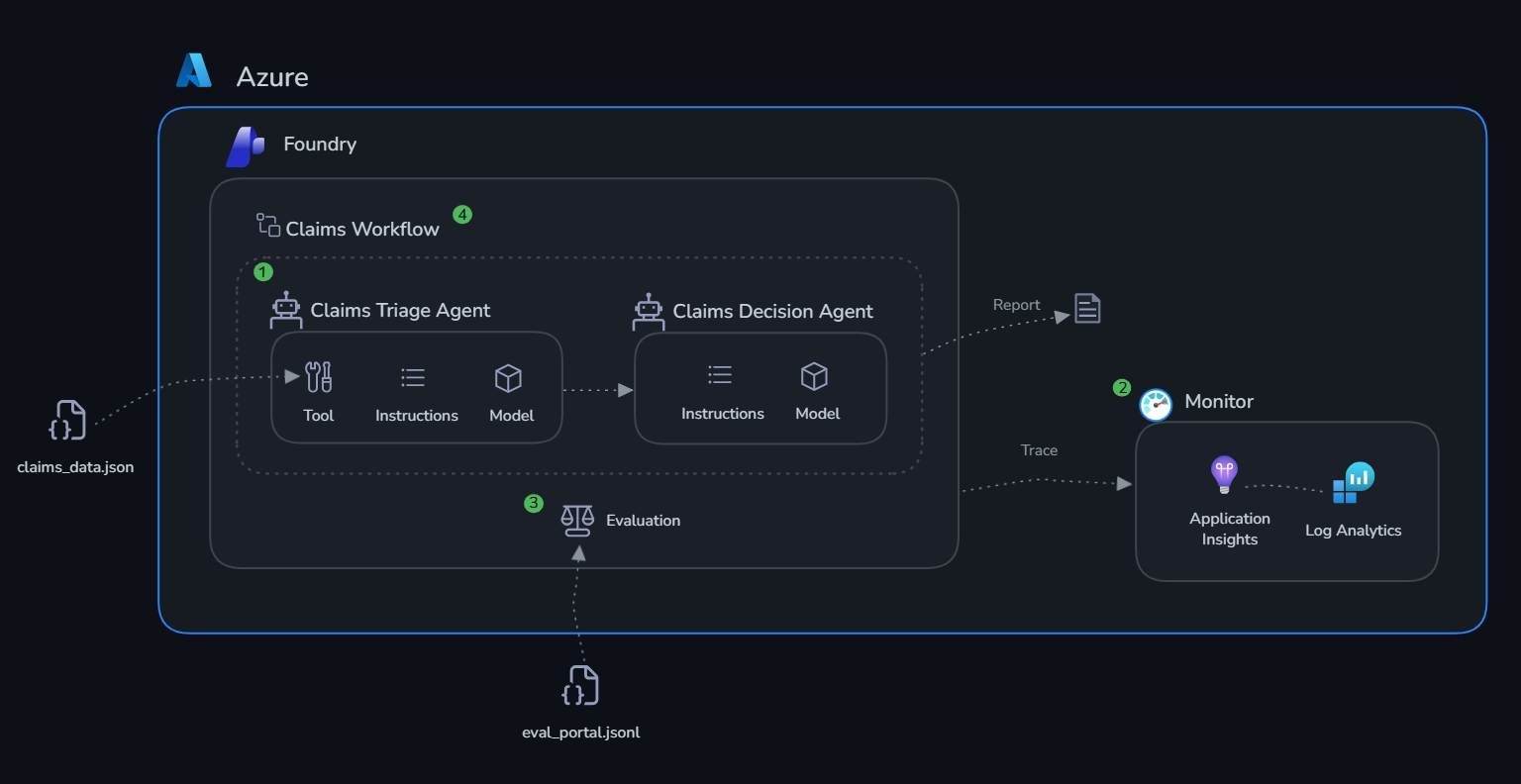
All challenges are Python SDK-based. Challenge 4 also walks you through the Foundry portal to build and test the multi-agent workflow visually.
Challenges
| # | Challenge | Duration | What You'll Do |
|---|---|---|---|
| 0 | Setup | 20 min | Provision resources, verify auth |
| 1 | Build Agents | 30 min | Create claims triage & decision agents |
| 2 | Monitor | 20 min | Enable tracing, explore App Insights |
| 3 | Evaluate | 30 min | Run evaluations, interpret quality metrics |
| 4 | Workflow | 20 min | Build a multi-agent workflow: triage → decision → claims report |
Why the Challenges Are in This Order
Build first. Without precise instructions and real claim data, the agents can't make useful decisions. The Claims Triage Agent without assess_claim is pattern-matching on claim descriptions — it has no way to check actual fraud scores, document completeness ratios, or damage-estimate variance. Ambiguous system prompts mean inconsistent decisions: the same risk profile might get approved one day and flagged the next.
Then monitor. Every decision the Claims Decision Agent makes needs to be traceable. For insurance claims, that's not optional — it's a business and regulatory requirement. Application Insights traces give you a complete record: what data the agent received, which tools it called, and exactly what it recommended. When an auditor asks why CLM-003 was sent for investigation, that trace is your answer.
Then evaluate. Two claims with the same fraud score and document completeness should get the same recommendation. Evaluation gives you a repeatable way to check that they do — and catches it when a prompt update breaks that consistency before it affects real claims.
Then deploy. The portal workflow connects triage to decision, processes a full claims batch, and produces a report that compliance teams can sign off on. That's the difference between a demo and something you'd put in front of an actual adjuster.
Architecture
Next Steps
Completing these challenges gives you a working multi-agent system with observability and evaluation in place. Here are the directions you can take it further:
Deploy as a hosted agent endpoint Microsoft Foundry can host your agents as persistent, scalable API endpoints — no infrastructure to manage. Once hosted, your claims intake system can submit new claims directly to the Triage Agent and receive a structured decision (approve / investigate / request documents / deny) without any manual triage step.
Add more tools to your agents
The assess_claim function in this lab uses local mock data. In production you'd replace it with tools that call real systems:
- A fetch_policy tool querying your policy management system for the exact coverage terms, exclusions, and limits applicable to a specific claim
- A check_fraud_database tool querying a fraud intelligence service for known patterns matching the claimant's history
- A request_documents tool that automatically triggers a document request workflow in your DMS when the agent recommends it
Build a knowledge base Upload ClaimSight's insurance policy documents, regulatory compliance guidelines, and fraud pattern library to a Microsoft Foundry knowledge base. Attach it to the Claims Decision Agent as a File Search tool so its recommendations cite actual policy language — producing decisions that are auditable and defensible to regulators.
Integrate evaluations into CI/CD Run your evaluation dataset automatically on every pull request or deployment. If the coherence or relevance score drops below a threshold (e.g. 3.5 out of 5), block the release. In a regulated industry, this isn't just good practice — it's the kind of quality gate that compliance and audit teams expect to see documented.
Explore advanced agent patterns - Parallelise triage across all incoming claims simultaneously instead of sequentially - Add confidence thresholds — if the Triage Agent's fraud risk assessment falls in an ambiguous range, route to a senior adjuster rather than passing to the Decision Agent automatically - Human-in-the-loop — for high-value claims (above a configurable threshold), always require human adjuster sign-off before the Decision Agent's recommendation is acted on
Fine-tune for your domain Use your evaluation results to identify systematic errors — claim types the agent consistently misjudges or fraud indicators it underweights. Use those cases to refine system prompts, add targeted few-shot examples, or fine-tune the underlying model on ClaimSight's historical claim decisions.