Task 01: Manage compute at the hub level
Introduction
To ensure smooth execution of AI workflows, Adatum must provision appropriate compute resources. Managing compute at the hub level allows for efficient processing of AI models and prompt flows, supporting the company’s AI-driven chatbot and customer interaction initiatives.
Description
In this task, you’ll create a compute instance to use in running prompt flows. This ensures the necessary processing power is available to execute AI workloads effectively.
Success Criteria
- The compute instance has been created and is running.
Learning Resources
Key Tasks
01: Create the compute instance resource in hub
Expand this section to view the solution
-
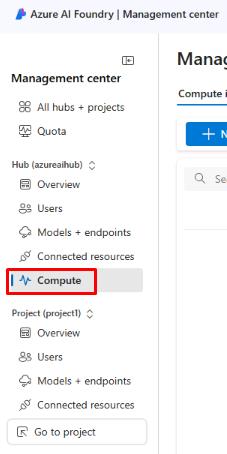
From the Azure AI Foundry Management center, select Compute under the Hub section from the left menu.
-
From the Manage compute resources in this hub page, select + New.
A compute instance is a virtual machine that is used to run prompt flows within projects. It’s created at the hub level and accessible by any projects with proper permissions.
-
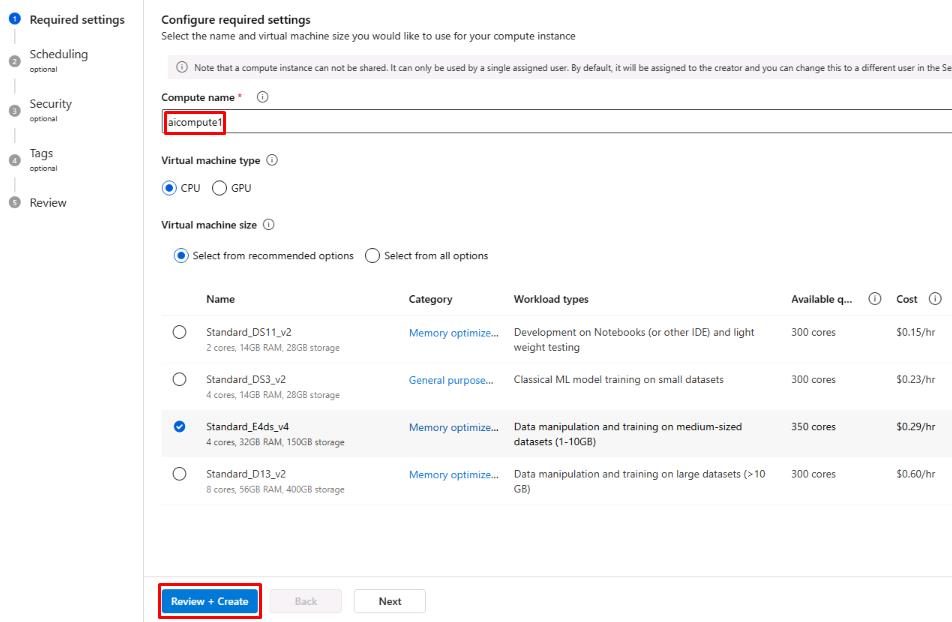
Name the compute instance aicompute1, leave the other settings as default, then select Review + Create.
-
Once the compute instance is created, it should show a status of Running.
The compute instance can be used for various different tasks such as creating an index, building an open source model, or executing complex prompt flows. While you won’t need to use the compute instance in this lab, this is how one would be created for any of those use cases.
You’ve successfully completed this task.