Build an agent in Teams
In .NET, use SDK 2.1 for AI integrations. Keep Microsoft.Teams.Apps focused on Teams activity routing/streaming, and compose AI behavior with external agent/model tooling.
This guide walks through building a Teams agent with the Microsoft.Extensions.AI abstractions against Azure OpenAI. The Teams SDK handles activity routing, streaming, and Teams-native affordances like Adaptive Cards and feedback controls, while IChatClient and tools provide the model and agent loop.
In a Teams app, IChatClient runs the agent loop, including model calls, tool invocations, and conversation history, while the Teams SDK handles activity routing, streaming, and Teams-native affordances like Adaptive Cards and feedback controls.
The pattern is based on core/samples/ExtAIBot.
Defining the agent
An agent is composed of three core elements: a client (model backend), instructions (system prompt), and tools (capabilities beyond text generation). A minimal setup starts with just a chat-enabled agent:
Register the Teams application, chat client, and agent services with ASP.NET Core dependency injection:
WebApplicationBuilder builder = WebApplication.CreateSlimBuilder(args);
builder.Services.AddTeamsBotApplication<ExtAIBotApp>();

builder.Services.AddSingleton<IChatClient>(sp =>
{
    IConfiguration config = sp.GetRequiredService<IConfiguration>();
    string endpoint = config["AzureOpenAI:Endpoint"] ?? throw new InvalidOperationException("AzureOpenAI:Endpoint is required.");
    string apiKey = config["AzureOpenAI:ApiKey"] ?? throw new InvalidOperationException("AzureOpenAI:ApiKey is required.");
    string deployment = config["AzureOpenAI:Deployment"] ?? throw new InvalidOperationException("AzureOpenAI:Deployment is required.");

    return new AzureOpenAIClient(new Uri(endpoint), new ApiKeyCredential(apiKey))
        .GetChatClient(deployment)
        .AsIChatClient()
        .AsBuilder()
        .UseFunctionInvocation()
        .Build();
});

builder.Services.AddSingleton<Agent>();

private const string SystemPrompt = """
    You are a Teams docs assistant that can search Microsoft Learn (Teams, .NET, Microsoft Graph, Azure)
    and explain bot concepts (streaming, Adaptive Cards, citations, feedback).

    When you use information from a search tool, cite your sources inline using the "citation" value \
    provided in each result (e.g. [1], [2]).
    Do not add a references or sources list at the end of your response — citations are displayed separately in the UI.
    """;

public Agent(IChatClient chatClient, ILogger<Agent> logger)
{
    _chatClient = chatClient;
    _logger = logger;
}
Adding a local tool
Tools extend the agent with executable capabilities. They are regular functions the model can decide to invoke. Anything that runs in your process — database lookups, business logic, or Teams-specific actions like attaching an Adaptive Card to the reply — belongs here.
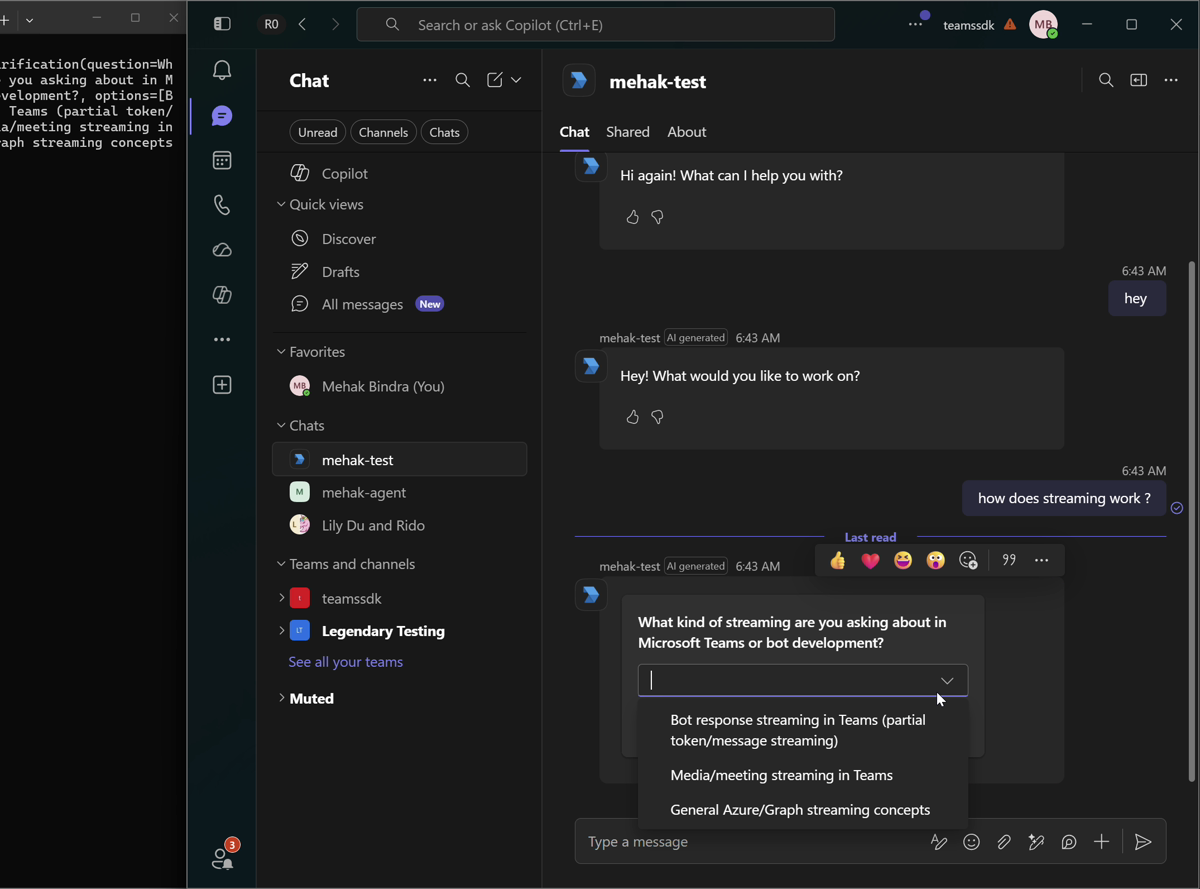
A good example is clarification: when a request is ambiguous, the agent asks the user to pick between interpretations instead of guessing. The tool builds an Adaptive Card and stashes it in a per-turn bucket the handler inspects after the run completes; the user's choice comes back as the next turn.
Tools are declared as AIFunctions with AIFunctionFactory.Create. The function name, description, parameter annotations, and return value tell the model when and how to call the tool.
// Provides local AIFunction definitions that the model can call during a turn.
internal static class LocalTools
{
    // Returns a fresh AIFunction each turn; pendingCards is a per-turn accumulator
    // captured by closure.

    private static readonly JsonSerializerOptions SerializerOptions = new()
    {
        DefaultIgnoreCondition = JsonIgnoreCondition.WhenWritingNull
    };
    public static AIFunction CreateClarificationCardTool(IList<object> pendingCards, ILogger logger) =>
        AIFunctionFactory.Create(
            ([Description("The clarification question to ask the user.")] string question,
             [Description("2–4 candidate interpretations the user can pick between.")] string[] options) =>
            {
                logger.LogInformation("[tool] request_clarification(question={Question}, options=[{Options}])",
                    question, string.Join(", ", options));
                pendingCards.Add(BuildClarificationCard(question, options));
                return "Clarification card attached.";
            },
            "request_clarification",
            "Show an Adaptive Card asking the user to clarify their request when needed. " +
            "The user picks one option and submits; their choice arrives as the next user turn.");

    private static JsonElement BuildClarificationCard(string question, string[] options)
    {
        AdaptiveCard card = new AdaptiveCard(
            new TextBlock(question)
                .WithSize(TextSize.Medium)
                .WithWeight(TextWeight.Bolder)
                .WithWrap(true),
            new ChoiceSetInput([.. options.Select(o => new Choice { Title = o, Value = o })])
                .WithId("clarificationChoice")
                .WithIsRequired(true)
                .WithErrorMessage("Please pick one option."))
            .WithVersion(Microsoft.Teams.Cards.Version.Version1_6)
            .WithActions(
                new ExecuteAction()
                    .WithTitle("Submit")
                    .WithVerb("clarification")
                    .WithAssociatedInputs(AssociatedInputs.Auto));

        return JsonSerializer.SerializeToElement(card, SerializerOptions);
    }
}
See clarification cards for how the user's choice flows back in.
Adding remote MCP tools
Remote tools are exposed via MCP servers and live behind a network boundary. The agent discovers their schemas at runtime and invokes them over HTTP. From the model's perspective, they behave like any other tool.
Remote tools are declared using MCP client wrappers and passed to the agent alongside local tools. The MCP client discovers the server's tool schemas and invokes those tools over HTTP.
// Owns the McpClient lifetime, lists tools at startup, and returns them wrapped
// with citation extraction so search results populate the CitationCollector.
internal sealed class McpToolSet : IAsyncDisposable
{
    private readonly McpClient _client;
    private readonly IList<McpClientTool> _tools;
    private readonly ILogger<McpToolSet> _logger;

    private McpToolSet(McpClient client, IList<McpClientTool> tools, ILogger<McpToolSet> logger)
    {
        _client = client;
        _tools = tools;
        _logger = logger;
    }

    public static async Task<McpToolSet> CreateAsync(ILogger<McpToolSet> logger, CancellationToken cancellationToken = default)
    {
        McpClient client = await McpClient.CreateAsync(
            new HttpClientTransport(new HttpClientTransportOptions
            {
                Endpoint = new Uri("https://learn.microsoft.com/api/mcp"),
                Name = "MSLearn",
                TransportMode = HttpTransportMode.StreamableHttp
            }),
            cancellationToken: cancellationToken);

        IList<McpClientTool> tools =
            await client.ListToolsAsync(cancellationToken: cancellationToken);

        return new McpToolSet(client, tools, logger);
    }

    // Returns each MCP tool wrapped so its results feed into the CitationCollector.
    public IList<AITool> GetTools(CitationCollector citations) =>
        [.. _tools.Select(t => new CitationCapturingTool(t, citations, _logger))];

    public ValueTask DisposeAsync() => _client.DisposeAsync();
}

internal sealed class McpToolSetLifetimeService(ILogger<McpToolSet> logger) : IHostedService
{
    private McpToolSet? _value;

    public McpToolSet Value => _value ?? throw new InvalidOperationException("MCP tool set is not initialized.");

    public async Task StartAsync(CancellationToken cancellationToken)
    {
        _value = await McpToolSet.CreateAsync(logger, cancellationToken);
    }

    public async Task StopAsync(CancellationToken cancellationToken)
    {
        if (_value is null) return;

        await _value.DisposeAsync();
        _value = null;
    }
}
builder.Services.AddSingleton<McpToolSetLifetimeService>();
builder.Services.AddHostedService(sp => sp.GetRequiredService<McpToolSetLifetimeService>());

public Agent(IChatClient chatClient, McpToolSetLifetimeService mcpTools, ILogger<Agent> logger)
{
    _chatClient = chatClient;
    _mcpTools = mcpTools;
    _logger = logger;
}
Running the agent in Teams
Integrate with Teams by forwarding incoming messages to the agent and streaming the response back to the chat interface chunk by chunk.
public async Task<RunResult> RunAsync(
    string userText,
    TeamsStreamingWriter writer,
    CancellationToken cancellationToken)
{
    try
    {
        McpToolSet mcpTools = _mcpTools.Value;
        ChatOptions options = new()
        {
            Tools =
            [
                LocalTools.CreateClarificationCardTool(pendingCards, _logger),
                .. mcpTools.GetTools(citations)
            ]
        };
        await writer.SendInformativeUpdateAsync("Thinking…", cancellationToken);
        await foreach (ChatResponseUpdate update in
            _chatClient.GetStreamingResponseAsync(new ChatMessage(ChatRole.User, userText), options, cancellationToken))
        {
            if (!string.IsNullOrEmpty(update.Text))
            {
                await writer.AppendResponseAsync(update.Text, cancellationToken);
            }
        }

        await writer.FinalizeResponseAsync();
    }
Per-conversation memory
By default, each run starts with no history — the model only sees the current message. This works for one-shot interactions, but is insufficient for multi-turn conversations where users refer back to earlier context. Keep a per-conversation buffer and reuse it across turns:
private readonly ConcurrentDictionary<string, List<ChatMessage>> _histories = new();
public async Task<RunResult> RunAsync(
    string conversationId,
    string userText,
    TeamsStreamingWriter writer,
    CancellationToken cancellationToken)
{
    List<ChatMessage> history = _histories.GetOrAdd(
        conversationId,
        _ => [new ChatMessage(ChatRole.System, SystemPrompt)]);
    McpToolSet mcpTools = _mcpTools.Value;

    ChatOptions options = new()
    {
        Tools =
        [
            LocalTools.CreateClarificationCardTool(pendingCards, _logger),
            .. mcpTools.GetTools(citations)
        ]
    };

    history.Add(new ChatMessage(ChatRole.User, userText));
    await writer.SendInformativeUpdateAsync("Thinking…", cancellationToken);
    StringBuilder fullText = new();
    await foreach (ChatResponseUpdate update in
        _chatClient.GetStreamingResponseAsync(history, options, cancellationToken))
    {
        if (!string.IsNullOrEmpty(update.Text))
        {
            await writer.AppendResponseAsync(update.Text, cancellationToken);
            fullText.Append(update.Text);
        }
    }
    string fullTextStr = fullText.ToString();
    if (fullTextStr.Length > 0)
        history.Add(new ChatMessage(ChatRole.Assistant, fullTextStr));

    await writer.FinalizeResponseAsync();
}
Each turn acquires a per-conversation lock before mutating history.
In production, push conversation history into Redis, Cosmos DB, or whatever you already use for state.
Grounding responses with citations
When a tool returns search results, you usually want the model to cite its sources. The pattern: intercept each tool result, assign every source a stable 1-based index, and hand that index back to the model so it can reference it inline as [1], [2], and so on. The collected citations are attached to the final reply in Enhancing the Teams Experience.
In Microsoft.Extensions.AI, wrap each MCP tool with a DelegatingAIFunction. Override InvokeCoreAsync, invoke the wrapped tool, then inspect its result to collect citation metadata without coupling citation logic to the agent.
// Wraps an McpClientTool, delegating all metadata to it while intercepting
// InvokeCoreAsync to extract citation data from the raw result string.
file sealed class CitationCapturingTool(McpClientTool inner, CitationCollector citations, ILogger logger)
    : DelegatingAIFunction(inner)
{
    protected override async ValueTask<object?> InvokeCoreAsync(
        AIFunctionArguments arguments,
        CancellationToken cancellationToken)
    {
        logger.LogInformation("[tool] {Name}({Args})",
            inner.Name,
            string.Join(", ", arguments.Select(a => $"{a.Key}={a.Value}")));

        object? result = await inner.InvokeAsync(arguments, cancellationToken);
        if (result?.ToString() is string text)
            citations.TryExtract(text);
        return result;
    }
}

internal sealed class CitationCollector
{
    private readonly ILogger _logger;
    private readonly Dictionary<string, CitationEntry> _citations = [];

    public CitationCollector(ILogger logger)
    {
        _logger = logger;
    }

    public void TryExtract(string result)
    {
        try
        {
            using JsonDocument doc = JsonDocument.Parse(result);
            if (!TryFindResults(doc.RootElement, out JsonElement results)) return;

            foreach (JsonElement item in results.EnumerateArray())
            {
                string? url = GetString(item, "contentUrl") ?? GetString(item, "link");
                if (url is null || _citations.ContainsKey(url)) continue;

                string snippet = GetString(item, "content") ?? GetString(item, "description") ?? "";
                _citations[url] = new CitationEntry(
                    Position: _citations.Count + 1,
                    Url: url,
                    Title: GetString(item, "title") ?? "",
                    Snippet: snippet.Length > 160 ? snippet[..160] : snippet);
            }
        }
        catch (JsonException ex)
        {
            _logger.LogDebug(ex, "Skipped citation extraction because the tool result was not valid JSON.");
        }
        catch (FormatException ex)
        {
            _logger.LogDebug(ex, "Skipped citation extraction because the tool result had an unexpected format.");
        }
    }

    private static bool TryFindResults(JsonElement element, out JsonElement results)
    {
        if (element.TryGetProperty("results", out results) && results.ValueKind == JsonValueKind.Array)
            return true;

        foreach (JsonProperty prop in element.EnumerateObject())
        {
            if (prop.Value.ValueKind == JsonValueKind.Object &&
                prop.Value.TryGetProperty("results", out results) &&
                results.ValueKind == JsonValueKind.Array)
                return true;
        }

        results = default;
        return false;
    }
}
For Teams-specific enhancements — continue to Enhancing the Teams Experience.