Enhance the Teams Experience
For .NET, implement AI enhancements with SDK 2.1 plus external model/agent frameworks. The Teams SDK provides the chat/activities surface; your AI stack provides reasoning/tool orchestration.
You can enrich the agent output into a more Teams-native experience — adding structure, interactivity, and metadata on top of the generated text. This guide builds on the agent from Build an agent in Teams.
Streaming
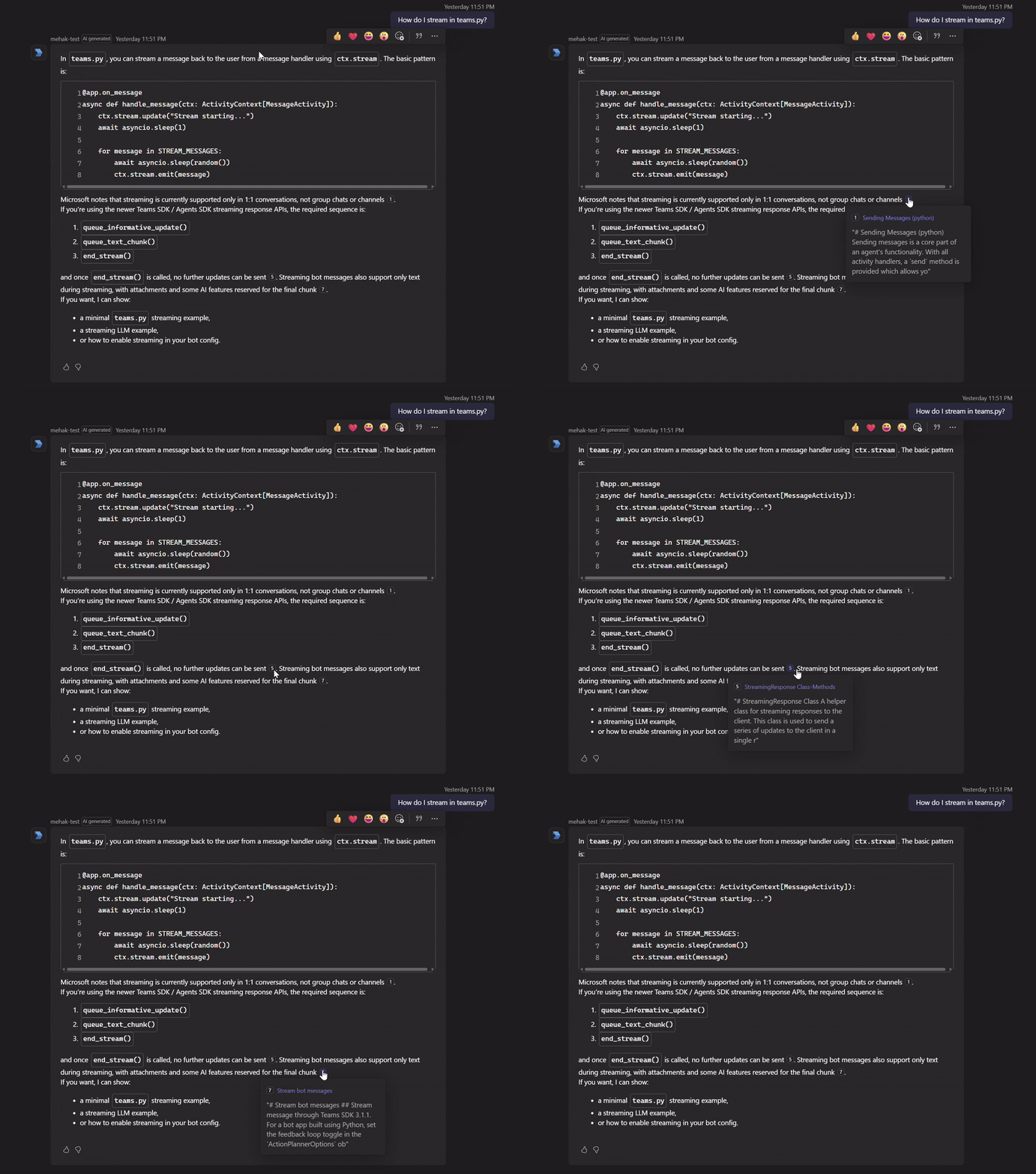
Streaming delivers responses to Teams incrementally as they're generated, rather than waiting for the full reply to complete. Each chunk of text is appended to the stream as it arrives.
TeamsStreamingWriter writer = TeamsStreamingWriter.CreateFromContext(context);
await writer.SendInformativeUpdateAsync("Thinking…", cancellationToken);

await foreach (ChatResponseUpdate update in _chatClient.GetStreamingResponseAsync(history, options, cancellationToken))
{
    if (!string.IsNullOrEmpty(update.Text))
    {
        await writer.AppendResponseAsync(update.Text, cancellationToken);
    }
}
 await writer.FinalizeResponseAsync(CancellationToken: cancellationToken);
See Streaming for the full story on how Teams renders chunks and the constraints on stream lifecycle.
AI-generated label
Mark the message as system-generated so Teams clearly labels it as AI output.
Mark the message as system-generated so Teams clearly labels it as AI output.
MessageActivityInput reply = new MessageActivityInput().AddAIGenerated();
await writer.FinalizeResponseAsync(msg, cancellationToken);
Feedback
Enable built-in thumbs up/down controls on the reply and surface a custom feedback form when users respond.
Enable built-in thumbs up/down controls on the reply and surface a custom feedback form when users respond.
MessageActivityInput reply = new MessageActivityInput().AddAIGenerated().AddFeedback(FeedbackTypes.Custom);
await writer.FinalizeResponseAsync(msg, cancellationToken);
See Feedback for the full form-handling story — capturing the submission, persisting it, and following up with the user.
Clarification cards
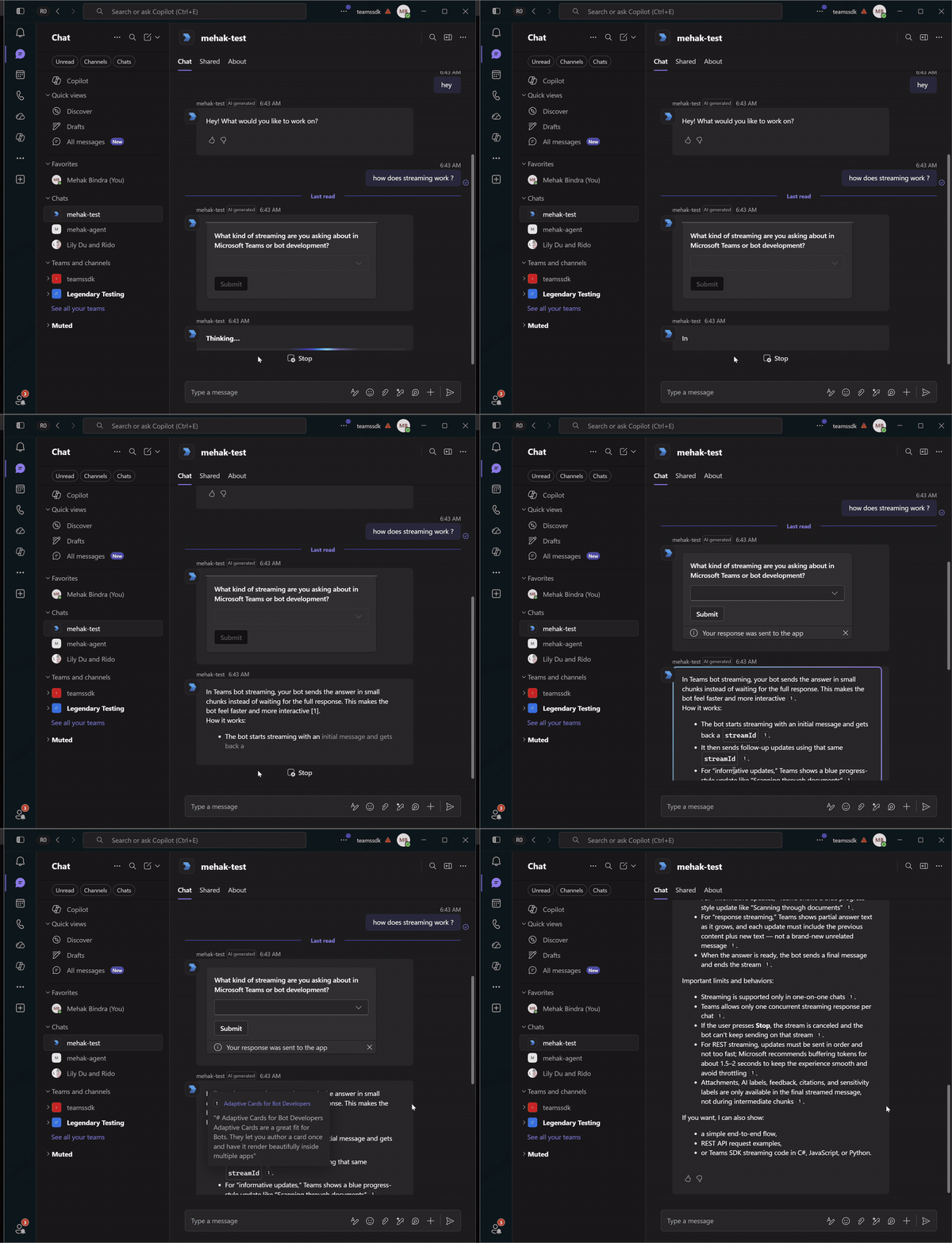
When the agent calls the request_clarification tool (from Build an agent), the reply is a card, not text. The model still produces a short wrap-up after the tool returns, so discard the streamed text and send only the card. Clearing the stream's accumulated text before emitting the card-only activity keeps the turn to a single clean reply.
    private async Task RespondAsync<TActivity>(Context<TActivity> context, string userText, CancellationToken cancellationToken)
        where TActivity : TeamsActivity
    {
        _ = context.Activity.Conversation?.Id
            ?? throw new InvalidOperationException("Missing conversation ID.");

        TeamsStreamingWriter writer = TeamsStreamingWriter.CreateFromContext(context);
        RunResult result = await _agent.RunAsync(context.Activity.Conversation!.Id, userText, writer, cancellationToken);

        MessageActivityInput msg = new MessageActivityInput();

        if (result.PendingCards.Count > 0)
        {
            // Card-only reply (e.g. clarification). No text and no feedback — the card IS the question.
            msg.WithText("")
                .AddAttachment([.. result.PendingCards.Select(c =>
                    TeamsAttachment.CreateBuilder().WithAdaptiveCard(c).Build())])
                    .AddAIGenerated();
        }
        else
        {
            // normal reply: attach follow-ups, citations, feedback (below).
            ...
        }

        await writer.FinalizeResponseAsync(msg, cancellationToken);
    }
this.OnAdaptiveCardAction(async (context, cancellationToken) =>
{
    if (context.Activity.Value?.Action?.Verb == "clarification")
    {
        string choice = context.Activity.Value.Action.Data?["clarificationChoice"]?.ToString() ?? "";
        await RespondAsync(context, choice, cancellationToken);
    }
    return InvokeResponse.Ok();
});
The user's selection arrives as a fresh turn through the card-action route — the same code path as a normal message — so the agent picks up with full context.
Suggested prompts
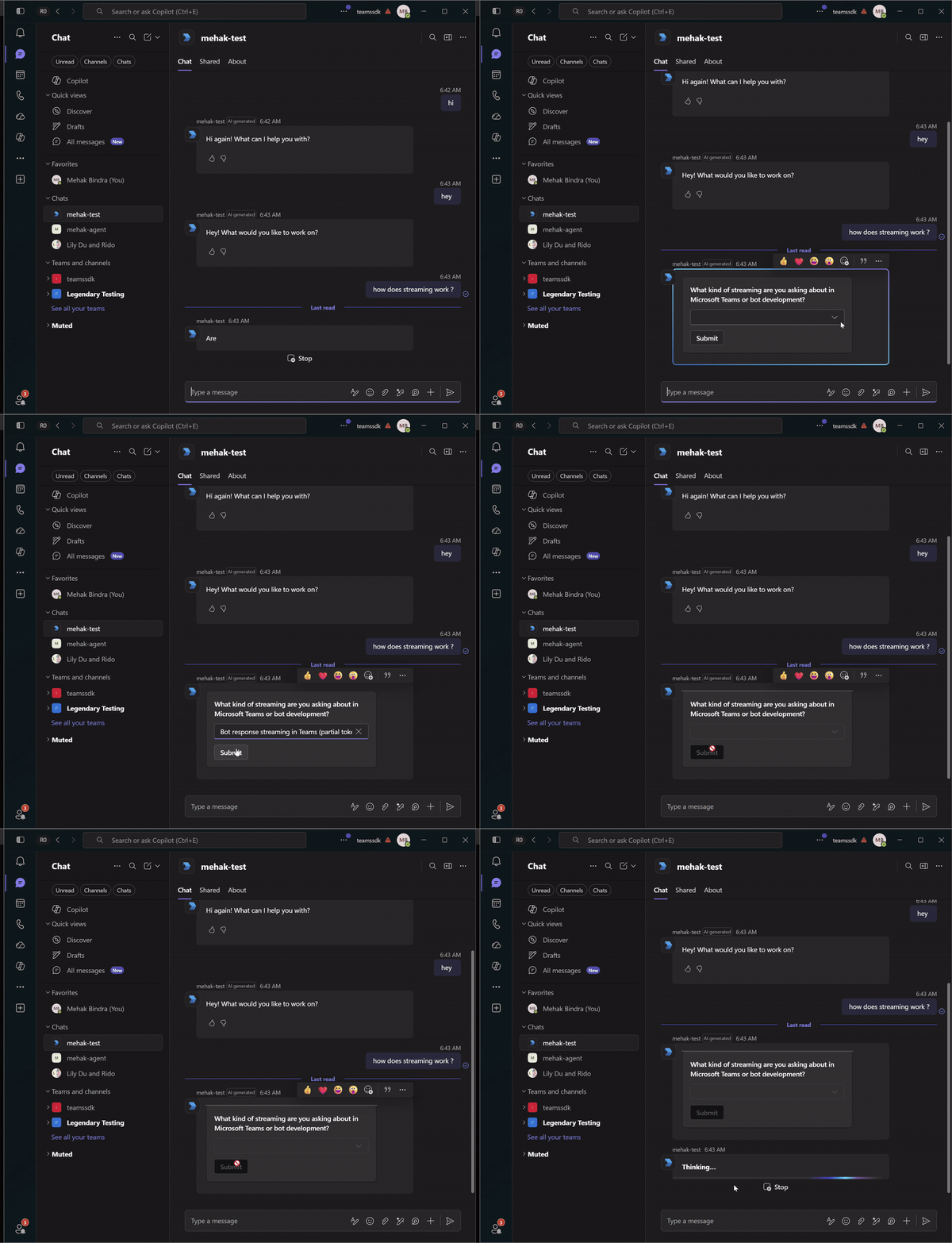
Suggested prompts give the user one-click follow-up questions after a reply. In Teams they render as chips under the message; tapping one sends the value back as a normal user message, so the same message handler picks it up — no extra routing required.
Rather than hard-coding them, generate two contextual follow-ups with a separate lightweight model call constrained to a strict JSON schema, then attach them as suggested actions.
private const string FollowUpsPrompt = """
    Produce 2 specific prompts the user might want to ask next.

    Output format — read carefully:
    Return ONLY a JSON object INSTANCE, like this:
    {"prompt1": "How do I stream a reply?", "prompt2": "Show me an Adaptive Card example"}

    Each prompt MUST:
    - Be phrased in the first person, as the user would type.
    - Stay under 8 words.

    Pick based on the conversation:
    - If recent turns have substantive content, drill into a concrete topic, API, or
    concept that just came up.
    - Otherwise (e.g. conversation just started, or the last turn is generic),
    suggest prompts that showcase what you can help with based on the MCP tools available.
    """;

private async Task<List<SuggestedAction>> GenerateFollowUpsAsync(
    IReadOnlyList<ChatMessage> history,
    CancellationToken cancellationToken)
{
    List<ChatMessage> messages =
    [
        .. history,
        new ChatMessage(ChatRole.System, FollowUpsPrompt)
    ];

    ChatResponse<FollowUps> response = await _chatClient.GetResponseAsync<FollowUps>(
        messages,
        cancellationToken: cancellationToken);

    if (!response.TryGetResult(out FollowUps? followUps) || followUps is null)
    {
        _logger.LogWarning("Follow-up generation did not return parseable JSON. Raw response: {Text}", response.Text);
        return [];
    }

    return [
        new SuggestedAction(ActionTypes.IMBack, followUps.Prompt1),
        new SuggestedAction(ActionTypes.IMBack, followUps.Prompt2)
    ];
}
Citations
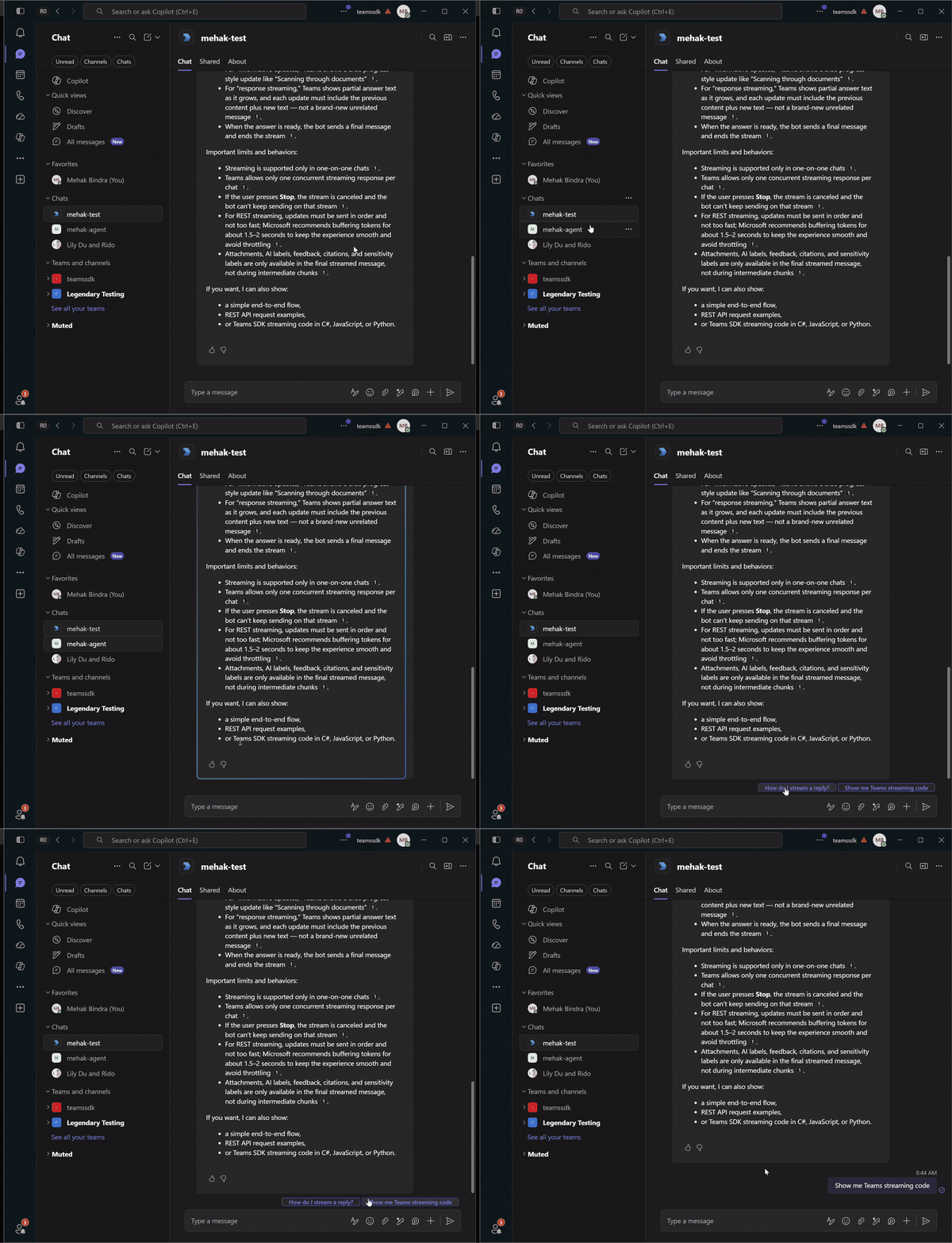
Citations render as footnote-style references inline with the reply — [1], [2], etc. — surfacing the source title, abstract, and URL on hover. They originate from tool outputs, where the collector from Grounding responses with citations assigned each result a stable position.
When building the final reply, attach only the citations whose position actually appears in the streamed text.
result.Citations.AttachCitations(reply, result.FullText);

public void AttachCitations(MessageActivityInput reply, string fullText)
{
    HashSet<int> used = [];
    foreach (Match match in Regex.Matches(fullText, @"\[(\d+)\]"))
    {
        if (int.TryParse(match.Groups[1].Value, out int position))
            used.Add(position);
    }

    foreach (CitationEntry citation in _citations.Values.Where(e => used.Contains(e.Position)))
    {
        reply.AddCitation(
            citation.Position,
            new CitationAppearance
            {
                Name = string.IsNullOrEmpty(citation.Title)
                    ? $"Source {citation.Position}"
                    : citation.Title[..Math.Min(80, citation.Title.Length)],
                Abstract = string.IsNullOrEmpty(citation.Snippet)
                    ? "No description available."
                    : citation.Snippet,
                Url = Uri.TryCreate(citation.Url, UriKind.Absolute, out Uri? uri) ? uri : null
            });
    }
}