Task 01 - Create a single-agent solution
Introduction
Zava, a retail chain that specializes in “do-it-yourself” solutions for home improvement projects, would like to build a shopping assistant that helps customers choose the correct products for their own home improvement projects. Customers will be able to upload images, ask questions regarding the set of products available from Zava, and make purchases, all from a multimodal chat interface. To start with, they have asked for a simple proof of concept application, starting with a single-agent architecture and moving to a multi-agent architecture in subsequent tasks.
Description
In this task, you will prepare a proof of concept chat application that will serve as the front end for your multimodal AI shopping assistant. You will first run this locally to get a feel for the application. To do so, you will need to install Python packages in a virtual environment.
Once the application is running, you will create a simple chat completion function with limited processing capabilities. You will then have an opportunity to reflect on some of the pain points involved in scaling this approach.
Success Criteria
- You have run the chat application locally.
- You have created a chat completion function that integrates into the chat application.
Learning Resources
- Work with chat completions models
- The Future of AI: Single Agent or Multi-Agent - How Should I Choose?
Key Tasks
01: Run the starter application
In order to run the starter image, you will need to have a recent version of Python (3.10 or later) installed on your local machine or Codespace. You will then use the virtual environment that you created in the prior exercise. After that, you can call the application using Uvicorn, which is an ASGI server for Python web applications, as the host.
Expand this section to view the solution
In a terminal, navigate to the \src directory if you are not already there. Next, activate the virtual environment using one of the following commands, depending on your operating system:
For Windows (Command Prompt):
.venv\Scripts\activate.bat
For Windows (PowerShell):
.venv\Scripts\Activate.ps1
For macOS/Linux:
source .venv/bin/activate
After that, run the following command to start the application.
uvicorn chat_app:app --host 0.0.0.0 --port 8000
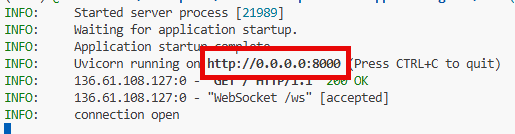
You can then access the application by navigating to http://127.0.0.1:8000 in your web browser if you are running this locally. If you are using a GitHub Codespace, hold down the Ctrl key and select the http://0.0.0.0:8000 link in the Codespace terminal window or select the Open in Browser button.
If you receive an error in your terminal indicating that you are not logged in, use Ctrl-C to stop the application. Then, use az login to log in to your Azure account and then try to start the application again.
You may also receive an error reading, in part, Message: The principal {YOUR_PRINCIPAL_ID} lacks the required data action Microsoft.CognitiveServices/accounts/AIServices/agents/read. If you receive this error message, return to your resource group and choose the Microsoft Foundry project associated with this training. Navigate to Access control (IAM) from the left-hand menu. Select the + Add button and then choose the Add role assignment option. In the Role dropdown, select the Azure AI User role. In the Assign access to dropdown, select + Select members. In the Select members list, choose your name. After that, select the Select button at the bottom of the pane. Finally, select Review + assign twice to grant the Azure AI User role to your account. Then, restart the application.
02: Try out the application
Once you have the application open, you can interact with it through the chat interface.
Enter the following prompt to demonstrate the application’s (limited) capabilities: “What colors of paint do you have available?”
You will receive back a hard-coded response that, “This application is not yet ready to serve results. Please check back later.”
03: Create an agent
The reason that you receive a hard-coded response is that the chat application does not have any intelligence associated with it. It is now time to fix that.
The chat application is designed to support a multi-agent architecture. However, for this initial task, you will create a single agent that can respond to a limited set of prompts. Create a new agent in the src/app/tools/ directory called singleAgentExample.py.
Expand this section to view solution
The start of singleAgentExample.py should include the following import statements:
import os
import base64
from openai import AzureOpenAI
from dotenv import load_dotenv
import numpy as np
import time
from azure.identity import DefaultAzureCredential, get_bearer_token_provider
Then, load the environment settings from the .env file using the load_dotenv() function:
# Load environment variables (Azure endpoint, deployment, keys, etc.)
load_dotenv()
After that, retrieve the necessary environment variables for your Azure OpenAI deployment. For this, you will use the gpt-5.4-mini deployment that you created in the prior exercise. Add the following code to retrieve these values:
# Retrieve credentials from .env file or environment
endpoint = os.getenv("gpt_endpoint")
deployment = os.getenv("gpt_deployment")
api_version = os.getenv("gpt_api_version")
The next step is to create an AzureOpenAI client using managed identity authentication. Add the following code to create the client:
# Initialize Azure OpenAI client for GPT model using managed identity
credential = DefaultAzureCredential()
token_provider = get_bearer_token_provider(credential, "https://cognitiveservices.azure.com/.default")

client = AzureOpenAI(
    azure_endpoint=endpoint,
    azure_ad_token_provider=token_provider,
    api_version=api_version,
)
The majority of this file will be dedicated to the generate_response() function, which will take a text input and return a response from the Azure OpenAI model. Add the following code to define this function:
def generate_response(text_input):
    start_time = time.time()
    """
    Input:
        text_input (str): The user's chat input.

    Output:
        response (str): A Markdown-formatted response from the agent.
    """

    # Prepare the full chat prompt with system and user messages
    chat_prompt = [
        {
            "role": "system",
            "content": [
                {
                    "type": "text",
                    "text": """You are a helpful assistant working for Zava, a company that specializes in offering products to assist homeowners with do-it-yourself projects.
                        Respond to customer inquiries with relevant product recommendations and DIY tips. If a customer asks for paint, suggest one of the following three colors: blue, green, and white.
                        If a customer asks for something not related to a DIY project, politely inform them that you can only assist with DIY-related inquiries.
                        Zava has a variety of store locations across the country. If a customer asks about store availability, direct the customer to the Miami store.
                    """
                }
            ]
        },
        {"role": "user", "content": text_input}
    ]

    # Call Azure OpenAI chat API
    completion = client.chat.completions.create(
        model=deployment,
        messages=chat_prompt,
        max_completion_tokens=10000,
        top_p=1,
        frequency_penalty=0,
        presence_penalty=0,
        stop=None,
        stream=False
    )
    end_sum = time.time()
    print(f"generate_response Execution Time: {end_sum - start_time} seconds")
    # Return response content
    return completion.choices[0].message.content
This single function prepares a chat prompt with a system message that defines the assistant’s role and a user message containing the input text. It then calls the Azure OpenAI chat API to generate a response and returns the content of that response. This particular function combines both the prompt definition and the call to the model in a single function for simplicity. As you will see later in this task, this is not necessarily the best approach for a production application.
04: Create a chat completion function
In the src/chat_app.py file, the following line of code is responsible for serving all results.
await websocket.send_text(fast_json_dumps({"answer": "This application is not yet ready to serve results. Please check back later.", "agent": None, "cart": persistent_cart}))
The src/app/tools/singleAgentExample.py file includes a simplistic implementation of a single-agent system. Open this file and review the code. Then, activate this agent by modifying the src/chat_app.py file to use it.
Expand this section to view solution
Open the src/chat_app.py file. Then, go to line 247 and comment out the following line:
await websocket.send_text(fast_json_dumps({"answer": "This application is not yet ready to serve results. Please check back later.", "agent": None, "cart": persistent_cart}))
After commenting this out, uncomment line 254, which contains the following code:
await handle_single_agent(websocket, user_message, persistent_cart)
This calls the handle_single_agent() function in src/handlers/single_agent_handler.py, which in turn calls generate_response() from singleAgentExample.py. The generate_response() function will route the user message through to your gpt-5.4-mini deployment.
Then, uncomment line 45 to import the handler:
from handlers.single_agent_handler import handle_single_agent
After updating this code and saving chat_app.py, restart your web service. If you are using a Docker container, you will need to rebuild the container image.
Begin by asking the following of the chat service: “What kinds of paints do you have?”
You should receive a response that indicates that Zava has blue, green, and white paint. You may also receive additional information or sales-like suggestions.
Then, enter the following message: “How about lattices?”
The agent will respond with a message that shows it understands that, in this case, “lattice” refers to a lattice trellis, which is a structure used to support climbing plants.
Finally, ask the following question: “What about history books?”
The agent will indicate that it can only assist with DIY-related inquiries.
05: Review pain points
So far, we have incorporated a single agent in the Zava chat application. In doing so, we have introduced a few pain points.
One pain point is that the prompt is included directly in the code, making it harder to tweak without rebuilding and redeploying the application. The prompt that we used is as follows:
You are a helpful assistant working for Zava, a company that specializes in offering products to assist homeowners with do-it-yourself projects.
Respond to customer inquiries with relevant product recommendations and DIY tips. If a customer asks for paint, suggest one of the following three colors: blue, green, and white.
If a customer asks for something not related to a DIY project, politely inform them that you can only assist with DIY-related inquiries.
Zava has a variety of store locations across the country. If a customer asks about store availability, direct the customer to the Miami store.
This prompt includes no information on specific brands of paint, styles of paint, or other product details that could help the assistant make more informed recommendations. There is no information on whether a given product is in stock at a specific location. It assumes the customer is in the Miami area.
To rectify this, there are two approaches we could take. The first approach would be to provide the assistant with relevant context about the products and inventory prior to making the query. We can see this approach in the Retrieval-Augmented Generation (RAG) pattern, in which our application queries a vector database for relevant information based on the user prompt and folds that information into the user prompt.
The other approach is to introduce tools that allow the assistant to access real-time information about products and inventory. This could involve integrating APIs that provide up-to-date data on product availability, specifications, and other relevant details. The primary benefit of this over the RAG pattern is that the agent can execute specific code without needing to rely on pre-existing knowledge or context.
But introducing tools can be a challenge when there is only one agent. As the number of tools increases, so does the complexity of managing those tools and ensuring they work together seamlessly, as well as ensuring that the agent selects the correct tool for a particular task.
Another challenge with this single-agent approach is that it becomes more difficult for other teams to extend the system’s capabilities. For example, marketing teams may want to introduce new promotional tools, while inventory management teams may need access to real-time stock information.
In the next task, we will address these challenges by introducing a multi-agent architecture that allows for greater flexibility and scalability.