Task 01 - Build an A2A Server
Introduction
The Agent2Agent (A2A) Protocol enables communication between multiple AI agents, allowing them to collaborate and share information to achieve complex tasks. This provides a common language and structure for agents to interact, making it easier to integrate different AI models and services.
To make it easier to understand how the A2A protocol differs from the code in Exercise 02, this exercise will feature a standalone solution that is not integrated with the multimodal chat interface from Exercise 02. There will be some overlap in terms of theme, but the functionality will differ between these two solutions.
Description
In this task, you will build an A2A server that facilitates communication between different AI agents. This server will act as a central hub where agents can register, discover each other, and exchange messages. As an important note, you will build the agents in the next task. For this task, you will focus on setting up the A2A server and creating a very basic agent that can register with the server.
Success Criteria
- You have set up an A2A server that can handle agent registration and message routing.
- You have created a basic agent that can register with the A2A server.
Learning Resources
- Agent2Agent (A2A) Protocol
- A2A Protocol documentation
- Microsoft Agent Framework
- Microsoft Agent Framework documentation
- Microsoft Agent Framework Agent with A2A Protocol
Key Tasks
01: Review the starter code
There is starter code provided in the src/a2a folder. Review the code to get an understanding of the foundation for this exercise.
Expand this section to view the solution
The starter code includes several directories with the following structure:
agent: Contains the implementation of the AI agents that will handle specific tasks and interact with the A2A server. These agents do not exist but you will create one simple agent as part of this task and extend them in the next task.api: This will contain an API layer built using FastAPI to handle incoming requests and route them to the appropriate agents. This file does not exist and you will create it as part of this task.static: CSS and JavaScript files that will be used by the HTML template. The filestatic/js/chat.jscontains a reference to the “Product Management Agent” but is otherwise generic and does not need to know the details of how the agent works.templates: HTML template for rendering the single-page application.
In addition, there are two main files:
gunicorn.conf.py: This configuration file is used to set up the Gunicorn server, which will serve the FastAPI application.main.py: This file is the entry point for the FastAPI application and is responsible for initializing the app and including the API routes.
02: Implement the Product Management Agent
This solution will follow a bottom-up approach, building the product management agent first and then building additional resources around it.
Expand this section to view the solution
Create a new file named product_management_agent.py in the src/a2a/agent directory. This agent will handle product-related queries and interact with the A2A server. Add the following import and load statements to the top of this file.
import logging
import os
from collections.abc import AsyncIterable
from typing import Any, Literal, Annotated
from azure.identity import DefaultAzureCredential
from dotenv import load_dotenv
from pydantic import BaseModel, ValidationError
from agent_framework import (
    AgentSession,
    ChatContext,
    Agent,
    tool,
)
from agent_framework.openai import OpenAIChatClient, OpenAIChatOptions

logger = logging.getLogger(__name__)
load_dotenv()
Next, add the following chat service configuration code to your file.
# region Chat Service Configuration

def get_chat_client() -> OpenAIChatClient:
    """Return Azure OpenAI chat client using the v1 API with managed identity."""
    endpoint = os.getenv('gpt_endpoint')
    deployment_name = os.getenv('gpt_deployment')

    if not endpoint:
        raise ValueError("gpt_endpoint is required")
    if not deployment_name:
        raise ValueError("gpt_deployment is required")

    return OpenAIChatClient(
        model=deployment_name,
        base_url=f"{endpoint.rstrip('/')}/openai/v1/",
        credential=DefaultAzureCredential(),
    )


# endregion
This code sets up the configuration for connecting to Azure OpenAI, depending on the environment variables provided. The get_chat_client() function uses the GPT deployment details that you have already set up in Exercise 01, so there are no additional configuration steps needed.
Next, add the following code to define a response format model:
# region Response Format


class ResponseFormat(BaseModel):
    """A Response Format model to direct how the model should respond."""

    status: Literal['input_required', 'completed', 'error'] = 'input_required'
    message: str


# endregion
Then, the next step is to create the Product Management Agent. Add the following code to this file:
# region Agent Framework Agent


class AgentFrameworkProductManagementAgent:
    """Wraps Microsoft Agent Framework-based agents to handle Zava product management tasks."""

    agent: Agent
    session: AgentSession = None
    SUPPORTED_CONTENT_TYPES = ['text', 'text/plain']

    def __init__(self):
        # Configure the chat completion service explicitly
        chat_service = get_chat_client()

        # Define the main ProductManagerAgent to delegate tasks to the appropriate agents
        self.agent = Agent(
            client=chat_service,
            name='ProductManagerAgent',
            instructions=(
                "Your role is to carefully analyze the user's request and respond as best as you can. "
                'Your primary goal is precise and efficient delegation to ensure customers and employees receive accurate and specialized '
                'assistance promptly.\n\n'
                'IMPORTANT: You must ALWAYS respond with a valid JSON object in the following format:\n'
                '{"status": "<status>", "message": "<your response>"}\n\n'
                'Where status is one of: "input_required", "completed", or "error".\n'
                '- Use "input_required" when you need more information from the user.\n'
                '- Use "completed" when the task is finished.\n'
                '- Use "error" when something went wrong.\n\n'
                'Never respond with plain text. Always use the JSON format above.'
            ),
            tools=[],
        )

    async def invoke(self, user_input: str, session_id: str) -> dict[str, Any]:
        """Handle synchronous tasks (like tasks/send).

        Args:
            user_input (str): User input message.
            session_id (str): Unique identifier for the session.

        Returns:
            dict: A dictionary containing the content, task completion status,
            and user input requirement.
        """
        await self._ensure_session_exists(session_id)

        # Use Agent Framework's run for a single shot
        response = await self.agent.run(
            messages=user_input,
            session=self.session,
            options=OpenAIChatOptions(response_format=ResponseFormat),
        )
        return self._get_agent_response(response.text)

    async def stream(
        self,
        user_input: str,
        session_id: str,
    ) -> AsyncIterable[dict[str, Any]]:
        """For streaming tasks we yield the Agent Framework agent's run_stream progress.

        Args:
            user_input (str): User input message.
            session_id (str): Unique identifier for the session.

        Yields:
            dict: A dictionary containing the content, task completion status,
            and user input requirement.
        """
        await self._ensure_session_exists(session_id)

        # text_notice_seen = False
        chunks: list[ChatContext] = []

        async for chunk in self.agent.run_stream(
            messages=user_input,
            session=self.session,
        ):
            if chunk.text:
                chunks.append(chunk.text)

        if chunks:
            yield self._get_agent_response(sum(chunks[1:], chunks[0]))

    def _get_agent_response(
        self, message: ChatContext
    ) -> dict[str, Any]:
        """Extracts the structured response from the agent's message content.

        Args:
            message (ChatContext): The message content from the agent.

        Returns:
            dict: A dictionary containing the content, task completion status, and user input requirement.
        """
        structured_response = None
        try:
            structured_response = ResponseFormat.model_validate_json(
                message
            )
        except ValidationError as e:
            logger.info('Message did not come in JSON format.')
            default_response = {
                'is_task_complete': True,
                'require_user_input': False,
                'content': message
            }
        except:
            logger.error('An unexpected error occurred while processing the message.')
            default_response = {
                'is_task_complete': False,
                'require_user_input': True,
                'content': 'We are unable to process your request at the moment. Please try again.',
            }

        if structured_response and isinstance(structured_response, ResponseFormat):
            response_map = {
                'input_required': {
                    'is_task_complete': False,
                    'require_user_input': True,
                },
                'error': {
                    'is_task_complete': False,
                    'require_user_input': True,
                },
                'completed': {
                    'is_task_complete': True,
                    'require_user_input': False,
                },
            }

            response = response_map.get(structured_response.status)
            if response:
                return {**response, 'content': structured_response.message}

        return default_response

    async def _ensure_session_exists(self, session_id: str) -> None:
        """Ensure the session exists for the given session ID.

        Args:
            session_id (str): Unique identifier for the session.
        """
        if self.session is None or self.session.service_session_id != session_id:
            self.session = self.agent.create_session(session_id=session_id)


# endregion
The __init__ method initializes the agent with specific instructions and an empty list of plugins, as you will not be implementing additional agents in this task. It defines one ChatCompletionAgent using the label self.agent. This default agent will serve as the entryway for all incoming requests, as the other agents will not directly receive requests.
Next, the invoke method is responsible for handling synchronous tasks. It ensures that a chat session exists for the given session ID and then uses the agent to get a response based on the user’s input. The response is processed to extract relevant information, such as whether the task is complete and if further user input is required.
The stream method handles streaming tasks, yielding progress updates as the agent processes the user’s input. It also ensures that a chat session exists for the session ID and uses the agent to invoke a streaming response.
The _get_agent_response method extracts structured responses from the agent’s message content, mapping them to a dictionary format that includes task completion status and user input requirements.
The _ensure_session_exists method ensures that a chat session is created or reused based on the session ID.
03: Implement the Agent Executor
The Agent Executor in the A2A Protocol is responsible for processing requests and generating responses. It requires two primary methods: async def execute() and async def cancel().
Expand this section to view the solution
Create a new file named agent_executor.py in the src/a2a/agent directory. Add the following import statements to the top of this file:
import logging

from a2a.server.agent_execution import AgentExecutor, RequestContext
from a2a.server.events.event_queue import EventQueue
from a2a.types import (
    TaskArtifactUpdateEvent,
    TaskState,
    TaskStatus,
    TaskStatusUpdateEvent,
)
from a2a.utils import (
    new_agent_text_message,
    new_task,
    new_text_artifact,
)
from .product_management_agent import AgentFrameworkProductManagementAgent

logger = logging.getLogger(__name__)
This import includes a reference to the AgentFrameworkProductManagementAgent that you created in the previous step. Next, you will create an executor class that inherits from AgentExecutor and implements the required methods.
class AgentFrameworkProductManagementExecutor(AgentExecutor):
    """AgentFrameworkProductManagement Executor for A2A Protocol"""

    def __init__(self):
        self.agent = AgentFrameworkProductManagementAgent()

    async def execute(
        self,
        context: RequestContext,
        event_queue: EventQueue,
    ) -> None:
        """Execute agent request with A2A protocol support

        Args:
            context: Request context containing user input and task info
            event_queue: Event queue for publishing task updates
        """
        query = context.get_user_input()
        task = context.current_task
        if not task:
            task = new_task(context.message)
            await event_queue.enqueue_event(task)

        async for partial in self.agent.stream(query, task.contextId):
            require_input = partial['require_user_input']
            is_done = partial['is_task_complete']
            text_content = partial['content']

            if require_input:
                await event_queue.enqueue_event(
                    TaskStatusUpdateEvent(
                        status=TaskStatus(
                            state=TaskState.input_required,
                            message=new_agent_text_message(
                                text_content,
                                task.contextId,
                                task.id,
                            ),
                        ),
                        final=True,
                        contextId=task.contextId,
                        taskId=task.id,
                    )
                )
            elif is_done:
                await event_queue.enqueue_event(
                    TaskArtifactUpdateEvent(
                        append=False,
                        contextId=task.contextId,
                        taskId=task.id,
                        lastChunk=True,
                        artifact=new_text_artifact(
                            name='current_result',
                            description='Result of request to agent.',
                            text=text_content,
                        ),
                    )
                )
                await event_queue.enqueue_event(
                    TaskStatusUpdateEvent(
                        status=TaskStatus(state=TaskState.completed),
                        final=True,
                        contextId=task.contextId,
                        taskId=task.id,
                    )
                )
            else:
                await event_queue.enqueue_event(
                    TaskStatusUpdateEvent(
                        status=TaskStatus(
                            state=TaskState.working,
                            message=new_agent_text_message(
                                text_content,
                                task.contextId,
                                task.id,
                            ),
                        ),
                        final=False,
                        contextId=task.contextId,
                        taskId=task.id,
                    )
                )

    async def cancel(
        self, context: RequestContext, event_queue: EventQueue
    ) -> None:
        """Cancel the current task execution"""
        logger.warning("Task cancellation requested but not implemented")
        raise Exception('cancel not supported')
This class contains two methods aside from a simple __init__() that instantiates a AgentFrameworkProductManagementAgent for use in the class. The execute method processes the incoming request, retrieves the user input, and uses the AgentFrameworkProductManagementAgent to handle the request. It streams partial responses and enqueues events to the event queue based on the agent’s output. The cancel method is a placeholder for task cancellation functionality, which is not implemented in this example.
04: Implement the A2A Server
The A2A server acts as a wrapper for the FastAPI application. It is responsible for initializing the application, defining the Agent Executor, and defining Agent Cards that describe the agents.
Expand this section to view the solution
Create a new file called a2a_server.py in the src/a2a/agent directory. Add the following import statements to the top of this file:
import logging
import httpx

from a2a.server.apps import A2AStarletteApplication
from a2a.server.request_handlers import DefaultRequestHandler
from a2a.server.tasks import BasePushNotificationSender, InMemoryPushNotificationConfigStore, InMemoryTaskStore
from a2a.types import AgentCapabilities, AgentCard, AgentSkill

from .agent_executor import AgentFrameworkProductManagementExecutor

logger = logging.getLogger(__name__)
This code defines the necessary imports for building the A2A server, including components from the A2A library and the previously defined AgentFrameworkProductManagementExecutor.
Then, you will need to implement the A2AServer class, which will initialize a Starlette application. Starlette is a lightweight ASGI framework that is well-suited for building asynchronous web applications. FastAPI will mount on top of Starlette.
class A2AServer:
    """A2A Server wrapper for the Zava Product Helper"""

    def __init__(self, httpx_client: httpx.AsyncClient, host: str = "localhost", port: int = 8001):
        self.httpx_client = httpx_client
        self.host = host
        self.port = port
        self._setup_server()

    def _setup_server(self):
        """Setup the A2A server with the product helper"""
        # Setup A2A components
        config_store = InMemoryPushNotificationConfigStore()
        push_sender = BasePushNotificationSender(self.httpx_client, config_store)

        request_handler = DefaultRequestHandler(
            agent_executor=AgentFrameworkProductManagementExecutor(),
            task_store=InMemoryTaskStore(),
            push_config_store=config_store,
            push_sender=push_sender,
        )

        # Create A2A Starlette application
        self.a2a_app = A2AStarletteApplication(
            agent_card=self._get_agent_card(),
            http_handler=request_handler
        )

        logger.info(f"A2A server configured for {self.host}:{self.port}")

    def _get_agent_card(self) -> AgentCard:
        """Returns the Agent Card for the Zava Product Helper."""
        capabilities = AgentCapabilities(streaming=True)

        skill_product_helper = AgentSkill(
            id='product_helper_sk',
            name='Zava Product Helper',
            description=(
                'Handles customer inquiries about Zava products, including features, pricing, and ranking products based on customer needs.'
            ),
            tags=['product', 'catalog', 'customer-support', 'agent-framework'],
            examples=[
                'Which paint roller is best for smooth surfaces?',
                'Sell me on the benefits of the Zava paint sprayer.',
                'How many different types of paint brushes do you offer?',
                'What are the three most popular colors of paint?',
            ],
        )

        agent_card = AgentCard(
            name='Zava Product Helper',
            description=(
                'Zava Product Helper providing comprehensive product information and recommendations.'
            ),
            url=f'http://{self.host}:{self.port}/',
            version='1.0.0',
            defaultInputModes=['text'],
            defaultOutputModes=['text'],
            capabilities=capabilities,
            skills=[skill_product_helper],
        )

        return agent_card

    def get_starlette_app(self):
        """Get the Starlette app for mounting in FastAPI"""
        return self.a2a_app.build()
This class contains four methods. The __init__ method initializes the server with an HTTP client, host, and port, and calls the _setup_server method to configure the A2A server. The _setup_server method sets up the necessary A2A components, including the request handler and the Starlette application. The _get_agent_card method defines the agent card for the Zava Product Helper, including its capabilities and skills. Finally, the get_starlette_app method returns the Starlette application for mounting in FastAPI.
05: Integrate the A2A Server with FastAPI
The final step is to define the FastAPI router.
Expand this section to view the solution
Create a new file in the src/a2a/api directory called chat.py. Add the following import statements to the top of this file:
import uuid
import logging
from typing import Dict

from fastapi import APIRouter, HTTPException
from fastapi.responses import StreamingResponse
from pydantic import BaseModel

from agent.product_management_agent import AgentFrameworkProductManagementAgent

logger = logging.getLogger(__name__)
Then, define a router and a simple in-memory session store:
router = APIRouter(prefix="/chat", tags=["chat"])

# In-memory session store (in production, use Redis or database)
product_management_agent = AgentFrameworkProductManagementAgent()
active_sessions: Dict[str, str] = {}
FastAPI allows you to define classes to represent the shape of messages. Define two classes, one for chat messages and the other for chat responses.
class ChatMessage(BaseModel):
    """Chat message model"""
    message: str
    session_id: str = None


class ChatResponse(BaseModel):
    """Chat response model"""
    response: str
    session_id: str
    is_complete: bool
    requires_input: bool
Now that you have message signatures defined, you will need to create four endpoints in total. The first is to send a message to the Product Management Agent.
@router.post("/message", response_model=ChatResponse)
async def send_message(chat_message: ChatMessage):
    """Send a message to the product management agent and get a response"""
    try:
        # Generate session ID if not provided
        session_id = chat_message.session_id or str(uuid.uuid4())

        # Store session
        active_sessions[session_id] = session_id

        # Get response from agent
        response = await product_management_agent.invoke(chat_message.message, session_id)

        return ChatResponse(
            response=response.get('content', 'No response available'),
            session_id=session_id,
            is_complete=response.get('is_task_complete', False),
            requires_input=response.get('require_user_input', True)
        )

    except Exception as e:
        logger.error(f"Error processing chat message: {e}")
        raise HTTPException(status_code=500, detail=str(e))
Next, create an endpoint for streaming messages:
@router.post("/stream")
async def stream_message(chat_message: ChatMessage):
    """Stream a response from the product management agent"""
    try:
        # Generate session ID if not provided
        session_id = chat_message.session_id or str(uuid.uuid4())

        # Store session
        active_sessions[session_id] = session_id

        async def generate_response():
            """Generate streaming response"""
            try:
                async for partial in product_management_agent.stream(
                    chat_message.message, session_id
                ):
                    # Format as SSE (Server-Sent Events)
                    content = partial.get('content', '')
                    is_complete = partial.get('is_task_complete', False)
                    requires_input = partial.get('require_user_input', False)

                    response_data = {
                        "content": content,
                        "session_id": session_id,
                        "is_complete": is_complete,
                        "requires_input": requires_input
                    }

                    yield f"data: {response_data}\n\n"

                    if is_complete:
                        break

            except Exception as e:
                logger.error(f"Error in streaming response: {e}")
                yield f'data: { {"error": "{str(e)}"} }\n\n'

        return StreamingResponse(
            generate_response(),
            media_type="text/plain",
            headers={
                "Cache-Control": "no-cache",
                "Connection": "keep-alive",
                "Access-Control-Allow-Origin": "*",
                "Access-Control-Allow-Headers": "*"
            }
        )

    except Exception as e:
        logger.error(f"Error setting up streaming: {e}")
        raise HTTPException(status_code=500, detail=str(e))
The final two endpoints deal with sessions. The first will get a list of existing sessions and the second will delete a specific chat session.
@router.get("/sessions")
async def get_active_sessions():
    """Get list of active chat sessions"""
    return {"active_sessions": list(active_sessions.keys())}


@router.delete("/sessions/{session_id}")
async def clear_session(session_id: str):
    """Clear a specific chat session"""
    if session_id in active_sessions:
        del active_sessions[session_id]
        return {"message": f"Session {session_id} cleared"}
    else:
        raise HTTPException(status_code=404, detail="Session not found")
06: Try out the application
Now that you have implemented the Product Management Agent, the Agent Executor, and the A2A Server, you can run the application to test its functionality.
Expand this section to view the solution
Navigate to the src/ directory in your terminal and run the following command to start the application using Gunicorn:
python a2a/main.py
This command will start the FastAPI application, which includes the A2A server and the Product Management Agent. You should see output indicating that the server is running and listening on the specified host and port.

Navigate to http://127.0.0.1:8001/agent-card/ in your web browser to access the agent card. This will return a JSON response with details about the Zava Product Helper agent.

From there, you can navigate to http://127.0.0.1:8001/ to access the main application. This will display a simple interface where you can enter queries for the Product Management Agent. Ask the agent the following questions:
- “Which paint roller is best for smooth surfaces?”
- “Sell me on the benefits of the Zava paint sprayer.”
- “How many different types of paint brushes do you offer?”
The agent should respond with relevant information based on the first two queries, but because the agent is not connected to any product database, it will not be able to provide a meaningful response to the third query.
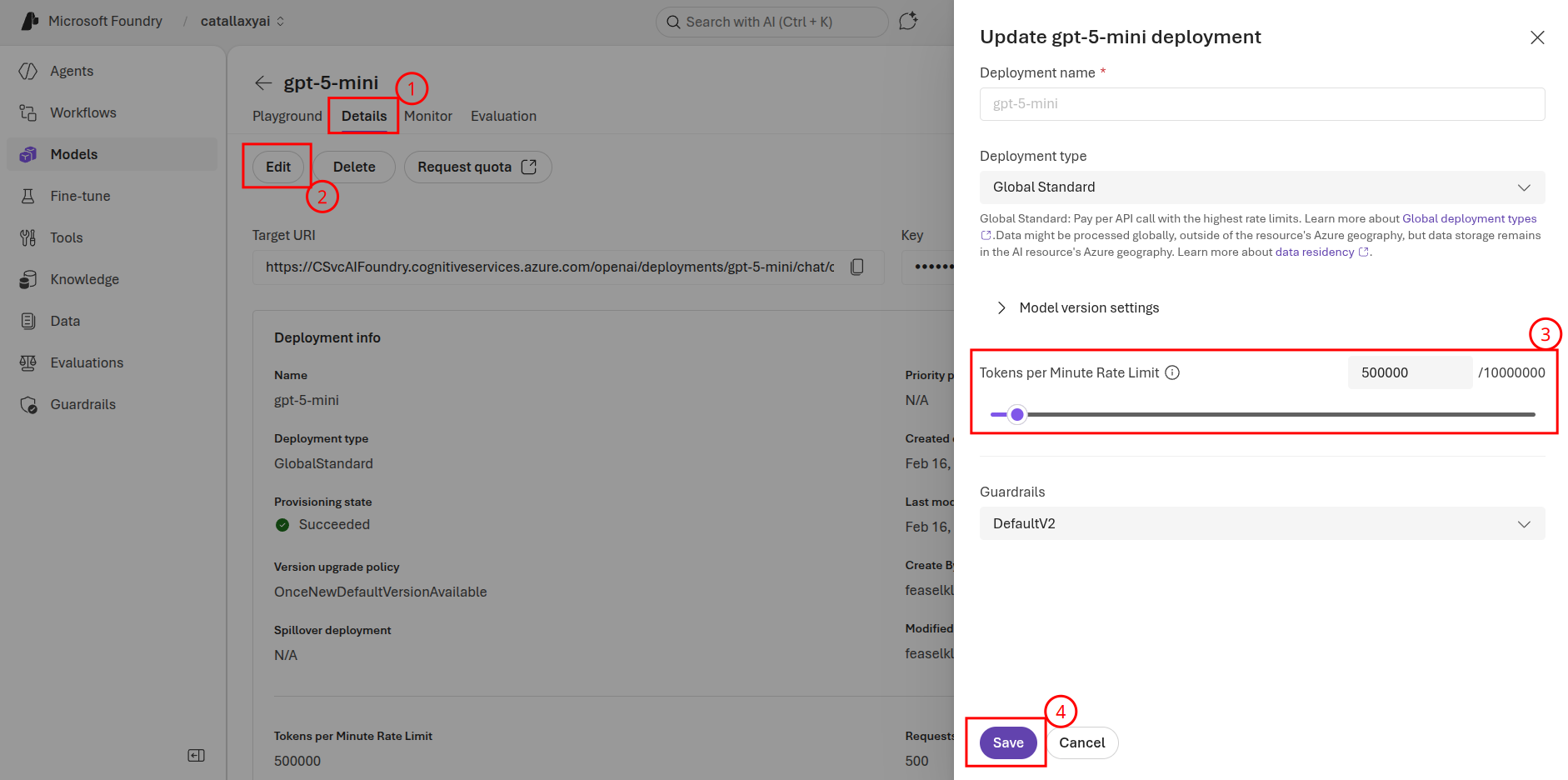
If you receive a 429 error when running through these examples, this means that the Microsoft Foundry service is rate limiting your GPT model requests. There are two ways to work around this limitation. The first is to wait a minute or so and continue testing your solution. The other approach is to increase the number of tokens per minute (TPM) your model allows. To update TPM, navigate to the GPT model in Microsoft Foundry. From there, select the Details tab and choose Edit for your model. You can then increase the number of tokens per minute. Select Save when you have completed this task.