Task 02 - Extend the Zava Product Manager application
Introduction
The prior task introduced the foundational elements of the Zava Product Manager application, which serves as a central hub for managing product-related inquiries and tasks. You have shown Zava that the Product Manager can effectively handle a variety of customer requests, from product lookups to recommendations. However, to further enhance the capabilities of the Product Manager and provide a more comprehensive solution, you will now extend the application by integrating additional agents using the Agent2Agent (A2A) Protocol.
Description
In this task, you will extend the Zava Product Manager application to incorporate additional agents using the Agent2Agent (A2A) Protocol. This will involve modifying the existing application to enable communication between multiple AI agents, allowing for more sophisticated interactions and improved customer service. With the Microsoft Agent Framework library, you can also create and use functions as tools to manage and extend the capabilities of your agents.
Success Criteria
- You have successfully integrated additional agents into the Zava Product Manager application using the A2A Protocol.
- You have created at least one Plugin that adds new functionality to your agents.
Learning Resources
- A2A Agents
- Create and run an agent with Agent Framework
- A2A Integration (note: .NET only at this time)
- (Semantic Kernel) A2A Travel Agent
Key Tasks
01: Incorporate new agents
Adding new agents to the Zava Product Manager application is fairly straightforward, as the core architecture is already in place. You will create three new agents in particular, including two in this step. The first will be the Marketing Agent, which will handle tasks related to product recommendations, upselling, cross-selling, and improving product descriptions. The second will be the Ranker Agent, which will manage product comparisons, reviews, and rankings. Finally, you will modify the existing Product Manager Agent to delegate tasks to these new agents as appropriate.
Before continuing, stop the existing application if it is still running. You can do this by pressing CTRL + C (or CMD + C on macOS) in the terminal window where the application is running.
Expand this section to view the solution
Navigate to the src/a2a/agent directory and open the product_management_agent.py file. You will see the existing implementation of the Product Manager Agent. In the __init__() method, there is code that defines a single agent, the ProductManagerAgent. Add the following code above the assignment of self.agent and below the assignment of chat_service in the __init__() method:
        # Define an MarketingAgent to handle marketing-related tasks
        marketing_agent = Agent(
            client=chat_service,
            name='MarketingAgent',
            instructions=(
                'You specialize in planning and recommending marketing strategies for products. '
                'This includes identifying target audiences, making product descriptions better, and suggesting promotional tactics. '
                'Your goal is to help businesses effectively market their products and reach their desired customers.'
            ),
        )

        # Define an RankerAgent to sort and recommend results
        ranker_agent = Agent(
            client=chat_service,
            name='RankerAgent',
            instructions=(
                'You specialize in ranking and recommending products based on various criteria. '
                'This includes analyzing product features, customer reviews, and market trends to provide tailored suggestions. '
                'Your goal is to help customers find the best products for their needs.'
            ),
        )
Python is a whitespace-sensitive language, so be sure to maintain proper indentation when adding this code. These chat completion agents should be at the same indentation level as the Product Manager Agent.
These two agents do not make use of any special context or information, so they are defined with only a name and instructions. Next, modify the self.agent assignment to include these new agents as tools, using the as_tool() method to make this possible. Inside of the self.agent assignment, modify the tools parameter as follows:
tools=[marketing_agent.as_tool(), ranker_agent.as_tool()],
This change allows the Product Manager Agent to delegate tasks to the Marketing Agent and Ranker Agent as needed.
02: Create a function and another agent
The two agents you created in the prior step are creative in nature: they do not acquire factual information but instead generate responses based on the instructions you provided. In practice, many agents will need to access specific information or perform particular tasks. To facilitate this, you can create functions that encapsulate specific functionalities. In this step, you will create a function that allows an agent to look up product information from a predefined list.
Expand this section to view the solution
Add the following code below the Chat Service Configuration region and above the Response Format region in the product_management_agent.py file:
# region Get Products

@tool(
    name='get_products',
    description='Retrieves a set of products based on a natural language user query.'
)
def get_products(
    question: Annotated[
        str, 'Natural language query to retrieve products, e.g. "What kinds of paint rollers do you have in stock?"'
    ],
) -> list[dict[str, Any]]:
    try:
        # Simulate product retrieval based on the question
        # In a real implementation, this would query a database or external service
        product_dict = [
            {
                "id": "1",
                "name": "Eco-Friendly Paint Roller",
                "type": "Paint Roller",
                "description": "A high-quality, eco-friendly paint roller for smooth finishes.",
                "punchLine": "Roll with the best, paint with the rest!",
                "price": 15.99
            },
            {
                "id": "2",
                "name": "Premium Paint Brush Set",
                "type": "Paint Brush",
                "description": "A set of premium paint brushes for detailed work and fine finishes.",
                "punchLine": "Brush up your skills with our premium set!",
                "price": 25.49
            },
            {
                "id": "3",
                "name": "All-Purpose Paint Tray",
                "type": "Paint Tray",
                "description": "A durable paint tray suitable for all types of rollers and brushes.",
                "punchLine": "Tray it, paint it, love it!",
                "price": 9.99
            }
        ]
        return product_dict
    except Exception as e:
        return f'Product recommendation failed: {e!s}'


# endregion
This code defines a function, get_products, which simulates retrieving product information based on a natural language query. In a real-world scenario, this method would likely query a database or an external service to fetch relevant product data, but for the sake of simplicity, it returns a hardcoded list of products.
The @ai_function decorator is used to define the method as a function that can be invoked by the Microsoft Agent Framework. The description parameter provides a brief explanation of what the function does. Language models can use this description to understand how to interact with the function.
Now that you have defined a function, you can create an agent that utilizes this function to handle product-related queries. Add the following agent code in the same area as where you defined the Marketing and Ranker agents, above the assignment of self.agent:
        # Define a ProductAgent to retrieve products from the Zava catalog
        product_agent = Agent(
            client=chat_service,
            name='ProductAgent',
            instructions=("""
                You specialize in handling product-related requests from customers and employees.
                This includes providing a list of products, identifying available quantities,
                providing product prices, and giving product descriptions as they exist in the product catalog.
                Your goal is to assist customers promptly and accurately with all product-related inquiries.
                You are a helpful assistant that MUST use the get_products tool to answer all the questions from user.
                You MUST NEVER answer from your own knowledge UNDER ANY CIRCUMSTANCES.
                You MUST only use products from the get_products tool to answer product-related questions.
                Do not ask the user for more information about the products; instead use the get_products tool to find the
                relevant products and provide the information based on that.
                Do not make up any product information. Use only the product information from the get_products tool.
                """
            ),
            tools=get_products,
        )
This code defines a new agent called ProductAgent, which is designed to handle product-related requests. The agent is configured with specific instructions that outline its role and responsibilities. Notably, the ProductAgent utilizes the get_products() function you just created, allowing it to access Zava’s (mock) product catalog.
Finally, modify the self.agent assignment to include the new ProductAgent as a tool and change the prompt to specify what each of these tools does. Replace the self.agent definition with the following:
        # Define the main ProductManagerAgent to delegate tasks to the appropriate agents
        self.agent = Agent(
            client=chat_service,
            name='ProductManagerAgent',
            instructions=(
                "Your role is to carefully analyze the user's request and respond as best as you can. "
                'Your primary goal is precise and efficient delegation to ensure customers and employees receive accurate and specialized assistance promptly.'
                'Whenever a user query is related to retrieving product information, you MUST delegate the task to the ProductAgent.'
                'Use the MarketingAgent for marketing-related queries and the RankerAgent for product ranking and recommendation tasks.'
                'You may use these agents in conjunction with each other to provide comprehensive responses to user queries.'
            ),
            tools=[product_agent.as_tool(), marketing_agent.as_tool(), ranker_agent.as_tool()],
        )
03: Try out the application
You now have a collection of agents that can handle a variety of product-related tasks. The Product Manager Agent can delegate tasks to the Product Agent, Marketing Agent, and Ranker Agent as appropriate. You can now run the application and test out the new functionality.
Expand this section to view the solution
Navigate to the src/ directory in your terminal and run the following command to start the application using Gunicorn:
python a2a/main.py
Navigate to http://127.0.0.1:8001/ in your web browser to access the application.
First, select the option that reads “Make a better product description for the Standard Paint Roller.”
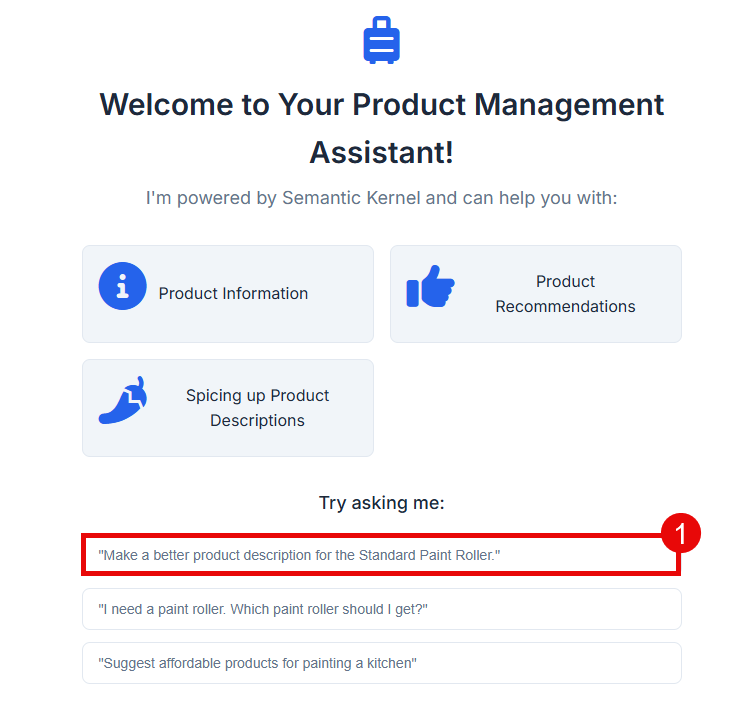
This will send the question to the Product Manager Agent, which will then route the request to the Marketing Agent. You can see these details in the application logs, which are available in the terminal.

You may need to request more details on the description, as the initial response may simply indicate that the request has been forwarded to the Marketing Agent. You can do this by asking, “Can you provide more details?” or “What is that new description?”
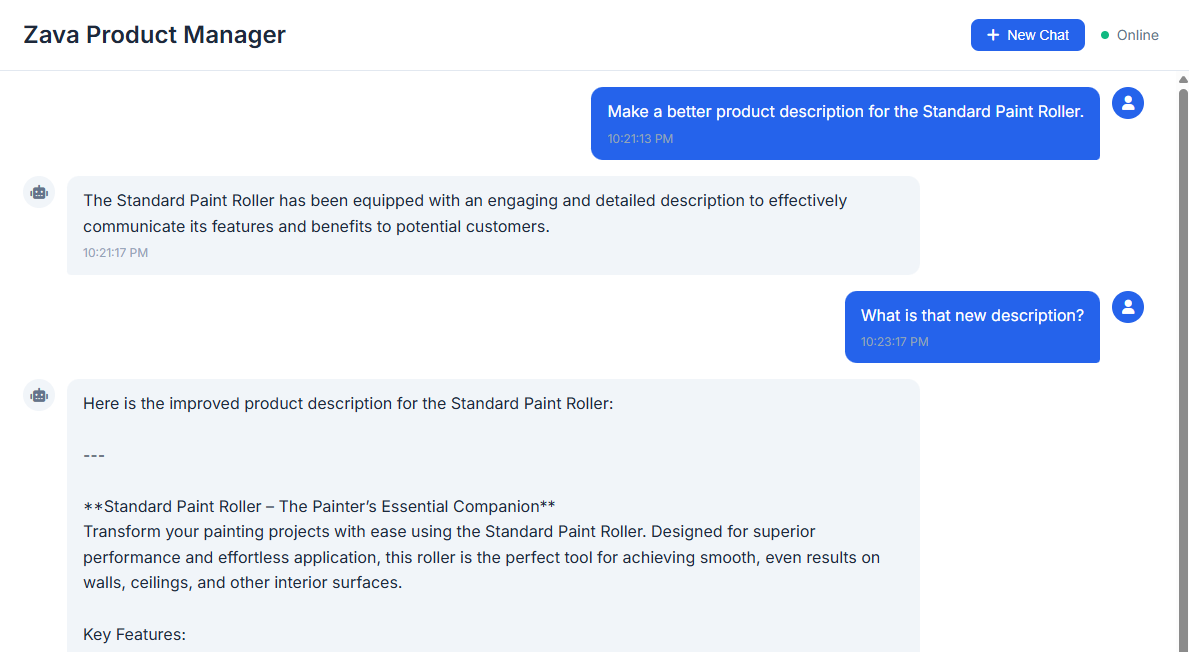
Use the following prompts to test each agent in combination.
- “What kinds of paint rollers do you have in stock?” (Product Agent)
- “What other products do you have for painting?” (Product Agent)
- “I like the concept of the All-Purpose Paint Tray, but it sounds too generic. Can you make the description more exciting?” (Marketing Agent)
- “I’m planning to paint a very small box and can only afford to buy one product. Which product would you recommend?” (Ranker Agent)
In Exercise 02, you created a series of agents in the Microsoft Foundry Agent Service. In this exercise, you have created similar agents using the Microsoft Agent Framework library and integrated them into the Zava Product Manager application. While both approaches are valid, the Agent Service provides additional features such as built-in observability, monitoring, and management capabilities that are not available when using Agent Framework alone. For more information on why you might wish to use the Agent Service, review the Agent Service documentation.