
Court Case Management
The Court Case Management module provides a structured system for tracking legal matters through the complete judicial process, from initial case filing through final disposition and appeals. It provides data entry forms and views for managing case parties and legal representation, recording filings and motions, scheduling hearings and court sessions, documenting judicial decisions and court orders, maintaining chronological docket entries for audit trails, and assigning work items to court staff for case processing. The module supports civil litigation, criminal proceedings, administrative hearings, probate matters, family court cases, and appellate case management with comprehensive visibility into case status, procedural compliance, and judicial workflow.
Typical use cases include trial court docket management, appellate case tracking, clerk of court operations, judicial assignment and workload balancing, court calendar scheduling, case party and attorney management, filing and motion tracking, hearing coordination, order and judgment documentation, and internal case processing task assignment.
Using the Module
The module provides forms and views to support judicial case management throughout the legal matter lifecycle from filing through final disposition. Foundational scheduling infrastructure is established through Court Session records, which define scheduled court sittings with session dates, court locations, presiding officials (assigned judge or magistrate), session status, and calendar block descriptions. Court sessions provide the scheduling foundation that hearings can reference for docket calendar management.
When legal matters are initiated, Court Case records document each case with case numbers, case titles, case types (civil, criminal, administrative, probate, family, appellate), case stages (filed, discovery, trial, decided, closed, appealed), assigned judges, judicial district assignments, filing dates, close dates, case status tracking, related case references for consolidated or split matters, and amounts in controversy with currency support. Court Case Party records can link persons or organizations to cases in defined roles—plaintiffs, defendants, petitioners, respondents, witnesses, interested parties, or third parties—with party type categorization, lead party indicators, contact information, and state/province references for jurisdiction context. Court Case Representation records can document legal representation relationships by connecting parties to their attorneys, guardians ad litem, or agents, including representation type, bar admission references, effective dates for representation periods, and state/province bar jurisdiction.
Throughout case proceedings, Court Case Docket Entry records maintain the official chronological audit log of all case activity, providing a complete timeline of filings, hearings, orders, decisions, continuances, and other significant events. Each docket entry captures entry date and time, entry type, entry text or description, sequential docket numbers, references to related filings/hearings/orders/decisions, entered by attribution, and supporting document linkages. This ensures procedural transparency and creates the official record of case progression required for appeals and judicial review.
Case documents and motions are managed through Court Case Filing records, which represent formal submissions entered into the case record. Each filing includes filing type (pleading, motion, brief, exhibit, transcript, notice, stipulation), filing date, filing party references, filing status (submitted, accepted, rejected, withdrawn), motion types for motions requiring judicial action, filing numbers, descriptions, and supporting document attachments. Filings can reference related court case decisions when rulings result from filed motions, enabling tracking from motion through disposition.
Court Case Hearing records document scheduled appearances and proceedings with hearing types (arraignment, pretrial conference, motion hearing, trial, sentencing, status conference, oral argument), scheduled dates and times, hearing status (scheduled, continued, held, cancelled), court session references for calendar placement, hearing location, presiding official, actual start and end times, hearing outcomes, continuance indicators and reasons, next hearing scheduling, and result descriptions. Hearings can reference related filings when hearings address specific motions or pleadings, and generate docket entries for the procedural record.
Judicial actions are captured through Court Case Decision records, which document rulings and determinations made during case proceedings. Decisions include decision types (ruling on motion, verdict, judgment, order, opinion, sentence), decision dates, deciding officials (judges, magistrates, hearing officers), decision text or summaries, decision status (draft, issued, appealed, affirmed, reversed), legal authority citations establishing precedent or statutory basis, and supporting document references for published opinions or detailed orders. Decisions can reference the filings and hearings they address, maintaining clear linkage from motion through ruling.
Court Case Order records represent formal directives issued by the court, often derived from decisions but documented separately for enforcement and compliance tracking. Orders capture order types (temporary restraining order, preliminary injunction, protective order, consent decree, final judgment, compliance order), issue dates, effective dates, expiration dates for temporary orders, order status (draft, issued, stayed, vacated, modified), compliance requirement references for regulatory orders, affected party references, enforcement indicators, and supporting document attachments. Orders generate docket entries and can reference the decisions and hearings from which they originate.
Internal case management is supported through Court Case Work Item records, which provide task tracking for court staff responsible for advancing cases through judicial processes. Work items include work item types (review filing, schedule hearing, prepare order, process judgment, notice parties, docket entry), assignment to staff persons or organization units, due dates, priority levels, work item status (pending, in progress, completed, cancelled), related case references, and specific linkages to the filings, hearings, orders, or decisions requiring staff action. This enables workflow coordination, workload balancing, and timely case processing.
graph TD
  appbase_ComplianceRequirement(Compliance Requirement)
  appbase_CourtCase(Court Case)
  appbase_CourtCaseDecision(Court Case Decision)
  appbase_CourtCaseDocketEntry(Court Case Docket Entry)
  appbase_CourtCaseFiling(Court Case Filing)
  appbase_CourtCaseHearing(Court Case Hearing)
  appbase_CourtCaseOrder(Court Case Order)
  appbase_CourtCaseParty(Court Case Party)
  appbase_CourtCaseRepresentation(Court Case Representation)
  appbase_CourtCaseWorkItem(Court Case Work Item)
  appbase_CourtSession(Court Session)
  appbase_Document(Document)
  appbase_JudicialDistrict(Judicial District)
  appbase_LegalAuthority(Legal Authority)
  appbase_StateorProvince(State or Province)
  appbase_CourtCaseOrder --> appbase_ComplianceRequirement
  appbase_CourtCase --> appbase_CourtCase
  appbase_CourtCaseDecision --> appbase_CourtCase
  appbase_CourtCaseDocketEntry --> appbase_CourtCase
  appbase_CourtCaseFiling --> appbase_CourtCase
  appbase_CourtCaseHearing --> appbase_CourtCase
  appbase_CourtCaseOrder --> appbase_CourtCase
  appbase_CourtCaseParty --> appbase_CourtCase
  appbase_CourtCaseRepresentation --> appbase_CourtCase
  appbase_CourtCaseWorkItem --> appbase_CourtCase
  appbase_CourtCaseDocketEntry --> appbase_CourtCaseDecision
  appbase_CourtCaseOrder --> appbase_CourtCaseDecision
  appbase_CourtCaseWorkItem --> appbase_CourtCaseDecision
  appbase_CourtCaseDecision --> appbase_CourtCaseFiling
  appbase_CourtCaseDocketEntry --> appbase_CourtCaseFiling
  appbase_CourtCaseWorkItem --> appbase_CourtCaseFiling
  appbase_CourtCaseDecision --> appbase_CourtCaseHearing
  appbase_CourtCaseDocketEntry --> appbase_CourtCaseHearing
  appbase_CourtCaseWorkItem --> appbase_CourtCaseHearing
  appbase_CourtCaseDocketEntry --> appbase_CourtCaseOrder
  appbase_CourtCaseWorkItem --> appbase_CourtCaseOrder
  appbase_CourtCaseFiling --> appbase_CourtCaseParty
  appbase_CourtCaseOrder --> appbase_CourtCaseParty
  appbase_CourtCaseRepresentation --> appbase_CourtCaseParty
  appbase_CourtCaseHearing --> appbase_CourtSession
  appbase_CourtCaseDecision --> appbase_Document
  appbase_CourtCaseDocketEntry --> appbase_Document
  appbase_CourtCaseFiling --> appbase_Document
  appbase_CourtCaseOrder --> appbase_Document
  appbase_CourtCaseWorkItem --> appbase_Document
  appbase_CourtCase --> appbase_JudicialDistrict
  appbase_CourtCaseDecision --> appbase_LegalAuthority
  appbase_CourtCaseParty --> appbase_StateorProvince
  appbase_CourtCaseRepresentation --> appbase_StateorProvince
The Court Case Management module provides a structured system for tracking legal matters through the court system, from case filing through final disposition. It manages core case information including parties, filings, hearings, orders, and decisions, while maintaining chronological docket entries for full case history. The module supports representation tracking, work item assignment, and court session scheduling. Typical use cases include civil litigation management, criminal case processing, administrative hearings, probate matters, family court proceedings, and appellate case tracking. It provides both operational case management and scheduling capabilities while ensuring comprehensive audit trails for all case activities.
Tables
Court Case
The primary record representing a legal matter before the court. Tracks case number, type, jurisdiction, status, assigned judge, and overall lifecycle of the matter.
Court Case Decision
Records a judicial ruling or determination made in a case. Captures the decision type, date, deciding official, and links to related hearings or filings. May represent interim or final decisions.
Court Case Docket Entry
The official chronological log entry for activity in a case. Provides an audit-friendly record of filings, hearings, orders, and other significant case events.
Court Case Filing
Represents a document or submission formally entered into the case record. Includes motions and other filings submitted by parties or external entities, along with filing date and status.
Court Case Hearing
Represents a scheduled case appearance or proceeding. May be associated with a Court Session and records hearing type, scheduling details, and results.
Court Case Order
Represents a formal directive issued by the court. Often generated from a decision, and may include effective dates, status (draft/issued), and compliance implications.
Court Case Party
Links a person or organization to a case in a defined role. Used to track plaintiffs, defendants, petitioners, respondents, and other involved parties.
Court Case Representation
Tracks representation relationships within a case. Identifies which party is represented by which attorney, guardian, or agent, including effective dates.
Court Case Work Item
Represents internal court staff tasks related to advancing a case. Includes assignments, due dates, status, and links to related filings, hearings, or orders.
Court Session
Represents a scheduled sitting of the court. Defines the date, location, presiding official, and status of a court calendar block during which one or more case hearings may occur.
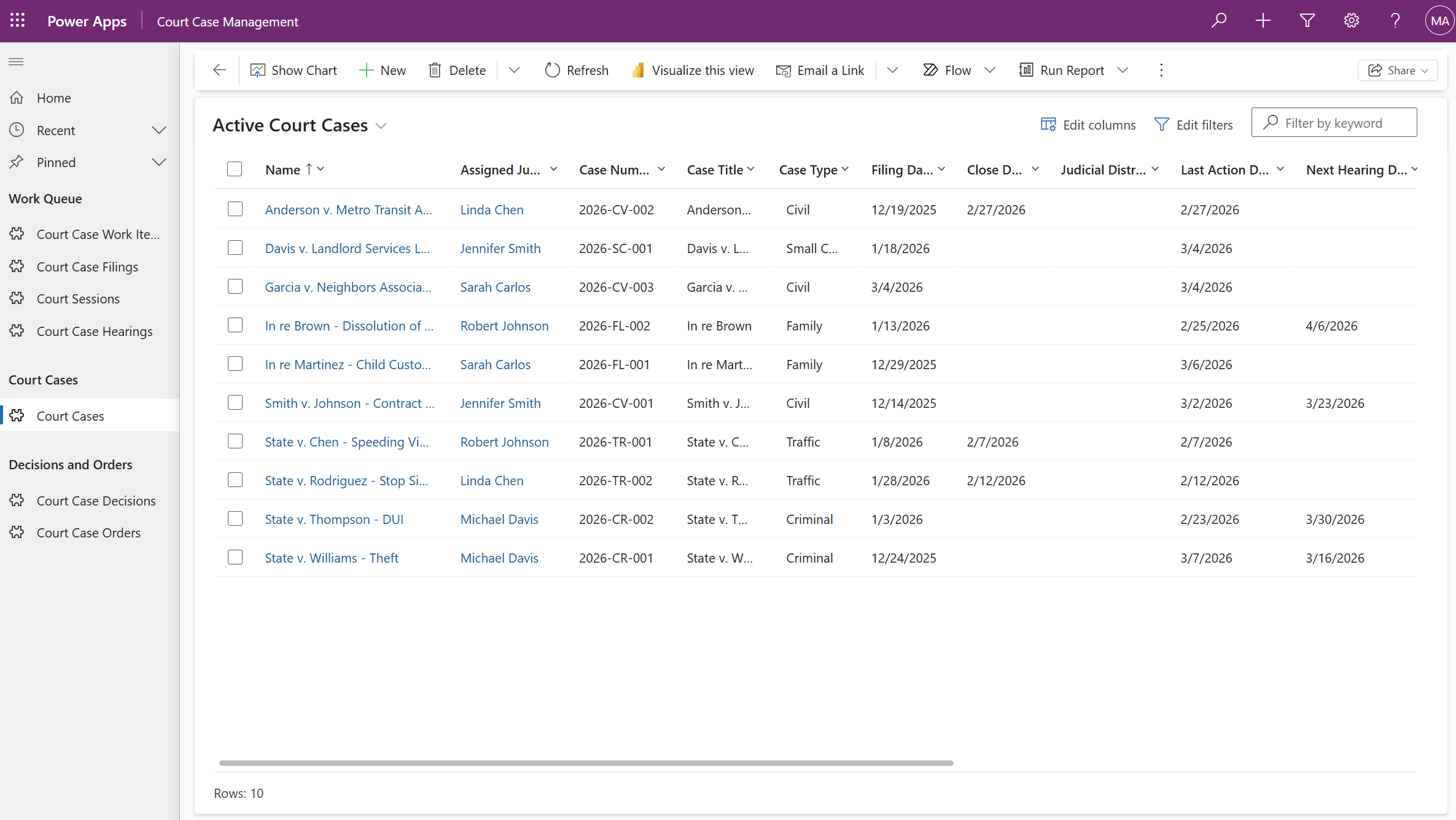
Note: All data shown in screenshots is fictitious and for demonstration purposes only.
Use the pac data CLI command or the Configuration Migration tool to import sample data into your environment.
📦 Sample Data
Sample court case management data.
No guides are available for this solution yet.
Required Modules
- 🧰 Core
ERD — Court Case Management
Screenshot
Note: All data shown is fictitious and for demonstration purposes only.

An open-source MIT License project maintained by Microsoft. Open Source at Microsoft