Task 06: Test connected agent orchestration
Description
You’ll provision the Zava Care orchestrator agent and verify that it correctly delegates tasks to its two worker agents - retrieving live claims data from Zava Claims and current pricing from Zava Procurement - to produce a unified response to a complex, multi-step query.
Success criteria
- You provisioned the
Zava Careagent package to your Microsoft 365 tenant without errors. - You opened the Zava Care agent in Copilot Chat and sent the emergency response coordination prompt.
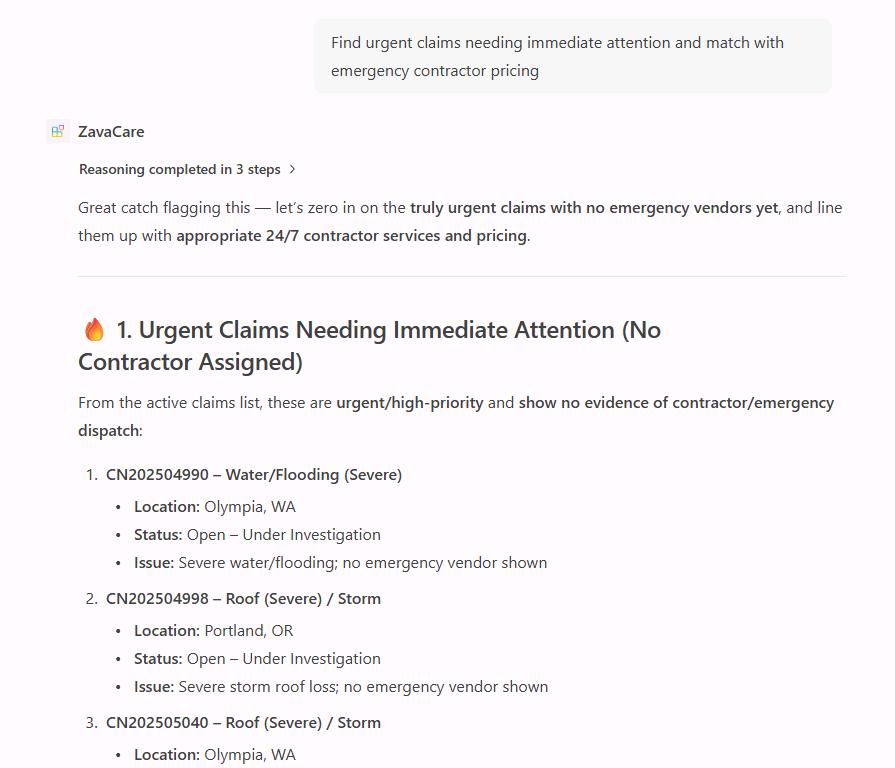
- You confirmed that the agent’s response drew on both worker agents - live claims data and embedded pricing information - in a single reply.
Key steps
01: Provision the connected agent
-
In the leftmost pane, select the Microsoft 365 Agents Toolkit (
) icon.
-
Under the LIFECYCLE section, select Provision.
-
Select the dev environment.
-
Wait for provisioning to complete.
02: Test multi-agent workflows
-
Open Microsoft Edge, then go back to
m365.cloud.microsoft/chat -
In the leftmost pane, under Agents, select Zava Care.
-
Test the following orchestrated workflow:
Complex Workflow : Multi Agent Coordination
Find urgent claims needing immediate attention and match with emergency contractor pricingNotice it uses both agents to generate a response.
-
Select Confirm through the prompts.
Well done! You’ve successfully built Zava Insurance’s Connected Agent orchestration system!
Conclusion
Congratulations! You’ve completed the lab. This achievement represents the culmination of a sophisticated multi-agent architecture that represents the future of enterprise AI systems - specialized, coordinated, and infinitely extensible! 🚀
In this lab you built a complete multi-agent system for Zava Insurance’s claims operations. You started by connecting a declarative agent to a live MCP server and verifying its tools with the MCP Inspector. You then configured a fully branded claims assistant with natural language instructions, before creating a second agent that answers pricing questions from embedded PDF knowledge files. Finally, you built an orchestrator agent that coordinates both specialists into a single, unified conversational experience inside Microsoft 365 Copilot Chat.
Next steps
Take these concepts further with in-depth, hands-on labs in Copilot Developer Camp: