Task 02: Define an application for the Airsonic stack
Introduction
Terra Firm isn’t migrating “random servers” - they’re migrating a workload that users rely on, with tiers that rise and fall together. Defining the application lets Dennis’s team treat the pilot as a single unit (web/app/database), making it easier to plan dependencies, choose a target approach, and avoid migrating pieces out of order.
Description
In this task, you’ll create an application definition for the Airsonic stack by linking the frontend and backend servers and their discovered workloads (Tomcat web app and PostgreSQL database). You’ll also set basic app properties such as business criticality and complexity.
Success criteria
- An application named airsonic-app-@lab.LabInstance.Id exists in Explore applications > Applications.
- The application includes the linked Airsonic servers and their discovered workloads.
Key tasks
- Create a new Custom application definition from Explore applications > Applications.
- Link the Airsonic frontend and backend servers (ensuring workloads are included).
- Set business criticality/complexity values and create the application.
You’re grouping the Airsonic Frontend + Backend + discovered workloads (Tomcat + PostgreSQL) into one “application” so you can assess, plan waves, and make PaaS vs IaaS decisions as a stack.
-
In the left menu under Explore applications, select Applications.
-
Select + Define application.
-
For the Name, enter airsonic-app-@lab.LabInstance.Id.
-
For the description, enter Airsonic application consists of a front end Java/Tomcat app and a back end PostgreSQL database.
-
For Type, select Custom.
-
Select Next.
-
Select Link workloads.
-
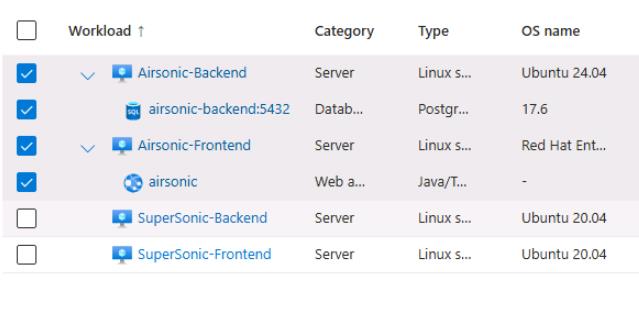
Select the checkboxes next to Airsonic-Frontend and Airsonic-Backend.
Selecting the servers will also select the Web app and Database workloads.
-
Select Add.
-
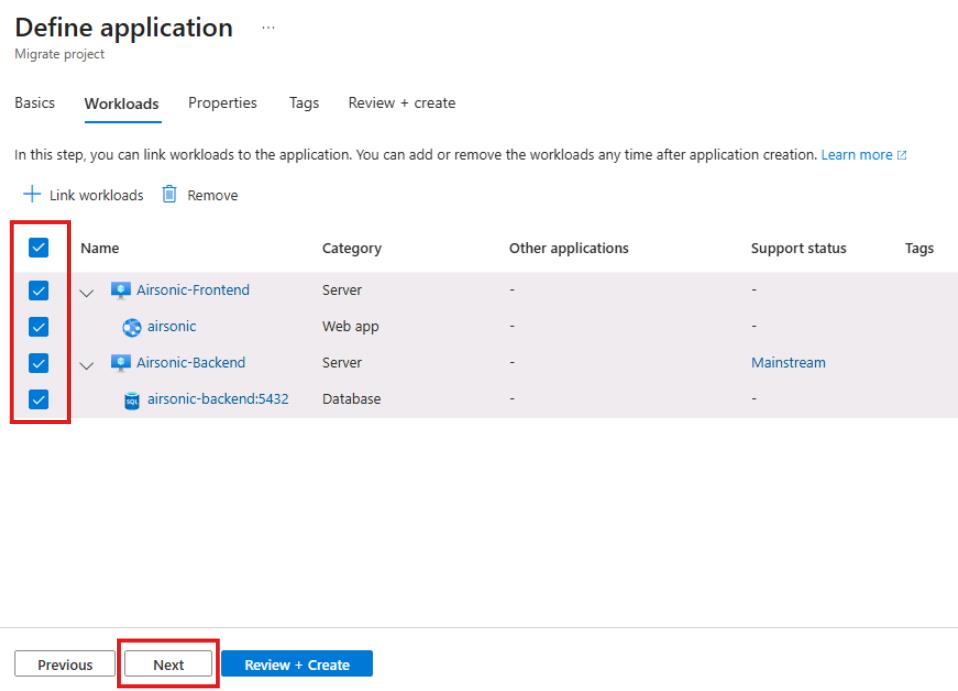
On the Workloads tab, select All four workloads, and then select Next.
-
On the properties tab, enter the following:
Object Value Business criticality Medium Complexity Medium Publisher Blank Technology stack Blank -
Select Review and Create, and then select Create.
Select Refresh until you see that the application has been created.
Congratulations!
You grouped the Airsonic stack into a single application, including its servers and discovered workloads, so it can be assessed and planned as a unit.