Task 04: Review the Assessment created by the Business Case
Introduction
Terra Firm wants options: lift-and-shift where it makes sense, but also modernization paths that reduce long-term work and improve security. The assessment translates discovery into readiness and recommendations, so Dennis can compare VM migration versus PaaS/container options and choose what best fits the pilot’s needs.
Description
In this task, you’ll open the assessment created by the business case and compare recommendations across PaaS preferred, PaaS only, and Lift and shift to Azure VM views. You’ll observe how targets and readiness differ by path.
Success criteria
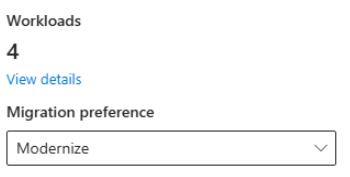
- The assessment shows 4 workloads and uses the Modernize preference.
- You can identify the recommended target approach for the web app and database across the different paths.
Key tasks
- Open the assessment produced by the business case and verify workload count and migration preference.
- Compare the migration paths across PaaS preferred, PaaS only, and Lift and shift.
- Use View details to identify the recommended target services for the app tier and database tier.
-
In the Azure Migrate project, under Decide and Plan, select Assessments.
-
Select the businesscase-bc-@lab.LabInstance.Id assessment.
-
Ensure that 4 Workloads are displayed and that the Migration preference is set to Modernize.
-
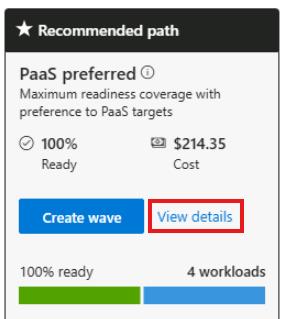
Compare the migration options between PaaS preferred, Paas only, and Lift and shift to Azure VM.
-
On the Paas preferred tile, select View details.
-
Observe the recommended migration path and readiness state:
- Replatform the Web app to an App Service Container.
- Replatform the PostgreSQL instance to Azure Database for PostgreSQL.
- Rehost the two remaining Servers to Azure VMs.
-
On the top menu, select Paas only

-
Observe the recommended migration path and readiness state:
- Replatform the Web app to AKS.
- Replatform the PostgreSQL instance to Azure Database for PostgreSQL.
- Rehost the two remaining Servers to Azure VMs.
-
On the top menu, select Lift and shift Azure VM.
-
Observe the recommended migration path and readiness state:

- Rehost the all 4 Servers to Azure VMs.
-
Select the X in the top right corner to close the assessment page.
Congratulations!
You compared modernization options and validated the recommended migration approach for the web app and PostgreSQL workload across PaaS and IaaS paths.