TechWorkshop L300: Secure Workload Migration to Azure - Windows Server & SQL Server
Tailspin Toys, a leading global toy manufacturer founded in 1957 and headquartered in Milwaukee, WI, is built for nonstop operations with distribution centers spanning the US, UK, Thailand, and New Zealand. The company’s mission-critical workloads run in an on-premises data center, with each location requiring seamless failover to maintain business continuity around the clock.
Driven by CTO Kaylee Frye’s vision to modernize operations, Tailspin is embarking on a strategic migration to Microsoft Azure—optimizing technology investments, reducing technical debt, and future-proofing their infrastructure. Kaylee and her team seek clarity on how to efficiently migrate complex workloads, maximize resiliency, and meet strict recovery targets (RTO 15 minutes/RPO 5 minutes).
Security is top of mind. CISO Brian Stitt wants robust protection as Tailspin transitions to cloud, safeguarding against cyber threats and ensuring unified management for both cloud and on-prem assets—including integration with existing Microsoft 365 licenses. The journey comes with challenges: legacy factory software must remain on-premises, critical third-party apps lack source code, and some workloads operate on outdated systems like Windows XP.
Every migration decision must balance minimal downtime with high availability and strong compliance, all while giving administrators a streamlined management experience. Tailspin’s DevOps-savvy teams, led by Chief Architect Casey Jensen, bring expertise in Kubernetes, modern databases, and CI/CD pipelines—ready to embrace modernization wherever possible. This workshop explores Tailspin’s real-world transformation, mapping their business and technical hurdles directly to hands-on migration strategies, security enhancements, and cloud management best practices.
In this lab, attendees will perform steps toward migrating Tailspin Toy’s on-premises Windows Server and SQL Server workloads to Azure. Tailspin needs a new Windows Server VM created in Azure for hosting their Web application, an on-premises SQL Server database migrated to Azure SQL Managed Instance, secure Windows Server, and an on-premises Windows Server VM to be Azure Arc-enabled.
Tailspin already has a Hub and Spoke network setup in Azure with Azure Bastion for enabling secure remote management of Azure VM using Azure Bastion. The Azure resources provisioned throughout this lab will be deployed into this environment.
Key technologies
- Windows Server
- SQL Server
- Azure SQL (SQL Server on Azure VMs, Azure SQL Managed Instance, Azure SQL Database)
- Azure Security
- Azure Arc
- Azure Active Directory (Entra ID)
Additional technologies
- Microsoft Defender
- Network Security (include Azure DDoS Protection)
- Azure Automanage
- Azure Virtual Desktop
- Azure Disk Storage
- Azure Files
- Azure Monitor
- Azure Sentinel
- Azure Backup
- Azure Site Recovery
- Azure Policy
- Azure Key Vault
- Azure Automation (optional)
- Azure Log Analytics (optional)
Solution architecture
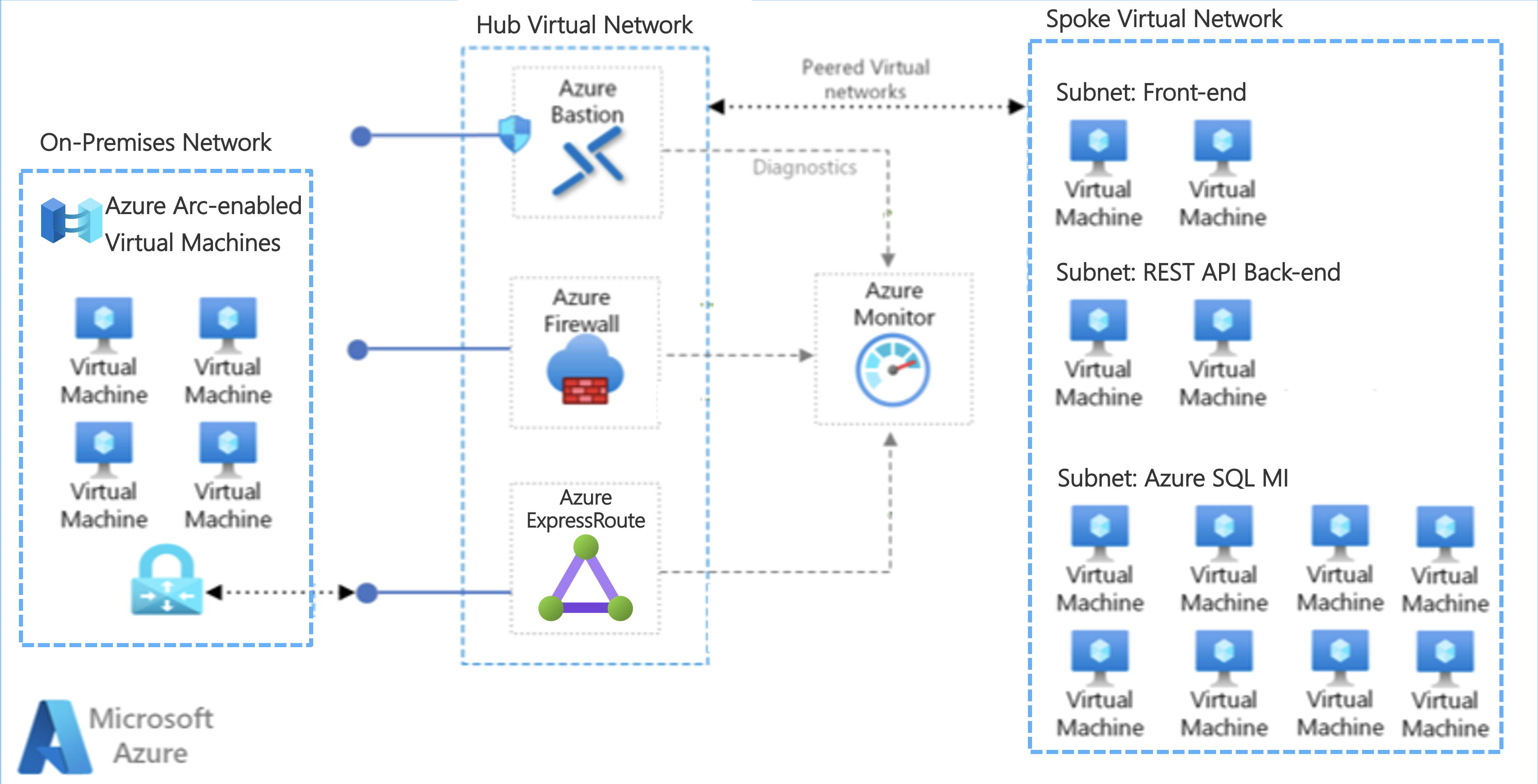
The diagram shows an on-premises network connected to Azure using Azure ExpressRoute with a Hub and Spoke network in Azure. Within Azure, the Spoke VNet is used to run the migrated front-end, back-end, and SQL database workloads, each isolated in its own subnet.
Redundant Azure ExpressRoute peering locations
Redundant Azure ExpressRoute peering locations provide an additional layer of resiliency and high availability for your connectivity to Azure. By establishing ExpressRoute circuits in two different peering locations, you gain built‑in redundancy that provides a backup connection if one location experiences an outage. This design minimizes downtime and helps ensure uninterrupted connectivity to Azure for your workloads and applications.
NOTE: You can find more information about Redundant Azure ExpressRoute peering locations at Designing for Disaster Recovery with ExpressRoute private peering and Building resilient ExpressRoute connectivity for business continuity and disaster recovery.
S2S VPN as a backup for ExpressRoute private peering
A Site-to-Site (S2S) VPN connection can be used as a secure failover path for ExpressRoute private peering. This means that if the ExpressRoute connection experiences an outage or disruption, the S2S VPN connection can provide a backup connection to ensure continued connectivity to Azure.
To set up a S2S VPN connection as a backup for ExpressRoute private peering, you need to create two virtual network gateways for the same virtual network: one using the gateway type ‘VPN’ and the other using the gateway type ‘ExpressRoute’. Once the S2S VPN connection is configured, it can provide a secure and reliable failover path for ExpressRoute private peering, ensuring that your connectivity to Azure remains uninterrupted even in the event of an outage or disruption in the ExpressRoute connection.
NOTE: You can find more information about Redundant Azure ExpressRoute peering locations at Use S2S VPN as backup for ExpressRoute private peering
ExpressRoute Gateway SKU Zone redundancy
Azure zone-aware SKUs provide high availability and resiliency for your workloads and applications by distributing resources across multiple availability zones within an Azure region. Each availability zone is a separate physical location with independent power, cooling, and networking, providing protection against datacenter-level failures.
By using zone-aware SKUs, you can deploy your resources, such as virtual machines, managed disks, and load balancers, across multiple availability zones, ensuring that your workloads and applications remain available even if one of the zones experiences an outage. This redundancy helps to minimize downtime and ensure that your services continue to run smoothly, even in the face of unexpected disruptions.
NOTE: You can find more information about Azure Availability Zones at https://learn.microsoft.com/en-us/azure/reliability/availability-zones-overview?tabs=azure-cli.
Exercises
This lab has exercises on:
- Provision a simulated on-presmises environment in your Azure subscription
- Arc-enable a Windows Server VM for application migration to Azure
- Migrate an on-premises SQL Server database to Azure SQL Managed Instance (SQL MI)
- Secure the SQL MI
This lab is available as GitHub pages.
Prerequisites
For running this lab you will need:
- An Azure subscription without a spending cap.
- A desktop, laptop, or virtual machine and access to install software on that machine.