Task 03 - Enable advanced capabilities for modern workloads
Introduction
With Tailspin’s SQL workloads successfully migrated and secured in Azure SQL Managed Instance, the next step is to unlock advanced capabilities that go beyond traditional relational queries. In this task, you will configure the Managed Instance to run in Always‑up‑to‑date mode and upgrade the database to the latest compatibility level, ensuring access to the newest SQL features while preserving backward compatibility for existing applications.
This foundation enables modern features such as vector support, designed for AI‑driven scenarios like semantic search, recommendation systems, and similarity detection. By loading vector data and running similarity queries, Tailspin can modernize its analytics and prepare its systems for next‑generation workloads that integrate machine learning and intelligent search directly into the database.
Description
In this task, you will:
- Verify the SQL Managed Instance engine update policy is set to Always-up-to-date, ensuring the engine continuously evolves with the latest SQL capablities.
- Upgrade the
ToyStoredatabase to the latest compatibility level to align query processing with modern workloads. - Create vector columns in the database schema to store embeddings or feature vectors.
- Use Azure SQL MI together with Azure OpenAI to generate embeddings and perform vector similarity queries, validating AI‑driven operations such as nearest‑neighbor search and semantic matching.
Success Criteria
- SQL Managed Instance update policy is set to always‑up‑to‑date, and the
ToyStoredatabase is upgraded to the latest compatibility level. - Vector columns are successfully created in the database schema.
- Embedding data is loaded and stored in the database without errors.
- Similarity queries execute correctly, returning expected results that demonstrate modern AI‑driven capabilities.
Step-by-Step Instructions
Tailspin’s ToyStore database is now running in Azure, and you are ready to take advantage of the latest SQL Server capabilities. First, configure the SQL Managed Instance update policy to Always‑up‑to‑date. Next, upgrade the ToyStore database to the latest compatibility level. Finally, integrate with Azure OpenAI to generate embeddings and execute semantic similarity queries, demonstrating how Tailspin can extend its workloads with intelligent search and recommendation features.
-
In the Azure portal, open your lab resource group and select the
tailspin<uniqueid>-sqlmiSQL Managed Instance resource.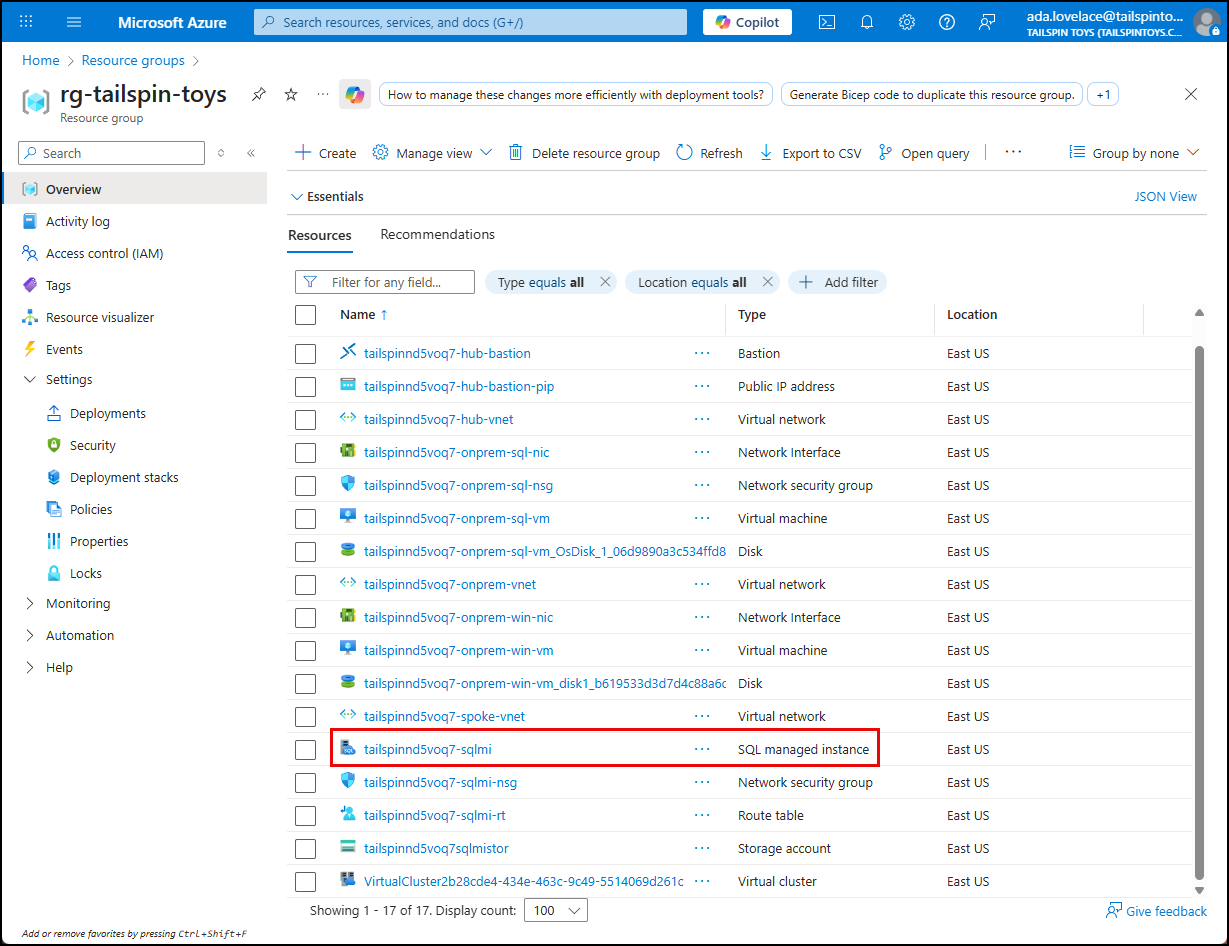
-
On the SQL Managed Instance blade, choose Maintenance and updates under Settings in the left menu. In the SQL engine updates section, confirm that Always-up-to-date is selected. If another values is shown, switch to Always-up-to-date and select Save.
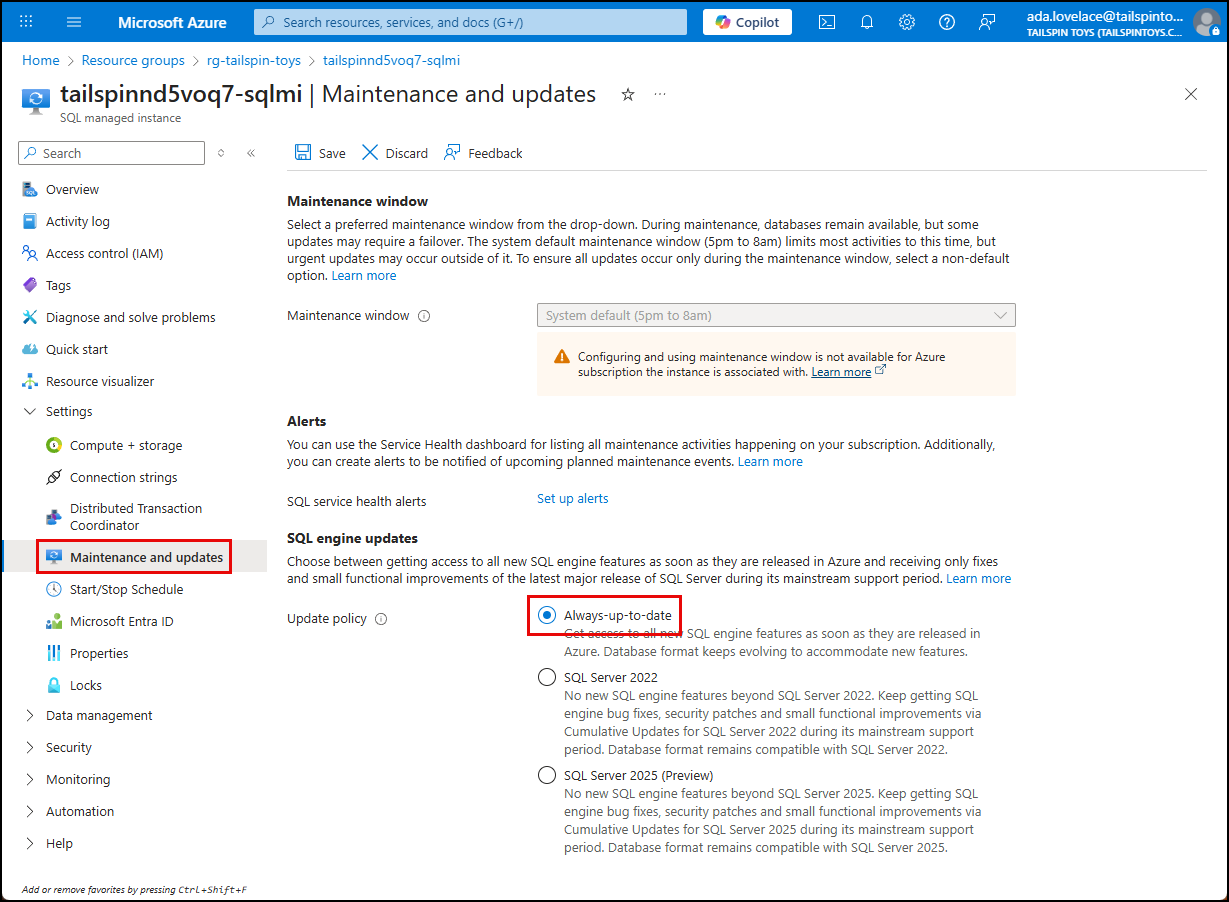
NOTE: The Always‑up‑to‑date policy ensures your Managed Instance automatically receives the latest SQL engine improvements for performance, security, and compliance. This eliminates manual patching and downtime planning. In this lab, the setting was enabled during deployment so you can immediately focus on modern workload features.
-
To upgrade the
ToyStoredatabase compatilibity level, go to the Overview blade of the SQL MI blade, and copy the Host value from the Essentials panel.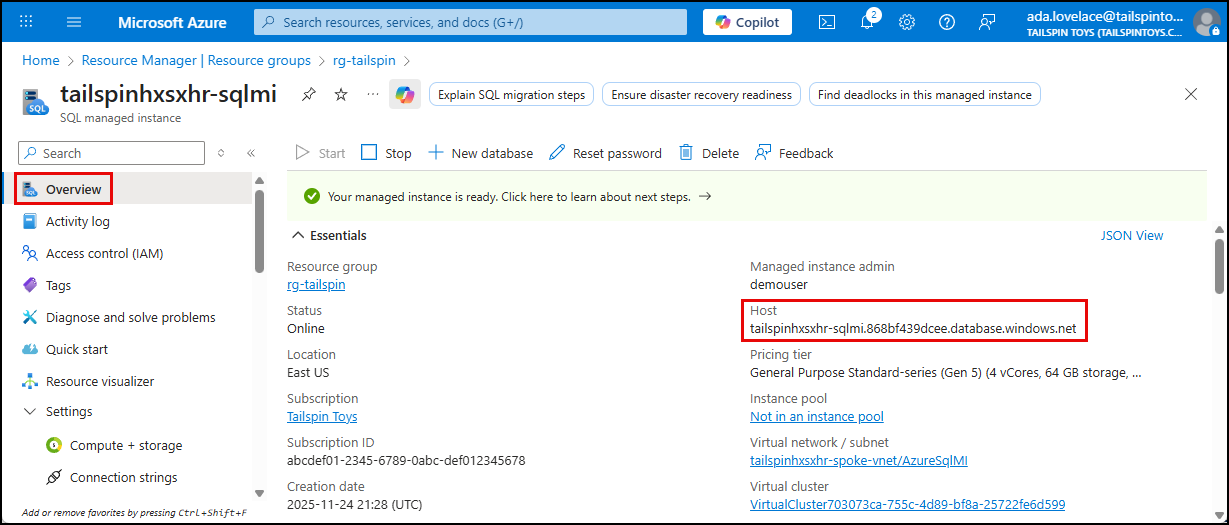
-
Return to the SQL VM Bastion session, and on the SQL VM. From the Windows start menu, launch Microsoft SQL Server Management Studio (SSMS), located under the Microsoft SQL Server Tools 20 folder.
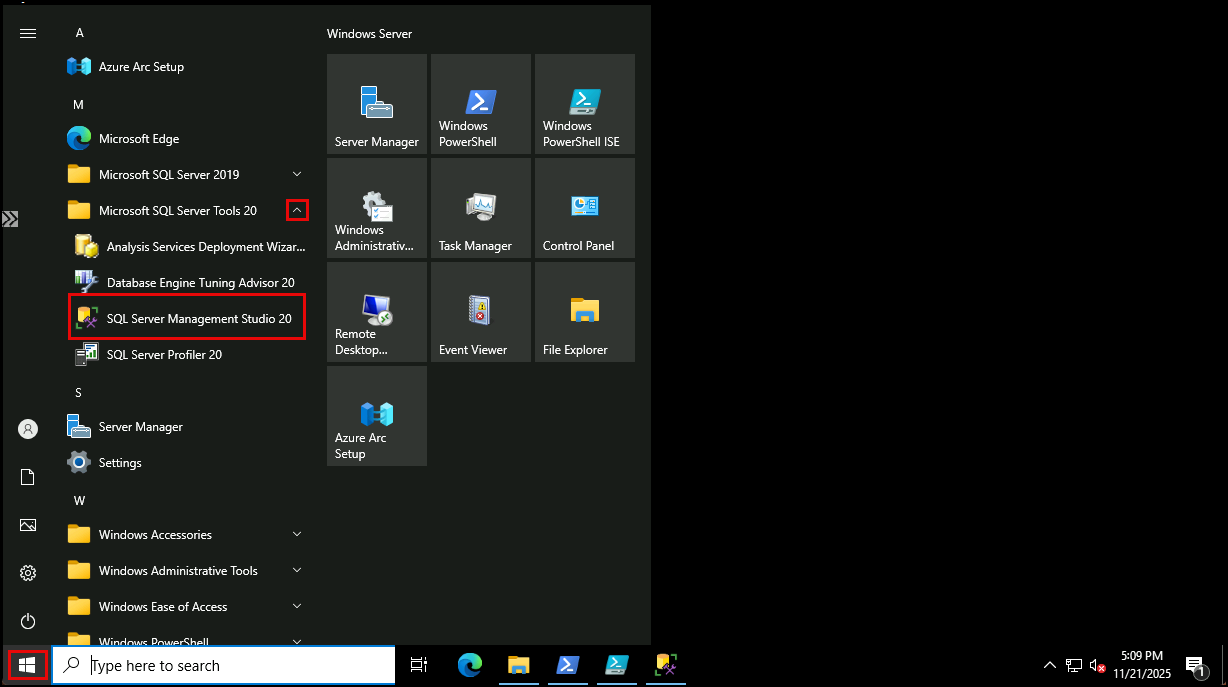
-
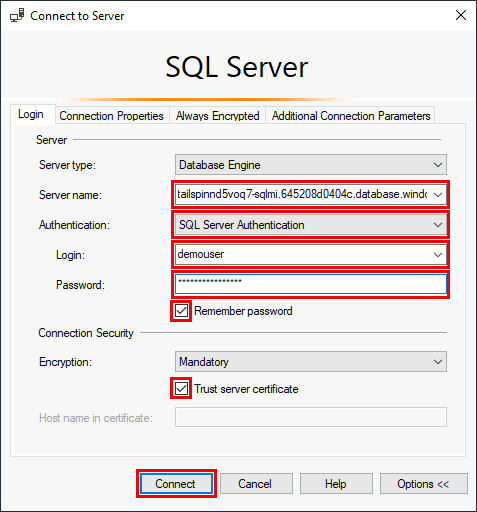
In the Connect to Server dialog, enter:
Using Entra Authentication:
- Server type:
Database Engine - Server name: Paste the host name of your SQL Managed Instance
- Authentication:
Microsoft Entra MFA - User name: Enter your Entra username (email)
- Enable Remember password and Trust server certificate
- Select Connect and complete the login process in the web browser
Or, using SQL Auth (disabled for most during deployment):
- Server type:
Database Engine - Server name: Paste the host name of your SQL Managed Instance
- Authentication:
Sql Server Authentication - Login:
demouser - Password: Enter the password you provided for the
demouserAdmin login when deploying your resources to Azure - Enable Remember password and Trust server certificate
- Select Connect
- Server type:
-
Once connected, expand Databases, right-click the
ToyStoredatabase, and select New Query in the context menu.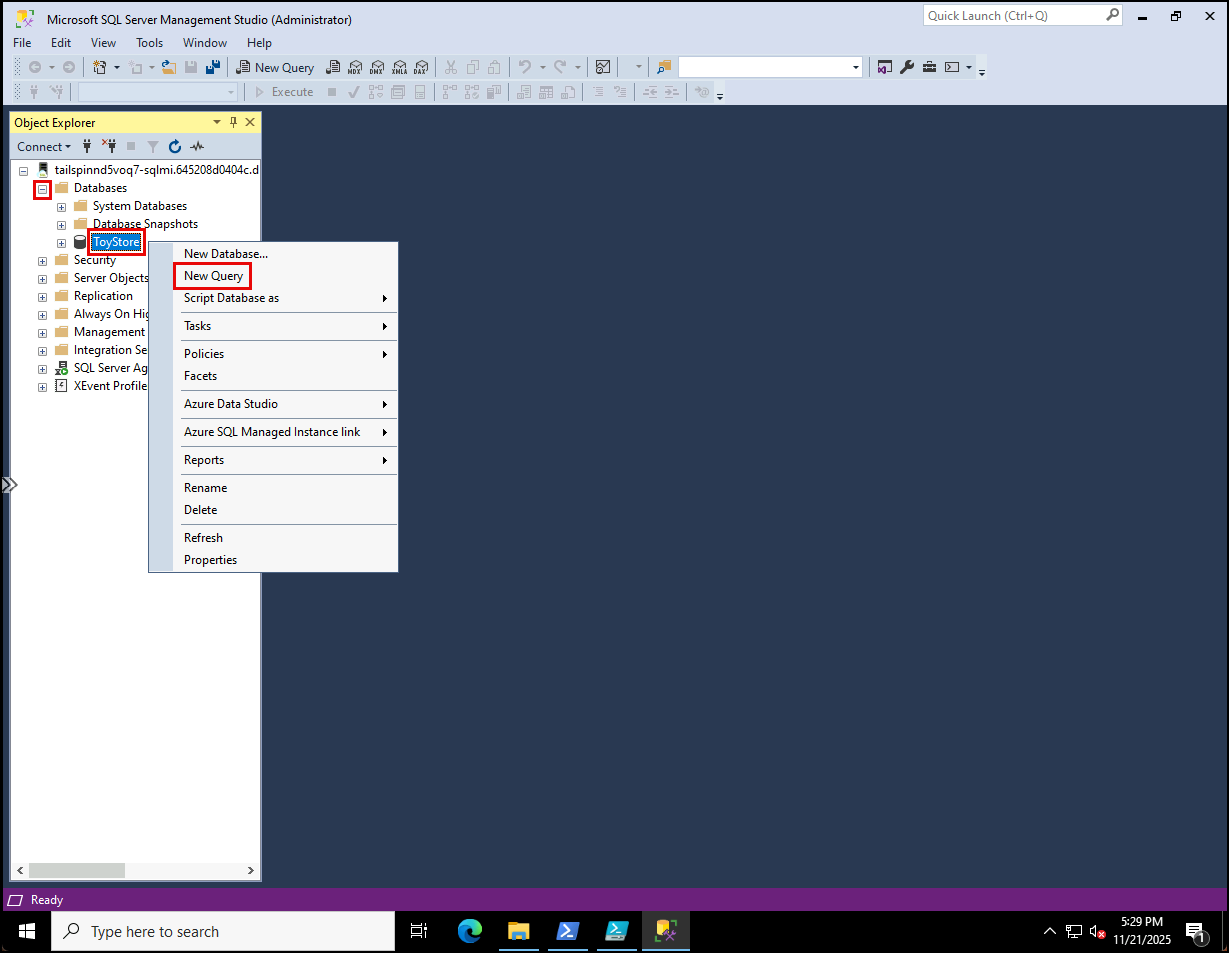
-
Run the following query to check the current compatibility level:
 SELECT name, compatibility_level
 FROM sys.databases
 WHERE [name] = 'ToyStore';
 GO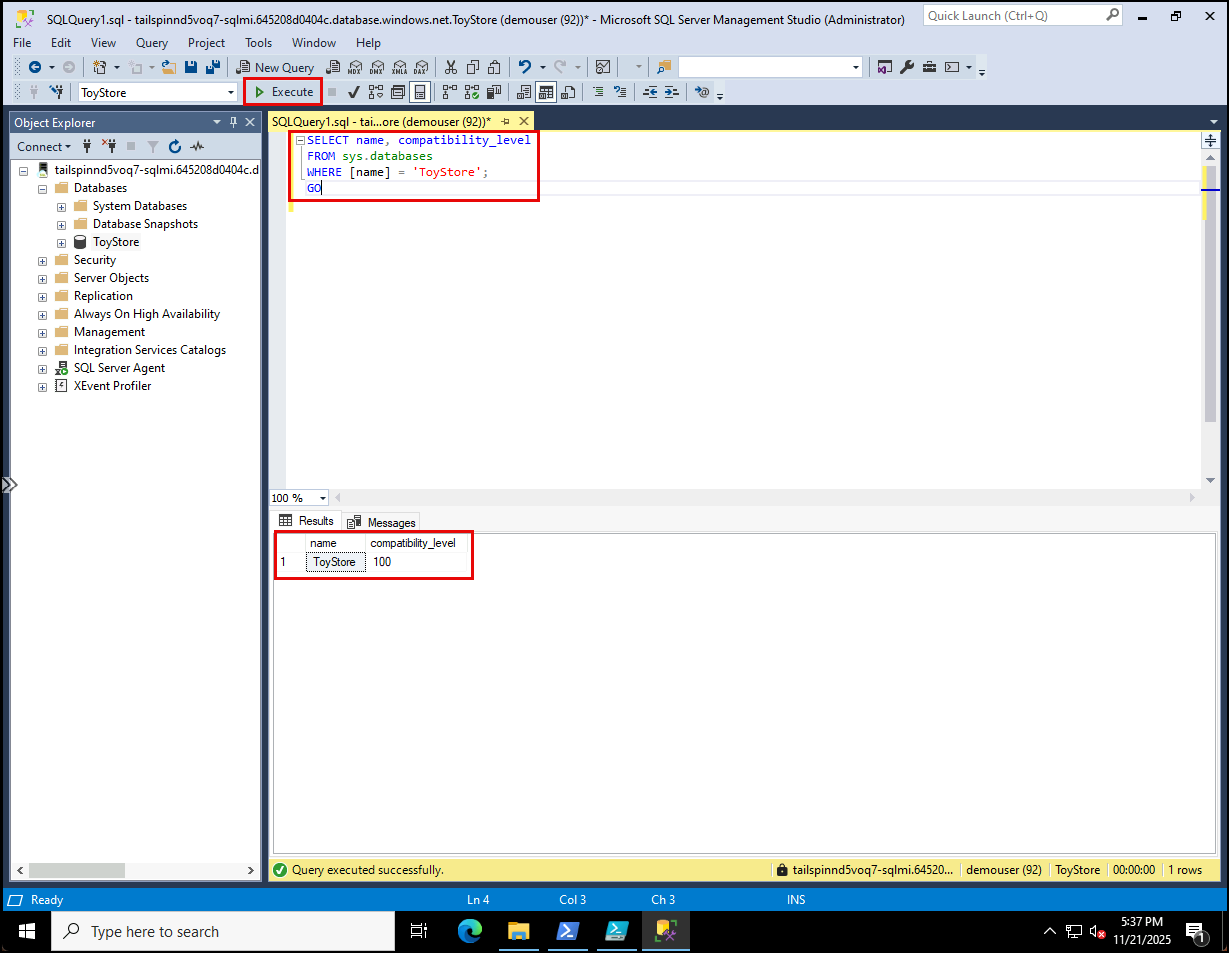
-
Update to the latest compatibity level (160 = SQL Server 2022):
 ALTER DATABASE ToyStore
 SET COMPATIBILITY_LEVEL = 160;
 GO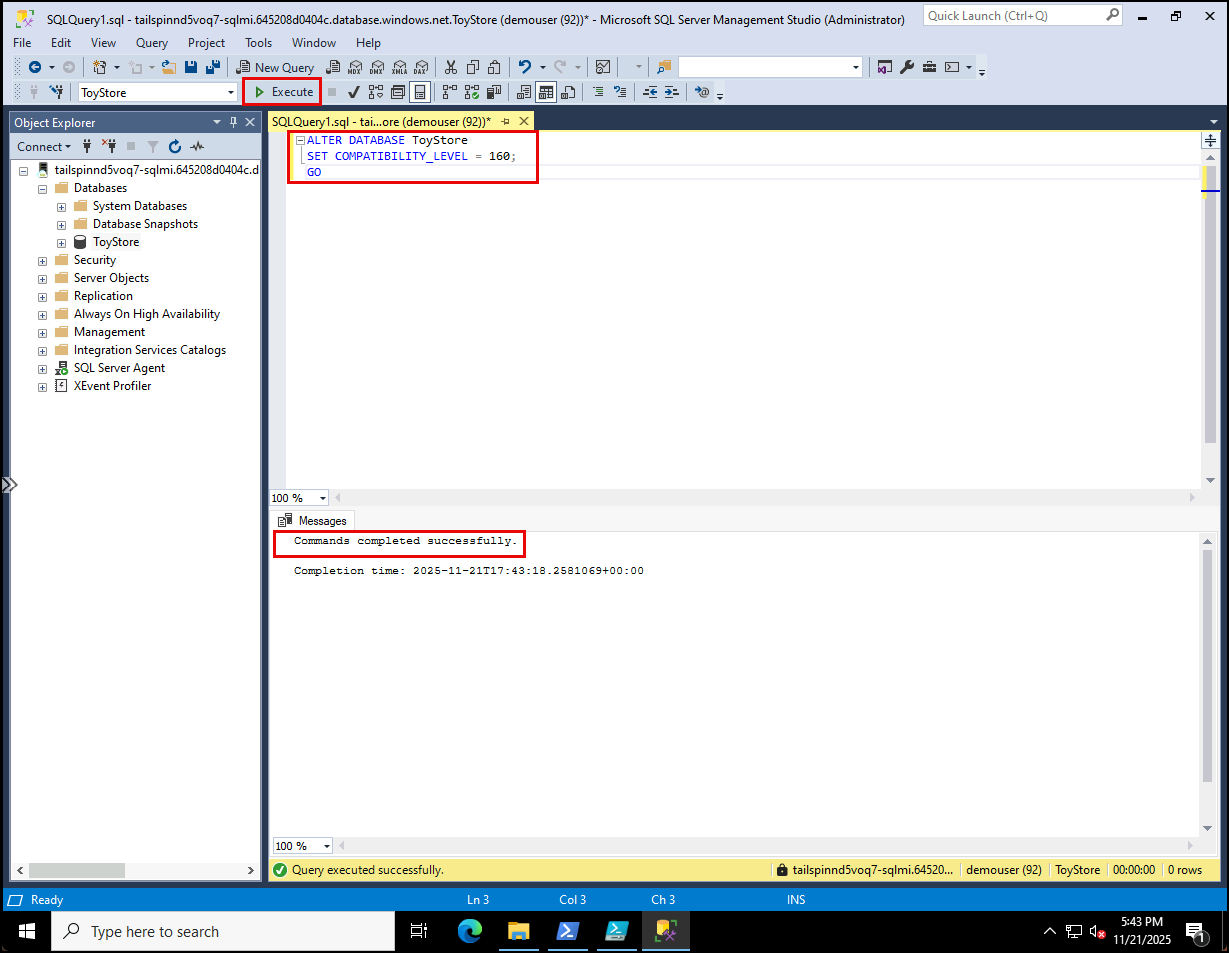
NOTE: Compatibility level 160 unlocks SQL Server 2022 query processing features such as intelligent query processing and enhanced cardinality estimation. This ensures modern workloads benefit from the latest optimizations while maintaining backward compatibility.
-
With the database upgraded, you can now prepare it for modern workload features such as vector‑based queries.
-
Add a vector column to store embeddings in the
[Production.ProductDescription]table:USE ToyStore; GO ALTER TABLE [Production].[ProductDescription] ADD [embedding] VECTOR(1536) NULL; -
Before you can generate embeddings from the database, you must retrieve the endpoint and key of the Azure OpenAI service that you deployed with the ARM template you ran in the setup for this lab. Navigate to your lab resource group in the Azure portal, and select the
tailspin<uniqueid>-oaiAzure OpenAI resource from the resources list.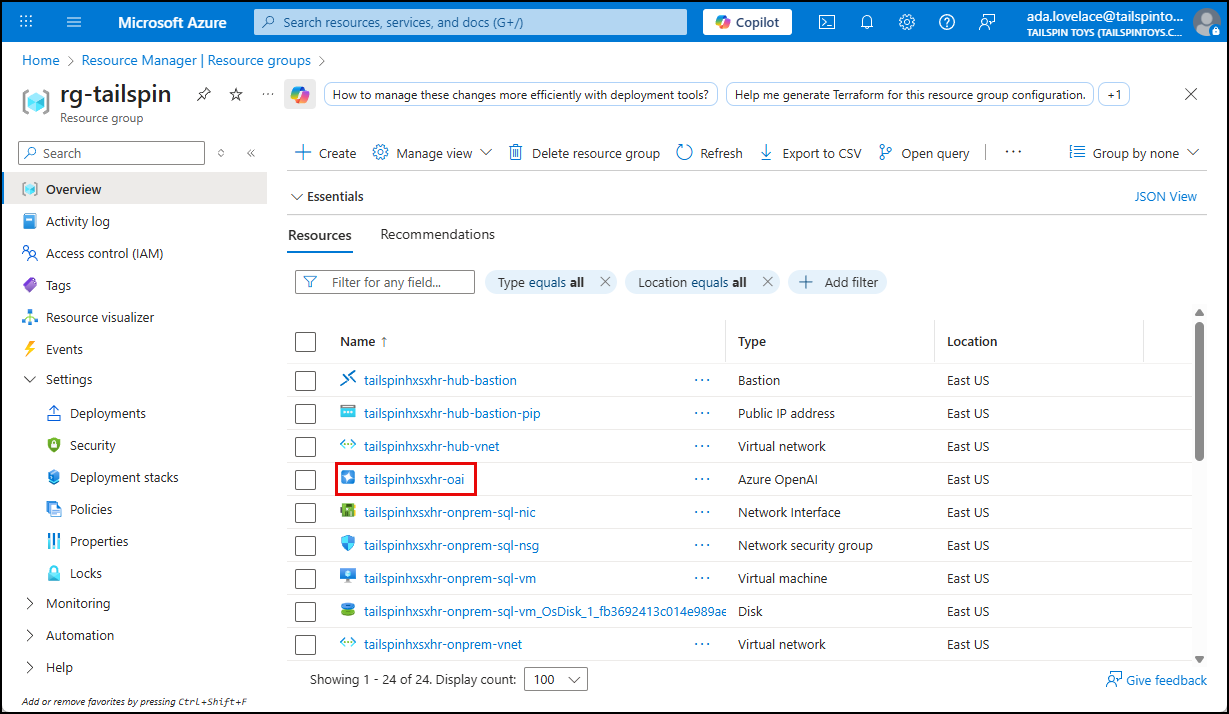
-
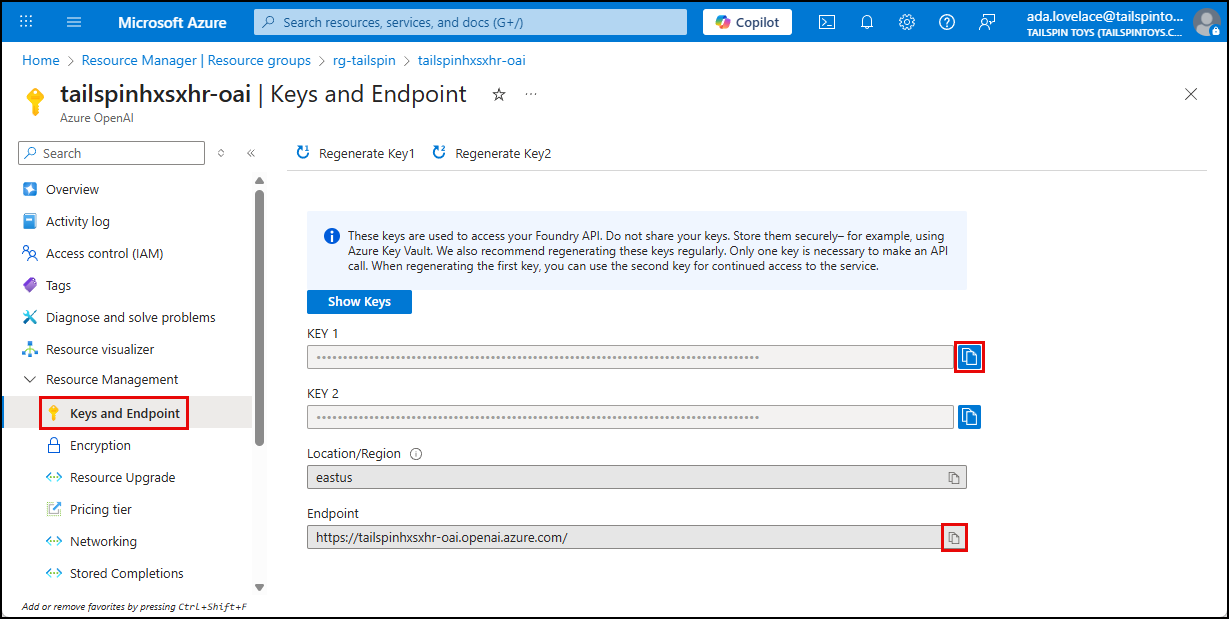
On the Azure OpenAI service blade, select Keys and Endpoint under Resource Management in the left menu, then copy the Endpoint and KEY 1 values for use below.
-
Create database credentials to store API key. Replace
<your-openai-endpoint>with the name of your Azure OpenAI service and<your-openai-api-key>with the API key for the Azure OpenAI API.IF NOT EXISTS(SELECT * FROM sys.symmetric_keys WHERE [name] = '##MS_DatabaseMasterKey##') BEGIN CREATE MASTER KEY ENCRYPTION BY PASSWORD = N'demo!pass1234567'; END GO IF EXISTS(SELECT * FROM sys.[database_scoped_credentials] WHERE NAME = '<your-openai-endpoint>') BEGIN DROP DATABASE SCOPED CREDENTIAL [<your-openai-endpoint>]; END CREATE DATABASE SCOPED CREDENTIAL [<your-openai-endpoint>] WITH IDENTITY = 'HTTPEndpointHeaders', SECRET = '{"api-key": "<your-openai-api-key>"}'; GO -
Create a stored procedure to generate embeddings by calling the Azure OpenAI API. Replace
<your-openai-endpoint>with your Azure OpenAI resource. Note that there are two (2)<your-openai-endpoint>tokens you must replace.CREATE OR ALTER PROCEDURE dbo.get_embedding @deployedModelName nvarchar(1000), @inputText nvarchar(max), @embedding vector(1536) output AS DECLARE @retval int, @response nvarchar(max); DECLARE @payload nvarchar(max) = json_object('input': @inputText); DECLARE @oaiEndpoint nvarchar(255) = '<your-openai-endpoint>' DECLARE @url nvarchar(1000) = @oaiEndpoint + 'openai/deployments/' + @deployedModelName + '/embeddings?api-version=2023-05-15' EXEC @retval = sp_invoke_external_rest_endpoint @url = @url, @method = 'POST', @credential = [<your-openai-endpoint>], @payload = @payload, @response = @response output; DECLARE @re vector(1536); IF (@retval = 0) BEGIN SET @re = cast(json_query(@response, '$.result.data[0].embedding') AS vector(1536)) END ELSE BEGIN DECLARE @msg nvarchar(max) = 'Error calling OpenAI API' + char(13) + char(10) + '[HTTP Status: ' + json_value(@response, '$.response.status.http.code') + '] ' + json_value(@response, '$.result.error.message'); THROW 50000, @msg, 1; END SET @embedding = @re; RETURN @retval GONOTE: This stored procedure sends text to the Azure OpenAI embeddings API, retrieves the resulting vector, and casts it into the SQL
VECTORdata type. It handles both success and error cases, returning the embedding to the caller or raising an exception if the API call fails. -
Run the following query to reconfigure the
ToyStoredatabase to enable external rest endpoint calls.EXEC sp_configure 'external rest endpoint enabled', 1; RECONFIGURE; -
Before you can perform semantic similarity queries against product descriptions stored in the database, you must create embedding representations of the
Descriptionfield and store those in the newembeddingfiled. To accomplish this, run the following query to update each row’sembeddingcolumn in the[Production].[ProductDescription]table with generated embeddings for theDescriptioncolumn.DECLARE @id INT; DECLARE @description NVARCHAR(MAX); DECLARE @embedding VECTOR(1536); DECLARE @deployedModelName NVARCHAR(50) = 'text-embedding-ada-002'; DECLARE cur CURSOR FOR SELECT ProductDescriptionId, Description FROM Production.ProductDescription WHERE embedding IS NULL; -- only update missing embeddings OPEN cur; FETCH NEXT FROM cur INTO @id, @description; WHILE @@FETCH_STATUS = 0 BEGIN -- Call your embedding procedure EXEC dbo.get_embedding @deployedModelName = @deployedModelName, @inputText = @description, @embedding = @embedding OUTPUT; -- Update the row with the generated embedding UPDATE Production.ProductDescription SET embedding = @embedding WHERE ProductDescriptionId = @id; FETCH NEXT FROM cur INTO @id, @description; END CLOSE cur; DEALLOCATE cur;NOTE: The ARM template deployed an Azure OpenAI resource with the
text-embedding-ada-002model. For simplicity, the model name is hard‑coded in the script. This script is a one‑time batch update for existing rows. In production, you would automate embedding generation for new inserts or updates (e.g., via triggers, ETL pipelines, or application logic). -
Run the following query to confirm that vectors are now stored in the
embeddingcolumn:SELECT TOP 5 ProductDescriptionId, Description, embedding FROM Production.ProductDescription;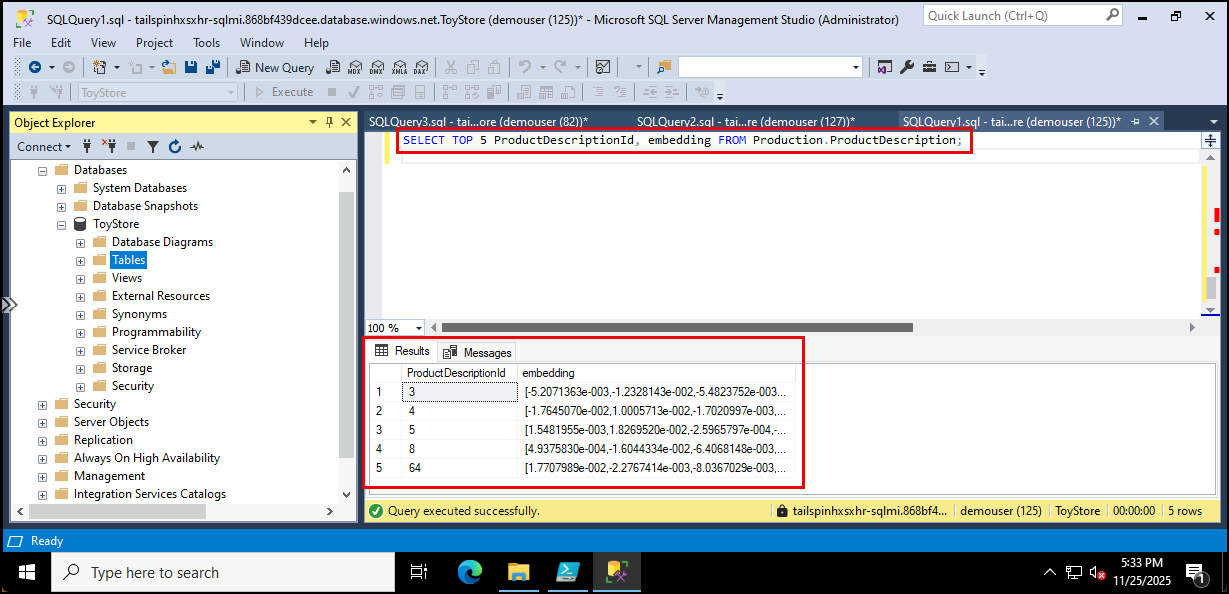
-
Now that embeddings are stored, you can query for product descriptions that are semantically similar to a given phrase, such as “affordable high-performance bike”. The following script generates an embedding for the input text and compares it against stored vectors using cosine distance:
DECLARE @inputText NVARCHAR(50) = 'affordable high-performance bike';
DECLARE @embedding VECTOR(1536);
DECLARE @retval int;
DECLARE @deployedModelName NVARCHAR(50) = 'text-embedding-ada-002';

EXEC @retval = dbo.get_embedding @deployedModelName, @inputText, @embedding OUTPUT;

SELECT TOP(10)
    ProductDescriptionId,
    Description,
    vector_distance('cosine', @embedding, embedding) cosine_distance
FROM Production.ProductDescription
ORDER BY cosine_distance;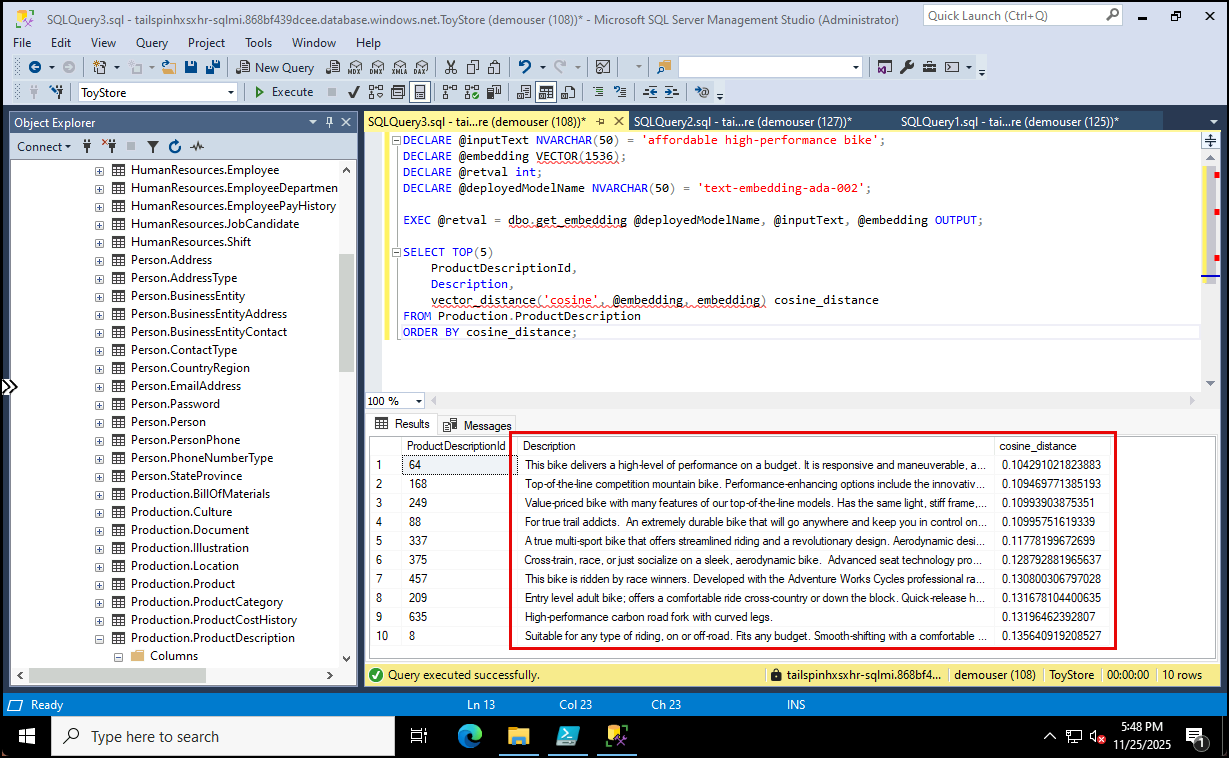
NOTE: This query demonstrates how SQL Server can perform semantic search directly inside the database, returning product descriptions most closely aligned with the meaning of the input phrase.