Task 02 - Enable Microsoft Defender for servers (Arc)
Introduction
Tailspin Toys is migrating their on-premises SQL Server database to Azure SQL Managed Instance. In this task, you will learn how to setup Microsoft Defender to protect the Arc Virtual Machines.
Description
In this task, you will learn how to setup Microsoft Defender to protect the Arc Virtual Machines.
The key tasks are as follows:
- Configure Microsoft Defender for Arc VMs.
Success Criteria
- Successfully enabled Microsoft Defender for Arc.
Step-by-Step Instructions
-
In your resource group in the Azure portal, select the
TailspinSqlresource with a type ofMachine - Azure Arc. -
On the
TailspinSqlblade, expand Settings in the left navigation menu and select Security.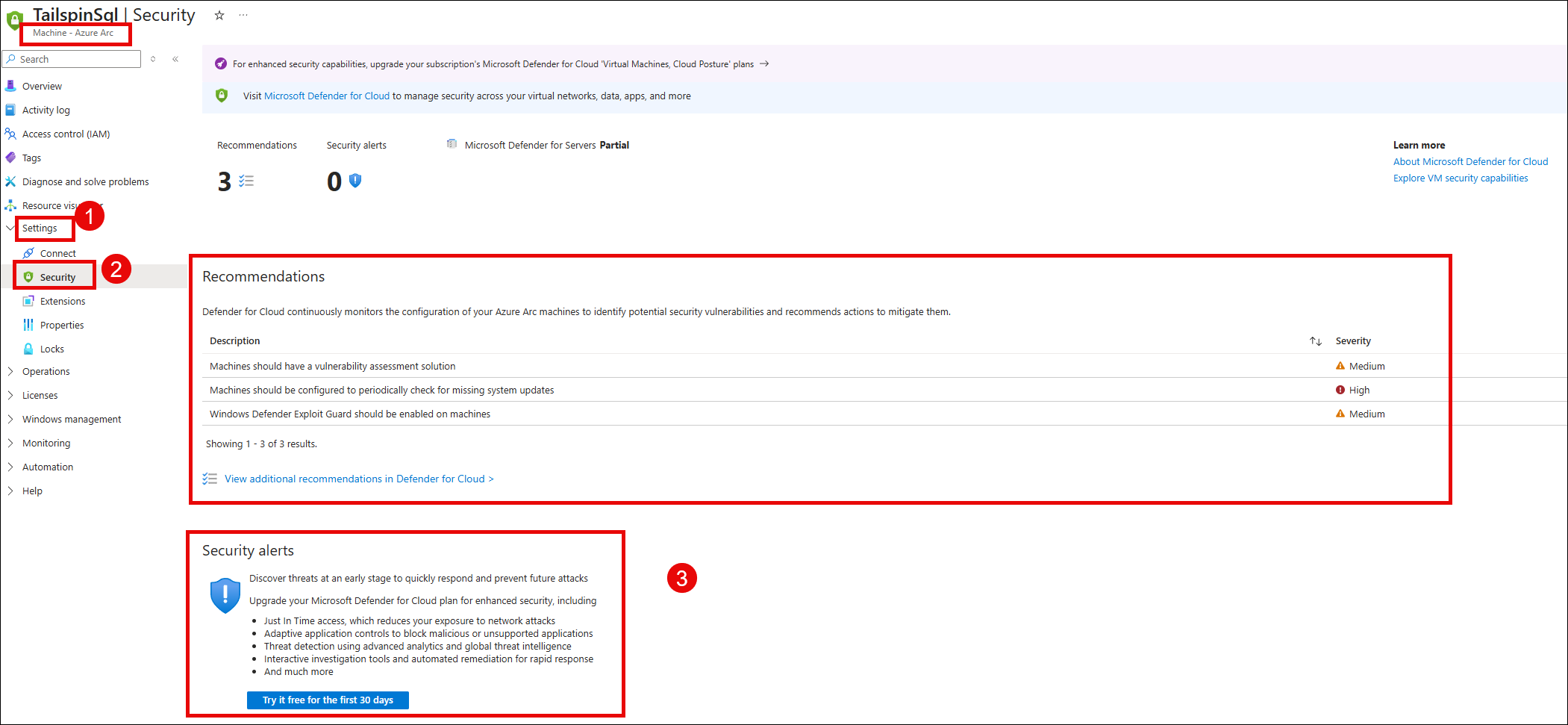
-
Observe the recommmendations on the Arc based SQL VM and experiment by selecting one or two of them to observe the level of recommmendations provided.
-
Notice at the bottom of the blade, under
Security Alerts, you are able to start a free 30 day trial to upgrade your Microsoft Defender for Cloud plan for enhanced security that can include:- Just In Time access, which reduces your exposure to network attacks
- Adaptive application controls to block malicious or unsupported applications
- Threat detection using advanced analytics and global threat intelligence
- Interactive investigation tools and automated remediation for rapid response
- And much more