Task 04 - Enable Microsoft Defender for Storage
Introduction
Tailspin Toys is migrating their on-premises SQL Server database to Azure SQL Managed Instance. In this task, you will learn how to monitor and improve the security posture of your Storage Accounts using Microsoft Defender for Storage. You will also apply some of the suggested actions to enhance the security of your storage accounts and reduce their attack surface.
Description
In this task, you will learn how to monitor and improve the security posture of your Storage Accounts using Microsoft Defender for Storage. You will also apply some of the suggested actions to enhance the security of your storage accounts and reduce their attack surface.
The key tasks are as follows:
- Enabled Microsoft Defender for Storage.
Success Criteria
- Successfully enabled Microsoft Defender for Storage.
Step-by-Step Instructions
-
In the Search resources, services, and docs box at the top of the Azure portal, search for Microsoft Defender for Cloud, then select the Microsoft Defender for Cloud service.
-
Expand Management in the left navigation menu and select Environment settings.
-
Expand the subscription tree at the bottom of the page, and select the subscription you are using for this exercise.
-
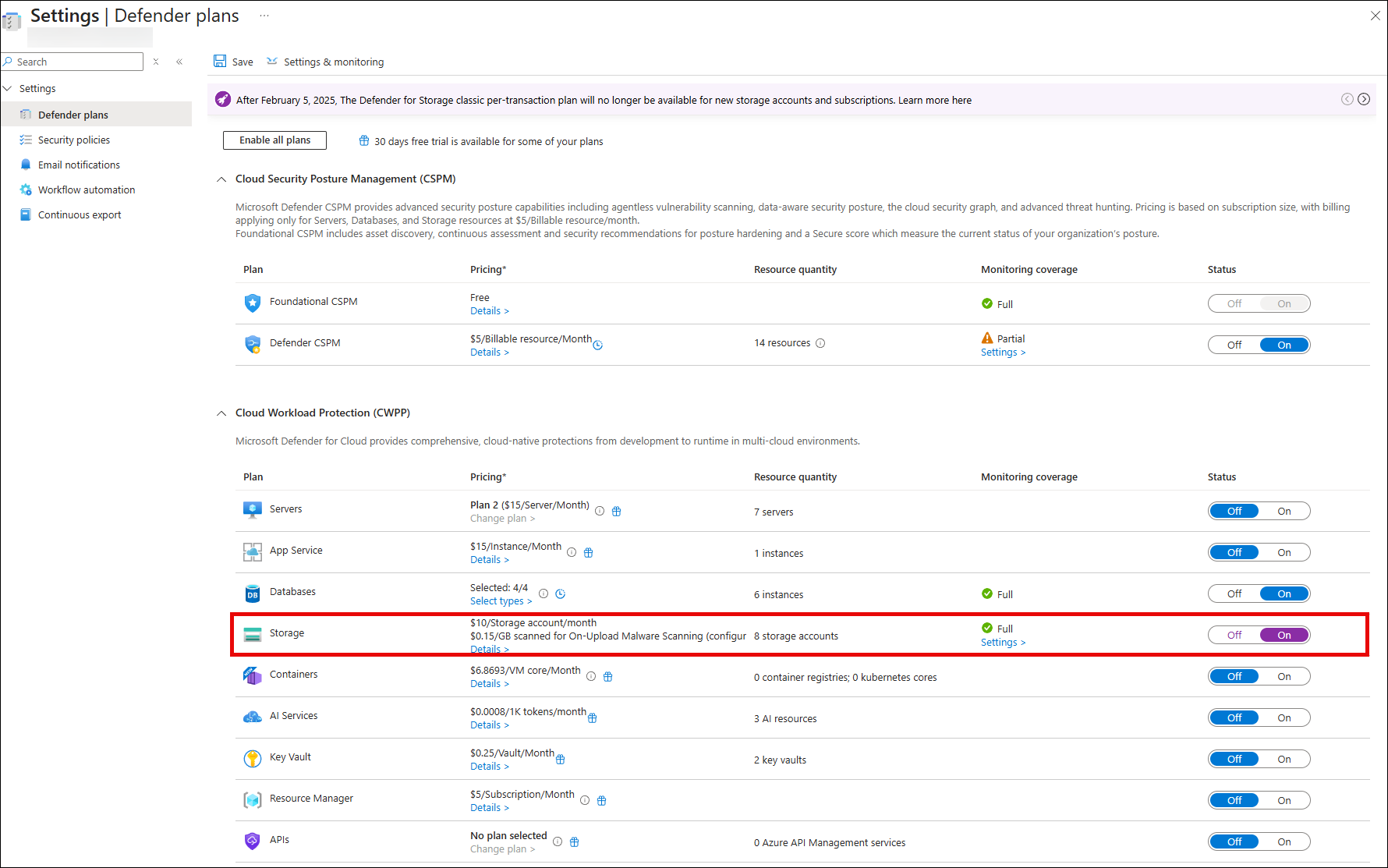
On the Defender plans page, locate the Storage plan and toggle the Status to On.
-
Select Save.