Task 02: Provision Log Analytics Workspace
Introduction
After provisioning the core infrastructure, the next step is to enable telemetry collection so security data can be analyzed in Microsoft Sentinel. You’ll create a Log Analytics workspace (LAW) and a Data Collection Rule (DCR), then associate them with the virtual machine.
Description
In this task, you’ll configure a Log Analytics workspace to receive telemetry and create a Data Collection Rule to forward data from the Azure VM. This enables Microsoft Defender for Cloud and Microsoft Sentinel to process security events and logs.
Success criteria
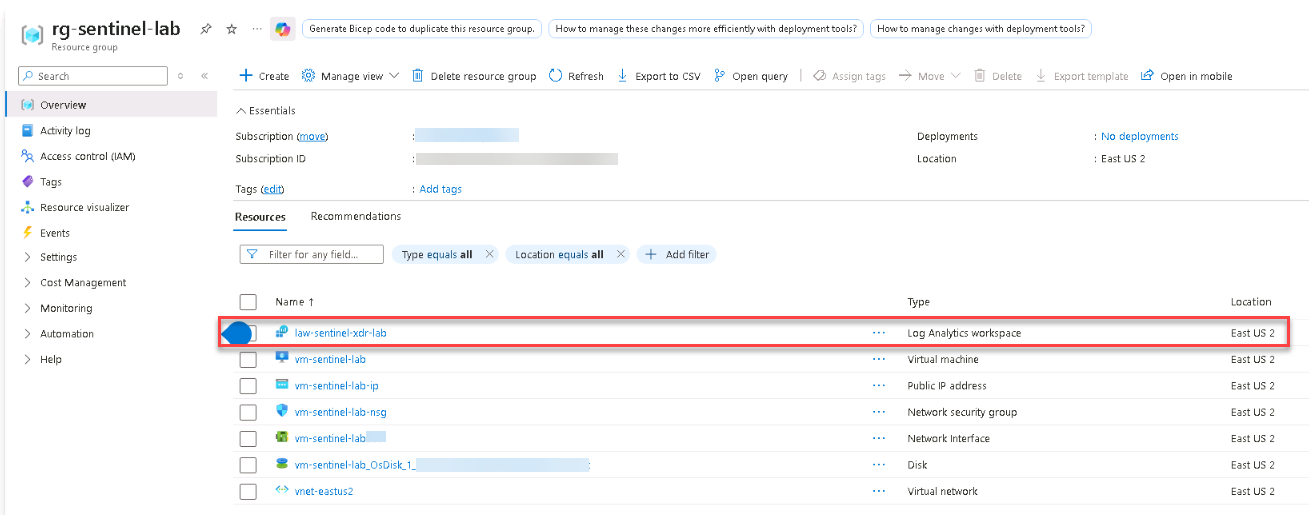
- A Log Analytics workspace named law-sentinel-xdr-lab is created in the East US 2 region.
- Data collection from the VM is confirmed through Defender for Cloud.
-
Create a
Log Analytics workspaceusing the following values:Setting Value Subscription Your SubscriptionResource group rg-sentinel-labName law-sentinel-xdr-labRegion East US 2Expand here for detailed steps
-
In the Azure portal, search for and select
Log Analytics workspaces. -
On the Log Analytics workspaces page, select + Create.
-
On the Basics tab, enter the information shown in the table.
-
Select Review + create, and then select Create.
-
Wait for the deployment to finish, and verify that the workspace appears in your resource group.
-
The Log Analytics workspace will be used by Microsoft Defender for Cloud and Microsoft Sentinel to store and analyze collected telemetry.