Task 06: Build and analyze a simulated attack timeline
Introduction
You’ll correlate mock telemetry data from multiple tables (SigninLogs, AuditLogs, and AzureActivity) to simulate and visualize a complete attack sequence.
Description
This exercise demonstrates how to correlate data sources using KQL to build a unified, MITRE-style attack timeline.
Success criteria
- Consolidated correlation query executes successfully.
- Attack timeline phases appear in chronological order.
- Query output displays risk escalation.
Key steps:
-
Open Advanced Hunting and execute the consolidated correlation query.
Expand here for detailed steps
- In the Defender portal, go to Investigation & Response > Hunting > Advanced Hunting.
- Verify your workspace context matches your Sentinel workspace (for example,
law-sentinel-xdr-lab1). -
Select + New query and run the following:
 // ============================================================================
 // CONSOLIDATED MOCK DATA CORRELATION QUERY
 // Combines SigninLogs + AuditLogs + AzureActivity
 // Shows complete attack timeline in one unified view
 // ============================================================================
 let SigninData = datatable(TimeGenerated: datetime, User: string, Status: string, IP: string, Risk: string)
 [
     datetime(2025-10-27 08:00:00), "admin-finance@fabrikam.com", "Failed", "203.0.113.45", "low",
     datetime(2025-10-27 08:05:00), "admin-finance@fabrikam.com", "Failed", "203.0.113.45", "low",
     datetime(2025-10-27 08:10:00), "admin-finance@fabrikam.com", "Failed", "203.0.113.45", "low",
     datetime(2025-10-27 08:15:00), "admin-finance@fabrikam.com", "Success", "203.0.113.45", "high",
     datetime(2025-10-27 09:00:00), "admin-finance@fabrikam.com", "Success", "203.0.113.45", "high"
 ]
 | extend EventType = "🔐 SignIn", Details = strcat(Status, " from ", IP);
 let AuditData = datatable(TimeGenerated: datetime, User: string, Operation: string, Target: string)
 [
     datetime(2025-10-27 08:20:00), "admin-finance@fabrikam.com", "List users", "Directory",
     datetime(2025-10-27 08:25:00), "admin-finance@fabrikam.com", "List groups", "Directory",
     datetime(2025-10-27 09:15:00), "admin-finance@fabrikam.com", "Add member to role", "Contributor",
     datetime(2025-10-27 09:30:00), "admin-finance@fabrikam.com", "Add service principal", "DataAccess-App"
 ]
 | extend EventType = "📋 Audit", Details = strcat(Operation, " > ", Target);
 let AzureData = datatable(TimeGenerated: datetime, User: string, Operation: string, Resource: string)
 [
     datetime(2025-10-27 09:45:00), "admin-finance@fabrikam.com", "LIST_KEY_VAULTS", "subscription-resources",
     datetime(2025-10-27 10:00:00), "admin-finance@fabrikam.com", "READ_SECRET", "DatabasePassword",
     datetime(2025-10-27 10:05:00), "admin-finance@fabrikam.com", "READ_SECRET", "StorageKey",
     datetime(2025-10-27 10:10:00), "admin-finance@fabrikam.com", "READ_SECRET", "ApiToken"
 ]
 | extend EventType = "☁️ Azure", Details = strcat(Operation, " > ", Resource);
 SigninData | project TimeGenerated, EventType, Details, Risk
 | union (AuditData | project TimeGenerated, EventType, Details, Risk = "N/A")
 | union (AzureData | project TimeGenerated, EventType, Details, Risk = "N/A")
 | order by TimeGenerated asc
 | extend MinutesFromStart = datetime_diff('minute', TimeGenerated, datetime(2025-10-27 08:00:00))
 | extend Phase = case(
     MinutesFromStart <= 15, "Phase 1: Initial Access",
     MinutesFromStart <= 60, "Phase 2: Discovery",
     MinutesFromStart <= 90, "Phase 3: Privilege Escalation",
     "Phase 4: Credential Access"
 )
 | project Phase, TimeGenerated, MinutesFromStart, EventType, Details, Risk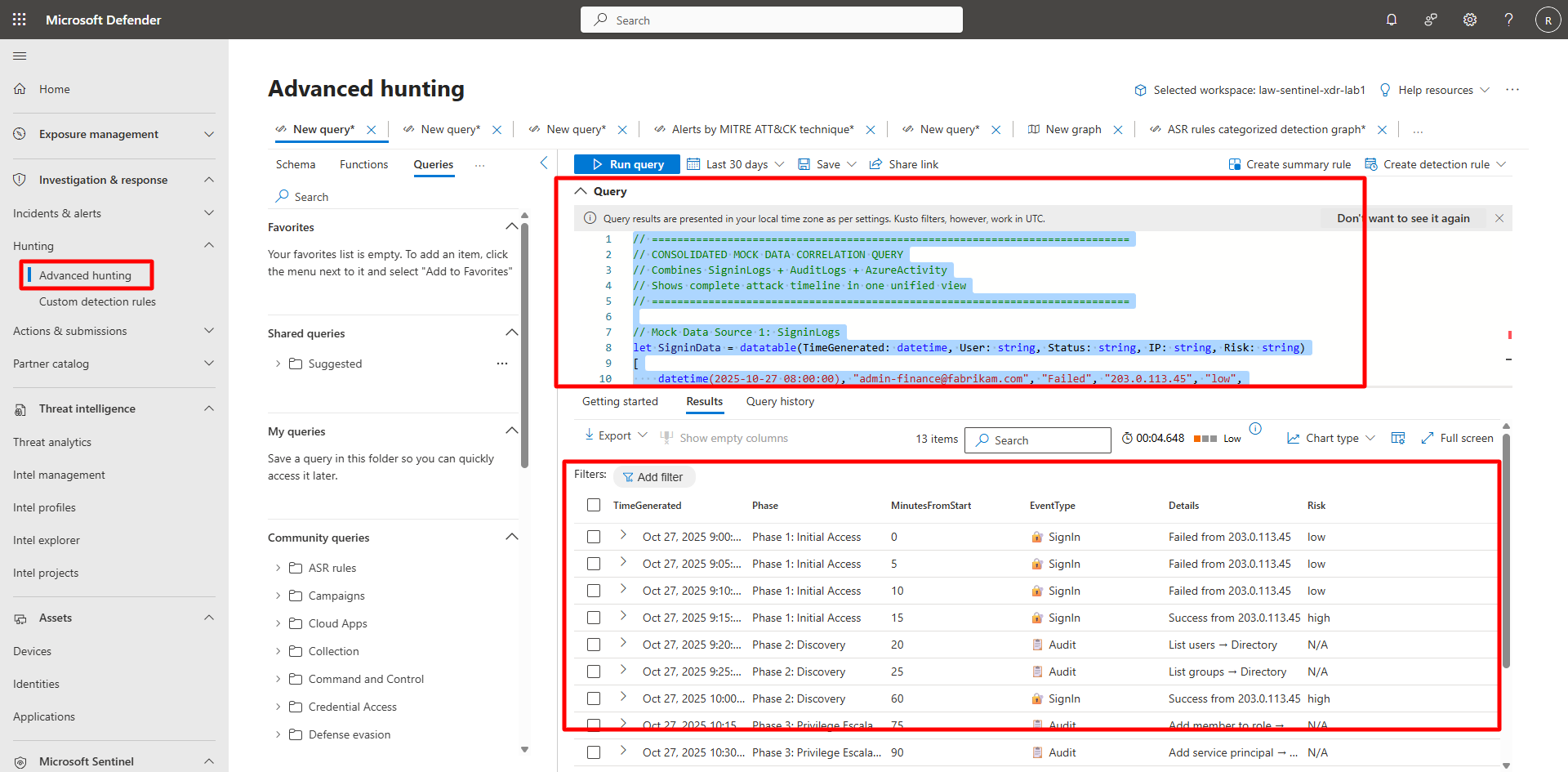
-
Interpret the timeline.
Expand here for detailed steps
-
Observe how the attack progresses through Initial Access → Discovery → Privilege Escalation → Credential Access.
-
Note correlation between sign-in attempts, role assignments, and secret access.
-
Review the Risk column for escalation from low to high.
-