Microsoft.UI.Reactor (Reactor)'s animation surface looks deceptively simple — set
.Opacity(visible ? 1 : 0) and attach .OpacityTransition(), and the
property change animates on next render. Underneath, four distinct
systems route into the same compositor layer: declaration-site implicit
animation via .Animate(properties), an ambient
WithAnimation scope that captures the reconciler's
property writes and replays them through a curve, the
KeyframeBuilder imperative timeline, and the
.Transition() enter/exit machinery that runs when an element mounts
or unmounts. All four converge on Windows Composition, which runs
animation interpolation on a dedicated compositor thread — separately
from the UI thread, which is why a stalled Render() doesn't stutter a
running animation. The most common mistake is reaching for an animation
on a layout property (Width, Height, Margin) and finding the animation
stutters; those properties live in WinUI's layout system, not the
compositor's, so they animate at layout rate instead of frame rate.
Animation Pipeline
This page maps the four authoring surfaces onto the underlying compositor and explains the trade-offs that pick one surface over another. The user-facing API is on the Animation page; this is the internals view.
The four systems
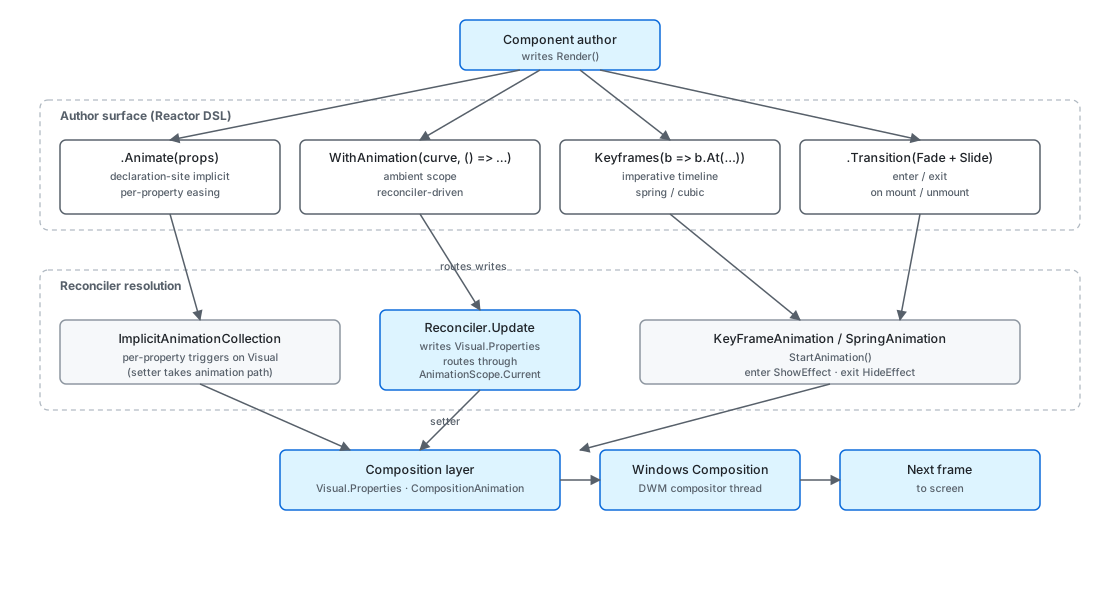
Each system answers a different question. .Animate(properties) says
"any time these properties change on this element, smooth between old
and new"; the curve and duration are part of the element's
configuration. WithAnimation(curve, body) says "run body and route
every reconciler-driven property write into a transition with this
curve"; the curve is ambient to the call, not attached to any element.
KeyframeBuilder builds an explicit timeline you can name and trigger.
.Transition(...) is for the mount / unmount edge, where the property
change isn't between two values at all — the element is appearing or
disappearing.
public static void WithAnimation(Curve? curve, Action action)
{
    var prevCurve = _current;
    var prevScope = _hasScope;
    _current = curve;
    _hasScope = true;
    try { action(); }
    finally { _current = prevCurve; _hasScope = prevScope; }
}
WithAnimation is a [ThreadStatic] scope, not an element modifier.
That matters: it captures property writes made by anything running
inside the scope, including code that runs through the
reconciler on a setState callback. The
HasScope flag carries through the try / finally so nested scopes
correctly restore the outer curve when they exit. Reach for this when
the trigger for the animation is a state change rather than a property
delta — the reconciler's natural fire-after-state-change behavior is
what routes the writes into the scope.
Caveat: The compositor only animates a fixed set of properties cheaply:
Opacity,Offset(translation),Scale,Rotation, andCenterPoint. Anything else —Width,Height,Margin,Background,Foreground— has to go through XAML's property system, which means a layout pass per frame. TheAnimatePropertyflag enum reflects exactly the compositor-cheap set; if your animation isn't smooth, the property you're animating probably isn't in it. Switch to a transform (scale a button down rather than animate its width) or accept that the animation will hold up the UI thread.
Transition composition
public abstract record Transition
{
    // -- Presets --
    public static readonly Transition Fade = new FadeTransition();
    public static Transition Slide(Edge edge = Edge.Bottom) => new SlideTransition(edge);
    public static Transition Scale(float from = 0.85f) => new ScaleTransition(from);

    // -- Asymmetric factory --
    public static Transition Enter(Transition enter) => new DirectionalTransition(enter, null);
    public static Transition Exit(Transition exit) => new DirectionalTransition(null, exit);

    // -- Combinators --
    /// <summary>Combine two transitions to play in parallel (e.g., Fade + Slide).</summary>
    public static Transition operator +(Transition a, Transition b) => new CombinedTransition(a, b);

    /// <summary>Asymmetric: left side is enter, right side is exit.</summary>
    public static Transition operator |(Transition enter, Transition exit)
        => new AsymmetricTransition(enter, exit);
}
Transition is the enter/exit machinery — what runs when an element
appears in or disappears from the tree on a re-render. The composition
operators are the API: Fade + Slide(Bottom) runs both in parallel,
Fade | Scale(0.85f) is asymmetric (| reads as "enter | exit"). The
combinators produce record types (CombinedTransition,
AsymmetricTransition); the reconciler walks the record graph at
mount and unmount time and translates each leaf into a
CompositionAnimation that targets the underlying Visual.
The mount path attaches Fade.Enter to the new element's Visual after
the reconciler creates it, runs the animation, and
clears the override once it completes. The unmount path is the inverse
and is the trickier of the two: WinUI normally removes a child from
its panel immediately on detach, which would kill the exit animation
mid-flight. Reactor holds the element in a "leaving" pseudo-state
until the exit transition's CompositionScopedBatch reports
completion, then commits the detach. State changes that fire while an
element is leaving go to the new tree, never the leaving one — the
leaving element is read-only.
Reference
| Surface | Owner type | When to use | Compositor thread? |
|---|---|---|---|
.Animate(props, curve) |
AnimationConfig |
Stable element, animate a property delta on every change. | Yes (per-property triggers) |
WithAnimation(curve, body) |
AnimationScope |
The change is driven by setState, animate whatever the reconciler writes. |
Yes (writes route through scope) |
Keyframes(name, b => ...) |
KeyframeBuilder |
Named, repeatable timeline triggered imperatively. | Yes (explicit KeyFrameAnimation) |
.Transition(t) |
ElementTransition |
The element is appearing / disappearing on a render. | Yes (mount-time + unmount-leave hold) |
AnimationScope.HasScope distinguishes "no scope" from "explicit
suppression": passing null as the curve marks the scope active but
disables animation, useful for one-off explicit writes inside an outer
animated scope.
Keyframe authoring
public KeyframeBuilder At(float progress,
    float? opacity = null, Vector3? scale = null,
    Vector3? translation = null, float? rotation = null,
    Easing? easing = null)
{
    if (progress < 0f || progress > 1f)
        throw new ArgumentOutOfRangeException(nameof(progress), progress, "Progress must be between 0.0 and 1.0.");

    _keyframes.Add(new KeyframeDef(progress)
    {
        Opacity = opacity,
        Scale = scale,
        Translation = translation,
        Rotation = rotation,
        Easing = easing,
    });
    return this;
}
KeyframeBuilder.At(progress, ...) is the per-frame
entry point — progress is normalized 0.0 to 1.0 across the
animation's Duration. Each property argument is optional, so a
keyframe that only sets Opacity leaves Scale and the rest at their
interpolated values. The internal KeyframeDef record carries the
optional easing override for that segment; when omitted, the segment
inherits the animation's default curve.
KeyframeBuilder produces a KeyframeAnimationDef — pure data, no
compositor types. The reconciler is the layer that turns the def into a
KeyFrameAnimation and calls Visual.StartAnimation on the materialized
element. Building the def in component code rather than building a
CompositionAnimation directly means the same definition can flow
through serialization, hot reload, or a future declarative
keyframe authoring API without touching the compositor binding.
Patterns
Animating an entire conditional subtree
When a state flag toggles a chunk of UI, reach for .Transition()
on the wrapping element rather than per-property animations on each
child. The element's enter / exit drive the whole subtree's
appearance through one transition spec:
public override Element Render()
{
    var (show, setShow) = UseState(false);
    return VStack(
        Button(show ? "Hide" : "Show", () => setShow(!show))
            .AutomationName(show ? "Hide conditional transition" : "Show conditional transition"),
        show
            ? Card(TextBlock("Hello")).Transition(Transition.Fade + Transition.Slide(Edge.Top))
            : null
    );
}
The reconciler treats the null branch as an unmount and the
Card(...) branch as a mount; the .Transition modifier on the
Card is what tells it to play the enter combination on mount and
the symmetric exit on unmount. The
reconciliation page documents the
mount / leave / unmount state machine in detail.
Common Mistakes
Animating a layout property and expecting compositor smoothness
// Don't:
return Border(child)
    .Width(expanded ? 400 : 100)        // layout property, not compositor
    .Animate(AnimateProperty.All);      // no effect on Width
public static void WithAnimation(Curve? curve, Action action)
{
    var prevCurve = _current;
    var prevScope = _hasScope;
    _current = curve;
    _hasScope = true;
    try { action(); }
    finally { _current = prevCurve; _hasScope = prevScope; }
}
.Animate(AnimateProperty.All) only triggers implicit animations on
the five compositor properties (Opacity, Offset, Scale,
Rotation, CenterPoint). Width is a XAML layout property — to
animate it, the panel measures and arranges every frame, on the UI
thread. The correct shape is to express the size change as a scale
transform on a fixed-size child, or to gate the change behind a
WithAnimation scope so at least the property write coalesces across
the dispatcher hop.
Tips
Five properties animate cheaply, the rest don't. The compositor
animates Opacity, Offset, Scale, Rotation, and CenterPoint
on its own thread — anything else takes the layout path. When picking
between an authoring shape, prefer one that targets the cheap set
(a scaled button instead of a resized button, a translated panel
instead of a margined panel).
Curve.Spring(...) is the expressive default. A spring curve has no
explicit duration — it settles when the physics says it does, which
tends to feel more responsive than a fixed-duration ease. Reach for
Curve.Ease(durationMs) only when the duration is part of the
design contract (e.g. matching a toast that times out after 400ms).
One scope per state cascade. When a single setState fires three
property writes that should all animate together, wrap the work in
one WithAnimation scope rather than attaching three .Animate(...)
modifiers. The single scope keeps the writes coherent across the
reconciler's update pass.
Next Steps
- Animation — Surface-level animation API and ready-made transitions.
- Reconciliation — How mount / leave / unmount drive transition lifecycle.
- Focus and Input Internals — Companion under-the-hood page on input.
- Hooks Internals — Why
setStatecascades animate consistently. - Perf Instrumentation — Reading ETW events from animation frames.