Recipe: Command Palette
A command palette is a filter-as-you-type list with a keyboard
accelerator to open and Enter to execute. In Microsoft.UI.Reactor (Reactor) it's three
UseState hooks, a static catalog of Command
records, and an OnPreviewKeyDown handler — no menubar, no modal
manager, no view model. The palette is just another conditional
overlay, layered over the page the same way the
modal-dialog recipe layers its confirmation sheet.
Primitives
| Concern | API |
|---|---|
| Open / query / selection state | UseState<bool> / UseState<string> / UseState<int> |
| Command catalog | Command records — same shape used by Button, MenuItem, AppBarButton |
| Filter | LINQ Where(...Contains(query, OrdinalIgnoreCase)) |
| Open focus | UseElementFocus() + UseEffect when open changes |
| Open accelerator | .OnKeyDown on the root surface |
| List navigation | .OnPreviewKeyDown on the palette container |
| Overlay composition | Group(page, palette) — same shape as Recipe: Modal dialog |
Command catalog
// The catalog is a static array of Reactor Command records. The same
// record could just as well be bound to a Button or a MenuItem — the
// palette is one more surface that consumes it.
private static readonly Command[] Catalog = new[]
{
    new Command { Label = "File: New",        Execute = () => Log("new") },
    new Command { Label = "File: Open…",      Execute = () => Log("open") },
    new Command { Label = "File: Save",       Execute = () => Log("save") },
    new Command { Label = "Edit: Find",       Execute = () => Log("find") },
    new Command { Label = "Edit: Replace",    Execute = () => Log("replace") },
    new Command { Label = "View: Toggle Theme", Execute = () => Log("theme") },
    new Command { Label = "View: Zen Mode",   Execute = () => Log("zen") },
    new Command { Label = "Go: Go to Line…",  Execute = () => Log("goto-line") },
    new Command { Label = "Go: Go to Symbol…",Execute = () => Log("goto-symbol") },
    new Command { Label = "Help: About",      Execute = () => Log("about") },
};

private static void Log(string id) { /* hook to telemetry in a real app */ }
A Command bundles a label with an action and metadata
(commanding covers the full surface — icon,
accelerator, CanExecute, async tracking). The palette only needs
Label and Execute; the rest is there when you want to share the
same record with a toolbar button or a context menu entry.
State
// Three pieces of state run the palette: whether it's open, the
// typed query, and the highlighted row in the filtered list. The
// focus helper is separate; it moves focus into the query box on open.
var (open, setOpen) = UseState(false);
var (query, setQuery) = UseState("");
var (index, setIndex) = UseState(0);
var (last, setLast) = UseState<string?>(null);
var (queryRef, requestQueryFocus) = this.UseElementFocus();
Three state hooks own the palette: open toggles the overlay, query
drives the filter, and index is the highlighted row. A fourth
last hook just echoes the most recently executed command for the
demo — it's not part of the palette pattern. The focus helper is
separate from palette state; it moves focus into the query box when
the overlay opens.
Filter
// Re-derive the filtered list on every render. The catalog is
// small; a real palette with hundreds of commands would key this
// through UseMemo on `query`.
var matches = string.IsNullOrWhiteSpace(query)
    ? Catalog
    : Catalog.Where(c => c.Label.Contains(query,
        StringComparison.OrdinalIgnoreCase)).ToArray();
// Clamp the selection so it never points off the end of the list.
var safeIndex = matches.Length == 0
    ? 0
    : Math.Clamp(index, 0, matches.Length - 1);
The filter runs on every render. For a small catalog that's the
right trade — no UseMemo ceremony, and the filter sees the latest
query without an extra dependency array. Promote to
UseMemo once the catalog crosses a few hundred
entries or the predicate grows past Contains. The safeIndex
clamp keeps the highlight valid when typing shortens the match list
out from under the old selection.
Keyboard handler
// Esc closes; Up / Down move the selection; Enter invokes the
// highlighted command. The OnPreviewKeyDown handler intercepts
// before the TextBox gets the keystroke, so arrow keys move
// the list instead of the caret.
void OnPaletteKey(object _, Microsoft.UI.Xaml.Input.KeyRoutedEventArgs e)
{
    switch (e.Key)
    {
        case VirtualKey.Escape:
            setOpen(false);
            e.Handled = true;
            break;
        case VirtualKey.Down:
            if (matches.Length > 0)
                setIndex((safeIndex + 1) % matches.Length);
            e.Handled = true;
            break;
        case VirtualKey.Up:
            if (matches.Length > 0)
                setIndex((safeIndex - 1 + matches.Length) % matches.Length);
            e.Handled = true;
            break;
        case VirtualKey.Enter:
            if (matches.Length > 0)
            {
                var cmd = matches[safeIndex];
                cmd.Execute?.Invoke();
                setLast(cmd.Label);
                setOpen(false);
                setQuery("");
                setIndex(0);
            }
            e.Handled = true;
            break;
    }
}
OnPreviewKeyDown tunnels — it fires before the bubbling pair, so
Up / Down move the selection instead of the TextBox caret, and
Enter fires the highlighted command rather than inserting a newline.
Setting e.Handled = true stops further routing so the underlying
control stays out of the way. The same handler closes the palette on
Escape; the input-and-gestures page
covers the preview-vs-bubble pairing in detail.
Render
// The page is rendered normally; the palette is a conditional
// overlay on top, just like the modal-dialog recipe. The root
// surface owns the Ctrl+K accelerator so the palette can open
// from anywhere on the page.
var page = VStack(12,
    Heading("Command Palette Demo"),
    TextBlock("Press Ctrl+K to open the palette.").Opacity(0.7),
    last is null
        ? Empty()
        : TextBlock($"Last command: {last}").Opacity(0.6)
).Padding(24);

UseEffect(() =>
{
    if (open)
        requestQueryFocus();
    return () => { };
}, open);

Element palette = Border(
    VStack(0,
        TextBox(query, v => { setQuery(v); setIndex(0); },
            placeholderText: "Type a command…")
            .AutomationName("Command search")
            .Width(420)
            .Ref(queryRef),
        matches.Length == 0
            ? (Element)TextBlock("No commands match.").Padding(12).Opacity(0.6)
            : VStack(0,
                matches.Select((c, i) =>
                    Border(
                        TextBlock(c.Label).Padding(10)
                    ).Background(i == safeIndex ? Theme.AccentTertiary : Theme.CardBackground)
                     .WithKey(c.Label)
                ).ToArray<Element>()
            )
    ).Background(Theme.CardBackground).CornerRadius(8).Width(440)
).Background(Theme.SmokeFill).Padding(60)
 .OnPreviewKeyDown(OnPaletteKey);

var root = (open ? Group(page, palette) : page)
    .OnKeyDown((_, e) =>
    {
        // Ctrl+K toggles the palette. A real app would prefer a
        // KeyboardAccelerator on the window root; this keeps the
        // recipe self-contained.
        var ctrl = (Microsoft.UI.Xaml.Window.Current?.CoreWindow
            .GetKeyState(VirtualKey.Control)
            & Windows.UI.Core.CoreVirtualKeyStates.Down)
            == Windows.UI.Core.CoreVirtualKeyStates.Down;
        if (ctrl && e.Key == VirtualKey.K)
        {
            setOpen(!open);
            e.Handled = true;
        }
    });
return root;
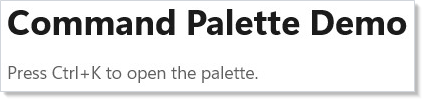
The page renders normally; the palette is a Border wrapping a
VStack returned alongside it in a Group(page, palette). The
theme smoke-fill scrim dims the page underneath. The root
surface's .OnKeyDown watches for Ctrl+K and toggles open, which
is the cheapest "global accelerator" that works from any focus state
on the page.
For a real app, hoist the open accelerator to a window-level
KeyboardAccelerator so the palette opens even
when focus is inside a chart or a third-party control that swallows
routed key events. The recipe keeps the handler inline so the
composition is visible end-to-end.
Tips
The palette is not a modal. It's an overlay with an input that
auto-focuses on open. Don't reach for UseFocusTrap
unless your palette grows a help row, a settings flyout, or anything
else that takes focus — for a single text field plus a result list,
Esc-to-close is enough.
Bind to Command, not raw Action. Even though the palette only
needs Label and Execute today, declaring the catalog as
Command[] means the same record can drive a
toolbar button or a menu item tomorrow without rewriting the catalog.
The metadata travels with the action — that's the whole point of the
commanding surface.
Refilter on every keystroke; memoize on every catalog. The
filter is O(n) per keystroke; for the catalog sizes a command
palette actually has (tens to low hundreds), a recompute on each
render is well under a frame. Reach for UseMemo when
the catalog grows or when the matcher does — a real fuzzy ranker
deserves its own cache and is worth a separate recipe.
Reset on close. When the user dismisses, clear query and
reset index to 0 so the next open starts fresh. The Enter
handler in the recipe does both; the Esc branch can be tightened the
same way if a stale query would surprise the user on the next open.
Next Steps
- Commanding — The full
Commandsurface, including async tracking and shared accelerators. - Input and Gestures — Preview-vs- bubble keyboard routing and the modifier tower the palette layers on.
- Recipe: Modal dialog — Same overlay shape, different ergonomics — a confirmation pane instead of a filter.
- Recipe: Search with suggestions — The filter-as-you-type pattern in isolation, without the overlay.
- Accessibility — Focus management when the palette grows secondary surfaces.
- Recipes index — Back to the gallery.