A component in Microsoft.UI.Reactor (Reactor) is a pure function from (state + props) to an element
tree. Render() is called every time the component's state changes or its
parent's render produces new props, and its only job is to return what the
UI should look like right now. Reactor takes that return value, diffs it
against the previous render via the reconciler, and
patches the underlying WinUI controls in place — only the properties and
children that actually changed get touched. The "function" framing is
load-bearing: a component must not mutate props, must not write to external
state during render, and must call hooks in the same positional
order on every render. Side effects belong in UseEffect;
derived values belong in UseMemo or inline; subscriptions
belong in effects with cleanup. Get those four rules right and a component
becomes the unit of composition that the rest of the framework is built on
— class components for stateful nodes, function components via Memo for
inline shapes, both composed into trees by being instantiated inside their
parent's Render() return value.
Components
Components are the building blocks of a Reactor app. Each component is a class
with a Render() method that returns an element tree describing its UI.
Reference
| Shape | Use when | Re-renders when |
|---|---|---|
class C : Component |
Stateful node with no input from parent. | Internal state changes (default ShouldUpdate() returns false for propless components — parent re-renders alone don't propagate). |
class C : Component<TProps> |
Stateful node that takes a record of inputs. |
Props compare unequal (records use structural equality), or internal state changes. |
Memo(ctx => …) |
Inline function component with its own hook state. | Internal state changes; with deps argument, also when any dep changes. |
RenderEachTime(ctx => …) |
Inline component that should always re-render with its parent. | Every parent render — opts out of memoization. |
Component<C, TProps>(new(…)) |
Instantiate a typed-props class component inside another component's render. | Driven by the rules above. |
Override ShouldUpdate(TProps? old, TProps? new) to make a Component<TProps>
ignore certain prop changes (cosmetic-only label updates, for example). The
default Equals()-based check on records is the right call for most cases.
The auto-generated components reference covers every member (coming soon —
see the Hooks reference for the existing
prototype); the rest of this page is the narrative.
Basic Component
Extend Component and override Render():
class Greeting : Component
{
    public override Element Render()
    {
        var (name, setName) = UseState("World");

        return VStack(12,
            TextBlock($"Hello, {name}!").FontSize(20).Bold(),
            TextBox(name, setName, placeholderText: "Your name")
                .AutomationName("Name")
                .Width(200)
        ).Padding(16);
    }
}

Render() is called every time state changes. You call hooks like UseState
at the top, then return an element tree. Reactor diffs the result against the
previous render and patches only the controls that changed.
Props with Records
When a component needs input from its parent, define a C# record for its
props and extend Component<TProps>:
class Alert : Component<AlertProps>
{
    public override Element Render()
    {
        var bg = Props.Severity switch
        {
            "error" => Theme.SystemCriticalBackground,
            "warning" => Theme.SystemCautionBackground,
            _ => Theme.SystemSuccessBackground
        };

        return Border(
            VStack(4,
                TextBlock(Props.Title).Bold(),
                TextBlock(Props.Message)
            ).Padding(12)
        ).Background(bg).CornerRadius(4);
    }
}
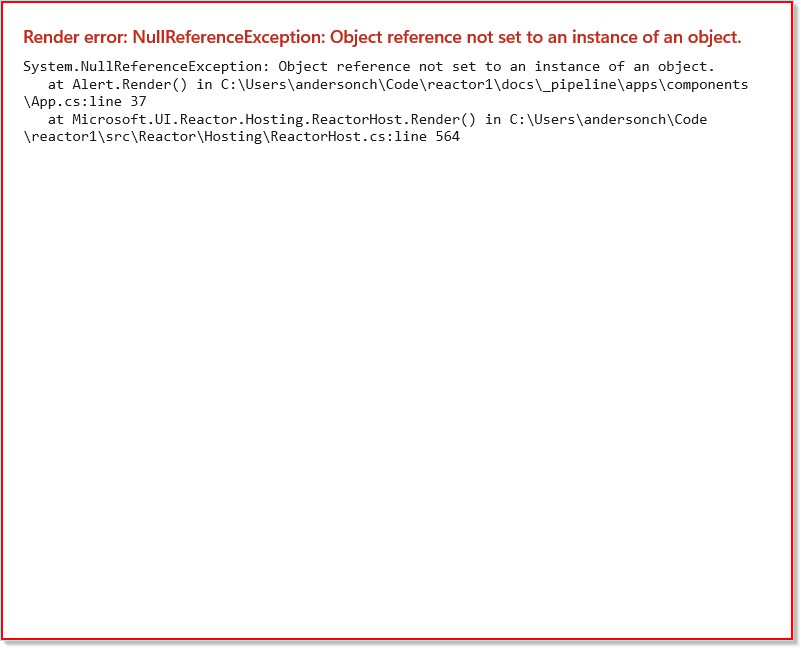
Records give you immutable data with value equality. Reactor uses this for
automatic memoization — if the parent re-renders but the props haven't
changed structurally, the child skips its Render() call.
Access props via Props.PropertyName inside Render(). The parent sets
props by assigning the Props property when creating the component instance.
Factory Helpers for Cleaner Call Sites
Component<T, TProps>(new(...)) reads heavily at the call site, especially
when nested in an element tree. The idiomatic Reactor pattern is to wrap each
class component in a free-function factory that matches the rest of the DSL:
static class Components
{
    public static ComponentElement Alert(string title, string message,
        string severity = "info") =>
        Component<global::Alert, AlertProps>(new(title, message, severity));
}
With using static Components; at the top of the consuming file, the call
site collapses to a normal function call:
| Before | After |
|---|---|
Component<Alert, AlertProps>(new("Saved", "Done")) |
Alert("Saved", "Done") |
Component<Alert, AlertProps>(new("Hi", "x", "warn")) |
Alert("Hi", "x", "warn") |
The class Alert and the helper method Alert coexist in the same scope —
C# resolves Alert(args) as a method call and Component<Alert, ...> as a
type reference, based on syntactic position.
Conventions:
- Match the component name. Helper
Alertfor classAlertreads like JSX:Alert(...)instead of<Alert ... />. - Group helpers in a single static class named
Components(or per feature). Oneusing staticimport per consuming file is plenty. - Skip
Create/Of/Newprefixes. Reactor's built-in element factories (Button,TextBlock,FlexRow) all read as bare functions; user helpers should match that grammar.
Custom ShouldUpdate
Override ShouldUpdate to control when a component re-renders:
record ExpensiveProps(string Label, int Value);

class ExpensiveDisplay : Component<ExpensiveProps>
{
    protected override bool ShouldUpdate(
        ExpensiveProps? oldProps, ExpensiveProps? newProps)
    {
        // Only re-render when the Value changes, ignore Label
        return oldProps?.Value != newProps?.Value;
    }

    public override Element Render()
    {
        return TextBlock($"Value: {Props.Value}").FontSize(18).Bold();
    }
}
The default behavior for Component<TProps> uses Equals() — which with
records means structural equality. Override ShouldUpdate when you want
coarser control, like ignoring cosmetic prop changes.
For propless Component, ShouldUpdate() returns false by default,
meaning the component only re-renders from its own state changes. Override
and return true to re-render whenever the parent re-renders.
Callback props and memoization
Memoization compares props with Equals(). For records that is a
field-by-field compare, and delegate fields (Action/Func) compare by
reference. A parent almost always passes a freshly-allocated callback (a
lambda or local function) on every render, so a child whose props carry an
inline Action field compares unequal every render and re-renders even
when no observable data changed:
record StepModel(int Id, string Name);

// Re-renders on every parent render — OnChanged is a fresh delegate each time.
record StepPropsNaive(StepModel Step, Action<string> OnChanged);
Wrap the callbacks in Callbacks<T> so their identity is excluded from the
memo comparison. Callbacks<T> is an always-equal record (Equals returns
true, GetHashCode returns 0), so the owning record's auto-generated
equality treats the callbacks slot as always-equal — only the data fields
drive the re-render decision:
record StepCallbacks(Action<string> OnChanged, Action OnRun);

// Only Step drives re-render now; the callbacks slot is ignored by memo.
record StepProps(StepModel Step, Callbacks<StepCallbacks> Cb);

class StepRow : Component<StepProps>
{
    public override Element Render() =>
        HStack(8,
            TextBlock(Props.Step.Name),
            // Read the callback off Props at event time — never capture it
            // into a local at render time.
            Button("Run", () => Props.Cb.Value.OnRun()));
}

static class StepPropsFactory
{
    public static StepProps Create(StepModel step, Action<string> onChanged, Action onRun) =>
        // Construct it — the payload converts implicitly:
        new StepProps(step, new StepCallbacks(onChanged, onRun));
}
This replaces the old workaround of hand-writing Equals/GetHashCode on
every props record (listing only the data fields), which was ~10 lines of
boilerplate per record and a silent stale-UI bug if you forgot a field.
Read callbacks live at dispatch time. When the reconciler skips a child's
re-render because the data is unchanged, it still refreshes the child's
Props with the latest values, so a handler that reads
Props.Cb.Value.OnChanged at event time always invokes the current
delegate — never a memoized-stale one. Do read the callback off Props when
the event fires; don't capture Props.Cb.Value.OnChanged into a local at
render time and hold onto it.
Function Components
Not everything needs a class. Use Memo for lightweight inline components
with their own hook state:
class FunctionComponentDemo : Component
{
    public override Element Render()
    {
        return VStack(12,
            SubHeading("Function components"),
            // Memo: render once + own state changes (the common case).
            Memo(ctx =>
            {
                var (on, setOn) = ctx.UseState(false);
                return HStack(8,
                    ToggleSwitch(on, setOn),
                    TextBlock(on ? "Active" : "Inactive")
                );
            }),
            // Memo with a dep: skip re-render when deps haven't changed.
            Memo(ctx =>
            {
                return TextBlock("I only re-render when deps change")
                    .Opacity(0.6);
            }, "stable-dep")
        ).Padding(16);
    }
}
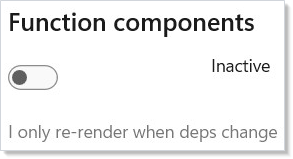
Memo(ctx => { ... })— an inline component with its own hook state. With nodepsargument, it renders once and re-renders only on its own state changes. Thectxparameter is aRenderContextthat providesUseState,UseEffect, and all other hooks.Memo(ctx => { ... }, deps)— same as above, but also re-renders when any value indepschanges. Use this for expensive subtrees that depend on external props (see Hooks forUseMemo).RenderEachTime(ctx => { ... })— opts the component back into re-rendering on every parent render. Use sparingly — it defeats memoization and can amplify render storms. Pick this only when you've decided you need the always-re-render behavior.
The former
Func(ctx => ...)factory was removed in this release. Replace it withMemo(ctx => ...)for the common case orRenderEachTime(ctx => ...)when you specifically want the always-re-render shape.
You can also use a function component as the app root:
ReactorApp.Run("Title", ctx =>
{
    var (n, setN) = ctx.UseState(0);
    return Button($"Count: {n}", () => setN(n + 1))
        .AutomationName("Increment count");
}, width: 400, height: 300);
Composition
Build complex UIs by nesting components:
class ComponentsApp : Component
{
    public override Element Render()
    {
        var (count, setCount) = UseState(0);

        return ScrollView(
            VStack(16,
                Heading("Component Patterns"),
                Component<Greeting>(),
                Component<Alert, AlertProps>(new("Success", "It works!")),
                Component<Alert, AlertProps>(new("Oops", "Something broke",
                    "error")),
                HStack(8,
                    Button("+1", () => setCount(count + 1)),
                    Component<ExpensiveDisplay, ExpensiveProps>(
                        new("Counter", count))
                ),
                Component<FunctionComponentDemo>()
            ).Padding(24)
        );
    }
}
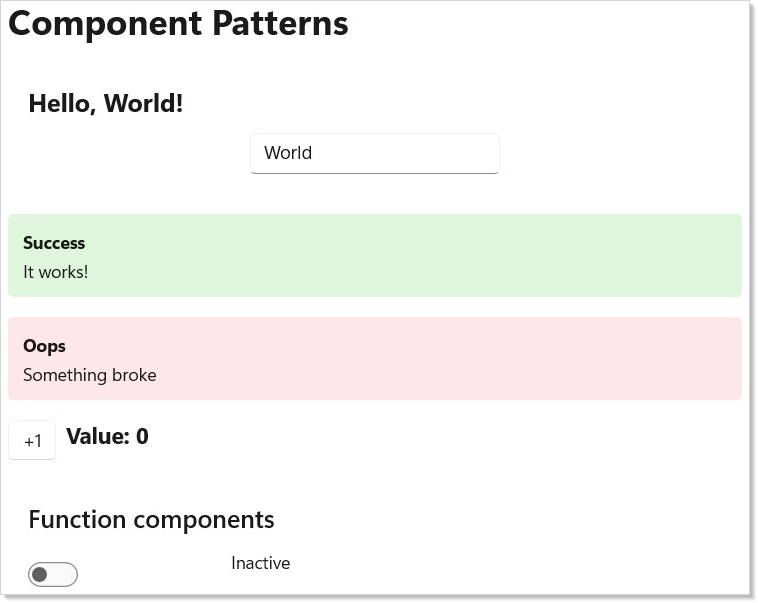
Each component manages its own state independently. The parent creates child
components with new and sets their Props. Reactor handles the rest —
mounting, updating, and unmounting as the tree changes.
Caveat: Identity stability across renders is what lets a component preserve its state, its hook slots, and its WinUI control instance between renders. The reconciler matches children by position by default — the first child in render N matches the first child in render N+1 regardless of what type it is. That's fine when a list is append-only and order is stable; it's catastrophic when items reorder, because the second-position state cell now belongs to a different item. Apply
.WithKey(item.Id)(or any stable key) on every child of aForEach/ collection render so the reconciler matches by identity instead. The Reconciliation chapter walks the four-phase keyed algorithm in full. The classic failure mode: a todo list where deleting item 2 makes item 3's checkbox state appear on item 2 — because positionally, slot 2 is still occupied, and the reconciler updated the existing component instead of mounting a new one. The fix is one.WithKey(item.Id)call per row.
Patterns
Composition with children
Component nesting is the primary way Reactor composes UI — there's no
"slot" or ContentPresenter concept; the parent's Render() directly
returns child element trees:
record CardProps(string Title, Element Body);

class Card : Component<CardProps>
{
    public override Element Render() =>
        Border(
            VStack(8,
                TextBlock(Props.Title).Bold(),
                Props.Body                 // any Element, including child components
            ).Padding(12)
        ).CornerRadius(8).WithBorder(Theme.CardStroke);
}
The caller decides what to put inside — a TextBlock, a Component<Form>,
even a runtime-built tree from ForEach. This is the equivalent of
React's children prop or XAML's ContentControl, but expressed in plain
C# without any binding boilerplate.
Render-props equivalent
When a component needs to delegate part of its render to the caller, take
a Func<…, Element> prop. The function gets called inside the
component's Render() and its return value is spliced in — same as
React's render props or the DataTemplate selector pattern:
record ItemsListProps<T>(
    IReadOnlyList<T> Items,
    Func<T, Element> Render,
    Func<T, string> Key);

class ItemsList<T> : Component<ItemsListProps<T>>
{
    public override Element Render() =>
        VStack(4, ForEach(Props.Items,
            item => Props.Render(item).WithKey(Props.Key(item))));
}
The caller picks the row shape — item => TextBlock(item.Name) or a full
nested component — and supplies a key selector, so the list component knows
nothing about the item type beyond how to render it and how to identify it.
(.WithKey takes either a string key or an item implementing
IReactorKeyed; an unconstrained generic T needs the selector.)
Lifted state
When two siblings need to coordinate, push the state up to their common
parent and pass (value, setter) down. This is the
recipes/master-detail pattern: the master list
and the detail panel both react to a shared selectedId, owned by the
parent. The siblings stay pure — they take props in, call back out. See
hooks for the UseState shape this pattern composes from.
ErrorBoundary integration
Wrap a subtree in ErrorBoundary to catch exceptions from any of its
children's Render calls. The boundary swaps in your fallback element
instead of letting the exception bubble up to the host, which would
unmount the whole tree:
class RiskyView : Component
{
    public override Element Render() => TextBlock("Risky content");
}

class ErrorBoundaryComposition : Component
{
    public override Element Render() =>
        ErrorBoundary(
            fallback: ex => TextBlock($"Crash: {ex.Message}")
                .Foreground(Theme.SystemCritical),
            child: Component<RiskyView>()
        );
}
The Advanced Patterns page covers the lifecycle and recovery contract; the point at the components layer is that boundaries are themselves components, composed into the tree at the granularity you want isolation.
Common Mistakes
Side effects in render
static class Globals { public static int RenderCount; }

class SideEffectsInRenderDont : Component
{
    public override Element Render()
    {
        // Don't — Render() may be called any number of times per user action.
        File.AppendAllText("log.txt", "rendered\n");  // I/O during render
        Globals.RenderCount++;                        // mutation during render
        return TextBlock("hi");
    }
}
Render() may be called any number of times per user action — once per
state change, plus diagnostic renders the devtools may
trigger. Side effects must move into UseEffect so they
run exactly once per commit. Diagnostic counters belong in
UseRef, which mutates without scheduling a re-render.
Mutating props
record ItemsProps(List<string> Items);

class MutatingPropsDont : Component<ItemsProps>
{
    public override Element Render()
    {
        // Don't — this mutates the parent's collection, so the parent never
        // sees the change and doesn't re-render.
        Props.Items.Add("new item");
        return VStack(4, ForEach(Props.Items, (item, i) => TextBlock(item).WithKey($"{i}-{item}")));
    }
}
Props are inputs from the parent — read-only by contract. Mutating the
underlying list bypasses the parent's state setter, so the parent never
sees the change and doesn't re-render. Worse, the next time the parent
does re-render and pass Items down again, your local mutation has
silently changed the parent's snapshot. The fix is to call back through
the prop's setter: take an Action<Item> OnAdd prop and have the parent
own the list via UseState.
Creating components inside render
// Don't:
public override Element Render()
{
    class LocalComponent : Component { ... }     // not even valid C#, but
    var inline = (Component)CreateLocal();        // any "build a class per render" shape
    return Component<inline>();
}
The reconciler matches by type identity — a fresh component class per
render compares unequal to last render's class, so the child unmounts and
remounts every commit, losing all hook state and WinUI control instances.
Define component classes at the top level of a file (or use Memo(ctx =>
…) for inline shapes, which the reconciler treats as a stable function
identity). The same anti-pattern in React loses state for the same reason
and for the same root cause.
Tips
Use records for props. They give you immutable data, value equality, and
with expressions for free. Reactor's memoization depends on Equals() working
correctly.
Prefer composition over deep inheritance. Component and
Component<TProps> are the only base classes you need. Build complexity
through nesting, not class hierarchies.
Use Memo for one-off components. If a component is only used in one
place and has simple state, an inline Memo(ctx => ...) avoids the class
boilerplate while still memoizing its render.
Keep Render() pure. Don't mutate external state or perform I/O inside
Render(). Use UseEffect for side effects. Render() should be a pure
function from (state + props) to elements.
Name components after what they display, not what they do. Alert,
UserCard, SettingsPanel — not AlertHandler, UserManager,
SettingsProcessor.
Next Steps
- Hooks — Next: deep dive into UseState, UseReducer, UseEffect, and all the hooks
- Dev Tooling — Previous: hot reload and preview mode for faster iteration
- Layout — Arrange components with VStack, HStack, Grid, and responsive patterns
- Styling and Theming — Apply colors, typography, and themes to your components
- Reconciliation — How the diff matches components across renders and why keys matter
- Advanced Patterns — ErrorBoundary, Memo, .Set, custom hooks