Recipes
A recipe is a small composition of Microsoft.UI.Reactor (Reactor) primitives that solves a real UI problem — login, master-detail, settings, paginated list, modal confirmation, multi-step form, search-with-suggestions, command palette, drag-to-reorder. The recipes here are not exhaustive apps; each is a single screen showing the pattern, and each ships a tiny doc app you can clone and adapt.
Gallery
| Recipe | What it shows |
|---|---|
| Login | Per-keystroke validation, UseMutation-owned submit state, error display. |
| Master-detail | Two-pane selection-driven layout from a list and a record. |
| Settings page | Per-key UsePersisted for Toggle / ComboBox / Slider. |
| Paginated list | UseInfiniteResource with empty / loading / error states and a load-more sentinel. |
| Modal dialog | Confirmation pattern with scrim and conditional render. |
| Multi-step form | Wizard navigation with per-step validation. |
| Search with suggestions | UseMemo-filtered suggestion list against a static catalog. |
| Command palette | Keyboard accelerator opening an overlay with a filtered command list. |
| Drag-reorder | Identity-preserving reorder of a keyed list, with a keyboard path. |
The gallery app
class RecipesIndexApp : Component
{
    public override Element Render() => VStack(12,
        Heading("Recipes"),
        TextBlock("Real-world compositions made of Reactor primitives.")
            .Opacity(0.7),
        VStack(8,
            HStack(8,
                Tile("Login", "Validation + async submit"),
                Tile("Master-detail", "Selection-driven layout"),
                Tile("Settings", "Persisted preferences")),
            HStack(8,
                Tile("Paginated list", "Loading + empty + error states"),
                Tile("Modal dialog", "Scrim + confirmation flow"),
                Tile("Multi-step form", "Wizard validation")),
            HStack(8,
                Tile("Search", "Memoized suggestions"),
                Tile("Command palette", "Keyboard-opened overlay"),
                Tile("Drag-reorder", "Keyed list reordering"))
        )
    ).Padding(20);

    private static Element Tile(string title, string sub) => VStack(4,
        TextBlock(title).Bold(),
        TextBlock(sub).Opacity(0.6)
    ).Padding(12);
}
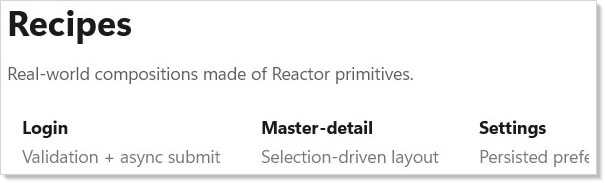
The gallery uses the same primitives every recipe page does — a
VStack for the column layout, TextBlock for descriptions, and
HStack for each tile row. The tile helper is a private static method, not a
component, so it has no hook scope:
private static Element Tile(string title, string sub) => VStack(4,
    TextBlock(title).Bold(),
    TextBlock(sub).Opacity(0.6)
).Padding(12);
Every page in this folder follows the same shape:
// Every recipe page in this folder pulls a tiny dedicated doc app under
// docs/_pipeline/apps/recipe-<name>/. The recipe template renders three
// snippet markers (state / shape / render) plus one screenshot for the
// gallery thumbnail above.
class GalleryShape : Component
{
    public override Element Render() => TextBlock("see docs/_pipeline/apps/recipe-*");
}
How to read a recipe
Every recipe has the same shape:
- A snippet of the recipe's working code, pulled from a real
doc app under
docs/_pipeline/apps/recipe-<name>/. - A screenshot of the recipe running, captured by the doc-pipeline harness.
- A walkthrough paragraph or two naming the primitives the recipe combines and the design decisions that hold the pattern up.
The recipes prefer composition of existing factories — no custom
Component per recipe. If you want the recipe in your app, copy the
snippet and replace the catalog data with yours.
Reference
| Primitive | Used in |
|---|---|
UseState |
Most recipes. |
UsePersisted |
Settings. |
UseMemo |
Search. |
UseMutation |
Login — async submit, pending, error. |
UseInfiniteResource |
Paginated list. |
| Conditional render | Modal dialog, Command palette. |
| Two-pane HStack | Master-detail. |
| Keyed children | Drag-reorder. |
Tips
Reach for a recipe before custom code. Most "I need a settings page" or "we need a login form" needs are met by one of these patterns. The recipe is the composition; the cost of inventing your own is the cost of debugging it.
Recipes are starting points, not products. Drop the snippet into your app and adapt it — the data, the styling tokens, the validation rules. The shape of the composition is the value here.
Search the controls catalog before reaching for a recipe. A problem solved by a single control (forms, data-system) doesn't need a recipe; recipes exist for shapes that span multiple controls and hooks.
Next Steps
- Controls — Previous: the catalog of factories the recipes compose.
- Forms — Forms-heavy recipes start here.
- Async Resources — Behind the Login and Paginated-list recipes.
- Persistence — Behind the Settings recipe.
- Commanding — Backs the Command-palette recipe.
- Navigation — Recipes that span multiple screens lean on this.