Recipe: Multi-Step Form
A wizard form is a step-index UseState plus a switch
on which step renders. The field state lives in the same component as
the step index, so moving forward and back never loses what the user
typed — Microsoft.UI.Reactor (Reactor) doesn't unmount the surrounding component when the
visible slot changes.
Primitives
| Concern | API |
|---|---|
| Step index | UseState<int> |
| Per-field state | UseState<string> / UseState<int> / UseState<bool> |
| Step branching | switch on the step index returning Element |
| Advance gating | .IsEnabled(canAdvance) on the Next button |
| Input controls | TextBox, RadioButtons, CheckBox |
State
// One UseState for the step index plus one per field. The fields
// are declared at the top of Render so they survive every step
// transition — Reactor never unmounts Wizard, so the hooks keep
// their values as the user moves forward and back.
var (step, setStep) = UseState(0);
var (name, setName) = UseState("");
var (email, setEmail) = UseState("");
var (role, setRole) = UseState(-1);
var (newsletter, setNewsletter) = UseState(false);
The step index and every field hook live at the top of Render. None
of them get torn down when the visible step changes; only the slot the
switch returns is swapped. That's why the user can move from step 2
back to step 1, edit a field, and step 2's selections are still there
when they come forward again.
Per-step validation
// canAdvance is a pure function of the step index plus the
// current field values. The Next button binds to it directly;
// no debounce, no separate validation pass.
bool canAdvance = step switch
{
    0 => name.Trim().Length >= 2
         && email.Contains('@') && email.Contains('.'),
    1 => role >= 0,
    _ => true,
};
canAdvance is a pure function of the current step plus the field
values. It runs on every render — no debounce, no validation pass —
and the Next button binds to it directly via .IsEnabled(canAdvance).
Step 0 wants a name and a plausible email; step 1 wants a role
selected; step 2 (summary) is always advanceable since the only
forward action is Submit.
Step bodies
Element StepAccount() => VStack(10,
    SubHeading("Step 1 of 3 — Account"),
    TextBox(name, setName, placeholderText: "Your name",
        header: "Name").Width(340),
    TextBox(email, setEmail, placeholderText: "you@example.com",
        header: "Email").Width(340)
);
Each step is a local function returning an Element. Account collects
the text fields; the second step collects the radio + checkbox:
Element StepPreferences() => VStack(10,
    SubHeading("Step 2 of 3 — Preferences"),
    TextBlock("Pick the role that fits best.").Opacity(0.7),
    RadioButtons(new[] { "Engineer", "Designer", "Manager" },
        role, setRole),
    CheckBox(newsletter, setNewsletter,
        label: "Send me product updates")
);
The locals close over the hook setters at the top of Render, so the
controlled-input contract from Forms just works — value
in, setter out, same shape as a single-page form.
Orchestrator
// The orchestrator picks which step renders, then lays the
// Back / Next buttons under it. Back is disabled on step 0;
// Next is disabled until canAdvance; the last step swaps the
// Next label to "Submit".
Element body = step switch
{
    0 => StepAccount(),
    1 => StepPreferences(),
    _ => StepSummary(),
};

return VStack(16,
    Heading("Create your account"),
    body,
    HStack(8,
        Button("Back", () => setStep(step - 1)).IsEnabled(step != 0),
        Button(step == 2 ? "Submit" : "Next",
            () => setStep(step + 1))
            .AutomationName(step == 2 ? "Submit form" : "Next step")
            .IsEnabled(canAdvance && step != 2)
    )
).Padding(20).Width(380);
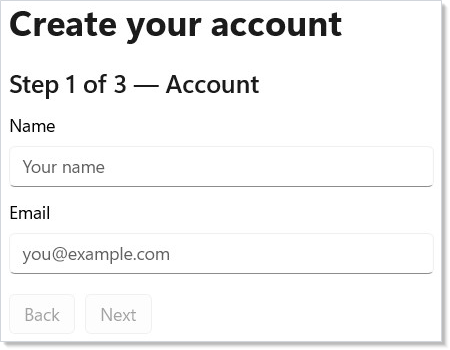
The orchestrator is a switch over step plus a Back / Next row.
The Back button is disabled on step 0; the Next button is disabled
until canAdvance; on the last step the Next button swaps to
"Submit" and grounds out (a real app would call into its commit path
here).
Tips
The step index is the whole state machine. A wizard doesn't need
a routing library, doesn't need a per-step Component, doesn't need
a WizardController. A UseState<int> plus a switch is the
canonical shape; everything else is decoration.
Declare every field hook at the top, not inside the step. Hooks
must be called in the same order on every render
(Hooks rules). Putting UseState inside a step branch
would skip the hook on renders where that step isn't active and break
the hook ordering. Top-level declarations also guarantee the values
survive step transitions.
Gate advancement at the button, not inside the handler. A disabled Next button is a single render check the user can see; guarding inside the click handler runs after they already pressed something the UI made look ready. Disabled-on-render is the load-bearing layer.
Don't add real Navigation for a 3-step
wizard. Navigation routes between top-level surfaces (pages,
dialogs); a wizard is one surface that mutates internally. Reach for
real routing only when a step needs its own URL, its own back-stack
entry, or its own deep link.
Next Steps
- Forms — The full input + validation surface each step pulls from.
- Navigation — Promote the wizard to real routed pages when a step needs its own URL or back-stack entry.
- Hooks — Why declaring every
UseStateat the top ofRenderis the load-bearing rule that lets wizard state survive step transitions. - Recipe: Login — Single-step sibling recipe with the same controlled-input contract.
- Recipes index — Back to the gallery.