Recipe: Master-detail
Master-detail in Microsoft.UI.Reactor (Reactor) is the canonical multi-pane shape: a list of records on
one side, the selected record's details on the other. The whole thing
is one UseState for the selected id and two slots in an HStack.
Primitives
| Slot | API |
|---|---|
| Selection state | UseState<int?> |
| List render | VStack + keyed Select(...).ToArray() |
| Selected highlight | Per-row .Background(...) |
| Detail branch | Element typed local for null case |
| Layout split | HStack(0, list, detail) |
record Note(int Id, string Title, string Body);

class NoteBrowser : Component
{
    private static readonly Note[] Notes = new[] {
        new Note(1, "Project plan", "Draft the milestone sequence; ship before Friday."),
        new Note(2, "Grocery list", "Bread, olive oil, lemons, parsley, two limes."),
        new Note(3, "Bug triage",   "Refocus on the persistence regression; defer the WinForms host."),
    };
The data layer is plain C#. A real app pulls notes from
IDataSource<T> or an
async-resources source; the shape stays
the same.
Selection state
// Single source of truth for "which note is selected" — the list
// writes to it via the button click; the detail pane reads from it.
// Re-renders are scoped to slots that actually changed.
var (selectedId, setSelectedId) = UseState<int?>(1);
var selected = Notes.FirstOrDefault(n => n.Id == selectedId);
One UseState<int?> holds the id; the list writes via a button click,
the detail reads via FirstOrDefault. Both slots re-render only when
the selection actually changes.
Layout
var list = VStack(2,
    Notes.Select(n =>
        Button(n.Title, () => setSelectedId(n.Id))
            .WithKey(n.Id.ToString())
            .AutomationName(n.Title)
            .HAlign(Microsoft.UI.Xaml.HorizontalAlignment.Stretch)
            .Background(n.Id == selectedId ? Theme.SubtleFill : Theme.SolidBackground)
    ).ToArray()
).Width(200).Padding(8);

Element detail = selected is null
    ? TextBlock("No selection").Opacity(0.6).Padding(20)
    : VStack(8,
        Heading(selected.Title),
        TextBlock(selected.Body).Opacity(0.8)
    ).Padding(20);

return HStack(0, list, detail);
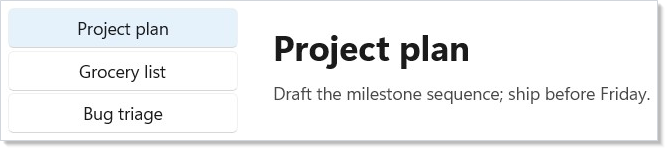
The list is a keyed VStack of full-width buttons; the selected row gets a
distinct background. The detail pane is conditional — selected is null
renders the empty state, otherwise the title + body. Both sides are
plain elements; no intermediate component is needed.
Tips
Lift the selection into context only when a third component needs
it. A list and a detail pane in the same Render share the
selection through a local — no UseContext needed
until a third pane (toolbar, status bar) wants to read or write.
Pre-resolve the selected record once. A FirstOrDefault is fine
for short lists; for large catalogs put the records in a
Dictionary<int, Note> so the lookup is O(1).
Don't reach for a ListView<T> for three rows. The full
collection control earns its weight at 50+ rows. A VStack of buttons
is fine for the recipe-sized case and trivial to read.
Next Steps
- Collections — Promote to
ListView<T>when the row count grows or each row gets non-trivial. - Navigation — When the detail belongs on its own page rather than a sibling pane.
- Data System — Pull the data layer behind an
IDataSource<T>once it's a network source. - Recipe: Login — Sibling recipe — adjacent shape but different validation surface.
- Recipes index — Back to the gallery.