Localization
Microsoft.UI.Reactor (Reactor)'s localization system wraps your component tree in a LocaleProvider
that supplies an IntlAccessor to every descendant via context.
You look up messages, format numbers and dates, and detect RTL layouts — all
locale-aware, all reactive.
| API | Purpose |
|---|---|
LocaleProvider |
Wraps a subtree with the active locale and resource provider |
UseIntl() |
Hook returning the IntlAccessor for messages, formatting, and direction |
IStringResourceProvider |
Pluggable string source (.resw, in-memory, custom) |
RtlHelper.IsRtlLocale(tag) |
Static check for right-to-left locales |
pseudoLocalize: true |
LocaleProvider flag that accents and pads strings for testing |
String Resource Provider
You start by implementing IStringResourceProvider. It maps a locale,
namespace, and key to a translated string. For production apps, use
ReswResourceProvider to load .resw files. For demos and tests, an
in-memory dictionary works:
class DemoResourceProvider : IStringResourceProvider
{
    private readonly Dictionary<string, Dictionary<string, string>> _strings = new()
    {
        ["en-US"] = new() {
            ["App.Title"] = "My Application",
            ["App.Greeting"] = "Hello, {name}!",
        },
        ["fr-FR"] = new() {
            ["App.Title"] = "Mon Application",
            ["App.Greeting"] = "Bonjour, {name} !",
        },
        ["ar-SA"] = new() {
            ["App.Title"] = "\u062a\u0637\u0628\u064a\u0642\u064a",
            ["App.Greeting"] = "\u0645\u0631\u062d\u0628\u0627\u060c {name}!",
        }
    };

    public string? GetString(string locale, string ns, string key)
    {
        var fullKey = $"{ns}.{key}";
        return _strings.TryGetValue(locale, out var s)
            && s.TryGetValue(fullKey, out var v) ? v : null;
    }
}
The GetString method receives the full locale tag (e.g., "fr-FR"), the
namespace (matching the .resw file name), and the key. Return null for
missing keys — the system falls back to the default locale automatically.
LocaleProvider
Wrap your app tree with LocaleProvider. It takes a locale string, a child
element, and an optional resource provider:
class LocaleSwitcher : Component
{
    public override Element Render()
    {
        var (localeIndex, setLocaleIndex) = UseState(0);
        var locales = new[] { "en-US", "fr-FR", "ar-SA" };
        var locale = locales[localeIndex];
        var provider = new DemoResourceProvider();

        return VStack(16,
            ComboBox(["English (US)", "Fran\u00e7ais", "\u0627\u0644\u0639\u0631\u0628\u064a\u0629"],
                localeIndex, setLocaleIndex)
                .Header("Locale"),
            LocaleProvider(locale,
                Component<LocalizedContent>(),
                resourceProvider: provider,
                defaultLocale: "en-US")
        ).Padding(24);
    }
}
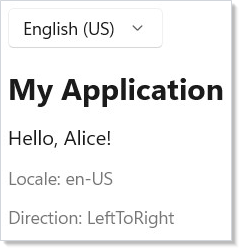
When the locale changes (here via a ComboBox), LocaleProvider re-renders
its subtree with a new IntlAccessor. Every component that calls UseIntl()
picks up the new locale automatically.
Message Lookup
Call UseIntl() in any descendant — it is a hook — to get the
IntlAccessor. Use .Message() to look up translated strings by key. Pass
arguments as ("name", value) tuples for interpolation — the first item is
the placeholder name as a string literal (matching the {name} in the
.resw pattern), the second is the value. This is the compact, AOT-safe
shape supported by the tuple-params overload:
class LocalizedContent : Component
{
    public override Element Render()
    {
        var intl = UseIntl();
        var title = intl.Message(new MessageKey("App", "Title"));
        var greeting = intl.Message(
            new MessageKey("App", "Greeting"),
            ("name", "Alice"));

        return VStack(12,
            TextBlock(title).FontSize(24).Bold(),
            TextBlock(greeting).FontSize(16),
            TextBlock($"Locale: {intl.Locale}").Opacity(0.6),
            TextBlock($"Direction: {intl.Direction}").Opacity(0.6)
        );
    }
}
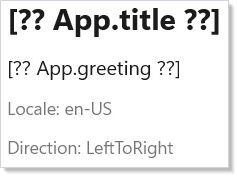
MessageKey takes a namespace and key. The namespace maps to your .resw
file name (e.g., "App" for App.resw). The accessor also exposes the
current Locale, Direction, and IsRtl flag.
In .resw-backed apps, Reactor.Localization.Generator reads the default
locale's files at build time and emits the same keys as generated fields
(for example, Loc.App.Title). These self-contained snippets spell out
new MessageKey(...) so the in-memory provider remains visible.
Formatting Numbers and Dates
IntlAccessor provides locale-aware formatting for numbers, dates, and
lists. Each method returns a string formatted according to the current
locale's rules:
class FormattingDemo : Component
{
    public override Element Render()
    {
        var intl = UseIntl();
        var price = intl.FormatNumber(1234.56,
            new NumberFormatOptions { Style = NumberStyle.Currency });
        var percent = intl.FormatNumber(0.875,
            new NumberFormatOptions { Style = NumberStyle.Percent });
        var date = intl.FormatDate(DateTimeOffset.Now,
            new DateFormatOptions { Style = DateStyle.Long });
        var items = intl.FormatList(
            new[] { "Apples", "Bananas", "Cherries" },
            ListFormatType.Conjunction);

        return VStack(8,
            SubHeading("Formatting"),
            TextBlock($"Price: {price}"),
            TextBlock($"Rate: {percent}"),
            TextBlock($"Date: {date}"),
            TextBlock($"List: {items}")
        ).Padding(24);
    }
}
| Method | Options |
|---|---|
FormatNumber(value, options?) |
NumberStyle.Default, .Currency, .Percent; fraction digit control |
FormatDate(value, options?) |
DateStyle.Short, .Long, .Full, .Default |
FormatList(values, type) |
ListFormatType.Conjunction ("and") or .Disjunction ("or") |
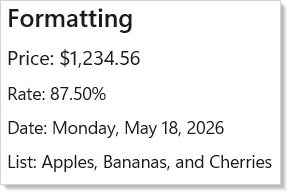
Formatting follows the locale's conventions — decimal separators, date order, currency symbols, and list conjunctions all adapt automatically.
RTL Detection
Use RtlHelper.IsRtlLocale() to check whether a locale is right-to-left.
The IntlAccessor exposes IsRtl and Direction for the active locale:
class RtlDemo : Component
{
    public override Element Render()
    {
        var intl = UseIntl();
        var locales = new[] { "en-US", "fr-FR", "ar-SA", "he-IL", "ja-JP" };

        return VStack(8,
            SubHeading("RTL Detection"),
            VStack(4,
                locales.Select(loc =>
                    HStack(8,
                        TextBlock(loc).Width(60),
                        TextBlock(RtlHelper.IsRtlLocale(loc) ? "RTL" : "LTR")
                            .Bold()
                            .Foreground(RtlHelper.IsRtlLocale(loc)
                                ? Theme.SystemCritical : Theme.SystemSuccess)
                    )
                    .WithKey(loc)
                ).ToArray()
            ),
            When(intl.IsRtl, () =>
                TextBlock("Current layout is right-to-left")
                    .Foreground(Theme.SystemCritical).SemiBold())
        ).Padding(24);
    }
}
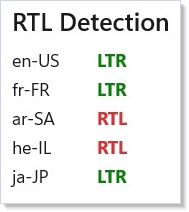
Arabic, Hebrew, Farsi, Urdu, and several other languages are detected as RTL.
Use intl.Direction to set FlowDirection on your layout
containers so text and UI elements flow correctly.
Pseudo-Localization
Pseudo-localization replaces characters with accented equivalents and adds
padding to expose hardcoded strings and truncation issues. Enable it by
setting pseudoLocalize: true on LocaleProvider:
class PseudoLocDemo : Component
{
    public override Element Render()
    {
        var (pseudo, setPseudo) = UseState(false);
        var provider = new DemoResourceProvider();

        return VStack(12,
            SubHeading("Pseudo-Localization"),
            ToggleSwitch(pseudo, setPseudo,
                header: "Enable pseudo-localization"),
            LocaleProvider("en-US",
                RenderEachTime(ctx =>
                {
                    var intl = ctx.UseIntl();
                    var title = intl.Message(new MessageKey("App", "Title"));
                    var greeting = intl.Message(
                        new MessageKey("App", "Greeting"),
                        ("name", "World"));
                    return VStack(4,
                        TextBlock(title).FontSize(18).Bold(),
                        TextBlock(greeting));
                }),
                resourceProvider: provider,
                pseudoLocalize: pseudo)
        ).Padding(24);
    }
}
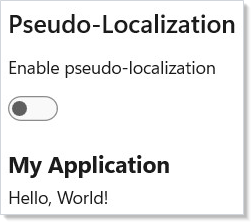
Run pseudo-localization during development to catch problems early: strings
that were not routed through intl.Message() appear unchanged, making them
easy to spot. The padded text reveals truncation in fixed-width layouts.
Tips
Always wrap with LocaleProvider at the root. Components that call
UseIntl() without a provider fall back to the OS locale, but you lose
control over locale switching and resource loading.
Use namespaced keys. Organize your .resw files by feature area
("Settings", "Checkout", "Common") so translations stay manageable as
the app grows.
Test with pseudo-localization early. Turn it on in debug builds. It costs nothing at runtime and catches layout issues that only surface in German or Arabic.
Format all user-visible numbers and dates. Never call .ToString()
directly. FormatNumber and FormatDate handle thousands separators, decimal
symbols, and date ordering for every locale.
Check intl.IsRtl for layout-sensitive logic. If you have directional
icons (arrows, chevrons) or absolute positioning, flip them when the locale
is RTL.
Next Steps
- Accessibility — previous topic: label controls, set landmarks, and support screen readers
- Animation — next topic: add transitions and layout animations to your UI
- Context — understand the provider pattern that
LocaleProvideruses under the hood - Forms and Input — localize form labels, placeholders, and validation messages