A modifier in Microsoft.UI.Reactor (Reactor) is not an operation — it is a value-bearing
function T -> T that returns a new Element record
with its Modifiers slot replaced. .Bold().Margin(8).Background(Theme.Accent)
allocates one TextBlockElement and folds three small ElementModifiers
records into it via ElementModifiers.Merge, then the reconciler reads
the merged record at commit time and writes WinUI properties in a single
sweep. The trade-off is that you do not get the SwiftUI / Compose
"each modifier wraps the previous one" semantics — most Reactor
modifiers are commutative because they live in a flat record, not on a
stack — and the cases where order does matter (paint stacking,
event-handler null-clears, .Set callbacks that read other modifiers)
are exactly the cases where the modifier writes to a property that
already carries semantics on its own. The most common mistake is
expecting .Padding().Background() to paint differently than
.Background().Padding(); in Reactor it doesn't, because both end up
in the same merged Padding / Background slots.
Modifier System¶
This page is the runtime view of the same fluent chain
Styling introduces from the surface. Both ride on top of
ElementExtensions in src/Reactor/Elements/; the difference is which
half of the call you care about — the API or the fold.
Modifiers are flat records, not nested wrappers¶
A modifier extension method does exactly one thing: it produces a new
Element whose Modifiers slot is the merge of the old one with a
single-field ElementModifiers carrying the new value. The two
helpers that do all the work are Modify and ModifyTheme:
private static T Modify<T>(T el, ElementModifiers mods) where T : Element =>
    el with { Modifiers = el.Modifiers is not null ? el.Modifiers.Merge(mods) : mods };

// #165/#157 — bucket-level merge entry points for pure-layout / pure-visual
// fluent modifiers. Routing through these avoids allocating a throwaway parent
// ElementModifiers (and the bucket sub-record its init shim builds) on every
// chained call: `.Margin().Width().Foreground()` merges the delta straight into
// the Layout / Visual slot instead of constructing a temporary ElementModifiers
// per step. Semantics are identical to Modify(el, new ElementModifiers { <field> }):
// ElementModifiers.Merge copies every non-bucket field as `other.X ?? X` (i.e.
// unchanged) when only a bucket is supplied, and merges the bucket with the same
// `other ?? this` precedence used here.
private static T ModifyLayout<T>(T el, LayoutModifiers delta) where T : Element
{
    var mods = el.Modifiers;
    if (mods is null)
        return el with { Modifiers = new ElementModifiers { Layout = delta } };
    var merged = mods.Layout is not null ? mods.Layout.Merge(delta) : delta;
    return el with { Modifiers = mods with { Layout = merged } };
}

private static T ModifyVisual<T>(T el, VisualModifiers delta) where T : Element
{
    var mods = el.Modifiers;
    if (mods is null)
        return el with { Modifiers = new ElementModifiers { Visual = delta } };
    var merged = mods.Visual is not null ? mods.Visual.Merge(delta) : delta;
    return el with { Modifiers = mods with { Visual = merged } };
}

private static T ModifyA11y<T>(T el, AccessibilityModifiers a11y) where T : Element
{
    var existing = el.Modifiers?.Accessibility;
    var merged = existing is not null ? existing.Merge(a11y) : a11y;
    return Modify(el, new ElementModifiers { Accessibility = merged });
}

private static T ModifyTheme<T>(T el, string property, ThemeRef theme) where T : Element
{
    var bindings = el.ThemeBindings is not null
        ? new Dictionary<string, ThemeRef>(el.ThemeBindings) { [property] = theme }
        : new Dictionary<string, ThemeRef> { [property] = theme };
    return el with { ThemeBindings = bindings };
}
Modify<T>(el, mods) is a record with expression on the concrete
element type — T : Element. That generic constraint is what lets
the call chain stay typed as TextBlockElement all the way through
.Bold().Margin(8).FontSize(24). SwiftUI returns
some View and Compose returns Modifier; Reactor keeps the concrete
type so .Set(tb => tb.IsTextScaleFactorEnabled = false) two modifiers
later still binds to a TextBlockElement action — the WinUI control
you get inside the callback is a typed TextBlock, not a base
UIElement.
| Where the value lands | Slot on Element |
Set via |
|---|---|---|
| Layout (margin, padding, size, alignment) | Modifiers.Layout |
.Margin, .Padding, .Width, .HAlign, etc. |
| Visual (font, foreground, opacity) | Modifiers.Visual |
.FontSize, .Foreground, .Opacity, etc. |
| Theme-bound brushes | ThemeBindings[propertyName] |
.Background(Theme.Accent), .Foreground(Theme.Ref(...)) |
| Container-attached values | Attached[typeof(TAttached)] |
.Grid(row: 1), .Flex(grow: 1), .Canvas(left: 8) |
| Event callbacks | typed OnXxx property on the leaf record |
.Click(handler), .TextChanged(handler) |
| Reference cells | Modifiers.Ref / reference slots |
.Ref(cell), .Target(cell), .LabeledBy(cell), .XYFocusRight(cell) |
| Imperative escape hatch | element callback list | .Set(control => …) |
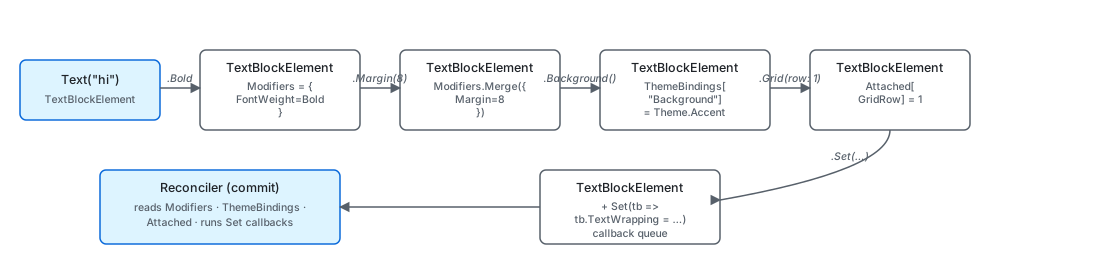
The slots are independent — adding a .Margin after a .Background
doesn't displace the .Background, it just merges into the same
record. That is why "modifier order doesn't matter" is true for almost
every Reactor modifier: the merge target is a field on a flat record,
not a position in a wrapper chain.
Dropping a modifier on a later render is a genuine reset, not a no-op:
the reconciler calls ClearValue on the dependency property instead of
writing that property's default value. The distinction is invisible on a
bare control and load-bearing on a styled one. A local value outranks
every Style setter in WinUI's precedence order, so writing the default
would pin it permanently rather than hand the property back to the
style. Render a themed Button with .Padding(24) and then without
.Padding() and you get the themed padding back, not 0.
Caveat: The four transform modifiers are the current exception.
.Scale(),.Rotation(),.Translation()and.CenterPoint()have no unset arm yet, so dropping one leaves the last value on the element. An un-animated write goes straight to the XAML facade property, so a future fix can clear those the usual way; but when an animation curve is in scope the value is driven by a composition animation on the element's visual, which outranks the property — releasing that case has to stop the animation as well, which is why this is not simply a missingClearValue. Until it is fixed, reset these by writing the identity value explicitly —.Scale(1f),.Rotation(0f),.Translation(0f, 0f, 0f)and.CenterPoint(Vector3.Zero)— rather than by omitting the call. Note.CenterPoint()takes only aVector3, so it has no component-wise overload to spell the identity with.
Reference modifiers are the exception to "just write this value" in the
implementation, but not in the authoring model. .Ref(cell) binds the
current element into an ElementRef cell; reference-property modifiers
such as .Target(cell), .LabeledBy(cell), .DescribedBy(cells...),
.FlowsTo(cells...), .FlowsFrom(cells...), and
.XYFocusUp/Down/Left/Right(cell) subscribe to those cells and write the
native property when the target resolves. Removing the modifier on a
later render clears the slot and unsubscribes. Unmounting the target
sets the cell to null, so every referrer clears without a handler
sampling cell.Current.
Caveat:
Modifycallsel.Modifiers.Merge(mods)with the new modifier as the right-hand side.Merge's rule for scalar properties is "other ?? self" — the later call wins when both set the same slot..FontSize(12).FontSize(16)keeps 16, not 12, because the second call went on top. This matters for theming: a.Background("#FF0000")literal placed after a.Background(Theme.Accent)overrides the theme binding entirely and silently breaks dark-mode color swaps. TheREACTOR_THEME_001analyzer flags the literal form so the override never ships.
Attached values live in a separate slot¶
Container-attached values (Grid.Row, Canvas.Left, FlexPanel.Grow)
don't go into Modifiers because they're metadata for a parent, not
the element itself. They ride in Element.Attached — a
Dictionary<Type, object> keyed by the attached-data record:
/// <summary>
/// Sets Grid attached properties (row, column, spans) on this element.
/// Only meaningful when the element is a child of a Grid.
/// </summary>
public static T Grid<T>(this T el, int row = 0, int column = 0, int rowSpan = 1, int columnSpan = 1) where T : Element =>
    (T)el.SetAttached(new GridAttached(row, column, rowSpan, columnSpan));
.Grid(row: 1, column: 2) creates a GridAttached(1, 2, 1, 1) record
and calls el.SetAttached(...). The dictionary is keyed by
typeof(GridAttached), so a later .Grid(row: 3) replaces the prior
entry (not merges — attached records are atomic). A Reactor Grid
asks each child element for its GetAttached<GridAttached>() during
mount, then writes Grid.SetRow / Grid.SetColumn on the WinUI
child. The same pattern wraps Flex:
public static T Flex<T>(this T el,
    double grow = 0,
    double shrink = 1,
    double? basis = null,
    double? minWidth = null,
    double? minHeight = null,
    FlexAlign? alignSelf = null,
    FlexPositionType position = FlexPositionType.Relative,
    double? left = null,
    double? top = null,
    double? right = null,
    double? bottom = null
) where T : Element
{
    if (grow < 0 || double.IsNaN(grow) || double.IsInfinity(grow))
        throw new ArgumentOutOfRangeException(nameof(grow), "Grow must be a non-negative, finite value.");

    if (shrink < 0 || double.IsNaN(shrink) || double.IsInfinity(shrink))
        throw new ArgumentOutOfRangeException(nameof(shrink), "Shrink must be a non-negative, finite value.");

    if (minWidth is { } mw && (mw < 0 || double.IsNaN(mw) || double.IsInfinity(mw)))
        throw new ArgumentOutOfRangeException(nameof(minWidth), "MinWidth must be a non-negative, finite value (or null for CSS `min-width: auto`).");

    if (minHeight is { } mh && (mh < 0 || double.IsNaN(mh) || double.IsInfinity(mh)))
        throw new ArgumentOutOfRangeException(nameof(minHeight), "MinHeight must be a non-negative, finite value (or null for CSS `min-height: auto`).");

    return (T)el.SetAttached(new FlexAttached(grow, shrink, basis, minWidth, minHeight, alignSelf, position, left, top, right, bottom));
}
Flex distinguishes itself with input validation — grow and shrink
have to be non-negative and finite — but otherwise lives in the same
Attached dictionary, keyed by typeof(FlexAttached). Reading two
attached entries from the same child is the parent's call; a Grid
ignores FlexAttached, a FlexPanel ignores
GridAttached. Mixing them on one element is harmless but pointless —
only the parent's matching kind gets read.
Event-callback modifiers are typed with updates¶
Event handlers don't ride in ElementModifiers either. They are
typed properties on the concrete leaf record (ButtonElement.OnClick,
TextBoxElement.OnChanged), and the .Click(...) /
.Changed(...) extensions are thin record with { } updates:
/// <summary>Wires a click handler (sets <see cref="ButtonElement.OnClick"/>). Passing <c>null</c> clears any existing handler.</summary>
public static ButtonElement Click(this ButtonElement el, Action? handler) =>
    el with { OnClick = handler };

/// <summary>Wires a click handler (sets <see cref="HyperlinkButtonElement.OnClick"/>). Passing <c>null</c> clears.</summary>
public static HyperlinkButtonElement Click(this HyperlinkButtonElement el, Action? handler) =>
    el with { OnClick = handler };
Two reasons the design split this off from generic modifiers. First,
C# bindsel.OnClick(arg)to delegate invocation before considering
extension methods, so a .OnClick
extension method would be permanently unreachable — the WinUI XAML
convention (Click="…", drop the On prefix) avoids the clash.
Second, callback identity participates in
reconciliation — Element.HasCallbacks is the
signal the reconciler uses to decide whether to refresh the event
trampoline's Tag after a skip fast-path. Storing callbacks in typed
fields keeps that check cheap (one is not null per relevant slot)
instead of forcing the reconciler to walk a delegate dictionary.
Patterns¶
Authoring a custom modifier¶
If you find yourself writing .Padding(8).WithBorder(Theme.CardStroke).Background(Theme.CardBackground)
on every card, hoist it into a single extension that calls the existing
modifiers in order:
public static T Card<T>(this T el) where T : Element =>
    el.Padding(8).WithBorder(Theme.CardStroke).Background(Theme.CardBackground);
The generic constraint T : Element is the only ceremony — every
piece of the chain preserves the concrete type, so the result still
binds to whatever record the caller passed in. There is no
CardModifier record to define, no ModifierBuilder, no registration
step. The chain is the modifier.
When you need a modifier that writes to a new slot (e.g., a custom
attached property a custom container reads), the pattern is the same
two helpers Grid and Flex use: define an attached-data record, have
a modifier store it on the element, and have the parent panel read it
back in its mount / update code.
SetAttached(...) and GetAttached<TAttached>() are the internal
shorthands the built-in modifiers use for those two steps, so that exact
spelling is first-party only. From outside the framework assembly, go
through the public Attached slot directly — it is a Type-keyed
IReadOnlyDictionary<Type, object> with an init setter, so a modifier
writes it with a with expression and the parent reads its own record
back out by type:
public record BadgeAttached(string Label);

public static class BadgeExtensions
{
    public static T Badge<T>(this T el, string label) where T : Element
    {
        // Copy any existing entries first — replacing the dictionary wholesale
        // would drop another provider's attached record on the same element.
        var attached = new Dictionary<Type, object>();
        if (el.Attached is { } existing)
        {
            foreach (var kv in existing) attached[kv.Key] = kv.Value;
        }
        attached[typeof(BadgeAttached)] = new BadgeAttached(label);
        return el with { Attached = attached };
    }
}
The parent panel reads it back keyed by its own record type:
if (child.Attached?.TryGetValue(typeof(BadgeAttached), out var data) == true
    && data is BadgeAttached badge)
{
    ApplyBadge(realizedChild, badge);
}
Reading the merged modifier in a custom panel¶
A custom layout panel that needs to know the user's
Modifiers.Layout.Margin reads it off the element directly — the
reconciler has already folded the chain by the time the panel's
mount handler runs:
public abstract record Element
{
    /// <summary>
    /// Optional key for stable identity across re-renders (like React's key prop).
    /// When set, the reconciler uses it to match elements across list reorderings.
    /// </summary>
    public string? Key { get; init; }

    /// <summary>
    /// Layout modifiers (margin, padding, size, alignment, etc.) applied to this element.
    /// Set via fluent extension methods: TextBlock("hi").Margin(10).Width(200)
    /// Modifiers are stored inline so the concrete element type is preserved through chaining.
    /// </summary>
    public ElementModifiers? Modifiers { get; init; }
The record exposes Modifiers as a single nullable slot; if null, no
modifier touched the element; if non-null, every modifier the chain
applied has been merged into it. There is no traversal cost — one
field read tells you everything the user said about the element's
appearance.
Common Mistakes¶
Expecting Padding and Background to stack like SwiftUI¶
private static T Modify<T>(T el, ElementModifiers mods) where T : Element =>
    el with { Modifiers = el.Modifiers is not null ? el.Modifiers.Merge(mods) : mods };

// #165/#157 — bucket-level merge entry points for pure-layout / pure-visual
// fluent modifiers. Routing through these avoids allocating a throwaway parent
// ElementModifiers (and the bucket sub-record its init shim builds) on every
// chained call: `.Margin().Width().Foreground()` merges the delta straight into
// the Layout / Visual slot instead of constructing a temporary ElementModifiers
// per step. Semantics are identical to Modify(el, new ElementModifiers { <field> }):
// ElementModifiers.Merge copies every non-bucket field as `other.X ?? X` (i.e.
// unchanged) when only a bucket is supplied, and merges the bucket with the same
// `other ?? this` precedence used here.
private static T ModifyLayout<T>(T el, LayoutModifiers delta) where T : Element
{
    var mods = el.Modifiers;
    if (mods is null)
        return el with { Modifiers = new ElementModifiers { Layout = delta } };
    var merged = mods.Layout is not null ? mods.Layout.Merge(delta) : delta;
    return el with { Modifiers = mods with { Layout = merged } };
}

private static T ModifyVisual<T>(T el, VisualModifiers delta) where T : Element
{
    var mods = el.Modifiers;
    if (mods is null)
        return el with { Modifiers = new ElementModifiers { Visual = delta } };
    var merged = mods.Visual is not null ? mods.Visual.Merge(delta) : delta;
    return el with { Modifiers = mods with { Visual = merged } };
}

private static T ModifyA11y<T>(T el, AccessibilityModifiers a11y) where T : Element
{
    var existing = el.Modifiers?.Accessibility;
    var merged = existing is not null ? existing.Merge(a11y) : a11y;
    return Modify(el, new ElementModifiers { Accessibility = merged });
}

private static T ModifyTheme<T>(T el, string property, ThemeRef theme) where T : Element
{
    var bindings = el.ThemeBindings is not null
        ? new Dictionary<string, ThemeRef>(el.ThemeBindings) { [property] = theme }
        : new Dictionary<string, ThemeRef> { [property] = theme };
    return el with { ThemeBindings = bindings };
}
In SwiftUI, calling .padding().background(Color.red) paints the
background outside the padding; reversing the order paints it
inside. In Reactor, both calls land in the same Modifiers.Layout.Padding
and Modifiers.Visual.Background slots, and the WinUI control gets
one padding and one background — the order doesn't change the
geometry. If you want the SwiftUI semantics, wrap the inner element in
a Border explicitly: Border(TextBlock("hi").Padding(10)).Background("#FF0000")
gives you the outer stripe; Border(TextBlock("hi")).Padding(10).Background("#FF0000")
gives you the inner.
Re-setting the same property and expecting an additive effect¶
// Don't:
TextBlock("hi").Margin(8).Margin(left: 16);   // last wins — margin is (16,8,8,8)? NO. it's (16,0,0,0)
private static T Modify<T>(T el, ElementModifiers mods) where T : Element =>
    el with { Modifiers = el.Modifiers is not null ? el.Modifiers.Merge(mods) : mods };

// #165/#157 — bucket-level merge entry points for pure-layout / pure-visual
// fluent modifiers. Routing through these avoids allocating a throwaway parent
// ElementModifiers (and the bucket sub-record its init shim builds) on every
// chained call: `.Margin().Width().Foreground()` merges the delta straight into
// the Layout / Visual slot instead of constructing a temporary ElementModifiers
// per step. Semantics are identical to Modify(el, new ElementModifiers { <field> }):
// ElementModifiers.Merge copies every non-bucket field as `other.X ?? X` (i.e.
// unchanged) when only a bucket is supplied, and merges the bucket with the same
// `other ?? this` precedence used here.
private static T ModifyLayout<T>(T el, LayoutModifiers delta) where T : Element
{
    var mods = el.Modifiers;
    if (mods is null)
        return el with { Modifiers = new ElementModifiers { Layout = delta } };
    var merged = mods.Layout is not null ? mods.Layout.Merge(delta) : delta;
    return el with { Modifiers = mods with { Layout = merged } };
}

private static T ModifyVisual<T>(T el, VisualModifiers delta) where T : Element
{
    var mods = el.Modifiers;
    if (mods is null)
        return el with { Modifiers = new ElementModifiers { Visual = delta } };
    var merged = mods.Visual is not null ? mods.Visual.Merge(delta) : delta;
    return el with { Modifiers = mods with { Visual = merged } };
}

private static T ModifyA11y<T>(T el, AccessibilityModifiers a11y) where T : Element
{
    var existing = el.Modifiers?.Accessibility;
    var merged = existing is not null ? existing.Merge(a11y) : a11y;
    return Modify(el, new ElementModifiers { Accessibility = merged });
}

private static T ModifyTheme<T>(T el, string property, ThemeRef theme) where T : Element
{
    var bindings = el.ThemeBindings is not null
        ? new Dictionary<string, ThemeRef>(el.ThemeBindings) { [property] = theme }
        : new Dictionary<string, ThemeRef> { [property] = theme };
    return el with { ThemeBindings = bindings };
}
The second .Margin(left: 16) builds a fresh ElementModifiers with
Margin = new Thickness(16, 0, 0, 0) and hands it to Merge. Merge
treats the new Margin value as a single atomic field — there's no
field-level merge inside Thickness. The result is (16, 0, 0, 0),
not (16, 8, 8, 8). Either call the per-side overload once
(.Margin(left: 16, top: 8, right: 8, bottom: 8)) or stick to the
uniform shape if all sides are equal.
Tips¶
Generic constraint preserves type — chain freely. .Bold() returns
TextBlockElement, .Margin() returns TextBlockElement, every
modifier preserves the type. .Set(tb => ...) at any point in the
chain still gets the strongly-typed TextBlock callback.
Merge is "later wins" per slot. Repeating the same modifier
overrides; it doesn't accumulate. The exception is event-callback
parity, which the Fluent API spec §15 Q2
documents — passing null to a .Click(null) clears the handler
rather than queuing a no-op.
Attached values are atomic. .Grid(row: 1).Grid(column: 2)
replaces the first GridAttached with a fresh one — the column wins
and the row resets to zero. Set all attached fields in one call:
.Grid(row: 1, column: 2).
Reach for .Set only when nothing else fits. If a modifier exists
(.Bold, .FontSize, .Foreground), use it — the reconciler can
batch property writes for known modifiers and skip them under
CanSkipUpdate. .Set always runs.
Next Steps¶
- Styling — Previous: the surface API for the chain documented here.
- Reconciliation — Next: where the merged modifier actually reaches WinUI.
- Theming tokens —
ThemeBindingscompanion slot for brush properties. - Flex layout — Worked example of an attached-data record.
- Element pool — Why modifier cleanup matters when a control is recycled.