A Microsoft.UI.Reactor (Reactor) Command is the unit of "what the user can do" in a Reactor
app. It bundles the action, its label, icon, keyboard accelerator,
description, and enabled state into a single immutable record that you
bind from multiple call sites simultaneously. The button that runs the
action, the menu item in the toolbar overflow, the right-click flyout
entry, and the Ctrl+S keyboard binding all reference the same record —
disable the command, and every surface disables in lock-step; change
its label for localization, and every surface re-
labels. The contract is synchronized state across surfaces — the
opposite of the WPF RoutedCommand model where each surface registers
its own binding and CanExecuteChanged events fan out invalidations.
Read this page when you have an action that lives in more than one
place (toolbar + menu + keyboard), when you need async tracking with
disable-while-running semantics, or when you're wiring a
dialog's primary button to a real action
rather than an inline lambda.
Commanding
A Command bundles an action with its metadata. Define it once and use it
across buttons, menus, toolbars, and dialogs — the metadata stays consistent
everywhere.
Defining a Command
Create a command with the properties you need:
class BasicCommandExample : Component
{
    public override Element Render()
    {
        var (text, setText) = UseState("Hello, World!");
        var (saved, setSaved) = UseState(false);

        var saveCmd = new Command
        {
            Label = "Save",
            Execute = () => setSaved(true),
            CanExecute = !saved,
            Icon = SymbolIcon("Save"),
            Accelerator = Accelerator(VirtualKey.S, VirtualKeyModifiers.Control)
        };

        return VStack(12,
            TextBox(text, v => { setText(v); setSaved(false); }, header: "Document")
                .Width(400),
            HStack(8,
                Button(saveCmd),
                When(saved, () => TextBlock("Saved!").Foreground(Theme.SystemSuccess))
            )
        ).Padding(24);
    }
}

Pass a Command to Button(), MenuItem(), or AppBarButton() and the
label, icon, accelerator, and enabled state are wired automatically. You
do not set them individually on each control.
Reference
| Member | Type | Purpose |
|---|---|---|
Label |
string (required) |
Text rendered on the button / menu item / tooltip. |
Execute |
Action? |
Synchronous action. Mutually exclusive with ExecuteAsync. |
ExecuteAsync |
Func<Task>? |
Async action — pair with UseCommand for tracking. |
CanExecute |
bool (default true) |
Whether the action can run right now. |
IsExecuting |
bool |
Managed by UseCommand while async work is in flight. |
DebounceMs |
int (default 0) |
Leading-edge debounce window in ms. 0 = off. Realized by UseCommand. |
IsDebouncing |
bool |
Managed by UseCommand while inside the DebounceMs window. |
Icon |
IconData? |
SymbolIcon(name), FontIcon(...), or BitmapIcon(uri). |
Description |
string? |
Tooltip / accessibility description. |
Accelerator |
KeyboardAcceleratorData? |
Keyboard binding (Accelerator(VirtualKey.S, Control)). |
AccessKey |
string? |
Single-character Alt-prefix shortcut for menu items. |
IsEnabled |
bool (computed) |
CanExecute && !IsExecuting && !IsDebouncing — what every surface reads. |
Command<T> exposes the same members with Execute: Action<T>? and
ExecuteAsync: Func<T, Task>? — the action receives an argument from
the call site.
Standard Commands
StandardCommand provides factory methods for the 16 most common application
actions. Each comes with a label, icon, and keyboard accelerator preset:
class StandardCommandsExample : Component
{
    public override Element Render()
    {
        var (log, updateLog) = UseReducer(new List<string>());

        var cut = StandardCommand.Cut(() => updateLog(l => [.. l, "Cut"]));
        var copy = StandardCommand.Copy(() => updateLog(l => [.. l, "Copy"]));
        var paste = StandardCommand.Paste(() => updateLog(l => [.. l, "Paste"]));
        var undo = StandardCommand.Undo(
            () => updateLog(l => [.. l, "Undo"]),
            canExecute: log.Count > 0);

        return VStack(12,
            CommandBar(
                primaryCommands: new[] { AppBarButton(cut), AppBarButton(copy),
                    AppBarButton(paste), AppBarButton(undo) }
            ),
            TextBlock($"Actions: {string.Join(", ", log)}").Padding(12)
        ).Padding(24);
    }
}

Available: Cut, Copy, Paste, Undo, Redo, Delete, SelectAll,
Save, Open, Close, Share, Play, Pause, Stop, Forward,
Backward. Each factory takes the action as its first argument and
optional canExecute: / label: overrides — the icon and accelerator
come from the preset.
One Command, Many Surfaces
The point of the model: one declaration drives every surface. Bind the
same Command to a Button and a MenuFlyout item — clicking either
runs the action, disabling the command disables both, and the
keyboard accelerator routes through the same
target:
class ButtonAndMenuExample : Component
{
    public override Element Render()
    {
        var (saves, setSaves) = UseState(0);

        // One Command. Two surfaces. Identical enabled-state, label, icon, accelerator.
        var save = new Command
        {
            Label = "Save",
            Icon = SymbolIcon("Save"),
            Accelerator = Accelerator(VirtualKey.S, VirtualKeyModifiers.Control),
            Execute = () => setSaves(saves + 1),
            CanExecute = saves < 3,
        };

        return VStack(12,
            // Button surface.
            Button(save),
            // MenuFlyout surface — same Command record.
            MenuFlyout(
                Button("File…"),
                MenuItem(save)),
            TextBlock($"Saved {saves} time(s); CanExecute={save.CanExecute}")
                .Foreground(Theme.SecondaryText)
        ).Padding(24);
    }
}
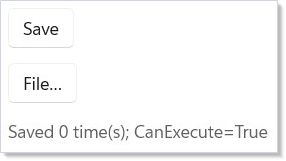
The synchronized-state contract is the value. Without it, each surface
would compute its own IsEnabled, each would carry its own label
duplicate, and the keyboard binding would have to be wired by hand.
With it, the Command record is the source of truth; the surfaces are
projections.
Custom-content buttons: the .Command() modifier
The Button(command) factory renders a plain text label. When you need
richer content — an icon next to a label, a stacked layout, or any custom
element tree — build the button from content and attach the command with
the .Command(command) fluent modifier:
class CommandModifierExample : Component
{
    public override Element Render()
    {
        var saveCmd = new Command { Label = "Save", Execute = () => { } };

        return VStack(12,
            // Plain label — the factory is enough:
            Button(saveCmd),

            // Custom content — compose the layout, then bind the command:
            Button(HStack(8, Icon(SymbolIcon("Save")), TextBlock("Save")))
                .Command(saveCmd)
        ).Padding(24);
    }
}
.Command() wires the same synchronized-state contract as the factory:
it routes the click through Execute / ExecuteAsync, applies the
command's Icon / Description / Accelerator / AccessKey metadata,
and binds IsEnabled so the button auto-disables while
command.IsEnabled is false. Crucially it re-applies IsEnabled on
every update, so a command toggling CanExecute (or IsExecuting
via UseCommand) flows straight through — you never re-thread
.IsEnabled(command.IsEnabled) by hand.
The modifier works on every clickable element — Button,
HyperlinkButton, RepeatButton, ToggleButton, and AppBarButton —
so custom-content variants of each stay in sync with their command.
It composes with
.IsDisabledFocusable(): a disabled command on a disabled-focusable button keeps the button reachable via Tab (only the click is suppressed) rather than dropping it from the tab order.
Binding paths are uniform
The factory and the .Command() modifier both set the same typed Command
property on the element record. That property is public, so you can also set
it directly with a record initializer — every path below binds identically:
the action dispatches on click and IsEnabled is applied from the command.
class BindingPathsExample : Component
{
    public override Element Render()
    {
        var saveCmd = new Command { Label = "Save", Execute = () => { } };

        return VStack(12,
            // Factory — plain label:
            Button(saveCmd),

            // Modifier — custom content:
            Button(HStack(8, Icon(SymbolIcon("Save")), TextBlock("Save"))).Command(saveCmd),

            // Record-init — the typed property is public (the Label ctor arg is required):
            new ButtonElement(saveCmd.Label) { Command = saveCmd },

            // `with` on an existing element hits the same property:
            Button("Save") with { Command = saveCmd },

            // The typed property also covers the split buttons:
            new SplitButtonElement(saveCmd.Label) { Command = saveCmd }
        ).Padding(24);
    }
}
The typed Command property is available on all six command-capable
elements — ButtonElement, HyperlinkButtonElement, RepeatButtonElement,
ToggleButtonElement, SplitButtonElement, and ToggleSplitButtonElement —
so a bare new SplitButtonElement(cmd.Label) { Command = cmd } dispatches and
disables exactly like the SplitButton(cmd) factory. (The .Command()
modifier is the convenience for the clickable-content subset above; the typed
property covers the split buttons too.)
One precedence rule applies when both a command and an explicit callback are present on the same element:
- Record-init /
withkeeps both — the explicitOnClick(or toggle callback) wins for dispatch, while the command still supplies metadata andIsEnabled. Set the command only (no callback) to dispatch through it. - The
.Command()modifier makes the command fully take over — it clears any conflicting callback so the command is the single dispatch path.
Async Commands and UseCommand
When a command has an ExecuteAsync action, wrap it with the
UseCommand hook to get automatic IsExecuting tracking
and a re-entrance guard. The button disables itself while the async
operation runs; a second click is dropped:
class AsyncCommandExample : Component
{
    public override Element Render()
    {
        var (status, setStatus) = UseState("Ready");

        var saveCmd = UseCommand(new Command
        {
            Label = "Save to Cloud",
            ExecuteAsync = async () =>
            {
                setStatus("Saving...");
                await Task.Delay(2000);
                setStatus("Saved at " + DateTime.Now.ToString("HH:mm:ss"));
            },
            Icon = SymbolIcon("Save")
        });

        return VStack(12,
            HStack(8,
                Button(saveCmd),
                TextBlock(status).Foreground(Theme.SecondaryText)
            ),
            When(saveCmd.IsExecuting, () =>
                ProgressRing().Width(20).Height(20))
        ).Padding(24);
    }
}
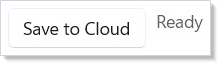
UseCommand sets IsExecuting = true before invoking the wrapped
action and clears it in a finally block — so a throwing
ExecuteAsync still unwinds the busy state. Read command.IsExecuting
from any surface that wants to render progress.
class AsyncWithProgressExample : Component
{
    public override Element Render()
    {
        var (progress, setProgress) = UseState(0.0);

        var upload = UseCommand(new Command
        {
            Label = "Upload",
            Icon = SymbolIcon("Upload"),
            ExecuteAsync = async () =>
            {
                for (var i = 0; i <= 100; i += 10)
                {
                    setProgress(i / 100.0);
                    await Task.Delay(120);
                }
            },
        });

        return VStack(12,
            HStack(8,
                Button(upload),
                When(upload.IsExecuting, () =>
                    TextBlock($"{(int)(progress * 100)}%")
                        .Foreground(Theme.SecondaryText))
            ),
            When(upload.IsExecuting, () =>
                Progress(progress * 100).Width(300))
        ).Padding(24);
    }
}
Caveat:
UseCommandsetsIsExecuting = truesynchronously before the awaited body runs, and clears it in afinallyblock after the awaited body completes — but a singleCommandrecord bound to two surfaces shares oneIsExecutingflag. That is intentional for the common case (one Save button + one Save menu item should both disable while saving, preventing double-submit) and surprising for the cross-page case: if the sameCommandinstance is bound from two NavigationView pages, the disable state crosses pages too — saving from page A leaves page B's Save button disabled until the await completes. Hoist theCommandto the navigation root and the behavior is correct; recreate it per page (viaUseMemokeyed on page identity) when you want per-surface isolation.
Debouncing double-clicks: DebounceMs
IsExecuting tracks the lifetime of an ExecuteAsync lambda — great
when there's real async work to wait on. But the common "stop the
double-click from re-firing the same action" case has no async work to
track: the action is synchronous (spawn a process, kick off a parent
re-render) and returns instantly, so IsExecuting blinks for
microseconds and the second click slips through. The historical
workaround was to wrap the sync action in ExecuteAsync purely to slip
in a Task.Delay, leaving magic numbers in the source.
DebounceMs is the framework-owned replacement. It applies a
leading-edge debounce: the first fire is accepted, every subsequent
fire within DebounceMs of it is dropped, and IsEnabled reports
false for the duration so the bound control visibly disables and then
re-enables when the window elapses.
class DebounceExample : Component
{
    public override Element Render()
    {
        var (runs, setRuns) = UseState(0);

        // Sync action + framework-managed debounce — no fake async, no Task.Delay.
        var runCmd = UseCommand(new Command
        {
            Label = "Run",
            Execute = () => setRuns(runs + 1),
            DebounceMs = 1500,
        });

        // Async action — IsExecuting still tracks the lambda; DebounceMs keeps the
        // button disabled past the lambda's return (the disabled window is the
        // longer of the two).
        var regenCmd = UseCommand(new Command
        {
            Label = "Re-gen",
            ExecuteAsync = () => { setRuns(runs + 1); return Task.CompletedTask; },
            DebounceMs = 250,
        });

        return VStack(12,
            HStack(8, Button(runCmd), Button(regenCmd)),
            TextBlock($"Fired {runs} time(s)").Foreground(Theme.SecondaryText)
        ).Padding(24);
    }
}
Caveat:
DebounceMsrequiresUseCommand. The debounce window and its re-enable timer are persistent state, and a plainCommandrecord is immutable and reconstructed on every render — it has nowhere to keep that state.UseCommandstores it in the component's hook table (the same place it keeps the async re-entrance guard), so always route a debounced command throughUseCommand. A rawnew Command { DebounceMs = … }that is bound directly (never passed toUseCommand) does not debounce.Debounce is leading-edge and fixed-duration by design — fire first, then ignore. Trailing-edge "wait for the input to settle, then fire once" debounce (search-as-you-type) is a different concept and is not what
DebounceMsprovides.
Parameterized commands
Command<T> lets a single command apply to every row of a list, every
selected item in a grid, or any other "do X with this thing" pattern.
The action receives the argument from the call site:
record TodoItem(int Id, string Title);

class ParameterizedCommandExample : Component
{
    public override Element Render()
    {
        var (items, setItems) = UseState<IReadOnlyList<TodoItem>>(
            UseMemo(() => new[] { new TodoItem(1, "Buy milk"), new TodoItem(2, "Walk dog"), new TodoItem(3, "Ship doc") }, []));

        // One Command<TodoItem> drives every row.
        var delete = new Command<TodoItem>
        {
            Label = "Delete",
            Icon = SymbolIcon("Delete"),
            Execute = item => setItems(items.Where(i => i.Id != item.Id).ToList()),
        };

        return VStack(8,
            ForEach(items, item =>
                HStack(8,
                    TextBlock(item.Title).Width(180),
                    // Inline button — Command<T> doesn't have a Button(cmd, arg) overload
                    // by design, so call .Execute(arg) directly from the click handler.
                    Button(delete.Label, () => delete.Execute?.Invoke(item))
                        .AutomationName($"Delete {item.Title}")
                        .IsEnabled(delete.IsEnabled))
                    .WithKey(item.Id.ToString()))
        ).Padding(24);
    }
}
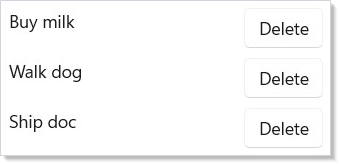
For menu integration, the variadic MenuItem(Command<T>, T parameter)
overload binds the row's data to the menu item:
class MenuItemParameterizedExample : Component
{
    public override Element Render()
    {
        var (log, setLog) = UseState("");
        var item = new TodoItem(1, "Buy milk");

        var deleteCommand = new Command<TodoItem>
        {
            Label = "Delete",
            Execute = i => setLog($"Deleted {i.Title}"),
        };
        var renameCommand = new Command<TodoItem>
        {
            Label = "Rename",
            Execute = i => setLog($"Renamed {i.Title}"),
        };

        // The row content is the flyout target; each MenuItem carries the row's data.
        return VStack(8,
            MenuFlyout(TextBlock(item.Title).Padding(8),
                MenuItem(deleteCommand, item),
                MenuItem(renameCommand, item)),
            TextBlock(log).Foreground(Theme.SecondaryText)
        ).Padding(24);
    }
}
This is the same shape as the right-click on a list row pattern — one parameterized command, one context-menu declaration, every row carries its own data.
Command Bar Integration
CommandBar with AppBarButton is the canonical toolbar surface.
Primary commands render inline; secondary commands collapse into the
overflow menu:
class CommandBarExample : Component
{
    public override Element Render()
    {
        var (text, setText) = UseState("Edit me");

        var save = StandardCommand.Save(() => { });
        var copy = StandardCommand.Copy(() => { });
        var delete = StandardCommand.Delete(
            () => setText(""), canExecute: text.Length > 0);

        return VStack(0,
            CommandBar(
                primaryCommands: new[] {
                    AppBarButton(save), AppBarButton(copy) },
                secondaryCommands: new[] {
                    AppBarButton(delete) }
            ),
            TextBox(text, setText, header: "Document").Margin(16)
        );
    }
}

The AppBarButton variant of every button supports Command directly;
there is no second wiring step. Use CommandBarFlyout for the same
shape rendered next to a selection — see
dialogs and flyouts.
Menu Integration
Commands work in menu bars too. The accelerator text (like Ctrl+S) appears automatically next to the menu item:
class MenuBarExample : Component
{
    public override Element Render()
    {
        var (text, setText) = UseState("Document text");

        var save = StandardCommand.Save(() => { });
        var close = StandardCommand.Close(() => setText(""));
        var undo = StandardCommand.Undo(() => { });
        var redo = StandardCommand.Redo(() => { });

        return VStack(0,
            MenuBar(
                Menu("File", MenuItem(save), MenuItem(close)),
                Menu("Edit", MenuItem(undo), MenuItem(redo))
            ),
            TextBlock(text).Padding(16)
        );
    }
}
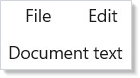
MenuItem(Command) and MenuItem<T>(Command<T>, T parameter) are the
two factory overloads. The latter is what powers per-row context
menus in ListView and DataGrid.
Keyboard accelerators
The Accelerator property on Command is the source of truth for the
keyboard binding. The accelerator is wired at the WinUI level — the
binding lives on whichever surface is rendering the command (the
button or the menu item), and Reactor inherits WinUI's "keyboard
accelerators are scoped to the focused element's ancestor chain" rule.
For a global accelerator that fires regardless of focus, render the
command from a MenuBar or CommandBar at the window root — both
attach their accelerators to the window's KeyboardAccelerators
collection, which is window-scoped.
class AcceleratorScopeExample : Component
{
    public override Element Render()
    {
        var (saves, setSaves) = UseState(0);

        var save = new Command
        {
            Label = "Save",
            Accelerator = Accelerator(VirtualKey.S, VirtualKeyModifiers.Control),
            Execute = () => setSaves(saves + 1),
        };

        // Window-scoped via MenuBar at the root.
        return VStack(0,
            MenuBar(Menu("File", MenuItem(save))),
            TextBlock($"Saved {saves} time(s)").Padding(16));
    }
}
For a command palette-style global shortcut catalog, see recipes/command-palette.
Patterns
Async confirmation dialog
The classic delete confirmation — primary button runs an ExecuteAsync,
the dialog stays open until the await completes, the primary disables
mid-flight. Wrap with UseCommand, bind IsPrimaryButtonEnabled to
command.IsEnabled, and close the dialog from inside the async body:
class AsyncConfirmDialogExample : Component
{
    public override Element Render() => Memo(ctx =>
    {
        var (open, setOpen) = ctx.UseState(false);
        var (status, setStatus) = ctx.UseState("Ready");

        var delete = ctx.UseCommand(new Command
        {
            Label = "Delete",
            ExecuteAsync = async () =>
            {
                await Task.Delay(500);   // stands in for api.DeleteAsync(id)
                setStatus("Deleted");
                setOpen(false);
            },
        });

        return VStack(12,
            Button("Delete…", () => setOpen(true)),
            TextBlock(status).Foreground(Theme.SecondaryText),
            ContentDialog("Delete?", TextBlock("This cannot be undone."),
                    primaryButtonText: "Delete") with
            {
                IsOpen = open,
                IsPrimaryButtonEnabled = delete.IsEnabled,
                OnClosed = r =>
                {
                    if (r == ContentDialogResult.Primary) delete.Execute?.Invoke();
                    else setOpen(false);
                },
            }
        ).Padding(24);
    });
}
See dialogs and flyouts for the full pattern.
Localized commands
StandardCommand presets ship with English labels. Override per render
using the with { ... } expression on the returned record:
class LocalizedCommandExample : Component
{
    public override Element Render()
    {
        var intl = UseIntl();

        var save = StandardCommand.Save(() => { }) with
        {
            Label = intl.Message(new MessageKey("Commands", "save.button")),
            Description = intl.Message(new MessageKey("Commands", "save.tooltip")),
        };

        return VStack(12, Button(save)).Padding(24);
    }
}
See localization for the UseIntl accessor and the
MessageKey namespace/key shape.
One command, three surfaces, one accelerator
The shape that motivates the whole model — Ctrl+S triggers the same action whether the user pressed it from the editor body, opened the File menu and clicked Save, or clicked the toolbar Save button:
class ThreeSurfacesExample : Component
{
    public override Element Render()
    {
        var (saves, setSaves) = UseState(0);

        var save = new Command
        {
            Label = "Save",
            Icon = SymbolIcon("Save"),
            Accelerator = Accelerator(VirtualKey.S, VirtualKeyModifiers.Control),
            ExecuteAsync = () => { setSaves(saves + 1); return Task.CompletedTask; },
        };
        var saveWrapped = UseCommand(save);

        return VStack(0,
            MenuBar(Menu("File", MenuItem(saveWrapped))),
            CommandBar(primaryCommands: new[] { AppBarButton(saveWrapped) }),
            TextBlock($"Saved {saves} time(s)").Padding(16));
    }
}
Common Mistakes
Creating Commands inside render without memoization
// Don't: re-create the Command on every render — each render allocates a
// fresh command record (and its captured closures). Memoizing keeps a
// stable instance across renders. Lift to a memo or hoist out of Render().
class DontCreateInRender : Component
{
    public override Element Render()
    {
        // BAD — a fresh Command (and closure) is allocated every render:
        // var save = new Command { Label = "Save", Execute = () => { } };

        // GOOD — UseMemo pins identity until deps change:
        var (count, setCount) = UseState(0);
        var save = UseMemo(() => new Command
        {
            Label = "Save",
            Execute = () => setCount(count + 1),
        }, count);

        return VStack(8, Button(save), TextBlock($"Saved {count}")).Padding(24);
    }
}
Re-creating the Command record every render allocates a fresh command
(and its captured closures). Where a host rebuilds keyboard
accelerators on reconcile it clears and re-adds them — a bounded rewire,
not an unbounded leak — and a command bound to a button is diffed by
value, so a fresh-but-equal command re-applies nothing. The avoidable
cost is simply the per-render allocation, and the analyzer fires
REACTOR_PERF_FUNCREF for the inline construction. Wrap it in
UseMemo with the correct dependencies, or hoist the command
above the component.
Ignoring CanExecute changes
class CanExecuteDontExample : Component
{
    public override Element Render()
    {
        var (text, setText) = UseState("");

        // Don't — the guard hides inside Execute, so every surface still
        // looks enabled and the user clicks expecting an action.
        var save = new Command
        {
            Label = "Save",
            Execute = () => { if (text.Length > 0) Save(); },
        };

        return VStack(12, TextBox(text, setText, header: "Document").Width(300), Button(save))
            .Padding(24);

        void Save() { }
    }
}
Pushing the guard inside Execute works but loses the synchronized
disable across surfaces — the toolbar button stays enabled-looking,
the menu item is still focusable, and the user clicks expecting an
action. Promote the predicate to CanExecute:
class CanExecuteDoExample : Component
{
    public override Element Render()
    {
        var (text, setText) = UseState("");

        // Do — promote the predicate to CanExecute so every surface
        // disables together.
        var save = new Command
        {
            Label = "Save",
            Execute = Save,
            CanExecute = text.Length > 0,
        };

        return VStack(12, TextBox(text, setText, header: "Document").Width(300), Button(save))
            .Padding(24);

        void Save() { }
    }
}
Now the button greys out, the menu item disables, and the accelerator no-ops — one decision, every surface.
Awaiting in a non-async event handler
The inline async lambda runs unmanaged — there is no IsExecuting,
no re-entrance guard, no busy state to render against. The user
clicks five times during the await and starts five concurrent saves.
Promote the action to ExecuteAsync on a Command, wrap with
UseCommand, and bind the button to the command. The
re-entrance guard drops duplicate clicks and IsExecuting lights up
the spinner.
Tips
Use StandardCommand for common operations. It saves you from manually
specifying icons and keyboard accelerators for the 16 most common actions
and keeps your surface consistent with WinUI conventions.
Always wrap async commands with UseCommand. It prevents
double-execution via the re-entrance guard, tracks IsExecuting, and
clears the busy flag in a finally so exceptions don't leave the UI
stuck disabled.
Read command.IsExecuting for loading indicators. Any surface
bound to a wrapped async command can render a spinner from the same
flag — the UseCommand wrapper guarantees the flag is
live across re-renders.
Commands are records — use with to customize. Override the label
for localization:
StandardCommand.Save(action) with { Label = "Guardar" }. The original
preset stays intact for the next caller.
Define commands at the call site for one-offs; hoist them when shared.
A single Save button can declare its command inline. A Save action used
in the toolbar, the menu, the keyboard binding, and the dialog primary
belongs at the parent component or in a UseMemo so identity is stable.
Next Steps
- Effects and Lifecycle — Previous: run side effects for timers, data loading, and cleanup
- Context — Next: share data across the component tree without prop drilling
- Dialogs and Flyouts — Wire dialog primaries and right-click menus to commands
- Hooks —
UseCommandand the rest of the hook surface - Navigation — Scope commands to a page vs. a window
- Recipes: Command palette — End-to-end recipe for a Ctrl+K palette
- Localization — Localize command labels and accelerator text