Effects are commit-phase side effects with dependency tracking. After Microsoft.UI.Reactor (Reactor)
finishes reconciling the element tree and patching the
WinUI controls for a render, it walks the effect queue for that render and
runs every UseEffect body whose dependency array has changed
since the previous commit. The body runs after the new UI has been
committed — never during render — so an effect is the safe place to start a
timer, open a subscription, or kick off a Task.Run that will eventually
call a setter to re-render the component. The cleanup
function you return is the mirror image: Reactor calls it before re-running
the effect with a new dep set, and again when the component unmounts. The
dependency array is the contract between you and the scheduler — every value
the effect reads from state, props, or context belongs in it. Forget one
and the effect captures a stale closure; allocate a new array or lambda each
render and the effect re-runs forever because reference identity churns.
Effects and Lifecycle
UseEffect runs side effects — code that reaches outside the
component's render function. Timers, data fetching,
subscriptions, and DOM manipulation all belong in effects, not in Render().
Reference
| Overload | When the body runs | When cleanup runs |
|---|---|---|
UseEffect(Action body, params object[] deps) |
After every commit where any entry in deps compares unequal (Array.Empty<object>() → mount only). |
Never — no cleanup function. |
UseEffect(Func<Action> bodyWithCleanup, params object[] deps) |
Same as above. | Before the next body run, and on unmount. |
UseEffect<T1>(Action body, T1 d1) (also <T1,T2>, <T1,T2,T3>, and Func<Action> flavors) |
Same as the params overload — typed-arity sugar for 1–3 deps. |
As above. |
Both overloads accept a params deps argument; pass no values for "run every
commit" (rarely correct), Array.Empty<object>() for "run once on mount",
or one-or-more reactive values for "re-run when any of these change". Compare
with UseResource when the side effect is a cached async read —
see Async Resources for the cached-fetch shape, which
handles cancellation, retry, and revalidation for you.
When you have one, two, or three dependencies, the typed-arity overloads
(UseEffect(body, a, b)) are a drop-in alternative to the params form. They
pass the deps positionally instead of through a params object[], so the
unchanged-deps path allocates no array and never boxes value-type deps (int,
bool, enums, structs). Behaviour is otherwise identical — the same per-element
equality comparison decides whether the body re-runs — so prefer them on hot
render paths. A single dependency whose compile-time type is an array of
reference types (for example string[]) is still compared element-by-element,
matching the params form; a value-type array such as int[] is treated as one
reference-compared dependency, so pass its elements as separate deps if you want
element-wise comparison.
Running Once on Mount
Pass an empty dependency array to run an effect once when the component mounts:
class MountEffectExample : Component
{
    public override Element Render()
    {
        var (loadedAt, setLoadedAt) = UseState("");

        UseEffect(() =>
        {
            setLoadedAt(DateTime.Now.ToString("HH:mm:ss"));
        }, Array.Empty<object>());

        return VStack(8,
            TextBlock("Component mounted at:"),
            TextBlock(loadedAt).FontSize(20).Bold()
        ).Padding(24);
    }
}
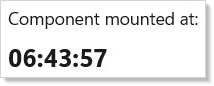
The empty Array.Empty<object>() dependency array tells Reactor this effect has
no external dependencies. It runs once after the first render and never again.
Running When Dependencies Change
Pass values in the dependency array to re-run the effect when those values change:
class DependencyEffectExample : Component
{
    public override Element Render()
    {
        var (query, setQuery) = UseState("");
        var (results, setResults) = UseState("Type to search...");

        UseEffect(() =>
        {
            if (string.IsNullOrWhiteSpace(query))
                setResults("Type to search...");
            else
                setResults($"Found 3 results for \"{query}\"");
        }, query);

        return VStack(12,
            TextBox(query, setQuery, placeholderText: "Search...", header: "Search query").Width(300),
            TextBlock(results).Foreground(Theme.SecondaryText)
        ).Padding(24);
    }
}
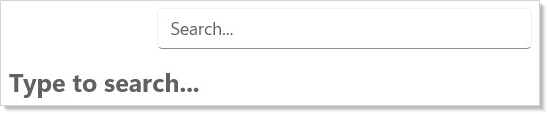
Every time query changes, the effect runs again. Reactor compares the current
dependencies to the previous ones using structural equality. If nothing
changed, the effect is skipped.
Cleanup with Timers
When an effect creates a resource (timer, subscription, event handler), return a cleanup function. Reactor calls it before re-running the effect and when the component unmounts:
class TimerCleanupExample : Component
{
    public override Element Render()
    {
        var (seconds, updateSeconds) = UseReducer(0);
        var (isRunning, setIsRunning) = UseState(false);

        UseEffect(() =>
        {
            if (!isRunning) return () => { };
            var timer = new PeriodicTimer(TimeSpan.FromSeconds(1));
            var cts = new CancellationTokenSource();
            var token = cts.Token;   // capture once — the loop must not re-read cts.Token
            _ = Task.Run(async () =>
            {
                try
                {
                    while (await timer.WaitForNextTickAsync(token))
                        updateSeconds(s => s + 1);
                }
                catch (OperationCanceledException) { /* expected on cleanup */ }
            });
            return () => { cts.Cancel(); timer.Dispose(); };
        }, isRunning);

        return VStack(12,
            TextBlock($"Elapsed: {seconds}s").FontSize(24).Bold(),
            HStack(8,
                Button(isRunning ? "Stop" : "Start", () => setIsRunning(!isRunning))
                    .AutomationName(isRunning ? "Stop timer" : "Start timer"),
                Button("Reset", () => updateSeconds(_ => 0))
            )
        ).Padding(24);
    }
}
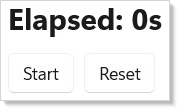
The Func<Action> overload of UseEffect returns a cleanup function. Here
the cleanup disposes the timer, preventing leaks when the component unmounts
or when isRunning changes.
The timer body runs on a background thread (it's inside Task.Run) and calls
the updateSeconds reducer from there. Once the host is bootstrapped, that
works out of the box — every UseState / UseReducer setter automatically
marshals onto the captured UI dispatcher when called from a non-UI thread, so
timers, PeriodicTimer, network callbacks, and code after
await ... ConfigureAwait(false) can all call the returned setter without any
extra opt-in. Pass threadSafe: true to the hook only when you need many
concurrent setters to apply in-place (locked) instead of being queued one-by-one
onto the UI thread. The setter throws InvalidOperationException if it's
called cross-thread before any host has bootstrapped (no UI dispatcher
captured) or after the dispatcher has begun shutting down — make sure the
effect cleanup cancels the background producer so it stops with the component.
Async Data Loading
Use UseEffect with UseState to load data asynchronously:
class AsyncLoadingExample : Component
{
    public override Element Render()
    {
        var (items, setItems) = UseState<string[]?>(null);

        UseEffect(() =>
        {
            _ = Task.Run(async () =>
            {
                await Task.Delay(1500); // simulate network call
                setItems(new[] { "Alice", "Bob", "Charlie" });
            });
        }, Array.Empty<object>());

        if (items is null)
            return TextBlock("Loading...").Padding(24);

        return VStack(8,
            Heading("Loaded Users"),
            VStack(4, items.Select(name => TextBlock(name).WithKey(name)).ToArray())
        ).Padding(24);
    }
}

The effect fires on mount, starts an async task, and updates state when it
completes. The component re-renders automatically when setItems is called.
Avoiding Infinite Loops
A common mistake is calling a state setter unconditionally inside an effect with that state in its dependency array:
class InfiniteLoopWarning : Component
{
    public override Element Render()
    {
        var (count, setCount) = UseState(0);

        // BAD: this creates an infinite loop!
        // UseEffect(() => { setCount(count + 1); }, count);

        // GOOD: guard with a condition
        UseEffect(() =>
        {
            if (count < 5) setCount(count + 1);
        }, count);

        return TextBlock($"Count stopped at: {count}").Padding(24);
    }
}
This would re-render, re-run the effect, set state again, re-render, and loop forever. Always guard state updates with a condition, or remove the changing value from the dependency array.
Caveat: Cleanup runs before the next effect body, not after. When a dependency changes, the sequence on the next commit is: cleanup of the previous effect instance, then a render with the new dep set, then the new effect body running. So if your effect subscribes to channel A and the dep changes to channel B, you'll see
unsubscribe(A) → subscribe(B)in that order — never two simultaneous subscriptions, never a missing unsubscribe between them. The same ordering applies on unmount: cleanup runs once, the effect body never runs again. The concrete failure mode this prevents: aPeriodicTimerthat capturesctsin the cleanup closure stops correctly when the dep changes, but only if you return() => { cts.Cancel(); timer.Dispose(); }from the body. Forget the cleanup and the old timer keeps firing alongside the new one. The scheduling internals — when each phase runs relative to the reconciler — are documented in effects-scheduling.
Patterns
Data fetching with cancellation
When an effect kicks off an async fetch, the cleanup function must cancel it. Otherwise a stale request can land after the user has navigated away, overwriting state on the next component instance (or worse, throwing on a disposed setter):
class FetchCancellationExample : Component
{
    static Task<string[]> FetchAsync(string q, CancellationToken ct) =>
        Task.FromResult(new[] { $"{q} result" });

    public override Element Render()
    {
        var (query, setQuery) = UseState("reactor");
        var (items, setItems) = UseState(Array.Empty<string>());

        UseEffect(() =>
        {
            var cts = new CancellationTokenSource();
            _ = Task.Run(async () =>
            {
                try
                {
                    var data = await FetchAsync(query, cts.Token);
                    setItems(data);
                }
                catch (OperationCanceledException) { /* expected */ }
            });
            return () => { cts.Cancel(); };
        }, query);

        return VStack(8,
            TextBox(query, setQuery, header: "Search query").Width(250),
            ForEach(items, item => TextBlock(item).WithKey(item))
        ).Padding(24);
    }
}
When query changes, cleanup cancels the in-flight fetch before the new
one starts. For the cached / retry / focus-revalidation shape of the same
pattern, reach for UseResource instead — it handles
all of this plus a per-component cache key for free.
Subscriptions with cleanup
The pattern is the same regardless of what you're subscribing to —
INotifyPropertyChanged, an IObservable, a global event bus, a
WinUI control's RoutedEventHandler. Subscribe in the body, return an
unsubscribe in the cleanup:
class EventSource
{
    public event EventHandler? Changed;
    public void Fire() => Changed?.Invoke(this, EventArgs.Empty);
}

class SubscriptionCleanupExample : Component
{
    static readonly EventSource Source = new();

    public override Element Render()
    {
        var (tick, updateTick) = UseReducer(0);

        UseEffect(() =>
        {
            void Handler(object? s, EventArgs e) => updateTick(t => t + 1);
            Source.Changed += Handler;
            return () => Source.Changed -= Handler;
        }, Source); // re-attach if Source identity changes

        return VStack(8,
            TextBlock($"Ticks: {tick}"),
            Button("Fire", Source.Fire)
        ).Padding(24);
    }
}
If you only need to react to property changes on an INotifyPropertyChanged
source, use UseObservable instead — it owns the
subscribe/unsubscribe pair so you don't have to.
UseResource for async data
For data that lives outside the component (server fetch, file read, slow
computation), reach for UseResource rather than
hand-rolling UseEffect + UseState. It returns an AsyncValue<T> with
Pending / Value / Error shape, handles cancellation on dep change,
retries on await Refresh(), and shares a per-context query cache so two
components reading the same key reuse the in-flight task. The pattern
to recognize: if the effect body would be "kick off a fetch, write the
result to state, handle the loading flag, handle the error flag", you're
re-implementing UseResource.
Common Mistakes
Object or array literals in the deps array
class DepsLiteralDontExample : Component
{
    static Task FetchAsync(object options) => Task.CompletedTask;

    public override Element Render()
    {
        var (url, setUrl) = UseState("https://example.test");

        // Don't — `options` is a fresh anonymous object on every render, so the
        // effect re-runs every commit and the fetch fires in a loop.
        var options = new { Url = url, Limit = 10 };
        UseEffect(() => FetchAsync(options), options);

        return TextBox(url, setUrl, header: "Request URL").Width(250).Padding(24);
    }
}
options is a fresh anonymous object on every render — its reference
compares unequal to the previous one, so the effect re-runs every commit
and the fetch fires in a loop. The REACTOR_HOOKS_004 analyzer warns
when a hook's deps argument is a freshly-allocated object, array, or
lambda. Pass the primitives instead:
class DepsLiteralDoExample : Component
{
    static Task FetchAsync(string url, int limit) => Task.CompletedTask;

    public override Element Render()
    {
        var (url, setUrl) = UseState("https://example.test");

        // Do — pass the primitives, which compare by value.
        UseEffect(() => FetchAsync(url, 10), url);

        return TextBox(url, setUrl, header: "Request URL").Width(250).Padding(24);
    }
}
Or memoize the container with UseMemo so its identity is
stable across renders.
Missing cleanup
class MissingCleanupDontExample : Component
{
    public override Element Render()
    {
        var (tick, updateTick) = UseReducer(0);

        // Don't — no cleanup, so the timer fires forever after unmount.
        // UseEffect(() =>
        // {
        //     var timer = new PeriodicTimer(TimeSpan.FromSeconds(1));
        //     _ = Task.Run(async () =>
        //     {
        //         while (await timer.WaitForNextTickAsync())
        //             updateTick(t => t + 1);
        //     });
        // }, Array.Empty<object>());

        return TextBlock($"Ticks: {tick}").Padding(24);
    }
}
If you leave the commented effect active, the component unmounts, the timer
keeps firing, the setter is called on a dead RenderContext,
and the setter throws (or worse, silently leaks the closure tree the timer
captured). Always return a cleanup that cancels the producer:
class MissingCleanupDoExample : Component
{
    public override Element Render()
    {
        var (tick, updateTick) = UseReducer(0);

        UseEffect(() =>
        {
            var cts = new CancellationTokenSource();
            var timer = new PeriodicTimer(TimeSpan.FromSeconds(1));
            var token = cts.Token;   // capture once — the loop must not re-read cts.Token
            _ = Task.Run(async () =>
            {
                try
                {
                    while (await timer.WaitForNextTickAsync(token))
                        updateTick(t => t + 1);
                }
                catch (OperationCanceledException) { /* expected on unmount */ }
            });
            // Cancel the source and dispose the timer; do NOT dispose the
            // source. The fire-and-forget worker shares ownership of it, and
            // CancellationTokenSource.Dispose is not safe alongside concurrent
            // member access — a call still registering against the token would
            // see ObjectDisposedException. A CTS with no timer holds no
            // unmanaged resource, so dropping the reference is enough.
            return () => { cts.Cancel(); timer.Dispose(); };
        }, Array.Empty<object>());

        return TextBlock($"Ticks: {tick}").Padding(24);
    }
}
Running an effect that should be a memo
class EffectVsMemoDontExample : Component
{
    public override Element Render()
    {
        var (first, setFirst) = UseState("Ada");
        var (last, setLast) = UseState("Lovelace");

        // Don't — this pays for two extra renders just to derive a string.
        var (full, setFull) = UseState("");
        UseEffect(() => setFull($"{first} {last}"), first, last);

        return VStack(8,
            TextBox(first, setFirst, header: "First name").Width(150),
            TextBox(last, setLast, header: "Last name").Width(150),
            TextBlock(full)
        ).Padding(24);
    }
}
This pays for two extra renders (initial mount with empty full, then
re-render after the effect writes) just to derive a string. The deriving
should happen in render, either inline or via
UseMemo for an expensive computation:
class EffectVsMemoDoExample : Component
{
    static string Compute(string input) => input.ToUpperInvariant();

    public override Element Render()
    {
        var (first, setFirst) = UseState("Ada");
        var (last, setLast) = UseState("Lovelace");

        var full = $"{first} {last}";                        // inline
        var stats = UseMemo(() => Compute(full), full);      // memoized when expensive

        return VStack(8,
            TextBox(first, setFirst, header: "First name").Width(150),
            TextBox(last, setLast, header: "Last name").Width(150),
            TextBlock(full),
            TextBlock(stats)
        ).Padding(24);
    }
}
Effects are for side effects — work that reaches outside the component. Pure derivations of existing state belong in render.
Tips
Use empty deps for one-time setup. UseEffect(action, Array.Empty<object>())
is the equivalent of "run on mount." Use it for initial data fetching, event
registration, or logging.
Always clean up resources. If your effect creates a timer, subscription, or event handler, return a cleanup function. Leaked resources cause bugs that are hard to trace.
Keep dependency arrays honest. Include every value the effect reads from component state. Omitting a dependency doesn't prevent the read — it prevents the re-run, leading to stale closures.
Don't call setState unconditionally in an effect that depends on that state. This creates an infinite loop. Guard with a condition or restructure the logic.
Prefer UseReducer for complex effect-driven state. When an
effect needs to update multiple related values, a reducer keeps the logic in
one place and avoids cascading re-renders.
Next Steps
- Styling and Theming — Previous: apply theme tokens, colors, and dark/light mode
- Commanding — Next: bundle actions with labels, icons, and accelerators
- Hooks — Deep dive into UseState, UseReducer, and other hooks used by effects
- Async Resources — Cached async reads with
UseResourceandUseMutation - Effects Scheduling — When effects run relative to render and commit
- Advanced Patterns — Combine effects with other hooks for complex scenarios