Recipe: Login
A Microsoft.UI.Reactor (Reactor) login form is four pieces working together: validated input,
submit-gated state, an async call, and an error-display surface. The
recipe below wires them with two UseState hooks and one
UseMutation — no view model, no event
handler classes, and no hand-rolled submitting / error flags.
Primitives
| Concern | API |
|---|---|
| Per-field state | UseState<string> |
| Async submit + pending + error | UseMutation |
| Submit-disabled gating | .IsEnabled(canSubmit) |
| Error display | Conditional Empty() vs TextBlock |
| Password input | PasswordBox |
State
// Only the two input fields are hand-held state. The in-flight flag
// and the last error belong to the mutation below, not to UseState.
var (email, setEmail) = UseState("");
var (pwd, setPwd) = UseState("");
Two UseState calls — email and password. Nothing else needs a hook
slot of its own: the in-flight flag and the last error are owned by the
mutation, not duplicated into component state.
Async submit
// UseMutation owns IsPending / Error / LastResult and cancels the
// in-flight call on unmount. The mutator throws on failure; the hook
// captures the exception into signIn.Error and re-renders.
var signIn = UseMutation<(string Email, string Password), bool>(
    mutator: async (input, ct) =>
    {
        await Task.Delay(800, ct);                   // pretend API call
        // Sentinel long enough to pass local validation, so the
        // failure branch is actually reachable from the form.
        if (input.Password == "wrongpassword")
            throw new InvalidOperationException("Invalid credentials.");
        return true;
    });
UseMutation is the write-side counterpart to
UseResource. It returns a Mutation<TInput, TResult> handle that is
stable across renders and exposes exactly the three things a submit
button needs: IsPending, Error, and LastResult. The mutator
receives a CancellationToken that fires on unmount, so a submit
in flight when the user navigates away is cancelled rather than
completing against a dead component.
Failure is signalled by throwing. The hook catches the exception,
stores it on Error, and re-renders — which is why there is no
try/finally and no setSubmitting(false) in the recipe.
Caveat: Don't reintroduce
var (submitting, setSubmitting) = UseState(false)alongside a mutation. Two sources of truth for "is a submit running" drift the moment a call is cancelled or a second submit overlaps —IsPendingis a count of in-flight calls and already handles both.
Per-keystroke validation
// Local validation runs on every keystroke. The submit button is
// disabled until the form is valid; in-flight submits are gated by
// the same predicate, reading the mutation's own pending flag.
var emailValid = email.Contains('@') && email.Contains('.');
var pwdValid = pwd.Length >= 8;
var canSubmit = emailValid && pwdValid && !signIn.IsPending;
The form derives emailValid and pwdValid from raw state on every
render — no debounce, no separate validation pass. Re-rendering on
every keystroke is fine in Reactor; the work happens in pure C# and
the reconciler skips slots that didn't change.
Render
// RunAsync returns a task that faults when the mutator throws, so
// discarding it directly would leave that fault unobserved. The hook
// has already captured the exception into signIn.Error — rendered
// above — so awaiting here is purely about observing the task.
async Task SubmitAsync()
{
    // Narrow: this is the credential failure the mutator above throws for
    // "wrongpassword", and signIn.Error (rendered below) is its display
    // path. Catching Exception here would also hide unrelated faults.
    try { await signIn.RunAsync((email, pwd)); }
    catch (InvalidOperationException) { /* displayed via signIn.Error */ }
}

return VStack(12,
    Heading("Sign in"),
    TextBox(email, setEmail, placeholderText: "you@example.com",
        header: "Email").Width(280),
    PasswordBox(pwd, setPwd, placeholderText: "8+ characters")
        .AutomationName("Password"),
    signIn.Error is null
        ? Empty()
        : TextBlock(signIn.Error.Message).Foreground(Theme.SystemCritical),
    // SubmitAsync swallows the fault above, so this discard cannot
    // leave anything unobserved.
    Button(signIn.IsPending ? "Signing in…" : "Sign in",
            () => _ = SubmitAsync())
        .AutomationName("Sign in")
        .IsEnabled(canSubmit)
).Padding(20).Width(320);
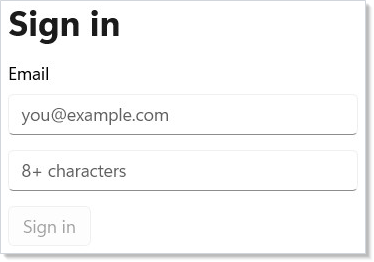
The canSubmit predicate gates the button on a single render —
disabling the button is enough; an analyzer-flagged guard inside the
mutator would double-fire on a re-render race. signIn.IsPending owns
both the spinner label ("Signing in…") and the disabled state, so an
in-flight submit can't be re-triggered by an Enter press.
SubmitAsync observes the task returned by signIn.RunAsync((email, pwd))
while letting the mutation own the rendered error state, so the UI reads the
handle instead of duplicating error flags.
Tips
Don't reach for a view model. A 30-line login form doesn't need
one; the two UseState hooks and the mutation are the view model. The
cost of a class hierarchy is the cost of maintaining it.
Let the mutation own pending and error. Every UseState bool you
add next to IsPending is a state machine you now have to keep in
sync with the hook's. Use MutationOptions.OnSuccess when you need to
run something after a successful submit (navigate, clear the form)
rather than polling LastResult from an effect.
Gate at the button, not inside the handler. A disabled button is a single render check; a guard inside the mutator runs after the user already pressed it and the UI looked ready. Both layers are good hygiene but the button gate is the load-bearing one.
Use PasswordBox, not TextBox with a hex style.
The control implements paste-without-reveal, autofill, and the
accessibility peer; reinventing it in user code drops those.
Next Steps
- Async Resources —
UseMutation's full option surface: optimistic updates, cache invalidation, callbacks. - Forms — The full input + validation surface this recipe pulls from.
- Effects — Cancellation pattern when the user navigates away mid-submit.
- Recipe: Modal dialog — Pair this with a "Forgot password?" modal.
- Accessibility — Focus order rules that apply once you add more fields.
- Recipes index — Back to the gallery.